Securing a data foundation(保护数据基础)
The overarching goal of Foundry is to provide a canonical view of the objective reality within your organization. The first step in building this reality is to build and permission your data foundation. To explain how to secure your data foundation, we will walk you through a notional example with an airplane manufacturer, called Sky Industries. We will represent a Sky Industries developer who is integrating raw Flight, Runway, Airport, Alert, Route, and Passenger data, preparing it for the ontology, and then making it available to the whole Sky Industries organization.
Creating projects
A key part of designing a data foundation is deciding which projects need to be created for your production data pipelines, in order to enable future expansion and easy maintenance. In our example, we will use the recommended project setup and have 3 projects that have distinct purposes:
- Flight Control System [Datasource]: Raw data is ingested from Bureau of Transportation Statistics (BTS) and cleaned in this project.
- Flight Delays [Transform]: Datasets are imported from the Flight Control System [Datasource] project and transformed to produce re-usable datasets.
- Aviation [Ontology]: Datasets are imported from Flight Delays [Transform] project and transformed to represent discrete organizational objects.
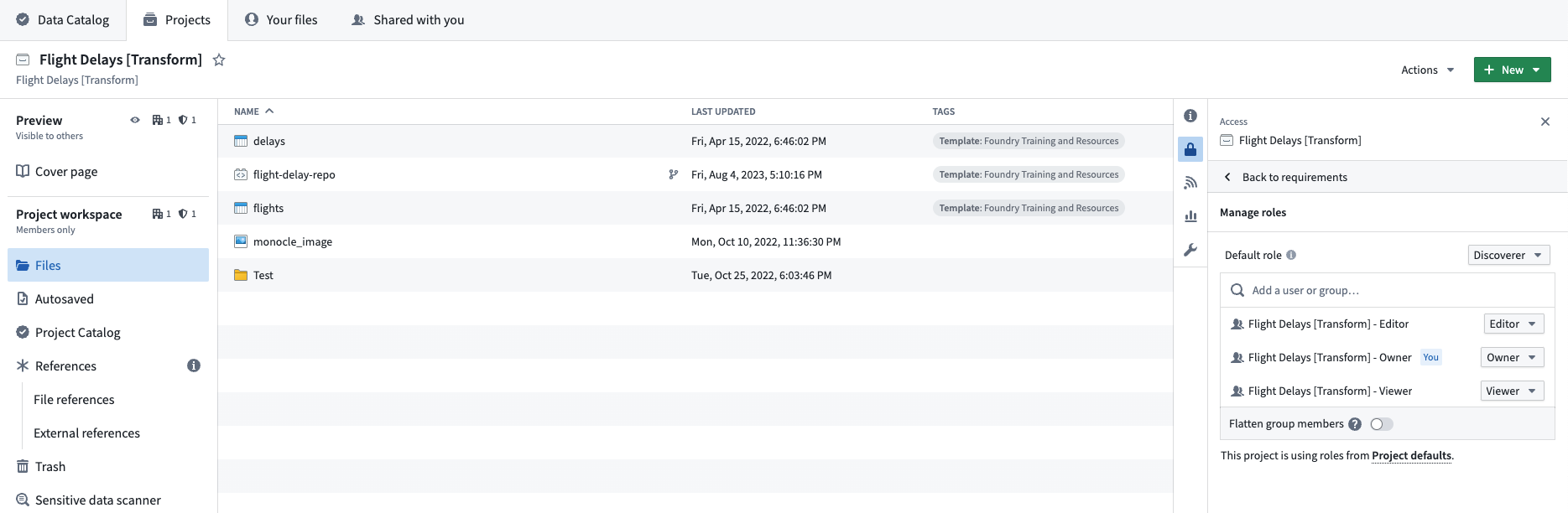
Depending on your Foundry instance, you will be able create projects and/or groups at the same time. The goal is to have three groups per project, each mapped to a default role (for example, a Viewer). We want our projects to all be discoverable by other users in our Organization, so we will set the Projects’ default role to Discoverer and we will not add Markings to the Project. Also, in each Project we will create a code repository where our transformations will live. Below is our final setup for the Flight Delays [Transform] Project.
Project references
Now that we have a Project in which to build our pipeline, we can start using Foundry to author our business logic. For details on best practices, review the Data integration documentation.
Before we can use data from another Project we need to create a reference to it in our current Project. Once we do so, we can use that dataset in our builds and enable anyone in our Project to author transformations on that data, even without having access to the source Project themselves.
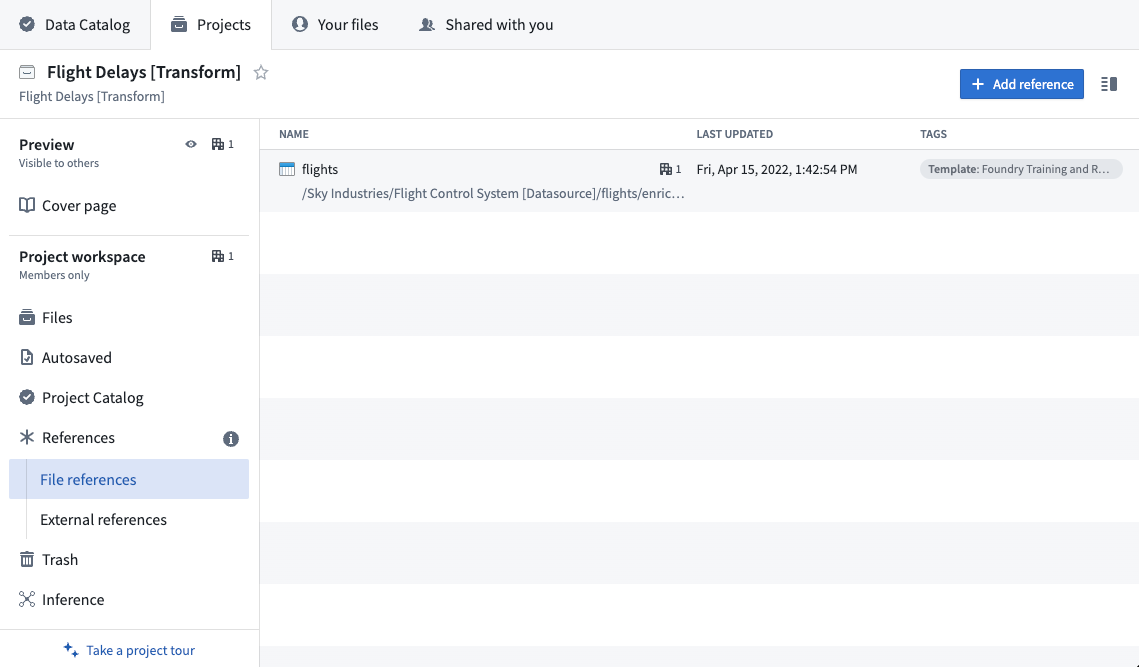
Below is what it will look like when we add Project references to the flights dataset in the Flight Control System [Datasource] Project to our Flight Delays [Transform] Project.
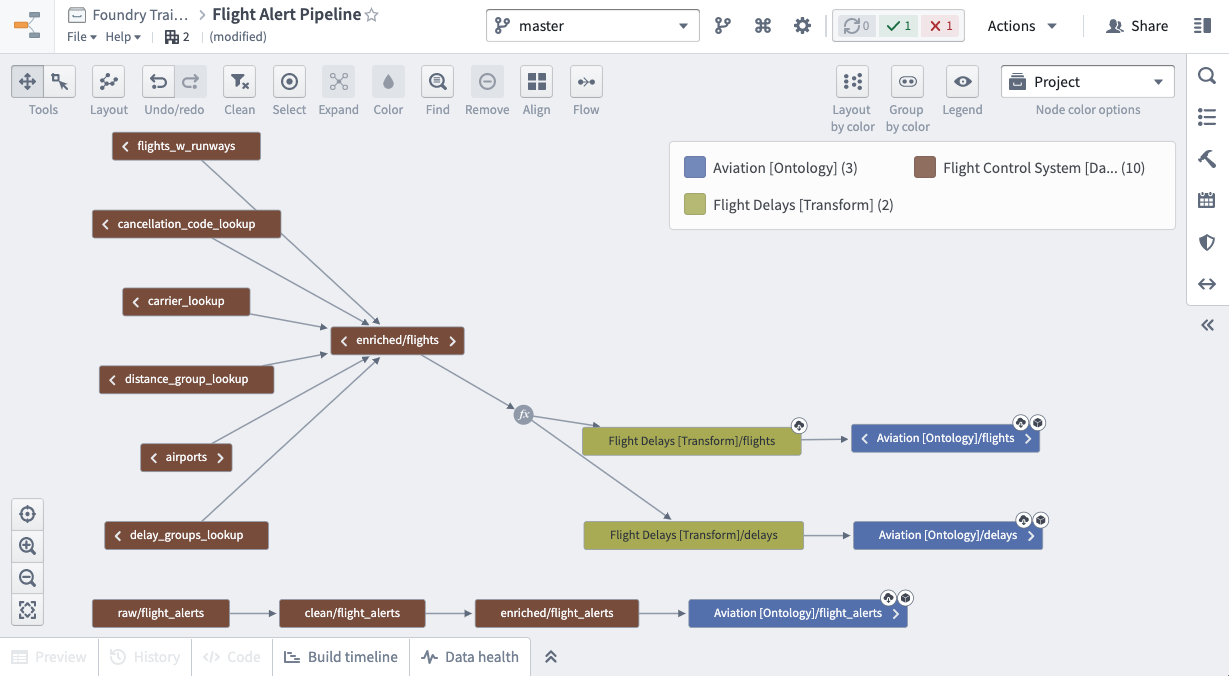
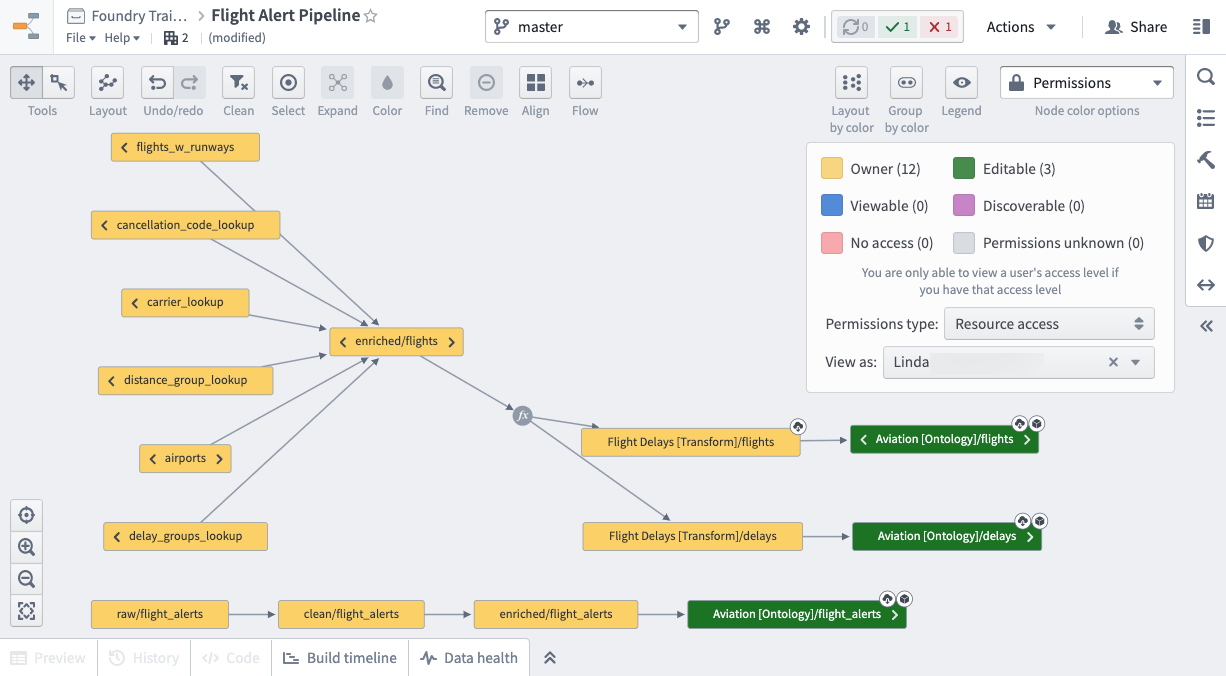
After writing all our transformations, below is what our final production pipeline looks like.
Since our pipeline covers 3 Projects, we can give users specific Role access separately for each Project.
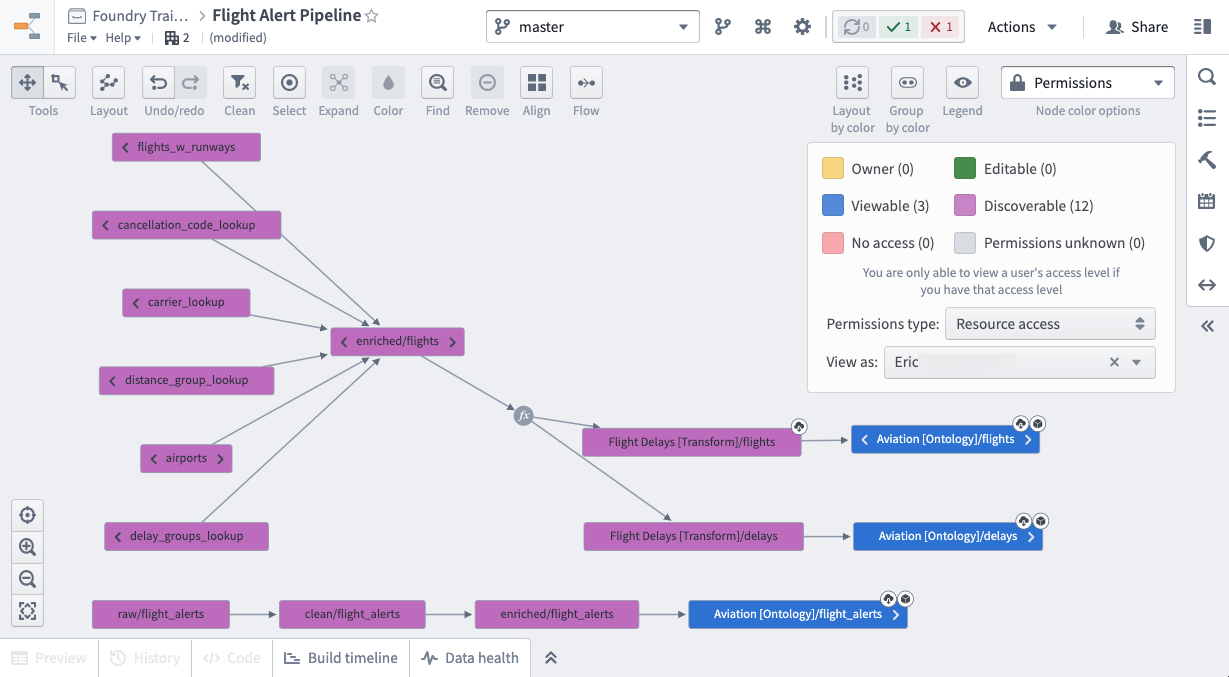
For example, we will add our first operational user, Eric, to the Aviation [Ontology] - Viewer group which will give them Viewer access on the Aviation [Ontology] Project. Given the default role is Discoverer, these same users would only have Discoverer access on the Flight Control System [Datasource] and Flight Delays [Transform] Projects, but Viewer on the Aviation [Ontology] project. Note that, having discoverer access to the Datasource Project will not preclude users from being granted access to downstream data, like in the Ontology Project.
Below is what the resource access for Eric looks like.
Eric’s colleague, Linda, is the one who will maintain the production pipeline. So Linda is added to the corresponding Owner and Editor groups for all 3 Projects. Breaking your pipeline into discrete Projects and groups is the easiest to maintain long term.
Sharing data
We recommend sharing data and resources with a colleague by adding them to the correct Project group so they have uniform access to the Project. This method is more legible and easier to manage than sharing resources directly. In addition to providing the right roles through the correct Project group membership, you should check that other access requirements like Markings and Organization membership are met. Review the checking permissions section for more details.
中文翻译
保护数据基础
Foundry 的总体目标是提供组织内客观现实的规范视图。构建这一现实的第一步是建立并授权您的数据基础。为了解释如何保护您的数据基础,我们将通过一个名为 Sky Industries 的飞机制造商的示例来逐步说明。我们将代表 Sky Industries 的一名开发人员,他正在整合原始航班、跑道、机场、警报、航线和乘客数据,为构建本体论(Ontology)做准备,然后将其提供给整个 Sky Industries 组织。
创建项目
设计数据基础的一个关键部分是决定为生产数据管道创建哪些项目,以便于未来的扩展和轻松维护。在我们的示例中,我们将使用推荐的项目设置,并创建 3 个具有不同用途的项目:
- 飞行控制系统 [数据源]: 从美国运输统计局(Bureau of Transportation Statistics, BTS)摄取原始数据,并在该项目中进行清理。
- 航班延误 [转换]: 从飞行控制系统 [数据源] 项目导入数据集,并进行转换以生成可重复使用的数据集。
- 航空 [本体论]: 从航班延误 [转换] 项目导入数据集,并进行转换以表示离散的组织对象。
根据您的 Foundry 实例,您可以同时创建项目和/或组。目标是每个项目有三个组,每个组映射到一个默认角色(例如,查看者(Viewer))。我们希望我们项目对组织中的其他用户都是可发现的,因此我们将项目的默认角色设置为发现者(Discoverer),并且不会向项目添加标记(Markings)。此外,在每个项目中,我们将创建一个代码仓库,用于存放我们的转换逻辑。以下是航班延误 [转换] 项目的最终设置。
项目引用
现在我们有了一个用于构建管道的项目,就可以开始使用 Foundry 来编写业务逻辑了。有关最佳实践的详细信息,请查看数据集成文档。
在我们可以使用来自另一个项目的数据之前,需要先在当前项目中创建对该项目的引用。完成此操作后,我们就可以在构建中使用该数据集,并允许我们项目中的任何人对该数据进行转换,即使他们本身没有访问源项目的权限。
以下是将飞行控制系统 [数据源] 项目中的航班数据集的项目引用添加到航班延误 [转换] 项目时的效果。
在编写完所有转换逻辑后,以下是我们的最终生产管道的样子。
由于我们的管道涵盖了 3 个项目,我们可以分别为每个项目授予用户特定的角色访问权限。
例如,我们将第一个操作用户 Eric 添加到航空 [本体论] - 查看者组,这将授予他们对航空 [本体论] 项目的查看者访问权限。鉴于默认角色是发现者,这些相同的用户对飞行控制系统 [数据源] 和航班延误 [转换] 项目只有发现者访问权限,但对航空 [本体论] 项目拥有查看者访问权限。请注意,对数据源项目拥有发现者访问权限不会阻止用户被授予对下游数据(例如本体论项目中的数据)的访问权限。
以下是 Eric 的资源访问权限情况。
Eric 的同事 Linda 将负责维护生产管道。因此,Linda 被添加到所有 3 个项目的相应所有者(Owner)和编辑者(Editor)组中。将管道分解为独立的项目和组是长期维护中最简单的方法。
共享数据
我们建议通过将同事添加到正确的项目组来与他们共享数据和资源,以便他们对该项目拥有统一的访问权限。这种方法比直接共享资源更清晰、更易于管理。除了通过正确的项目组成员身份提供适当的角色外,您还应检查是否满足其他访问要求,例如标记(Markings)和组织成员身份。有关更多详细信息,请查看检查权限部分。