Configure network ingress(配置网络入站流量)
Network ingress refers to connections that are initiated from outside Foundry. When using our managed Software as a Service (SaaS) platform, Control Panel offers allowlist configuration to define from where such connections can be established.
Appropriate network ingress rules must be configured in Control Panel for users to log in and browse Foundry, and for processes that require reaching into Foundry, such as setting up an agent for Data Connection.
:::callout{theme="neutral"} The ability to configure network ingress in Control Panel may not yet be available for your enrollment. :::
Configure network ingress in Control Panel
The ability to configure network ingress allowlists is available in the Network ingress tab of Control Panel. This feature is available to users with the Information Security Officer or Enrollment Administrator role. These roles are granted by Enrollment Administrators, in the Enrollment permissions tab of Control Panel.
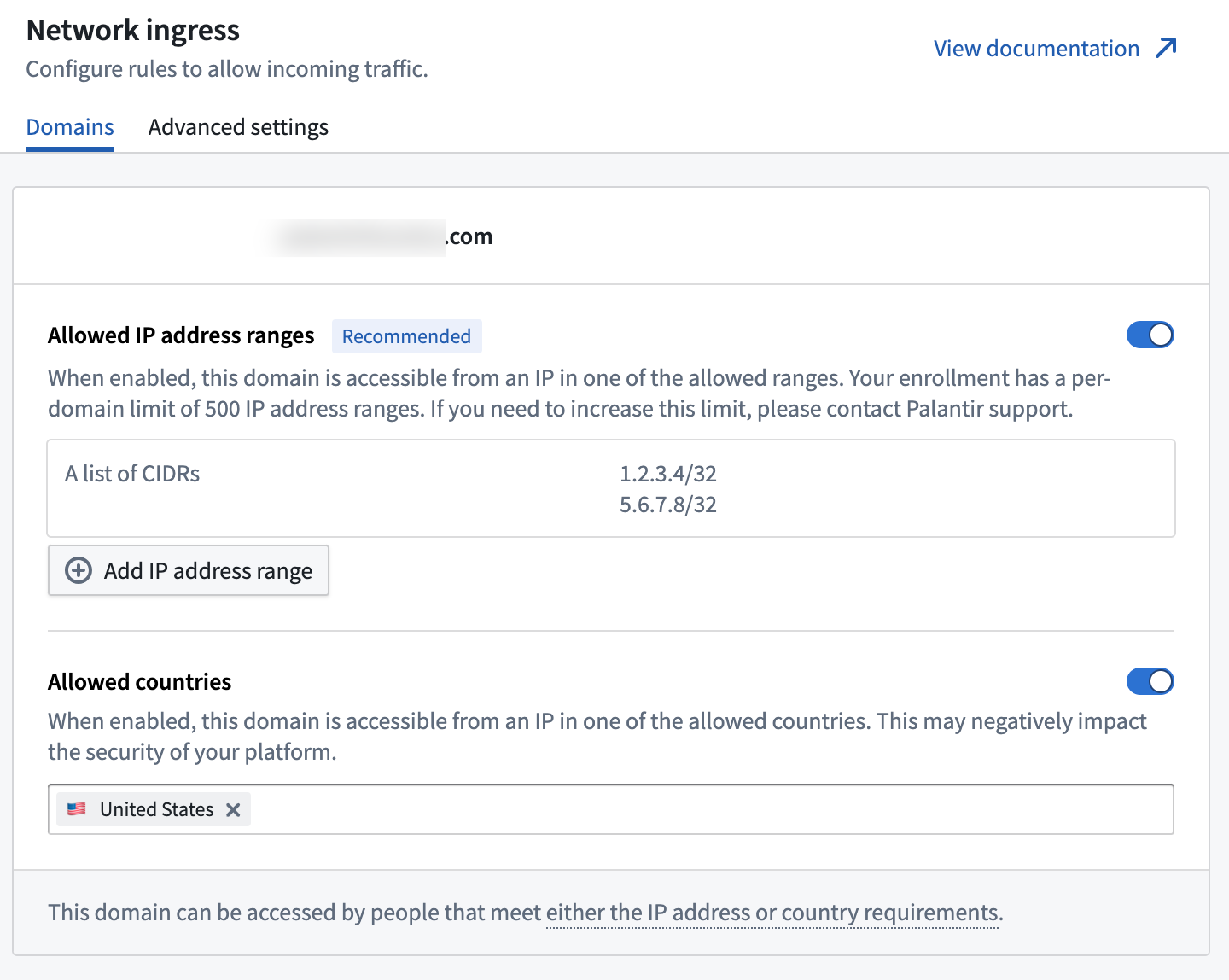
Two types of rules are supported:
- In the Allowed IP address ranges section: The ability to specify IPv4 ranges, in CIDR notation, from where ingress connections can be established. A maximum of 500 CIDRs blocks can be configured.
- In the Allowed countries section: The ability to specify countries from where ingress connections can be established.
Rules are additive; connections can be established if satisfying either an IP-based rule or a country rule.
:::callout{theme="note"} A user connecting through a Virtual Private Network (VPN) is allowed based on the egress IP of the VPN. :::
Considerations: Country-based allowlisting
When using country-based allowlisting rather than strict IP-based allowlisting, be sure to understand the convenience and security tradeoffs. While authentication is still required, using broad network allowlisting may greatly increase the risk for:
- Identity-based attacks
- Examples: Authentication material spillage, account takeovers, brute force, and credential theft.
- Social engineering and web-based attacks
- Examples: Man-in-the-middle attacks, DNS poisoning, and other targeted phishing.
- Exploitation of underlying infrastructure and applications
- Example: Zero-day exploits.
Palantir recommends strict IP allowlisting as a defense-in-depth control intended to significantly reduce these risks by denying adversaries the network access required to take offensive action.
:::callout{theme="warning"} Country-based allowlisting works by geotagging the IPs of incoming connections. This behavior is subject to potential data quality issues from the third-party used by Palantir to drive this feature. False positives and false negatives may occur, which is expected for IP geotagging tools. :::
Make a change request
Given the sensitive nature of configuring network ingress, all ingress changes must go through an Approvals workflow. After finishing your modifications, select the Request changes option in the bottom-right corner of the page and provide a justification for the change. Separate approvals request will be made for each domain that has proposed changes to its ingress configuration. By default, administrators are able to approve their own ingress change requests. However, the approvals workflow ensures changes are reviewed before going into effect and provides a history of all modifications.
The following image shows an example of the dialog when requesting changes to the ingress configurations of two domains.
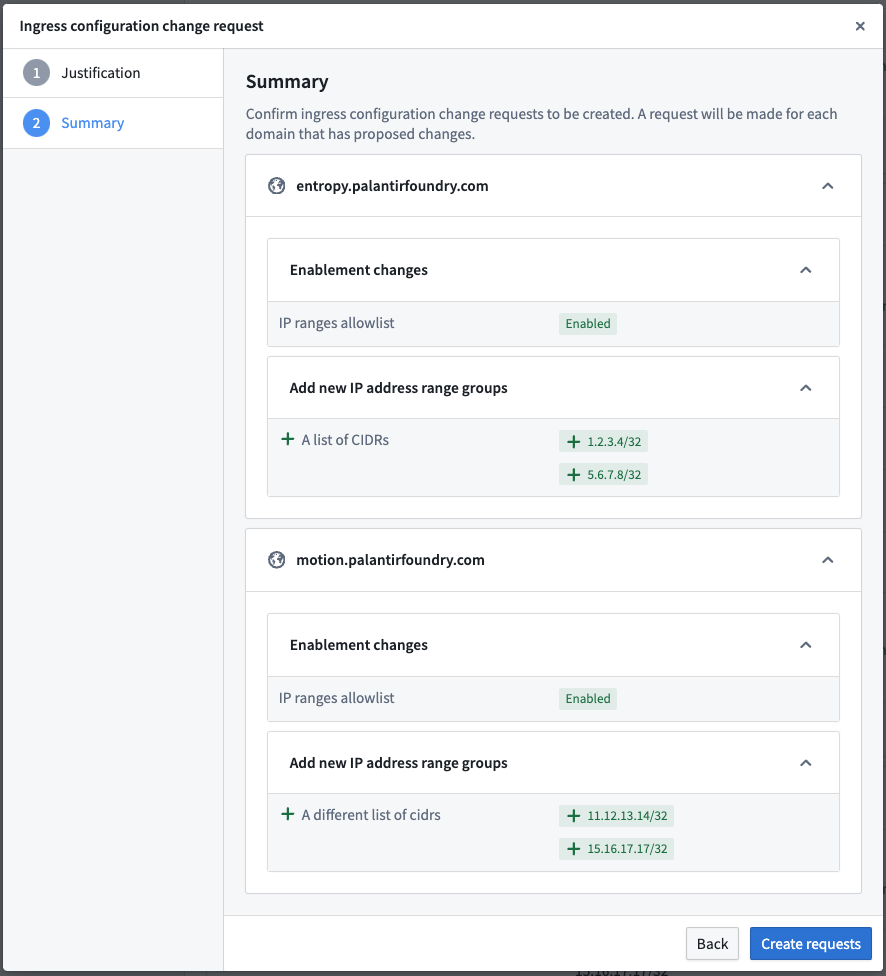
Requests appear in Control Panel's Approvals inbox.
:::callout{theme="warning"} IP addresses originating from certain locations may be automatically denied by Palantir. If this occurs for an IP address you want to allow, contact your Palantir representative. :::
Advanced settings
Under Advanced settings, you can toggle Palantir access on or off; toggling Palantir access on enables ingress networking access from Palantir's corporate network without having to explicitly allow Palantir's corporate IPs.
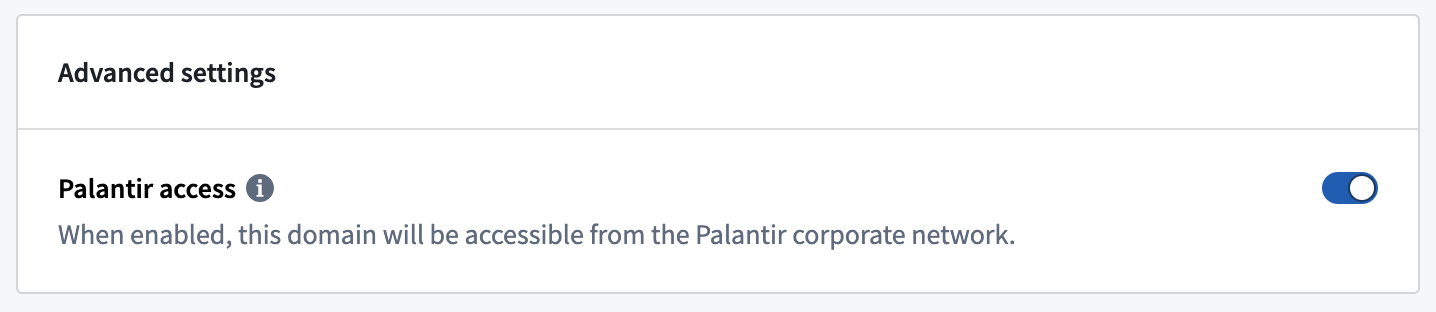
Palantir access should usually be turned on if you are being supported by Palantir engineers who access your enrollment through a dedicated authentication provider and from the Palantir network. Note that Palantir access is via VPN and is not specific to one geographical region.
:::callout{theme="neutral"} Similar to IP and country-level allowlisting, the Palantir access setting is additive: if your network ingress configuration allows connections from the United States, and this toggle is enabled, access will be possible from corporate network locations outside the United States. :::
中文翻译
配置网络入站流量
网络入站流量(network ingress)指从 Foundry 外部发起的连接。在使用我们托管的软件即服务(SaaS)平台时,控制面板(Control Panel)提供允许列表(allowlist)配置功能,用于定义允许从哪些来源建立此类连接。
必须在控制面板中配置适当的网络入站规则,以便用户登录和浏览 Foundry,以及供需要访问 Foundry 的进程使用,例如为数据连接(Data Connection)设置代理。
:::callout{theme="neutral"} 您的注册环境可能尚不支持在控制面板中配置网络入站流量的功能。 :::
在控制面板中配置网络入站流量
在控制面板的网络入站流量(Network ingress)选项卡中,可以配置网络入站允许列表。此功能适用于拥有信息安全官(Information Security Officer)或注册管理员(Enrollment Administrator)角色的用户。这些角色由注册管理员在控制面板的注册权限(Enrollment permissions)选项卡中授予。
支持两种类型的规则:
- 在允许的 IP 地址范围(Allowed IP address ranges)部分:可以指定允许建立入站连接的 IPv4 范围(采用 CIDR 表示法)。最多可配置 500 个 CIDR 块。
- 在允许的国家/地区(Allowed countries)部分:可以指定允许建立入站连接的国家/地区。
规则是累加性的;只要满足基于 IP 的规则或基于国家/地区的规则,即可建立连接。
:::callout{theme="note"} 通过虚拟专用网络(VPN)连接的用户将根据 VPN 的出站 IP 进行判断。 :::
注意事项:基于国家/地区的允许列表
在使用基于国家/地区的允许列表而非严格的基于 IP 的允许列表时,请务必了解便利性与安全性之间的权衡。虽然仍然需要身份验证,但使用宽泛的网络允许列表可能会大幅增加以下风险:
- 基于身份的攻击
- 示例:身份验证材料泄露、账户接管、暴力破解和凭证窃取。
- 社会工程和基于网络的攻击
- 示例:中间人攻击、DNS 投毒和其他针对性钓鱼攻击。
- 利用底层基础设施和应用程序的漏洞
- 示例:零日漏洞利用。
Palantir 建议使用严格的 IP 允许列表作为纵深防御(defense-in-depth)控制手段,通过拒绝攻击者所需的网络访问权限来大幅降低这些风险。
:::callout{theme="warning"} 基于国家/地区的允许列表通过对入站连接的 IP 进行地理标记来实现。此行为可能受到 Palantir 用于驱动此功能的第三方数据质量问题的影响。可能会出现误报和漏报,这对于 IP 地理标记工具来说是正常现象。 :::
提交变更请求
鉴于配置网络入站流量的敏感性,所有入站流量变更必须通过审批工作流(Approvals workflow)进行。完成修改后,选择页面右下角的请求变更(Request changes)选项,并提供变更理由。对于每个入站配置有拟议变更的域,将分别生成审批请求。默认情况下,管理员可以批准自己的入站变更请求。然而,审批工作流确保变更在生效前经过审查,并提供所有修改的历史记录。
下图展示了请求变更两个域的入站配置时的对话框示例。
请求会出现在控制面板的审批收件箱(Approvals inbox)中。
:::callout{theme="warning"} 来自某些位置的 IP 地址可能会被 Palantir 自动拒绝。如果您希望允许的 IP 地址出现此情况,请联系您的 Palantir 代表。 :::
高级设置
在高级设置(Advanced settings)下,您可以开启或关闭Palantir 访问(Palantir access);开启Palantir 访问后,将允许从 Palantir 公司网络进行入站网络访问,而无需显式允许 Palantir 的公司 IP。
如果您正在接受 Palantir 工程师的支持,且这些工程师通过专用身份验证提供商从 Palantir 网络访问您的注册环境,则通常应开启Palantir 访问。请注意,Palantir 访问通过 VPN 进行,不限于特定地理区域。
:::callout{theme="neutral"} 与基于 IP 和国家/地区的允许列表类似,Palantir 访问设置也是累加性的:如果您的网络入站配置允许来自美国的连接,并且此开关已启用,则也可以从美国以外的公司网络位置进行访问。 :::