Configure outbound applications with OAuth 2.0 authorization code grants(使用 OAuth 2.0 授权码授权配置出站应用)
Outbound applications provide a way for administrators to manage OAuth 2.0 connections to external systems from workflows built in Foundry. Outbound applications are managed at the Organization level in Control Panel.
An outbound application represents a bundle of configurations required for Foundry to behave as an OAuth 2.0 client. The application makes requests to another system that can behave as an OAuth 2.0 server.
Outbound applications in Foundry only support the OAuth 2.0 authorization code grant ↗ type. To set up an OAuth 2.0 client credentials grant, follow these resources to manually establish the handshake process within a webhook.
:::callout{theme="neutral" title="Private network support"}
Outbound applications support connections to OAuth 2.0 servers on private networks using agent proxy egress policies. This allows Foundry to route traffic through a Data Connection agent installed in your network. See the egress policy configuration option documentation for details.
The egress policy only governs how Foundry connects to the OAuth 2.0 server. To complete the authorization code grant flow, the authorization page opens in the browser on your own computer, so the computer initiating the authorization must also have network access to the OAuth 2.0 server.
:::
Create an outbound application
To create an outbound application, first navigate to the Outbound applications in Control Panel, under Organization settings. If you have access to multiple Organizations, be sure to select the Organization in which you wish to create your outbound application. All users of this Organization with permission to set up sources in Data Connection will be able to select any outbound application as an authorization mechanism for their connection.
To view the Outbound applications page, you need access to the "Manage outbound applications" workflow, which is granted by default to the Organization administrator role in Control Panel.
Learn more about configuring roles.
Select New application and provide the required inputs to set up your outbound application. Detailed configuration options are listed below.
Configuration options
The following configuration options are available when creating an outbound application.
| Option | Required? | Description |
|---|---|---|
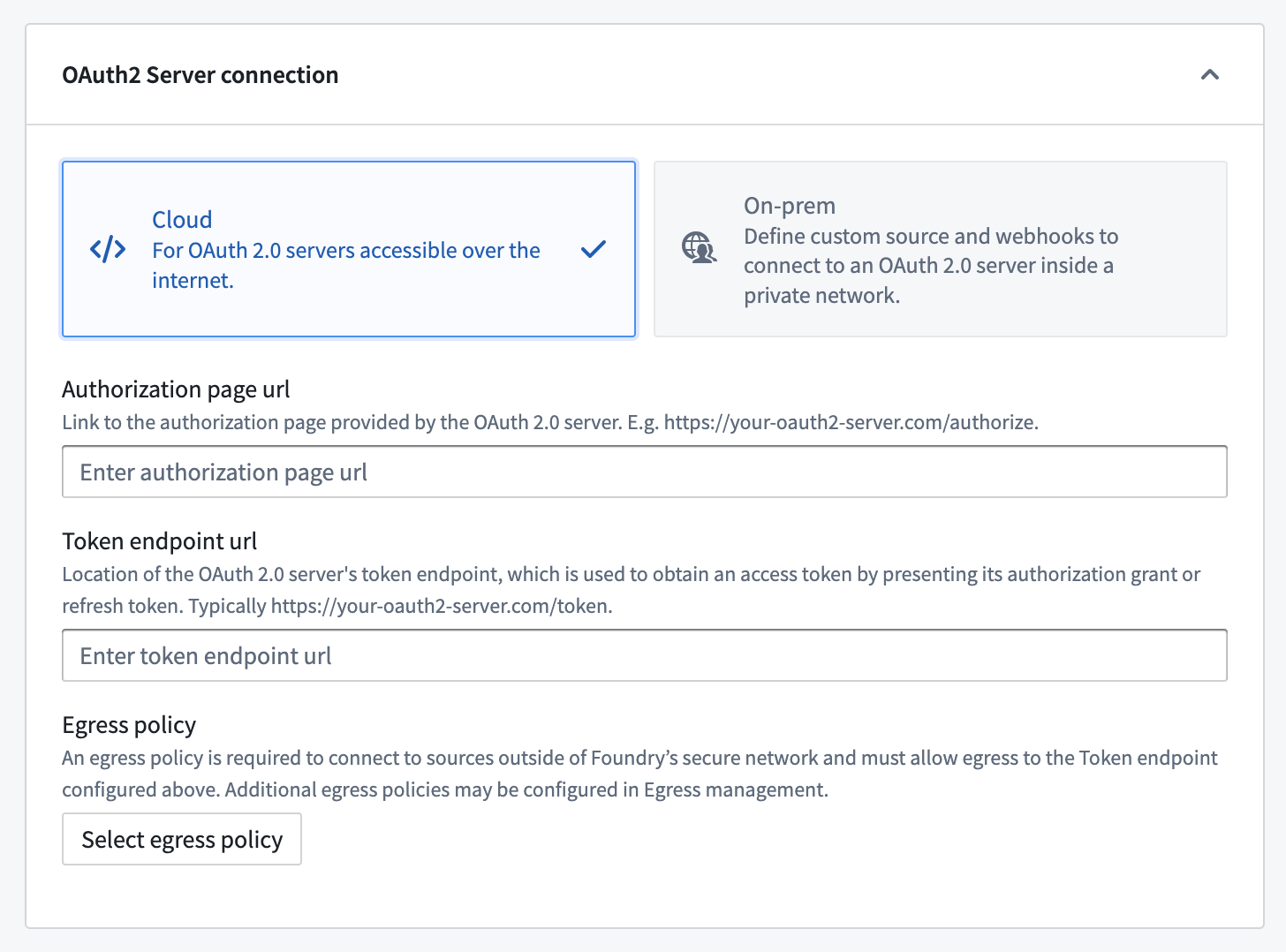
| Authorization page URL | Yes | The authorization endpoint ↗ for the OAuth 2.0 provider. Generally, this URL is similar to https://oauth2-server.com/authorize and should be available in public documentation for most SaaS offerings. |
| Token endpoint URL | Yes | The token endpoint ↗ for the OAuth 2.0 provider. Generally, this URL is similar to https://oauth2-server.com/token and should be available in public documentation for most SaaS offerings. |
| Egress policy | Yes | To connect to the OAuth 2.0 server, you must create and attach an egress policy that allows connecting to the token endpoint URL. Use a direct connection egress policy for servers accessible from Foundry's network, or an agent proxy egress policy for servers on a private network. Egress is managed per enrollment. |
| Application name | Yes | A user-facing name for this outbound application. The name is visible when selecting the outbound application in Data Connection while configuring authentication for a source. |
| Description | No | A description of the outbound application. |
| Approval prompt | Yes | This text will be displayed when using the authorization grant flow before opening a pop-up window to display the login prompt for the external OAuth 2.0 provider. |
| Client ID | Yes | The client identifier ↗ from the OAuth 2.0 provider. Note that some external systems may use a different term to refer to client ID. |
| Client secret | Yes | The client secret ↗ from the OAuth 2.0 provider. Note that some external systems may use a different term to refer to a client secret. |
| Scopes | Yes | The list of scopes configured in on the OAuth 2.0 server corresponding to the provided client ID. The list entered here must match what is listed in the administration interface for the external system. Scopes may be left blank to indicate that an empty list of scopes should be provided when authorizing with the OAuth 2.0 server. |
| Access token expiration | No | An optional access token expiration. Normally, this value is returned by the OAuth 2.0 server as part of the authorization grant flow. Any value entered here will be ignored if the server provides an access token expiration. |
| Enable PKCE | No | An optional toggle. When enabled, the outbound application will use proof key for code exchange ↗ (PKCE), an extension to the authorization code grant that protects against CSRF and authorization code injection attacks with an additional security handshake. This setting is highly recommended for public clients, and some OAuth 2.0 servers enforce it. |
We recommend using a direct connection when setting up an outbound application if the OAuth 2.0 server is reachable from Foundry directly. For cloud-hosted Foundry instances, this means a server that can be reached through a direct Internet connection.
If the OAuth 2.0 server is on a private network, you can use an agent proxy egress policy to route traffic through a Data Connection agent installed in your network. This allows Foundry to connect to the OAuth 2.0 server as if it were directly reachable.
(Legacy) Custom webhook-based OAuth 2.0 handshakes
:::callout{theme="warning" title="Legacy"} Custom webhook-based OAuth 2.0 configuration is in the legacy phase of development, and no additional development is expected. Full support remains available. This configuration may not be available on your enrollment. If the OAuth 2.0 server implements the standard Authorization Code grant flow, use the standard configuration options with a direct connection or agent proxy egress policy instead. :::
If the OAuth 2.0 server requires a non-standard token handshake, you can use custom webhooks to implement the OAuth 2.0 flow manually. This approach routes handshake requests through a REST API source using an agent worker to connect to the server.
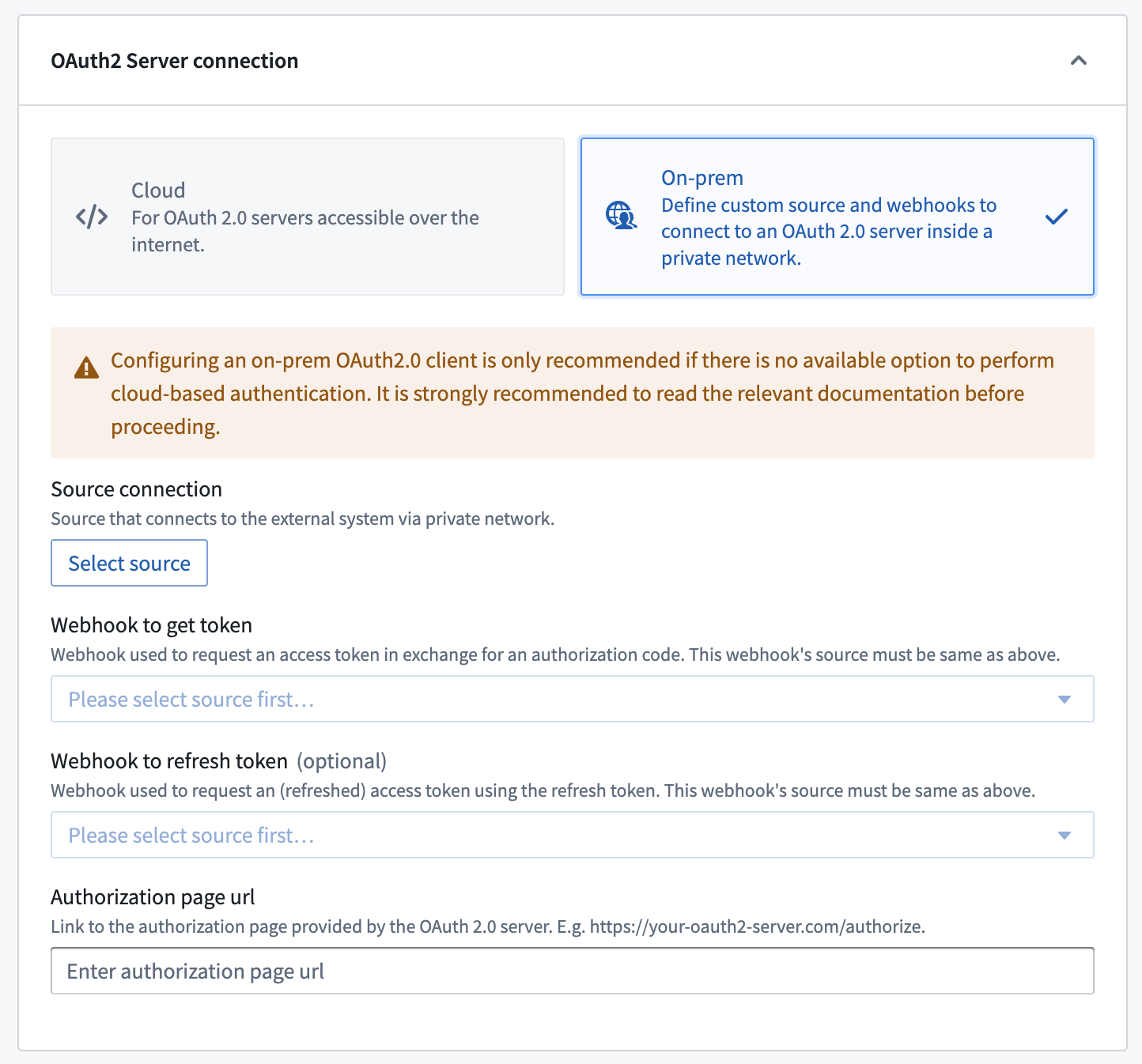
| Option | Required? | Description |
|---|---|---|
| Source connection | Yes | Choose a REST API source that is configured to use an agent worker to connect to the OAuth 2.0 server inside your network. |
| Webhook to get token | Yes | A webhook that calls the token endpoint ↗ for the OAuth 2.0 server to fetch a token. See the section below for more information. |
| Webhook to get refresh token | No | A webhook that calls the token endpoint ↗ for the OAuth 2.0 server to refresh a token. See the section below for more information. |
| Authorization page URL | Yes | The authorization endpoint ↗ for the OAuth 2.0 provider. Generally, this URL is similar to https://oauth2-server.com/authorize. |
To set up a custom webhook-based handshake:
- Create a REST API source that can connect to your OAuth 2.0 server. For example, you might configure your source with the server domain and client secret:
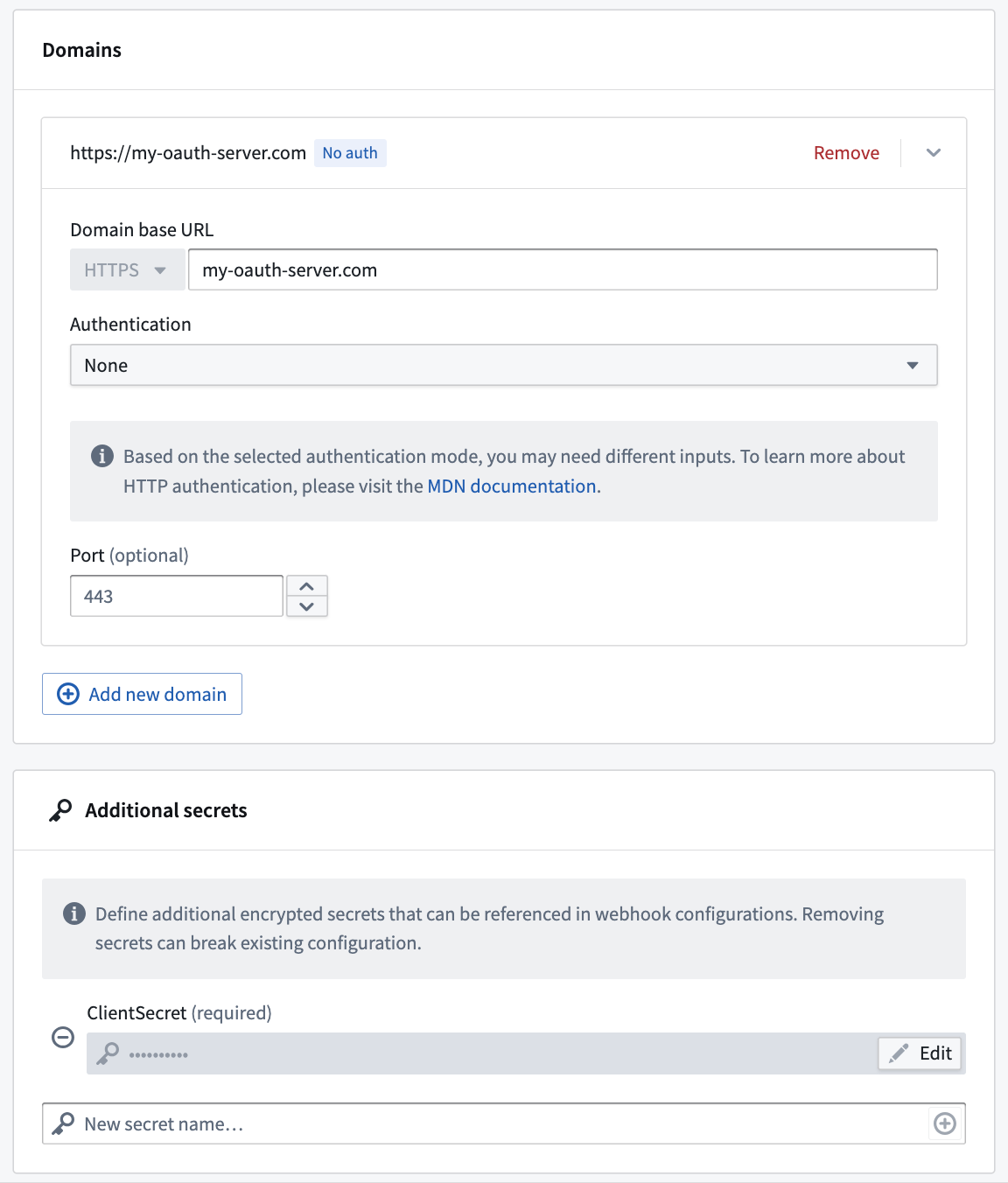
- Create a webhook on that REST API source that calls the
/tokenendpoint of the OAuth 2.0 server. You can optionally create a second webhook for the refresh flow.
Use the instructions in the following sections to create the token and refresh token webhooks.
Token webhook
:::callout{theme="warning" title="Webhooks published as functions are incompatible"} Webhooks published as functions cannot be used in legacy custom webhook-based OAuth 2.0 outbound applications. When creating your token and refresh webhooks, ensure function publishing is disabled. :::
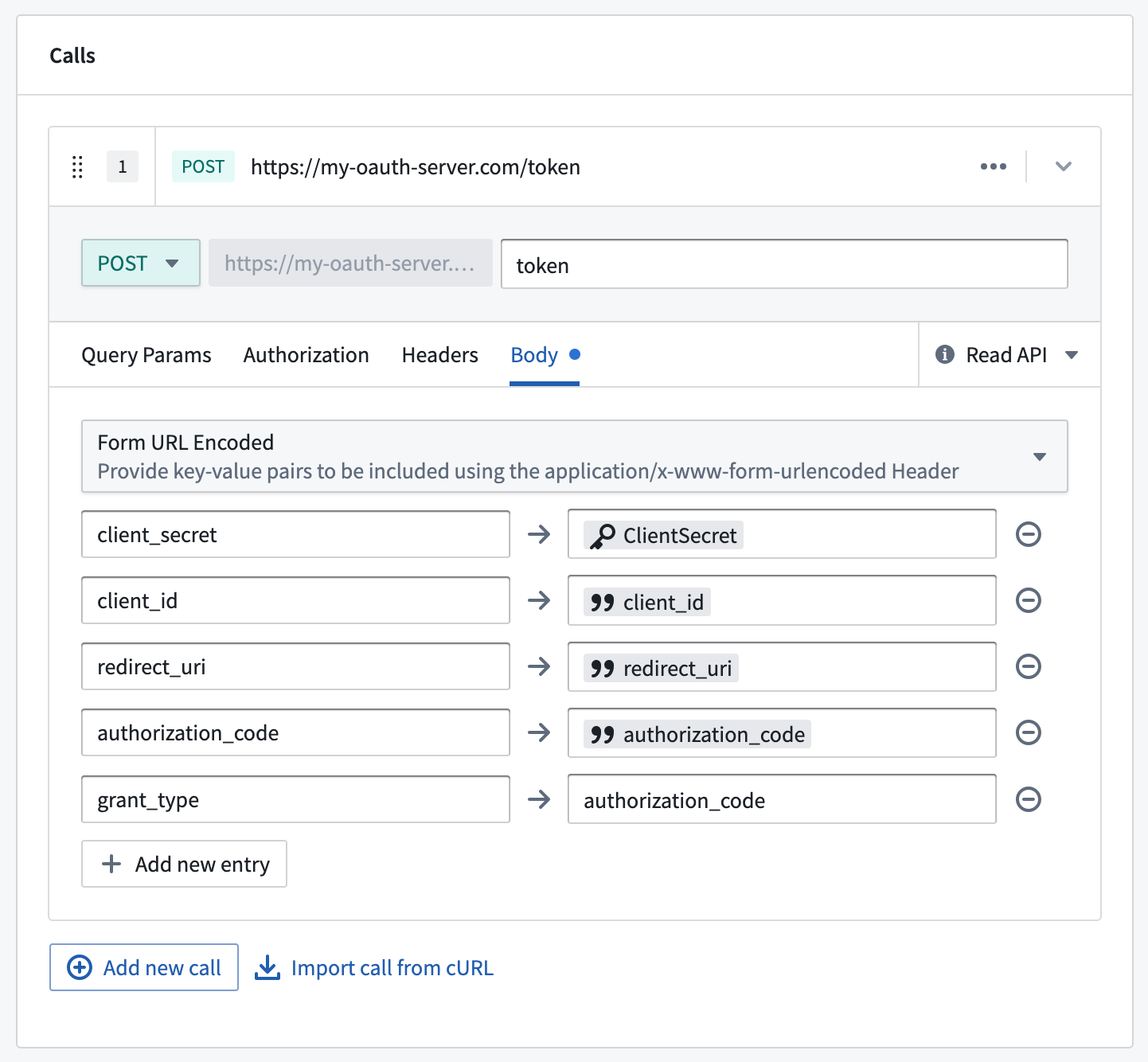
The token webhook should implement a request to the /token endpoint on the OAuth 2.0 server to fetch a valid token given a client_id, redirect_uri, and authorization_code. The token webhook must have the input and output parameters listed below. Learn more about webhook parameters.
Below is an example request configuration showing a standard OAuth 2.0 server token request:
| Input parameter | Required? | Type |
|---|---|---|
client_id |
Yes | String |
redirect_uri |
Yes | String |
authorization_code |
Yes | String |
code_verifier |
No | String |
You must also set grant_type=authorization_code as one of the entries in the webhook form body. code_verifier is required if Enable PKCE is toggled on in your outbound application. Review the documentation for your OAuth 2.0 server for additional required configurations.
| Output parameter | Required? | Type | Comments |
|---|---|---|---|
access_token |
Yes | String | |
scope |
Yes | String | |
refresh_token |
No | String | Not all OAuth 2.0 servers or applications will be configured to allow automatic token refresh. If no refresh token is returned, users will be prompted to re-authorize the application whenever the original token expires. |
expires_in |
No | String | Not all OAuth 2.0 servers will return this parameter. If this parameter is not present or a value is not returned, the access token expiration in the outbound application will be used instead. |
Refresh token webhook
:::callout{theme="warning" title="Webhooks published as functions are incompatible"} Webhooks published as functions cannot be used in legacy custom webhook-based OAuth 2.0 outbound applications. When creating your token and refresh webhooks, ensure function publishing is disabled. :::
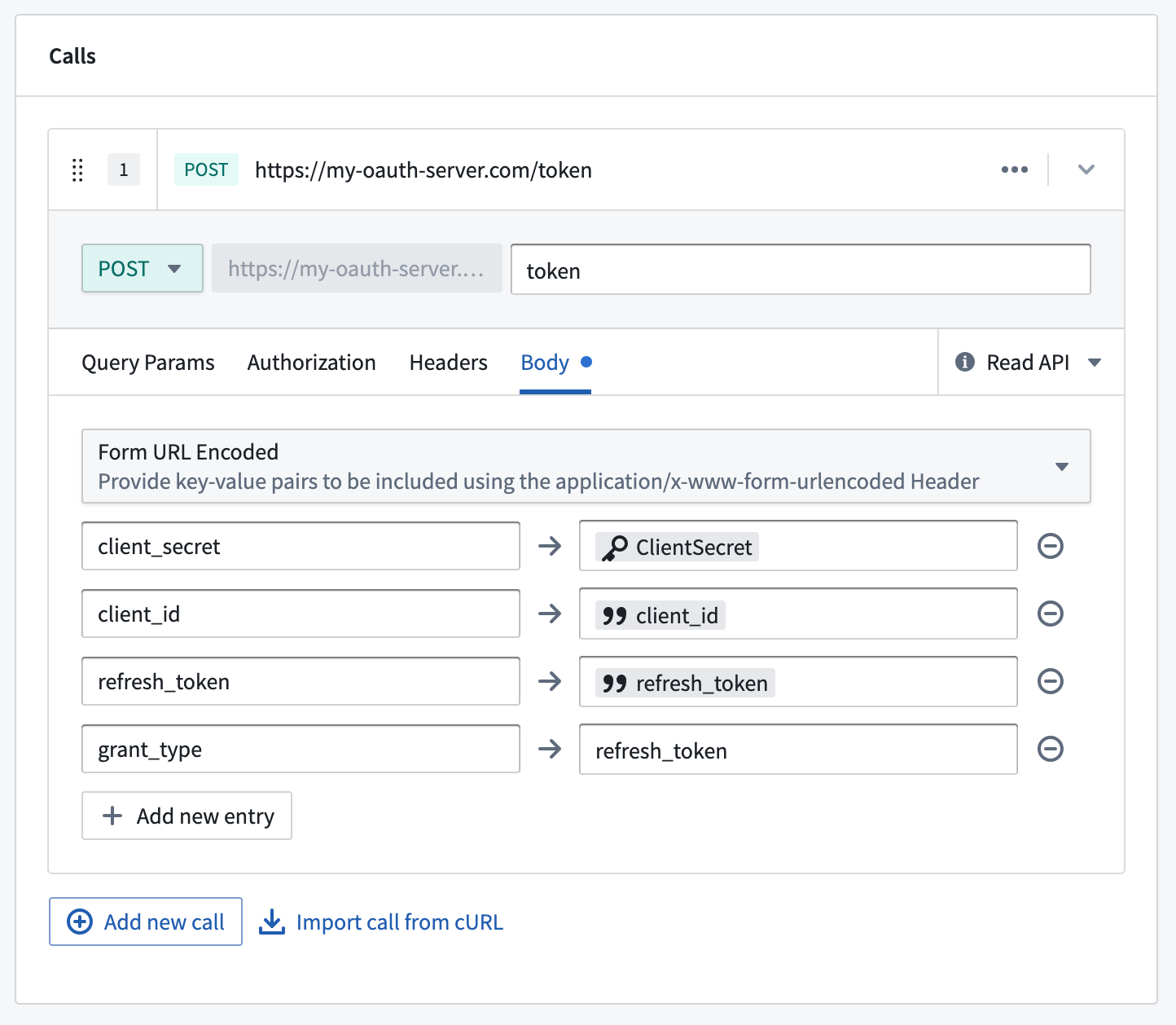
After creating the token webhook, you must create a second webhook for the refresh token flow using the input and output parameters listed below. The webhook should implement a request to the /token endpoint to fetch a new token given a refresh_token and client_id.
Below is an example request configuration showing a standard OAuth 2.0 server refresh request:
| Input parameter | Required? | Type |
|---|---|---|
client_id |
Yes | String |
refresh_token |
Yes | String |
You must also set grant_type=refresh_token as one of the entries in the webhook form body. Review the documentation for your OAuth 2.0 server for additional required configurations.
The available output parameters are the same as the parameters for the token webhook.
| Output parameter | Required? | Type | Comments |
|---|---|---|---|
access_token |
Yes | String | |
scope |
Yes | String | |
refresh_token |
No | String | Not all oauth servers or applications will be configured to allow automatic token refresh. If no refresh token is returned, users will be prompted to re-authorize the application whenever the original token expires. |
expires_in |
No | String | Not all OAuth 2.0 servers will return this parameter. If this parameter is not present or a value is not returned, the access token expiration in the outbound application will be used instead. |
Manage outbound applications
Once you create an outbound application, it will be available to all users in that Organization to use as the authorization method for a REST API source in Data Connection. The following options are available for administrators with permisssions to manage outbound applications.
Delete an outbound application
Deleting an outbound application will permanently remove stored tokens and refresh tokens for all users who have authorized the application. The application configuration, including the client secret, will also be permanently deleted. This action cannot be reversed.
Reset an outbound application
Resetting an outbound application will permanently remove stored tokens and refresh tokens for all users who have authorized the application. This effectively returns the application to the state just after initial setup when no user has yet completed the interactive authorization flow. The next time a user attempts to perform a workflow that requires a token from this outbound application, they will be prompted to complete the authorization flow again.
Enable an outbound application
Enabling an outbound application means that users may perform the interactive authorization flow to this external system. Disabling an application will prevent any previously stored tokens and refresh tokens from being used. However, these tokens will not be deleted and may be used again after the application has been re-enabled.
New users who have not previously authorized the application will not be able to perform the interactive authorization flow while the outbound application is disabled.
Newly created applications will be enabled by default and may only be disabled after being created.
Use outbound applications in Data Connection
For details on how to use outbound applications in Functions, Actions, Workshop, and AIP chatbots, see Supported workflows below.
:::callout{theme="neutral" title="Non-interactive workflows"} Outbound applications work with automated workflows such as Automate and scheduled Functions as long as the user has a valid token. A user must first complete the authorization flow in an interactive UI context (such as Workshop or AIP Studio). If the refresh token expires before the automated workflow runs, the user must re-authorize through an interactive workflow. :::
:::callout{theme="neutral"} Outbound applications do not support usage by users from multiple Organizations. If users in multiple organizations need to authorize against the same OAuth 2.0 server, you must create a separate outbound application with a different REST API source for users in each Organization. :::
Once an outbound application is created and enabled, it may be used as the authentication method for a domain in a REST API source. When configuring a domain, select OAuth 2.0 and then select the desired outbound application from the dropdown.
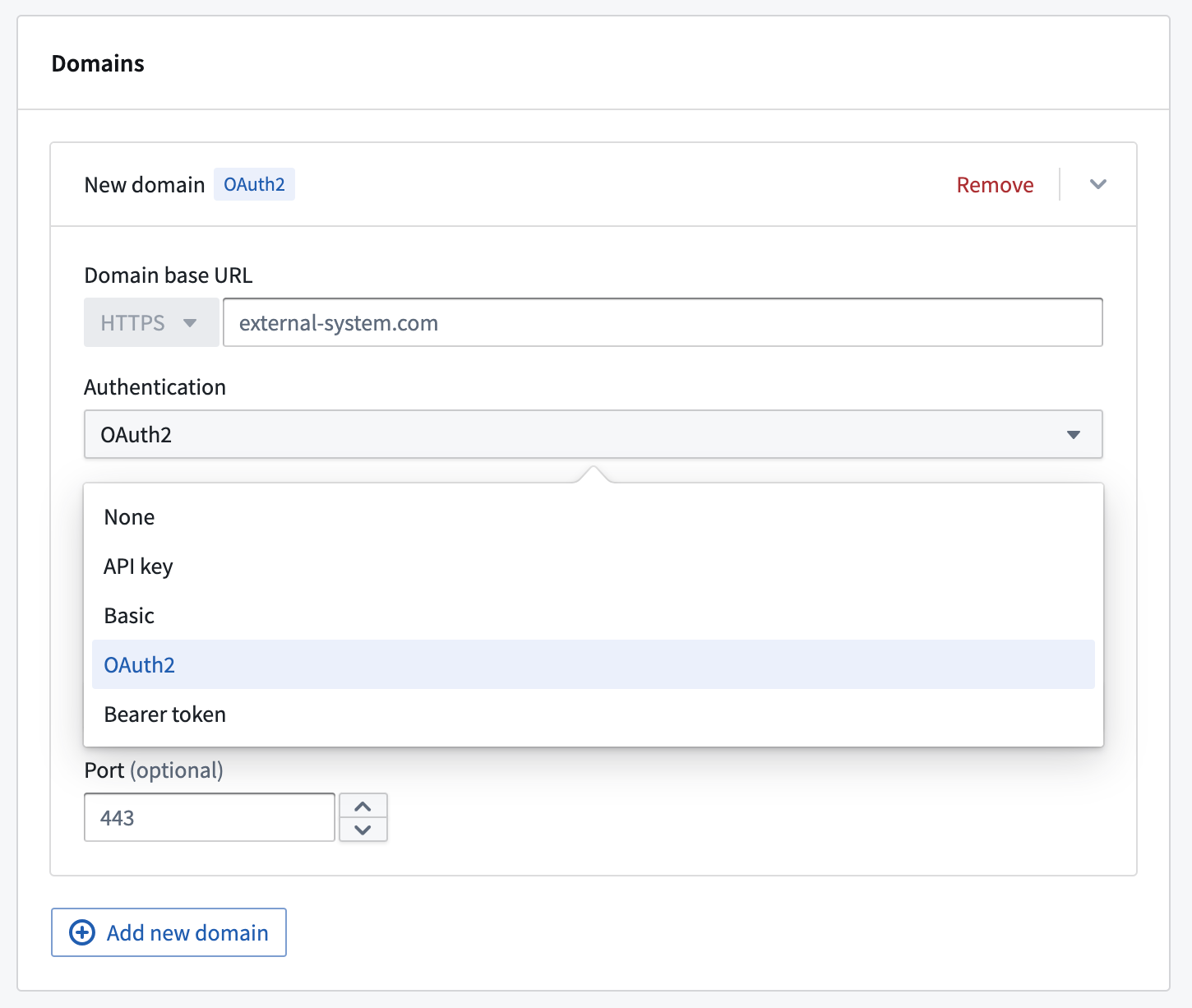
Any webhooks using a domain with OAuth 2.0 configured will result in an interactive prompt for each user the first time they attempt to run it. Webhooks are most often invoked through Actions from Workshop; in this case, when running an Action in Workshop, the user will see a pop-up window showing the authentication page of the OAuth 2.0 server, prompting them to authorize Foundry to interact with this system on their behalf.
:::callout{theme="neutral"} In order to call OAuth 2.0 backed webhooks in a Function-backed Action, navigate to the rules configuration page of your Action and call the webhook directly as the first rule followed by a Function to process the webhook response. You can also configure the webhook call to take inputs from a function. :::
If a token refresh workflow is configured, users are unlikely to see this prompt again unless the authorization is revoked in the external system or the outbound application is reset. If no refresh workflow is configured, the end user will see the authentication pop-up anytime the resulting token expires. Tokens often expire within minutes or hours, and we encourage use of the refresh flow for a better user experience.
Supported workflows
Once a REST API source is configured with an outbound application, the OAuth token is available across the following Foundry features:
- Functions: Use OAuth tokens from your source in Python and TypeScript v2 functions to authenticate with external systems directly from your code. TypeScript v1 functions must use a webhook instead.
- Function-backed actions: Actions whose backing functions call an OAuth-configured source pass the token automatically.
- Webhook side effects: Webhooks on an OAuth-configured REST API source include the token in outgoing requests.
- Workshop: Actions applied in Workshop that require OAuth tokens trigger an authorization prompt if no valid token exists, or work automatically if the user has already authorized. Functions invoked directly from Workshop (for example, as function-backed variables or to populate widget content) cannot trigger the authorization prompt; wrap the function in a function-backed action to use OAuth-backed sources in Workshop.
- AIP chatbots: Agents that invoke OAuth-backed action tools use the same token lifecycle as other workflows.
中文翻译
使用 OAuth 2.0 授权码授权配置出站应用
出站应用(Outbound applications)为管理员提供了一种管理从 Foundry 工作流到外部系统的 OAuth 2.0 连接的方式。出站应用在控制面板(Control Panel)的组织级别进行管理。
出站应用代表一组配置的集合,使 Foundry 能够充当 OAuth 2.0 客户端(client)。该应用向另一个可充当 OAuth 2.0 服务器(server) 的系统发出请求。
Foundry 中的出站应用仅支持 OAuth 2.0 授权码授权类型 ↗。 要设置 OAuth 2.0 客户端凭证授权(Client credentials grant),请按照这些资源在 webhook 中手动建立握手流程。
:::callout{theme="neutral" title="私有网络支持"}
出站应用支持使用代理代理出站策略(Agent proxy egress policies)连接到私有网络上的 OAuth 2.0 服务器。这使得 Foundry 能够通过安装在您网络中的数据连接代理(Data Connection agent)路由流量。详情请参见出站策略配置选项文档。
出站策略仅控制 Foundry 如何连接到 OAuth 2.0 服务器。要完成授权码授权流程,授权页面会在您自己的计算机浏览器中打开,因此发起授权的计算机也必须具有对 OAuth 2.0 服务器的网络访问权限。
:::
创建出站应用
要创建出站应用,首先在控制面板的组织设置(Organization settings)下导航到出站应用(Outbound applications)。如果您有多个组织的访问权限,请确保选择您希望创建出站应用的组织。该组织中所有有权在数据连接(Data Connection)中设置源的用户都将能够选择任何出站应用作为其连接的授权机制。
要查看出站应用页面,您需要访问"管理出站应用"工作流,该权限默认授予控制面板中的组织管理员(Organization administrator)角色。
了解更多关于配置角色的信息。
选择新建应用(New application)并提供所需输入来设置您的出站应用。详细配置选项如下所列。
配置选项
创建出站应用时可以使用以下配置选项。
| 选项 | 是否必填 | 描述 |
|---|---|---|
| 授权页面 URL (Authorization page URL) | 是 | OAuth 2.0 提供商的授权端点 ↗。通常,此 URL 类似于 https://oauth2-server.com/authorize,大多数 SaaS 产品的公开文档中应提供此信息。 |
| 令牌端点 URL (Token endpoint URL) | 是 | OAuth 2.0 提供商的令牌端点 ↗。通常,此 URL 类似于 https://oauth2-server.com/token,大多数 SaaS 产品的公开文档中应提供此信息。 |
| 出站策略 (Egress policy) | 是 | 要连接到 OAuth 2.0 服务器,您必须创建并附加一个允许连接到令牌端点 URL 的出站策略。对于可从 Foundry 网络访问的服务器,使用直接连接出站策略(Direct connection egress policy);对于私有网络上的服务器,使用代理代理出站策略(Agent proxy egress policy)。出站(Egress)按注册(enrollment)进行管理。 |
| 应用名称 (Application name) | 是 | 此出站应用的面向用户名称。在数据连接中为源配置身份验证时选择出站应用时,该名称可见。 |
| 描述 (Description) | 否 | 出站应用的描述。 |
| 批准提示 (Approval prompt) | 是 | 在使用授权授权流程时,在打开弹出窗口显示外部 OAuth 2.0 提供商的登录提示之前,将显示此文本。 |
| 客户端 ID (Client ID) | 是 | 来自 OAuth 2.0 提供商的客户端标识符 ↗。请注意,某些外部系统可能使用不同的术语来指代客户端 ID。 |
| 客户端密钥 (Client secret) | 是 | 来自 OAuth 2.0 提供商的客户端密钥 ↗。请注意,某些外部系统可能使用不同的术语来指代客户端密钥。 |
| 作用域 (Scopes) | 是 | 在 OAuth 2.0 服务器上配置的与提供的客户端 ID 对应的作用域列表。此处输入的列表必须与外部系统管理界面中列出的内容一致。作用域可以留空,表示在向 OAuth 2.0 服务器授权时应提供空的作用域列表。 |
| 访问令牌过期时间 (Access token expiration) | 否 | 可选的访问令牌过期时间。通常,此值由 OAuth 2.0 服务器作为授权授权流程的一部分返回。如果服务器提供了访问令牌过期时间,此处输入的任何值都将被忽略。 |
| 启用 PKCE (Enable PKCE) | 否 | 可选开关。启用后,出站应用将使用代码交换证明密钥 ↗ (PKCE),这是授权码授权的一个扩展,通过额外的安全握手来防止 CSRF 和授权码注入攻击。强烈建议公共客户端使用此设置,某些 OAuth 2.0 服务器会强制要求使用。 |
如果 OAuth 2.0 服务器可直接从 Foundry 访问,我们建议在设置出站应用时使用直接连接。对于云托管的 Foundry 实例,这意味着可以通过直接互联网连接访问的服务器。
如果 OAuth 2.0 服务器位于私有网络上,您可以使用代理代理出站策略通过安装在您网络中的数据连接代理路由流量。这使得 Foundry 能够像直接访问一样连接到 OAuth 2.0 服务器。
(旧版) 基于自定义 Webhook 的 OAuth 2.0 握手
:::callout{theme="warning" title="旧版"} 基于自定义 Webhook 的 OAuth 2.0 配置处于旧版开发阶段,预计不会再有进一步开发。仍提供完全支持。此配置可能在您的注册中不可用。如果 OAuth 2.0 服务器实现了标准的授权码授权流程,请改用标准配置选项配合直接连接或代理代理出站策略。 :::
如果 OAuth 2.0 服务器需要非标准的令牌握手,您可以使用自定义 webhook 手动实现 OAuth 2.0 流程。此方法通过使用代理工作器(Agent worker)连接到服务器的 REST API 源来路由握手请求。
| 选项 | 是否必填 | 描述 |
|---|---|---|
| 源连接 (Source connection) | 是 | 选择一个配置为使用代理工作器连接到您网络内 OAuth 2.0 服务器的 REST API 源。 |
| 获取令牌的 Webhook (Webhook to get token) | 是 | 调用 OAuth 2.0 服务器的令牌端点 ↗以获取令牌的 webhook。更多信息请参见下文。 |
| 获取刷新令牌的 Webhook (Webhook to get refresh token) | 否 | 调用 OAuth 2.0 服务器的令牌端点 ↗以刷新令牌的 webhook。更多信息请参见下文。 |
| 授权页面 URL (Authorization page URL) | 是 | OAuth 2.0 提供商的授权端点 ↗。通常,此 URL 类似于 https://oauth2-server.com/authorize。 |
要设置基于自定义 webhook 的握手:
- 创建一个可以连接到您的 OAuth 2.0 服务器的 REST API 源。例如,您可以使用服务器域名和客户端密钥配置您的源:
- 在该 REST API 源上创建一个调用 OAuth 2.0 服务器
/token端点的 webhook。您可以选择为刷新流程创建第二个 webhook。
使用以下各节的说明创建令牌和刷新令牌 webhook。
令牌 Webhook
:::callout{theme="warning" title="作为函数发布的 Webhook 不兼容"} 作为函数发布的 webhook 不能用于旧版基于自定义 webhook 的 OAuth 2.0 出站应用。在创建令牌和刷新 webhook 时,请确保禁用函数发布。 :::
令牌 webhook 应实现对 OAuth 2.0 服务器 /token 端点的请求,以根据给定的 client_id、redirect_uri 和 authorization_code 获取有效令牌。令牌 webhook 必须具有下面列出的输入和输出参数。了解更多关于 webhook 参数的信息。
以下是一个示例请求配置,显示标准的 OAuth 2.0 服务器令牌请求:
| 输入参数 | 是否必填 | 类型 |
|---|---|---|
client_id |
是 | 字符串 |
redirect_uri |
是 | 字符串 |
authorization_code |
是 | 字符串 |
code_verifier |
否 | 字符串 |
您还必须将 grant_type=authorization_code 设置为 webhook 表单正文中的条目之一。如果在您的出站应用中启用了 PKCE,则需要 code_verifier。请查阅您的 OAuth 2.0 服务器的文档以了解其他必需的配置。
| 输出参数 | 是否必填 | 类型 | 注释 |
|---|---|---|---|
access_token |
是 | 字符串 | |
scope |
是 | 字符串 | |
refresh_token |
否 | 字符串 | 并非所有 OAuth 2.0 服务器或应用都会配置为允许自动令牌刷新。如果未返回刷新令牌,则在原始令牌过期时,系统将提示用户重新授权应用。 |
expires_in |
否 | 字符串 | 并非所有 OAuth 2.0 服务器都会返回此参数。如果此参数不存在或未返回值,则将使用出站应用中的访问令牌过期时间。 |
刷新令牌 Webhook
:::callout{theme="warning" title="作为函数发布的 Webhook 不兼容"} 作为函数发布的 webhook 不能用于旧版基于自定义 webhook 的 OAuth 2.0 出站应用。在创建令牌和刷新 webhook 时,请确保禁用函数发布。 :::
创建令牌 webhook 后,您必须使用下面列出的输入和输出参数为刷新令牌流程创建第二个 webhook。该 webhook 应实现对 /token 端点的请求,以根据给定的 refresh_token 和 client_id 获取新令牌。
以下是一个示例请求配置,显示标准的 OAuth 2.0 服务器刷新请求:
| 输入参数 | 是否必填 | 类型 |
|---|---|---|
client_id |
是 | 字符串 |
refresh_token |
是 | 字符串 |
您还必须将 grant_type=refresh_token 设置为 webhook 表单正文中的条目之一。请查阅您的 OAuth 2.0 服务器的文档以了解其他必需的配置。
可用的输出参数与令牌 webhook 的参数相同。
| 输出参数 | 是否必填 | 类型 | 注释 |
|---|---|---|---|
access_token |
是 | 字符串 | |
scope |
是 | 字符串 | |
refresh_token |
否 | 字符串 | 并非所有 OAuth 服务器或应用都会配置为允许自动令牌刷新。如果未返回刷新令牌,则在原始令牌过期时,系统将提示用户重新授权应用。 |
expires_in |
否 | 字符串 | 并非所有 OAuth 2.0 服务器都会返回此参数。如果此参数不存在或未返回值,则将使用出站应用中的访问令牌过期时间。 |
管理出站应用
一旦创建了出站应用,该组织中的所有用户都可以将其用作数据连接(Data Connection)中 REST API 源的授权方法。以下选项适用于具有管理出站应用权限的管理员。
删除出站应用
删除出站应用将永久移除所有已授权该应用的用户的已存储令牌和刷新令牌。应用配置(包括客户端密钥)也将被永久删除。此操作不可撤销。
重置出站应用
重置出站应用将永久移除所有已授权该应用的用户的已存储令牌和刷新令牌。这实际上将应用恢复到初始设置后、尚无用户完成交互式授权流程的状态。下次用户尝试执行需要此出站应用令牌的工作流时,系统将提示他们再次完成授权流程。
启用出站应用
启用出站应用意味着用户可以对此外部系统执行交互式授权流程。禁用应用将阻止使用任何先前存储的令牌和刷新令牌。但是,这些令牌不会被删除,并且在重新启用应用后可以再次使用。
在出站应用禁用期间,之前未授权过该应用的新用户将无法执行交互式授权流程。
新创建的应用默认处于启用状态,并且只能在创建后禁用。
在数据连接中使用出站应用
有关如何在函数(Functions)、操作(Actions)、工作坊(Workshop)和 AIP 聊天机器人中使用出站应用的详细信息,请参见下面的支持的工作流。
:::callout{theme="neutral" title="非交互式工作流"} 只要用户拥有有效令牌,出站应用即可与自动化工作流(如 Automate 和计划函数)配合使用。用户必须首先在交互式 UI 上下文(如 Workshop 或 AIP Studio)中完成授权流程。如果在自动化工作流运行之前刷新令牌过期,用户必须通过交互式工作流重新授权。 :::
:::callout{theme="neutral"} 出站应用不支持来自多个组织的用户使用。如果多个组织中的用户需要针对同一 OAuth 2.0 服务器进行授权,您必须为每个组织中的用户创建一个具有不同 REST API 源的单独出站应用。 :::
一旦创建并启用了出站应用,它就可以用作 REST API 源中域(Domain)的身份验证方法。配置域时,选择 OAuth 2.0,然后从下拉菜单中选择所需的出站应用。
任何使用配置了 OAuth 2.0 的域的 webhook 都会在用户首次尝试运行时为每个用户显示交互式提示。Webhook 通常通过工作坊(Workshop)中的操作(Actions)调用;在这种情况下,在 Workshop 中运行操作时,用户将看到一个弹出窗口,显示 OAuth 2.0 服务器的身份验证页面,提示他们授权 Foundry 代表他们与此系统交互。
:::callout{theme="neutral"} 要在基于函数的操作(Function-backed Action)中调用支持 OAuth 2.0 的 webhook,请导航到操作的规则配置页面,直接调用 webhook 作为第一条规则,然后使用函数处理 webhook 响应。您还可以将 webhook 调用配置为从函数获取输入。 :::
如果配置了令牌刷新工作流,用户不太可能再次看到此提示,除非在外部系统中撤销了授权或出站应用被重置。如果未配置刷新工作流,最终用户将在生成的令牌过期时看到身份验证弹出窗口。令牌通常会在几分钟或几小时内过期,我们鼓励使用刷新流程以获得更好的用户体验。
支持的工作流
一旦 REST API 源配置了出站应用,OAuth 令牌即可在以下 Foundry 功能中使用:
- 函数(Functions):在 Python 和 TypeScript v2 函数中使用来自源的 OAuth 令牌,直接从代码中与外部系统进行身份验证。TypeScript v1 函数必须改用 webhook。
- 基于函数的操作(Function-backed actions):其支持函数调用 OAuth 配置源的操作会自动传递令牌。
- Webhook 副作用(Webhook side effects):OAuth 配置的 REST API 源上的 webhook 会在出站请求中包含令牌。
- 工作坊(Workshop):在 Workshop 中应用的、需要 OAuth 令牌的操作会在没有有效令牌时触发授权提示,如果用户已授权则自动工作。直接从 Workshop 调用的函数(例如,作为基于函数的变量或用于填充小部件内容)无法触发授权提示;请将函数包装在基于函数的操作中,以在 Workshop 中使用 OAuth 支持的源。
- AIP 聊天机器人(AIP chatbots):调用 OAuth 支持的操作工具的代理使用与其他工作流相同的令牌生命周期。