Internal dataset export(内部数据集导出)
Internal dataset exports can be used to export internal Foundry service datasets into your enrollment to analyze your usage of the Foundry platform. Once exported, these datasets remain up to date with new data for your enrollment.
:::callout{theme="warning"} Internal datasets are sensitive and should only be viewed by authorized persons. Palantir recommends that any exported dataset be appropriately permissioned, for instance, by applying a marking on the project. Processing of exported data is subject to Palantir's Acceptable Use Policy ↗. :::
Setting up an export
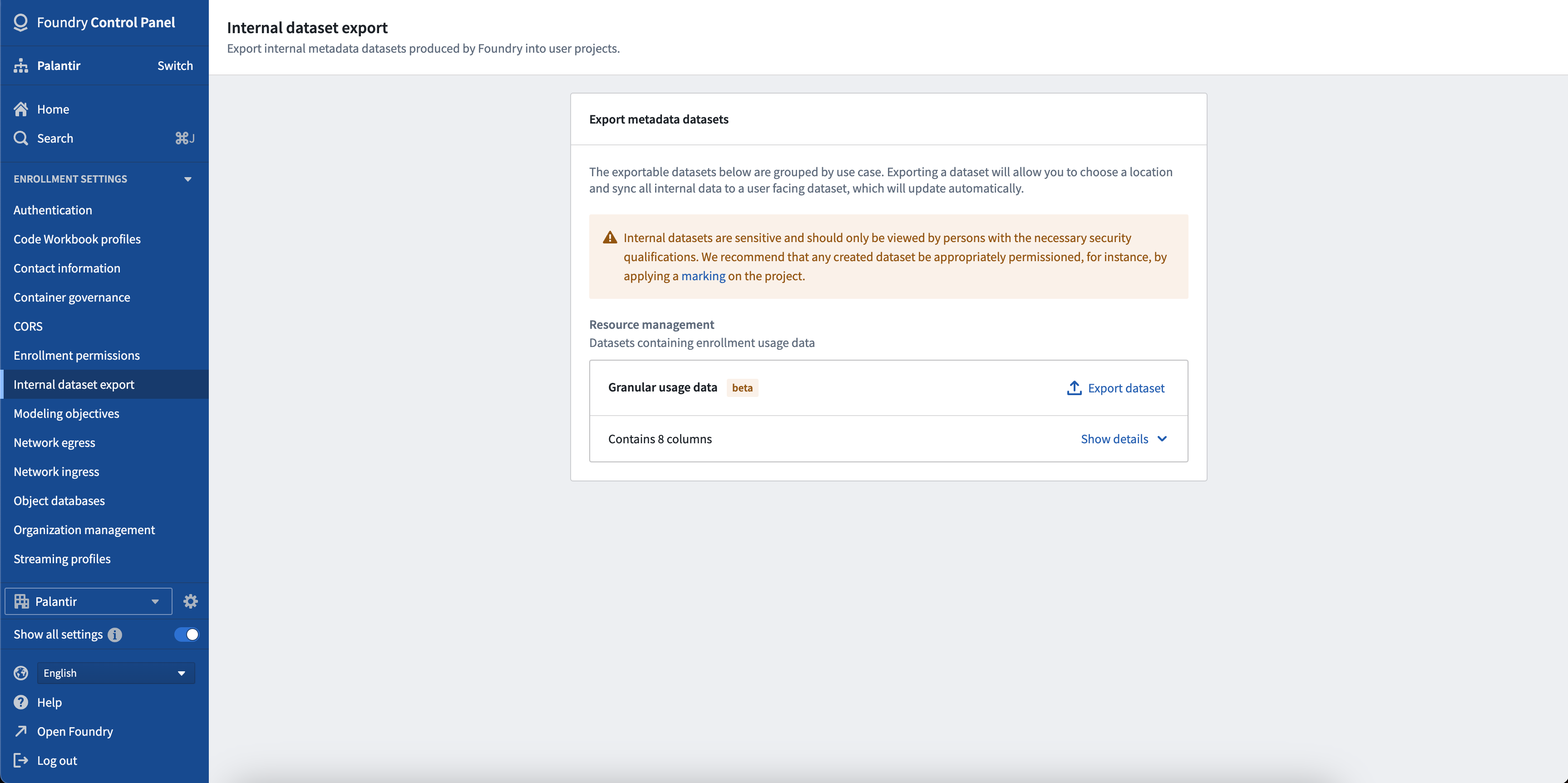
To export a dataset, first find the dataset in the list of exportable datasets and click the Export Dataset button. A dialog will appear where you can choose where to save this export. Once exported, a new build will start and there may be several minutes between creating the export and your data being visible in your dataset.
Note these datasets can contain sensitive information and should only be viewed by people with the necessary security qualifications. Once exported, you are responsible for ensuring this data has the appropriate permissions, for instance, by applying a marking to the project.
Exportable datasets
The following categories list all of the datasets that are currently available to export and what permissions are required to create the export. To see the schema of these datasets, go to the Internal dataset export section in Control Panel and click the dropdown icon beside the dataset.
Resource Management: Granular Usage Data
The Granular Usage Data dataset contains the infrastructure usage data for your enrollment such as compute and storage values. This dataset can only be exported by users with the Resource Management Administrator role. More information about how to manage the users with this role can be found in the enrollment permissions documentation.
Resource Management: AIP Token Usage
The AIP Token Usage dataset contains granular LLM usage data for your enrollment, with per-model breakdowns of token consumption. Each row represents a specific model and usage metric (such as input tokens, output tokens, cache reads or writes) per resource per day, along with the corresponding compute and currency usage. For more information about how LLM token usage translates to compute-seconds, see Compute usage with AIP. This dataset can only be exported by users with the Resource Management Administrator role. More information about how to manage the users with this role can be found in the enrollment permissions documentation.
User Activity: Processed user activity metrics
The Processed user activity metrics dataset contains aggregated user activity generated by the users of your enrollment when interacting with platform applications. Events are aggregated on a daily basis, per application and type of interaction (view or modify). Each event is also enriched with the project RID of the application and the organization RID of the user that generated the activity. This dataset can only be exported by users with the Enrollment Administrator role. More information about how to manage the users with this role can be found in the enrollment permissions documentation.
User Activity: Raw event logs
The Raw event logs dataset contains granular event logs generated by the users of your enrollment, enriched with the organization RID of the user. Compared to the Processed user activity metrics dataset, this dataset is more granular and enables more detailed activity analysis. This dataset can only be exported by users with the Enrollment Administrator role. More information about how to manage the users with this role can be found in the enrollment permissions documentation.
FAQ
Who pays for the build of this exported dataset?
The compute cost associated with generating the exported dataset is not included in your usage costs. However, any usage of this exported dataset such as Contour analysis, pipelines, or syncing to the Ontology will incur the same cost as any other use of these features.
Why are resource names not present in the exported datasets?
The resource and project names may contain sensitive information regarding the data that is contained and as such are not included in the resource usage export.
Why is there no data in my exported dataset?
Exported datasets are generated on demand and require time to build before data appears in the exported dataset. If your exported dataset is still unavailable after 30 minutes, contact your Palantir representative.
中文翻译
内部数据集导出
内部数据集导出功能可用于将 Foundry 内部服务数据集导出到您的注册环境(enrollment)中,以便分析您对 Foundry 平台的使用情况。导出后,这些数据集会随着注册环境中的新数据保持同步更新。
:::callout{theme="warning"} 内部数据集包含敏感信息,仅限授权人员查看。Palantir 建议对任何导出的数据集设置适当的权限,例如在项目上应用标记(marking)。对导出数据的使用需遵守 Palantir 的可接受使用政策 ↗。 :::
设置导出
要导出数据集,请首先在可导出数据集列表中找到目标数据集,然后点击导出数据集按钮。此时会弹出一个对话框,供您选择此导出文件的保存位置。导出操作完成后,系统将启动新的构建任务,从创建导出到数据在数据集中可见可能需要几分钟时间。
请注意,这些数据集可能包含敏感信息,仅限具备相应安全资质的人员查看。导出后,您有责任确保此数据具有适当的访问权限,例如对项目应用标记。
可导出的数据集
以下类别列出了当前所有可导出的数据集以及创建导出所需的权限。要查看这些数据集的架构(schema),请前往控制面板(Control Panel)中的内部数据集导出部分,然后点击数据集旁边的下拉图标。
资源管理:细粒度使用数据
细粒度使用数据(Granular Usage Data)数据集包含您注册环境的基础设施使用数据,例如计算和存储数值。该数据集仅限具有资源管理管理员(Resource Management Administrator)角色的用户导出。有关如何管理具有此角色的用户的更多信息,请参阅注册环境权限文档。
资源管理:AIP 令牌使用情况
AIP 令牌使用情况(AIP Token Usage)数据集包含您注册环境的细粒度 LLM 使用数据,并按模型细分了令牌消耗量。每一行代表每个资源每天特定模型和使用指标(如输入令牌、输出令牌、缓存读取或写入),以及相应的计算和货币使用量。有关 LLM 令牌使用量如何换算为计算秒数的更多信息,请参阅使用 AIP 的计算用量。该数据集仅限具有 Resource Management Administrator 角色的用户导出。有关如何管理具有此角色的用户的更多信息,请参阅注册环境权限文档。
用户活动:处理后的用户活动指标
处理后的用户活动指标(Processed user activity metrics)数据集包含您注册环境的用户在与平台应用程序交互时生成的聚合用户活动。事件按天、按应用程序和交互类型(查看或修改)进行聚合。每个事件还会补充生成该活动的用户的应用程序项目 RID 和组织 RID。该数据集仅限具有注册环境管理员(Enrollment Administrator)角色的用户导出。有关如何管理具有此角色的用户的更多信息,请参阅注册环境权限文档。
用户活动:原始事件日志
原始事件日志(Raw event logs)数据集包含您注册环境的用户生成的细粒度事件日志,并补充了用户的组织 RID。与处理后的用户活动指标数据集相比,该数据集粒度更细,能够支持更详细的活动分析。该数据集仅限具有注册环境管理员角色的用户导出。有关如何管理具有此角色的用户的更多信息,请参阅注册环境权限文档。
常见问题解答
谁来承担此导出数据集的构建费用?
生成导出数据集相关的计算成本不包含在您的使用成本中。但是,对此导出数据集的任何使用(如 Contour 分析、管道(pipelines)或同步到本体论(Ontology))将产生与这些功能的其他使用相同的费用。
为什么导出数据集中没有资源名称?
资源和项目名称可能包含有关所含数据的敏感信息,因此未包含在资源使用情况的导出文件中。
为什么我的导出数据集中没有数据?
导出数据集按需生成,需要一定的构建时间,之后数据才会出现在导出数据集中。如果您的导出数据集在 30 分钟后仍不可用,请联系您的 Palantir 代表。