Network egress observability(网络出口可观测性)
Observability in Control Panel
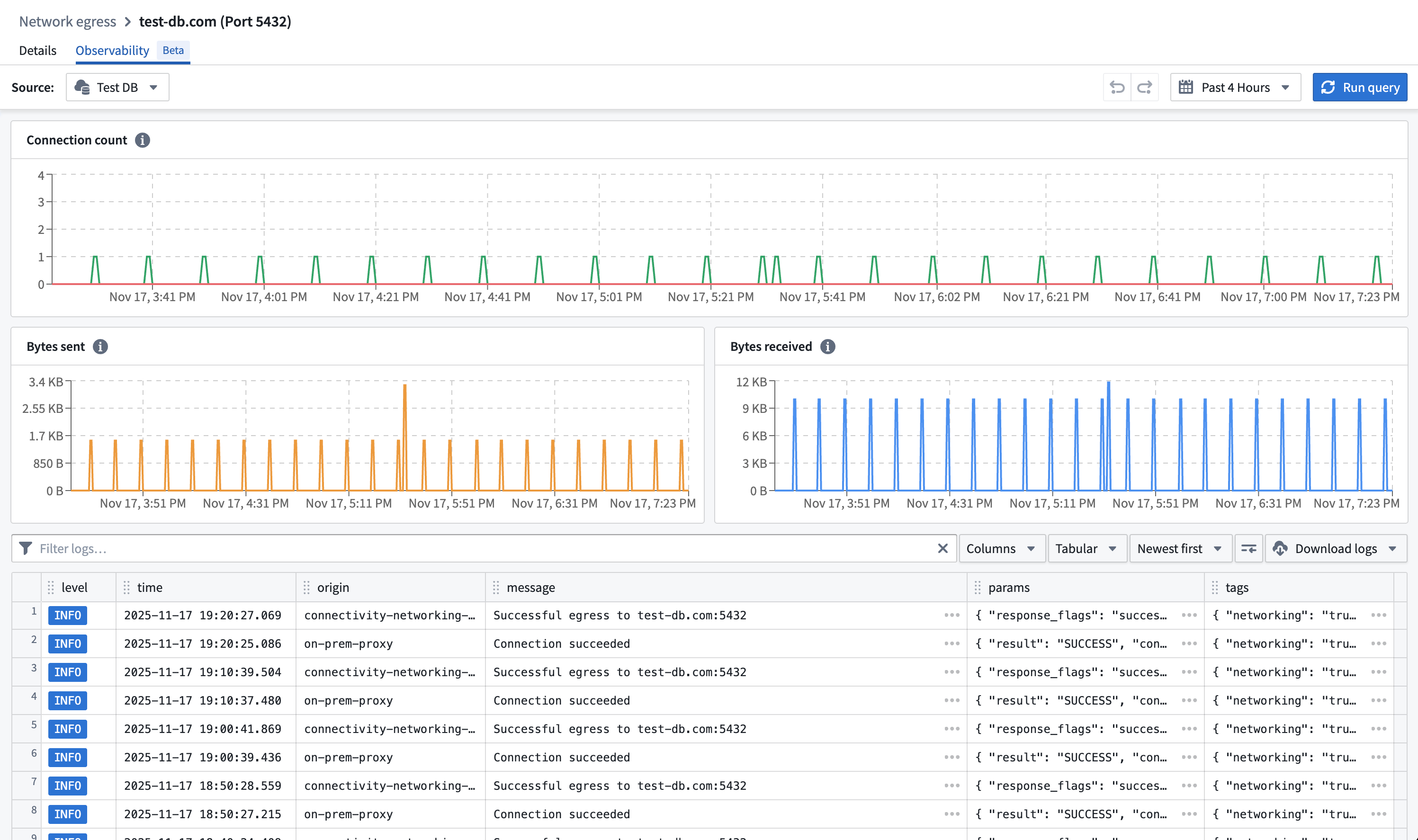
In the network egress policy page, the Observability tab contains logs and metrics for uses of the network egress policy per data connection source that imports this policy.
Select a data connection source in the source picker and view the network egress logs and metrics that were created with the policy.
Observability in Builds
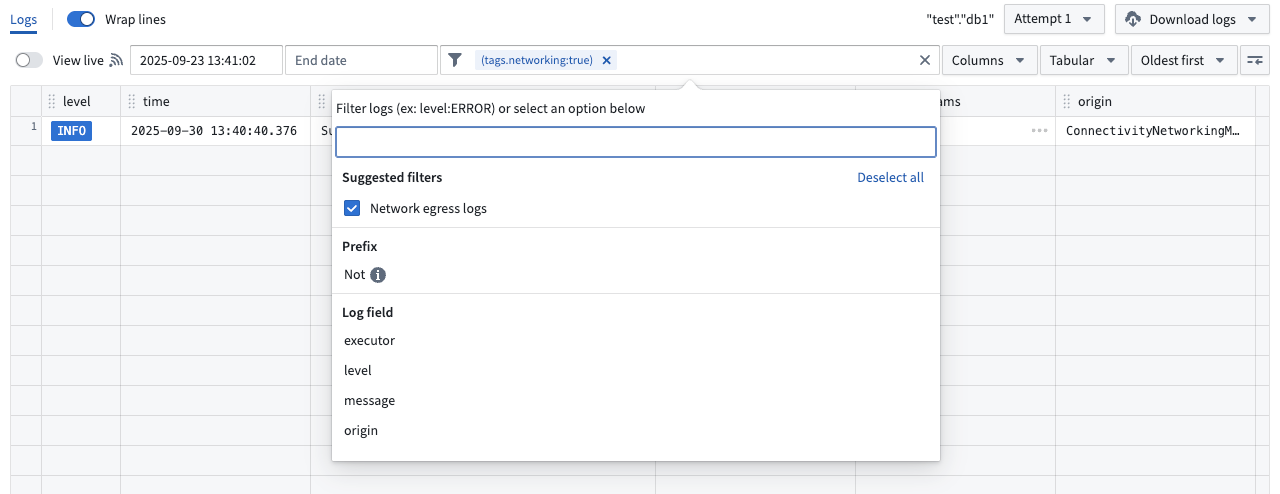
Network egress logs are included in build telemetry. To view only network egress logs, add the suggested Network egress logs filter .
Log definition
Network egress logs derived from different origins are available to help diagnose connectivity issues across all Foundry networking layer methods, such as direct connection or agent proxy policies.
connectivity-sidecar origin
connectivity-sidecar routes connections to the appropriate network egress policy used for transparent proxy routing.
Egress log
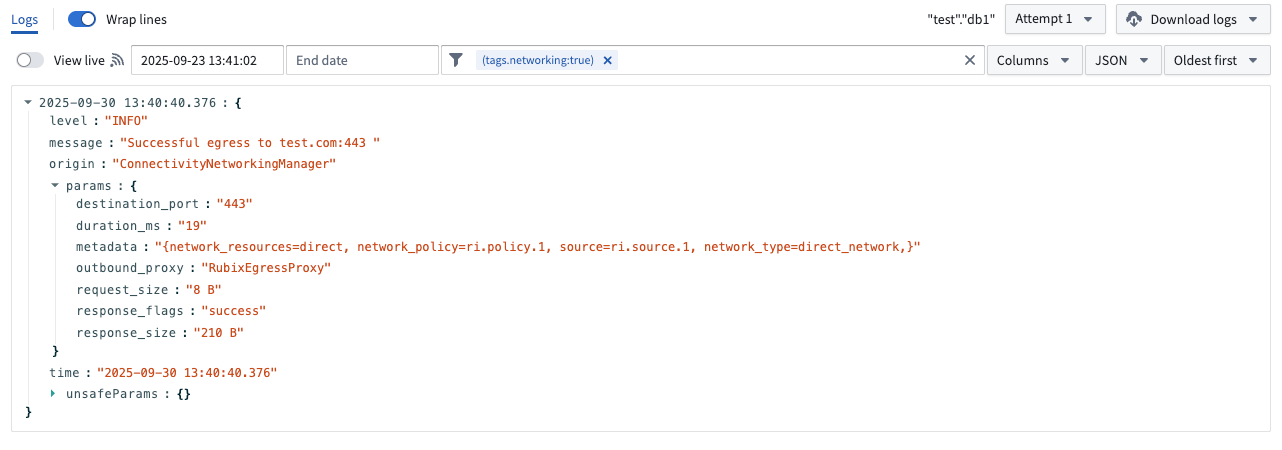
Egress logs contain the following parameters:
connection_id: A unique identifier for the connection.response_flags: Response can be either success or failed.bytes_sent: The number of bytes sent from the sidecar to the outbound proxy.bytes_received: The number of bytes received by the sidecar from the outbound proxy.duration_ms: The duration of the connection in milliseconds.destination_port: The destination port of the connection.metadata:network_policy: Resource identifier of the network egress policy that egress was attempted with.source: Resource identifier of the data connection source that egress was attempted for.network_type: Type can be either direct or agent proxy.network_resources: Data connection agent IDs if agent proxy network egress policy.
DNS query log
DNS query logs contain the following parameters:
answer_count: The number of DNS records returned in a DNS response.connection_id: A unique identifier for the connection.parse_status: The result of parsing the incoming DNS message.pod_name: The name of the pod that initiated the DNS request.query_class: The class of DNS resource record being requested. This should almost always be 1 for Internet.query_name: The hostname in the DNS query. This is logged as an unsafe parameter.query_type: The type of DNS resource record being requested (for example, 1 for IPv4, 2 for NS).response_code: The DNS response code.return_message: The human-readable string version ofresponse_code.sources: The source IDs associated with the DNS query.
egress-proxy origin
egress-proxy is the service that handles explicit proxy connections.
on-prem-proxy origin
on-prem-proxy is the service running in Foundry that proxies traffic to a data connection agent when using agent network egress policies.
agent-proxy origin
agent-proxy is the service running on a data connection agent in a private network. It opens the connection to the end destination for agent network egress policies.
Direct connection
There are two possible outcomes for direct connection egress: successful or failed.
Successful egress
Traffic successfully egressed out of the Palantir platform. The connection could still fail due to issues with ingress firewalls on the destination, authentication, or TLS handshake, but this is considered a successful egress as traffic has left the Palantir platform.
Failed egress
Traffic failed to egress out of the Palantir platform.
Next steps:
- Verify the existence of the address and port through which egress was attempted and ensure that they are resolvable by the Palantir platform's direct connected network.
- If traffic is still failing to egress, contact Palantir Support.
Agent proxy
There are two possible outcomes for agent proxy: successful egress or failed egress.
Successful egress
Traffic was successfully proxied to one of the data connection agents of the policy. The connection could still fail due to issues with ingress firewalls on the destination, authentication, or TLS handshake, but this is considered a successful egress as traffic was proxied to a backing data connection agent.
Failed egress
Traffic failed to egress out of the Palantir platform.
Next steps:
- Verify that the address and port through which egress was attempted have a corresponding network egress policy imported in the data connection source.
- Ensure that all of the backing data connection agents of the agent proxy policy are healthy.
- If traffic is still failing to proxy to the data connection agent, contact Palantir Support.
Limits
Network egress observability is only provided for network egress policies which use TCP-level allowlisting.
中文翻译
网络出口可观测性
控制面板中的可观测性
在网络出口策略页面中,可观测性(Observability) 选项卡包含每个导入该策略的数据连接源(Data Connection Source)使用网络出口策略的日志和指标。
在源选择器中选择一个数据连接源,即可查看使用该策略创建的网络出口日志和指标。
构建中的可观测性
网络出口日志包含在构建遥测数据中。要仅查看网络出口日志,请添加建议的网络出口日志(Network egress logs)过滤器。
日志定义
来自不同来源的网络出口日志可用于诊断所有Foundry网络层方法(如直连或代理策略)的连接问题。
connectivity-sidecar 来源
connectivity-sidecar 将连接路由到用于透明代理路由的适当网络出口策略。
出口日志
出口日志包含以下参数:
connection_id:连接的唯一标识符。response_flags:响应可以是成功或失败。bytes_sent:从sidecar发送到出站代理的字节数。bytes_received:sidecar从出站代理接收的字节数。duration_ms:连接持续时间(毫秒)。destination_port:连接的目标端口。metadata:network_policy:尝试出口的网络出口策略的资源标识符。source:尝试出口的数据连接源的资源标识符。network_type:类型可以是直连或代理。network_resources:如果使用代理网络出口策略,则为数据连接代理ID。
DNS查询日志
DNS查询日志包含以下参数:
answer_count:DNS响应中返回的DNS记录数量。connection_id:连接的唯一标识符。parse_status:解析传入DNS消息的结果。pod_name:发起DNS请求的Pod名称。query_class:请求的DNS资源记录类别。对于互联网,这几乎总是1。query_name:DNS查询中的主机名。此参数记录为不安全参数(unsafe parameter)。query_type:请求的DNS资源记录类型(例如,1表示IPv4,2表示NS)。response_code:DNS响应代码。return_message:response_code的人类可读字符串版本。sources:与DNS查询关联的源ID。
egress-proxy 来源
egress-proxy 是处理显式代理连接的服务。
on-prem-proxy 来源
on-prem-proxy 是在Foundry中运行的服务,当使用代理网络出口策略时,它将流量代理到数据连接代理。
agent-proxy 来源
agent-proxy 是在私有网络中的数据连接代理上运行的服务。它为代理网络出口策略打开到最终目的地的连接。
直连
直连出口有两种可能的结果:成功或失败。
出口成功
流量成功从Palantir平台出口。由于目标入口防火墙、身份验证或TLS握手问题,连接仍可能失败,但这被视为出口成功,因为流量已离开Palantir平台。
出口失败
流量未能从Palantir平台出口。
后续步骤:
- 验证尝试出口的地址和端口是否存在,并确保它们可以被Palantir平台的直连网络解析。
- 如果流量仍然无法出口,请联系Palantir支持团队。
代理
代理有两种可能的结果:出口成功或出口失败。
出口成功
流量成功代理到策略的其中一个数据连接代理。由于目标入口防火墙、身份验证或TLS握手问题,连接仍可能失败,但这被视为出口成功,因为流量已代理到后端数据连接代理。
出口失败
流量未能从Palantir平台出口。
后续步骤:
- 验证尝试出口的地址和端口是否在数据连接源中导入了相应的网络出口策略。
- 确保代理策略的所有后端数据连接代理均正常运行。
- 如果流量仍然无法代理到数据连接代理,请联系Palantir支持团队。
限制
网络出口可观测性仅适用于使用TCP级别白名单的网络出口策略。