Intake forms(入職表單)
Platform access is most commonly managed through SAML or OpenID Connect (OIDC) integrations with appropriate identity providers. Information and attributes about users and groups is inherited to the platform through these integrations. In cases where the available identity provider does not provide sufficient information about users that may be required for the effective management of platform access, administrators can set up authentication intake forms to capture, review, and supplement that information.
Intake form management
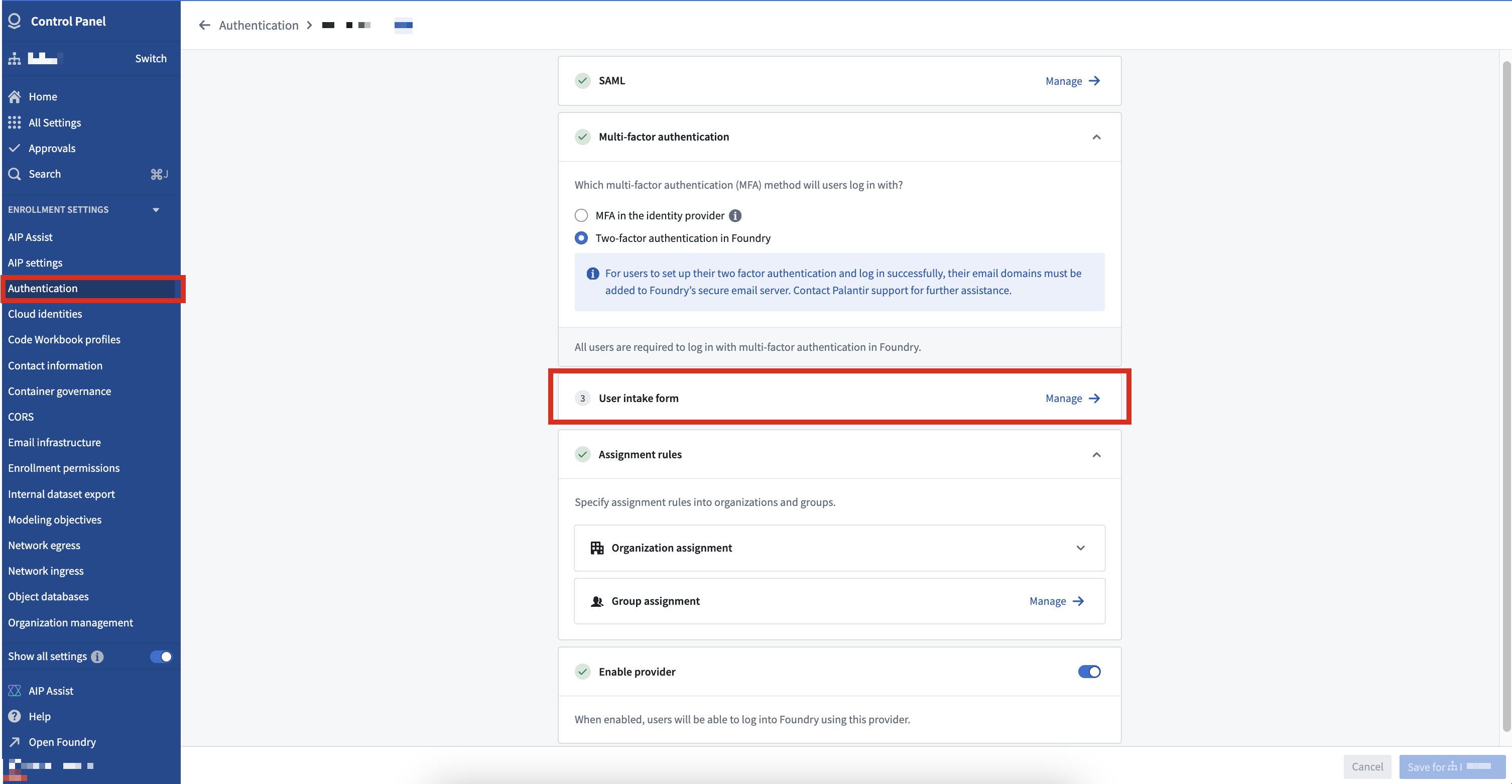
Users with permissions to manage an authentication provider integration (Organization administrators, by default) can create, edit, and delete an intake form in Control Panel. Navigate to the Authentication tab under Enrollment settings and select the authentication integration to associate with the intake form.
Form editor
Intake forms are created by adding components to capture necessary user attributes and provide context to the reviewer.
The following components can be captured as a user attribute if configured appropriately:
- Text field
- Dropdown menu
- Multiple select
- Date
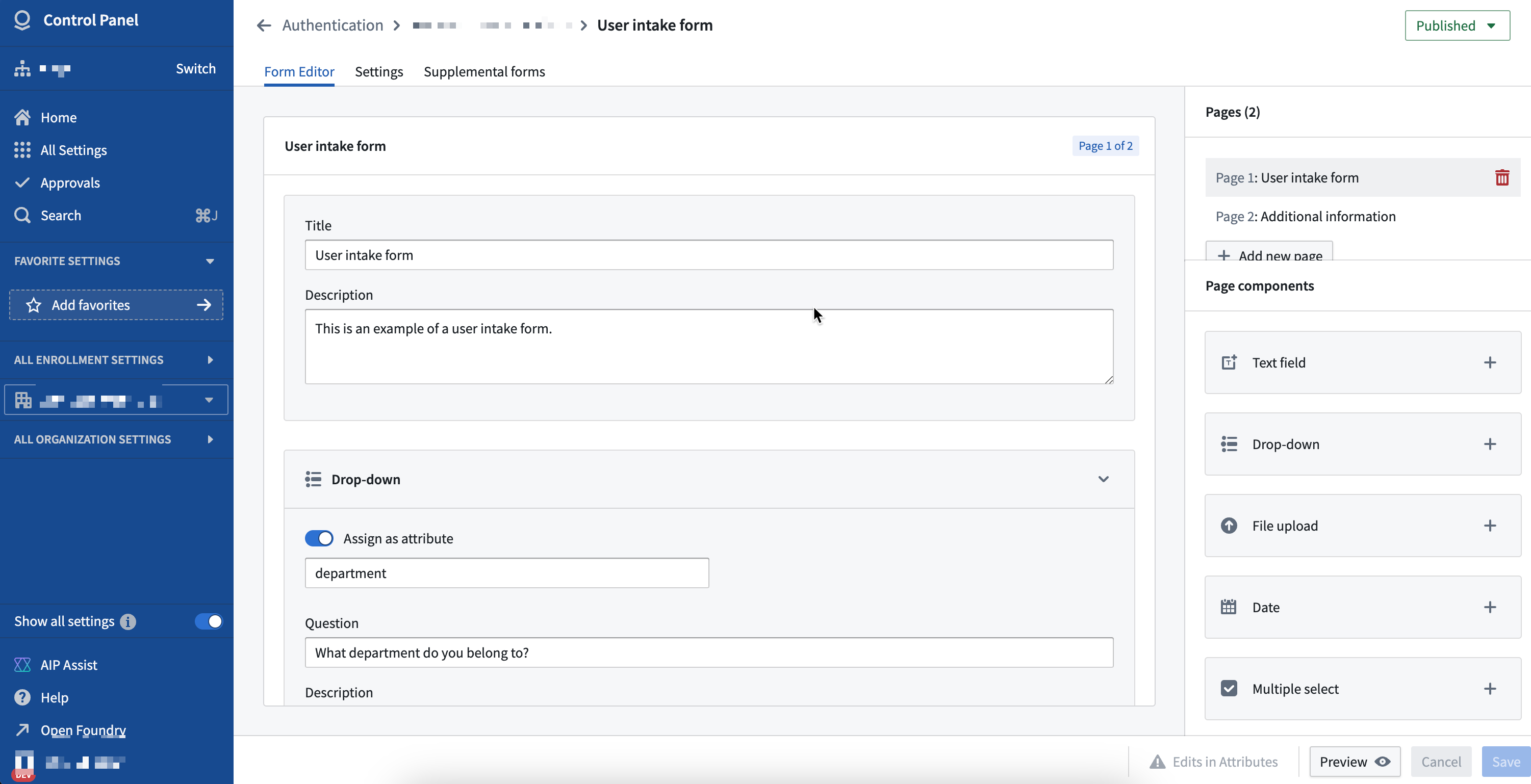
The File upload and Acknowledgment components cannot be captured as user attributes in an intake form, but they may be useful in providing the reviewer with useful context. For example, an Organization may require users to upload a completed training certificate if they are requesting certain attributes.
Field configuration in intake forms allows for advanced behavior, such as defining conditional fields. For example, conditional fields for dropdown menus can be configured to only appear for users based on their previous selections.
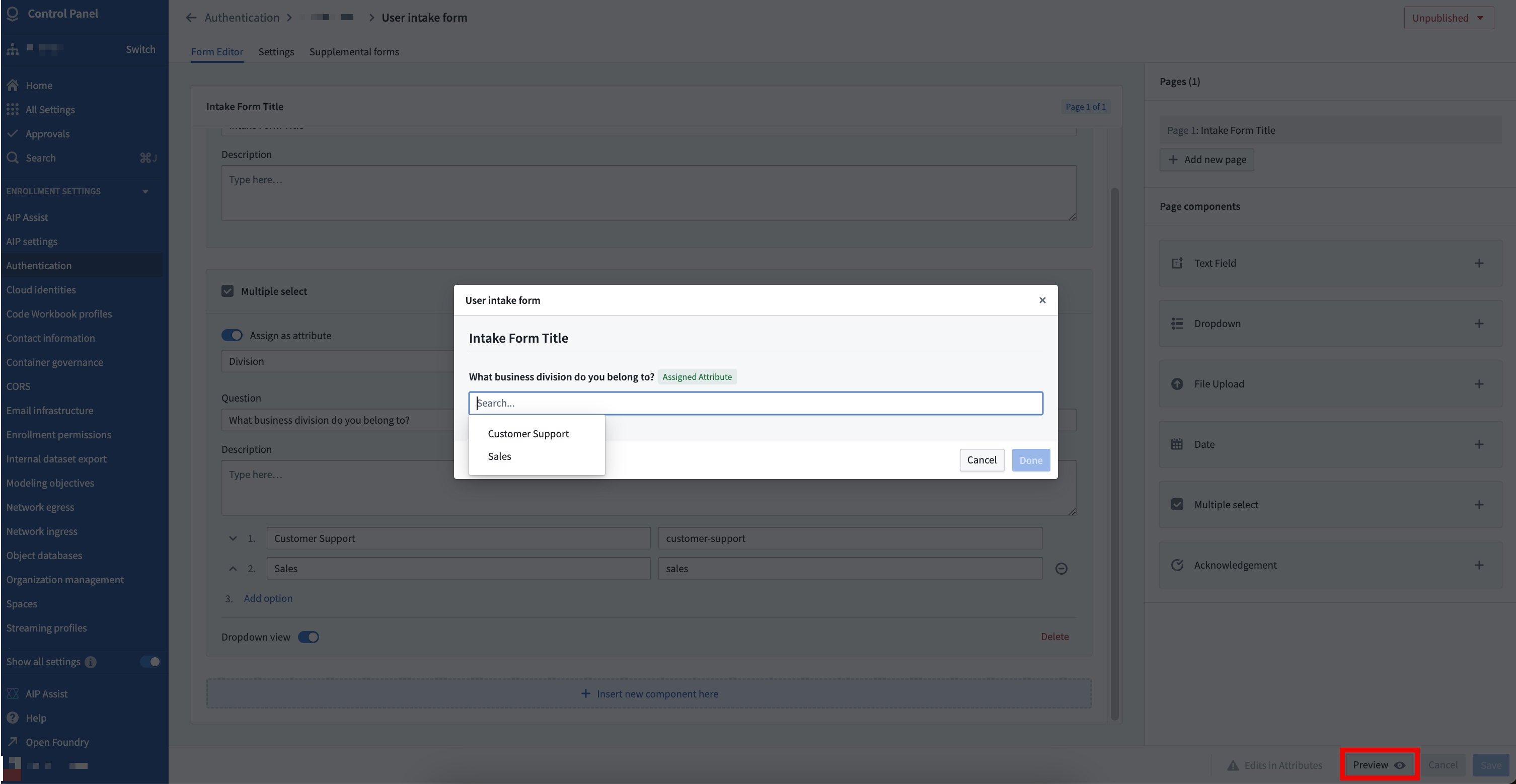
You can preview the form once configuration is complete to validate the user experience for the form user.
Supplemental forms
A primary form can be configured to capture required information to review a user’s eligibility for accessing the platform when they first log in.
Additionally, supplemental forms can be configured if more user information must be captured and reviewed. Users are not required to complete a configured supplemental form at the time of their first log in, but they may be required to do so periodically or following a period of inactivity. For example, platform access may be contingent on the submission of a yearly training certificate or other evidence captured during the completion of the primary intake form.
Settings
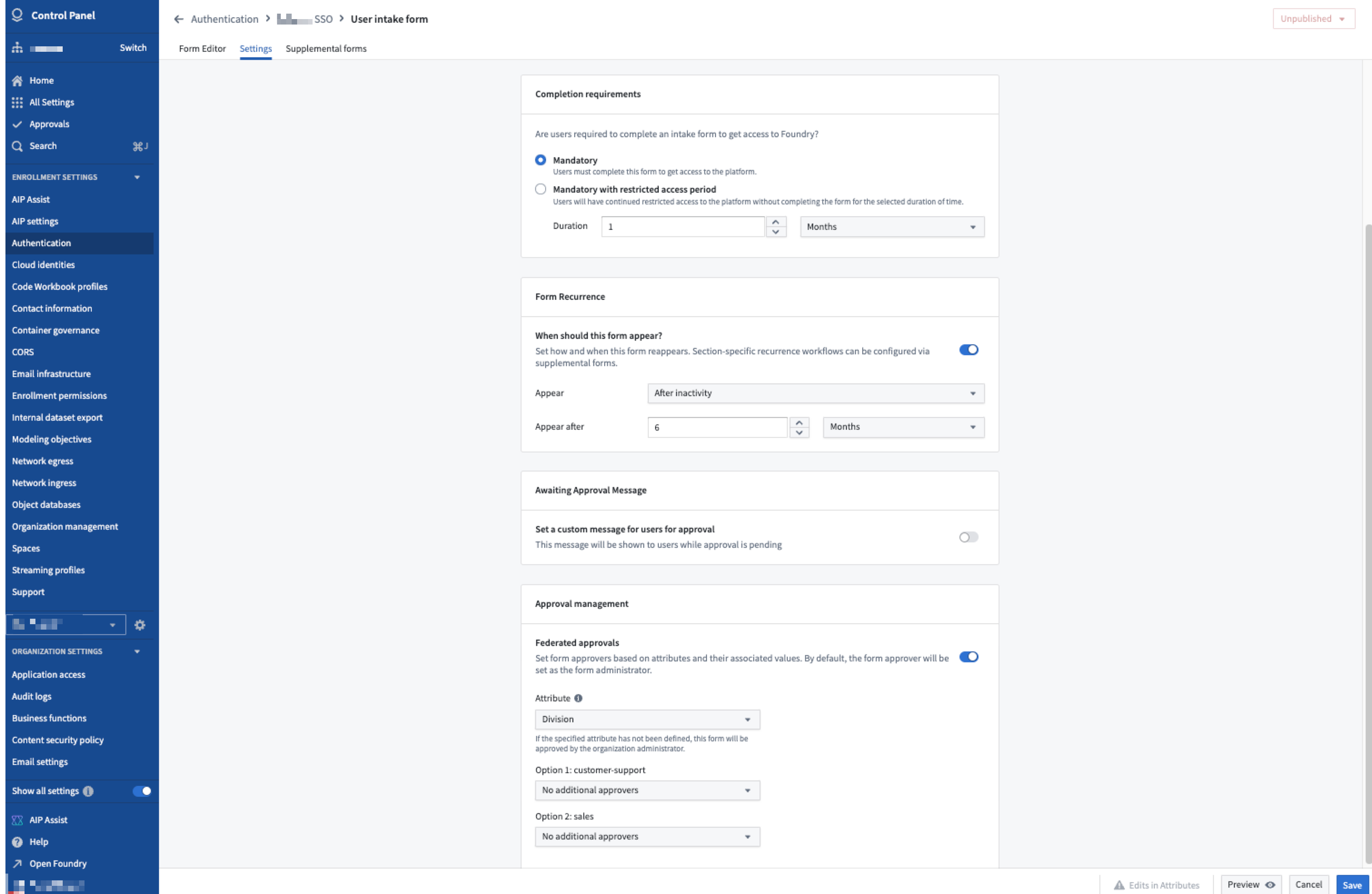
Form settings, such as completion requirements and approval management, can also be configured. By default, Organization administrators can approve all completed entries; an advanced setting can allow for federated approvals to define who is eligible to approve what attributes in addition to Organization administrators.
If the attributes collected from a user intake form are used by Organization assignment rules, the administrator of the Organization to which the user is assigned can approve the relevant intake form entry.
In the example below, separate "Sales" and "Customer Support" administration groups may be set as reviewers for each attribute.
Publishing
A configured intake form can be previewed to validate it meets requirements. Once the configuration is finalized, the Organization administrator can then publish the form.
Intake form completion
When an intake form is first published, all users authenticating through this provider will be required to complete the form at the time of their first login. Once completed, users will not be allowed to access the platform until an eligible user approves their submission. While waiting for review, users may resubmit the form.
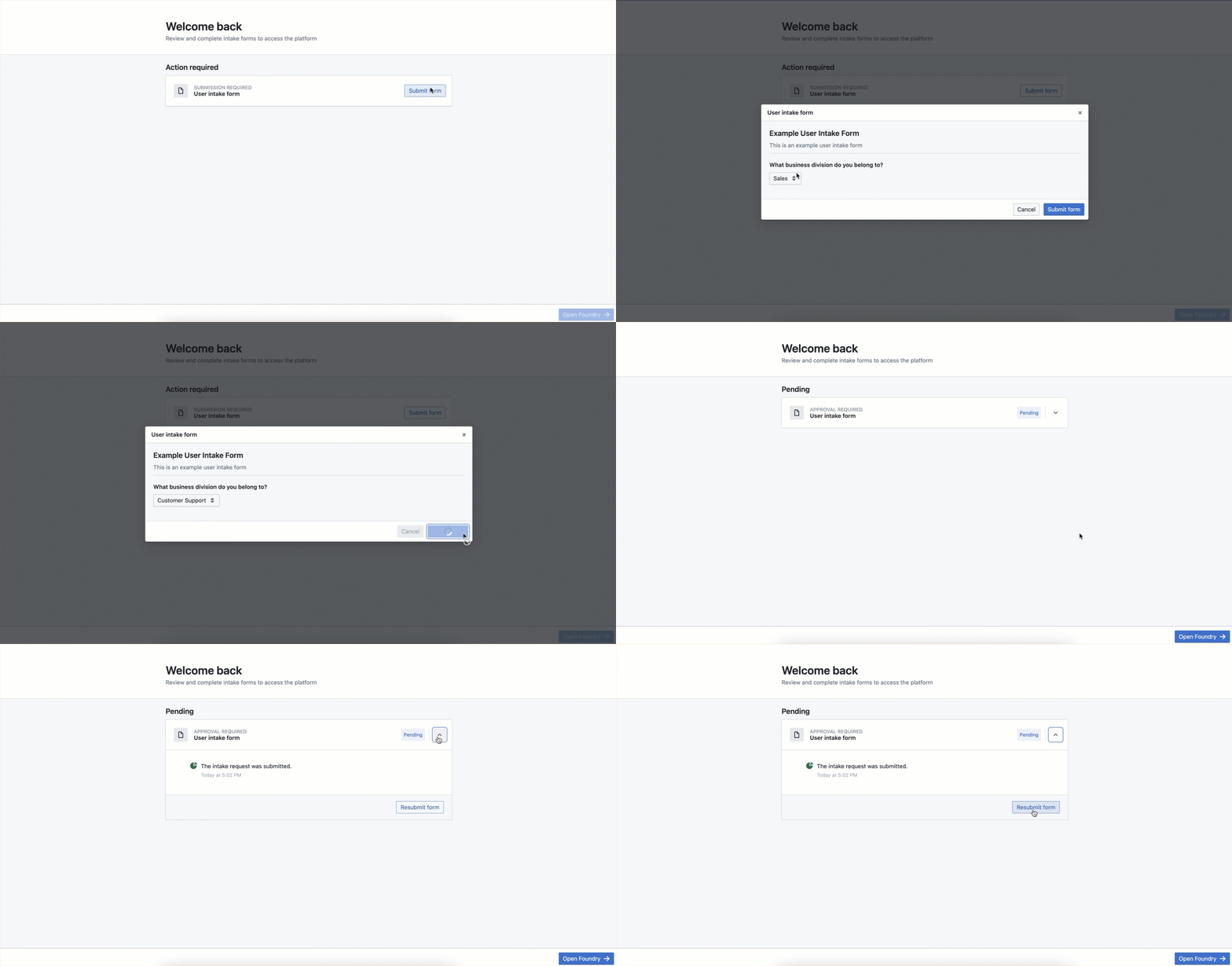
Once a user’s intake form is approved, users will not need to complete the form at their next login. They may be required to eventually complete the form again depending on the form’s recurrence settings configuration.
If changes are made to an intake form after it has been published, only new users will be required to complete the updated intake form by default. Authorization will not be removed for users that have already completed the outdated intake form and have been approved prior to the update of the intake form. If the changes to the intake form are considered to be significant enough to require re-authorization of all users, the default behavior can be overwritten at time of re-publication which would lock all existing users out and require the completion and approval of the updated intake form.
Intake form review
Eligible users can review submitted intake forms by navigating to the Approvals inbox in Control Panel and filtering on User intake requests.
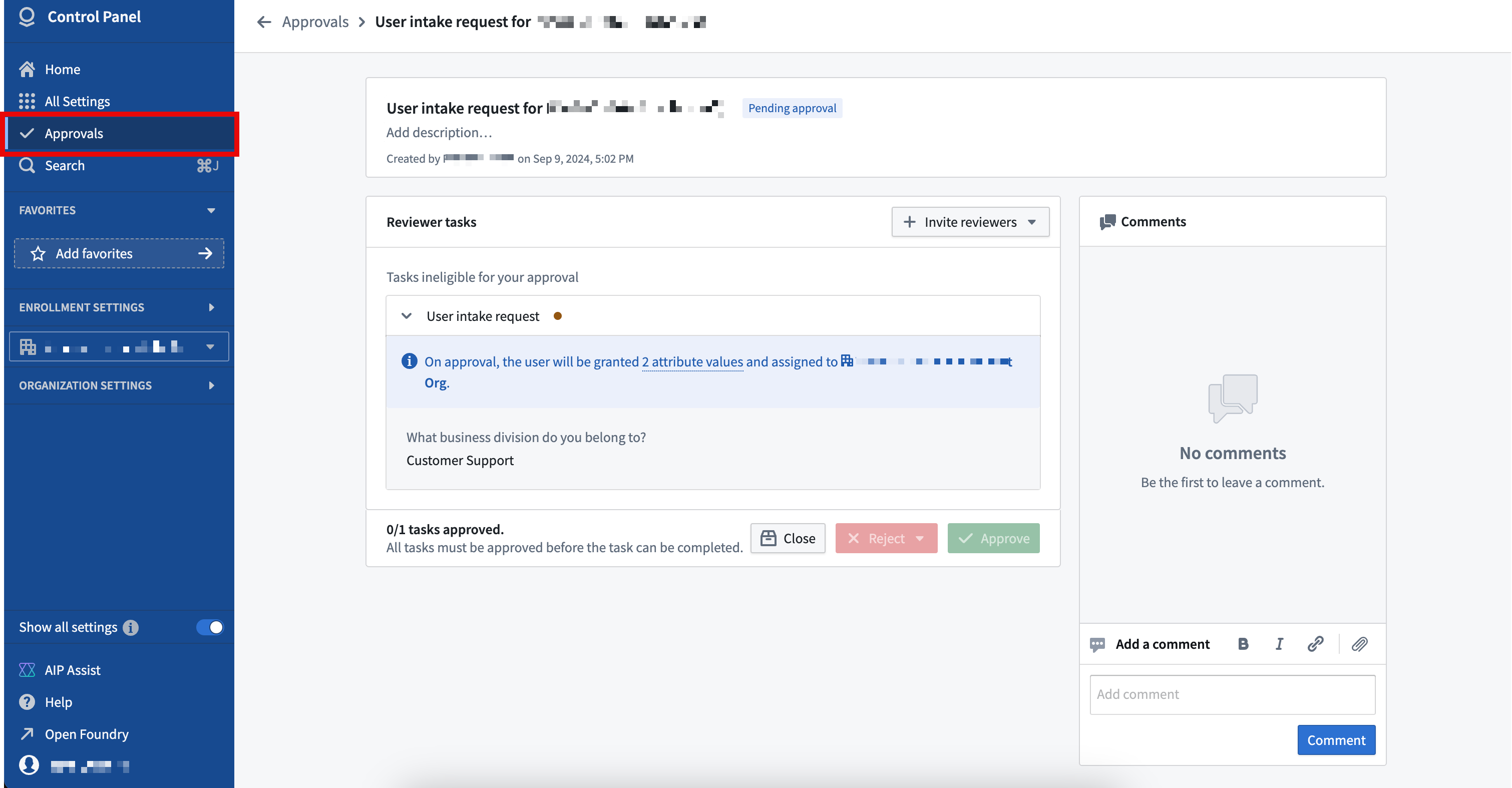
Any intake form entries that result in platform access to an Organization are automatically approved if submitted by Organization administrators.
中文翻译
入職表單
平台存取權限最常透過 SAML 或 OpenID Connect (OIDC) 與適當身分提供者 (identity provider) 整合來管理。使用者與群組的資訊及屬性會透過這些整合繼承至平台。若現有的身分提供者無法提供有效管理平台存取權限所需的使用者資訊,管理員可設定驗證入職表單 (authentication intake form),用以擷取、審查及補充該資訊。
入職表單管理
具備管理驗證提供者整合權限的使用者(預設為「組織管理員」)可在控制面板中建立、編輯及刪除入職表單。請導覽至「註冊設定」下的「驗證」分頁,並選取要與入職表單關聯的驗證整合。
表單編輯器
入職表單透過新增元件來擷取必要的使用者屬性,並為審查者提供相關背景資訊。
若適當設定,下列元件可作為使用者屬性 (user attribute) 擷取:
- 文字欄位
- 下拉選單
- 多重選取
- 日期
「檔案上傳」與「確認」元件無法在入職表單中作為使用者屬性擷取,但可能有助於為審查者提供有用的背景資訊。例如,組織可能要求使用者在申請特定屬性時上傳已完成的訓練證書。
入職表單中的欄位設定可實現進階行為,例如定義條件式欄位 (conditional fields)。舉例來說,下拉選單的條件式欄位可設定為僅根據使用者先前的選項顯示。
設定完成後,您可以預覽表單,以驗證表單使用者的使用體驗。
補充表單
可設定主要表單 (primary form),在使用者首次登入時擷取審查其平台存取資格所需的資訊。
此外,若需要擷取並審查更多使用者資訊,也可設定補充表單 (supplemental forms)。使用者無須在首次登入時完成已設定的補充表單,但可能需定期或在閒置一段時間後完成。例如,平台存取權限可能取決於是否提交年度訓練證書,或是在完成主要入職表單時擷取的其他證明。
設定
表單設定(例如完成要求與核准管理)也可進行配置。預設情況下,「組織管理員」可核准所有已完成的提交;進階設定則允許聯合核准 (federated approvals),以定義除「組織管理員」外,哪些人有權核准哪些屬性。
若使用者入職表單收集的屬性用於組織指派規則,則使用者所屬組織的管理員可核准相關的入職表單提交。
在以下範例中,可分別將「銷售」與「客戶支援」管理群組設為各屬性的審查者。
發佈
可預覽已設定的入職表單,以驗證其符合需求。設定完成後,「組織管理員」即可發佈表單。
入職表單填寫
入職表單首次發佈時,所有透過此提供者進行驗證的使用者都必須在首次登入時完成表單。提交完成後,使用者須待符合資格的使用者核准其提交,才能存取平台。在等待審查期間,使用者可重新提交表單。
使用者入職表單經核准後,下次登入時無須再次填寫。但根據表單的重複設定配置,使用者可能最終仍需再次填寫表單。
若入職表單在發佈後有所變更,預設情況下僅新使用者須完成更新後的入職表單。已填寫舊版入職表單並在更新前獲得核准的使用者,其授權不會被撤銷。若入職表單的變更被認為重大到需要所有使用者重新授權,則可在重新發佈時覆寫預設行為,這將鎖定所有現有使用者的存取權限,並要求他們完成並獲得更新後入職表單的核准。
入職表單審查
符合資格的使用者可以導覽至控制面板中的「核准」收件匣,並篩選「使用者入職請求」,來審查已提交的入職表單。
任何導致平台存取組織的入職表單提交,若由「組織管理員」提交,則會自動核准。