Multi-factor authentication(多因素认证(Multi-factor authentication))
Access to Foundry requires multi-factor authentication, which may either be performed in Foundry with app-based two-factor authentication or directly in your identity provider. Learn more about Palantir's recommendations for identity security.
After configuring a SAML 2.0 integration, click the back arrow at the top of the page and expand the Multi-factor authentication section to select a multi-factor authentication method for your users.
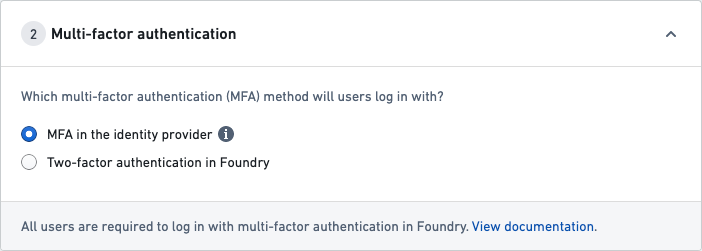
Once you have set up multi-factor authentication, move on to Organization assignment.
If you are unable to generate codes for multi-factor authentication, or if a user in your organization requires a multi-factor authentication reset, first check with your organization’s IT team to find out how your multi-factor authentication is managed.
If your multi-factor authentication is managed by your organization's IT through your identity provider Your IT team will need to manage any reset requests.
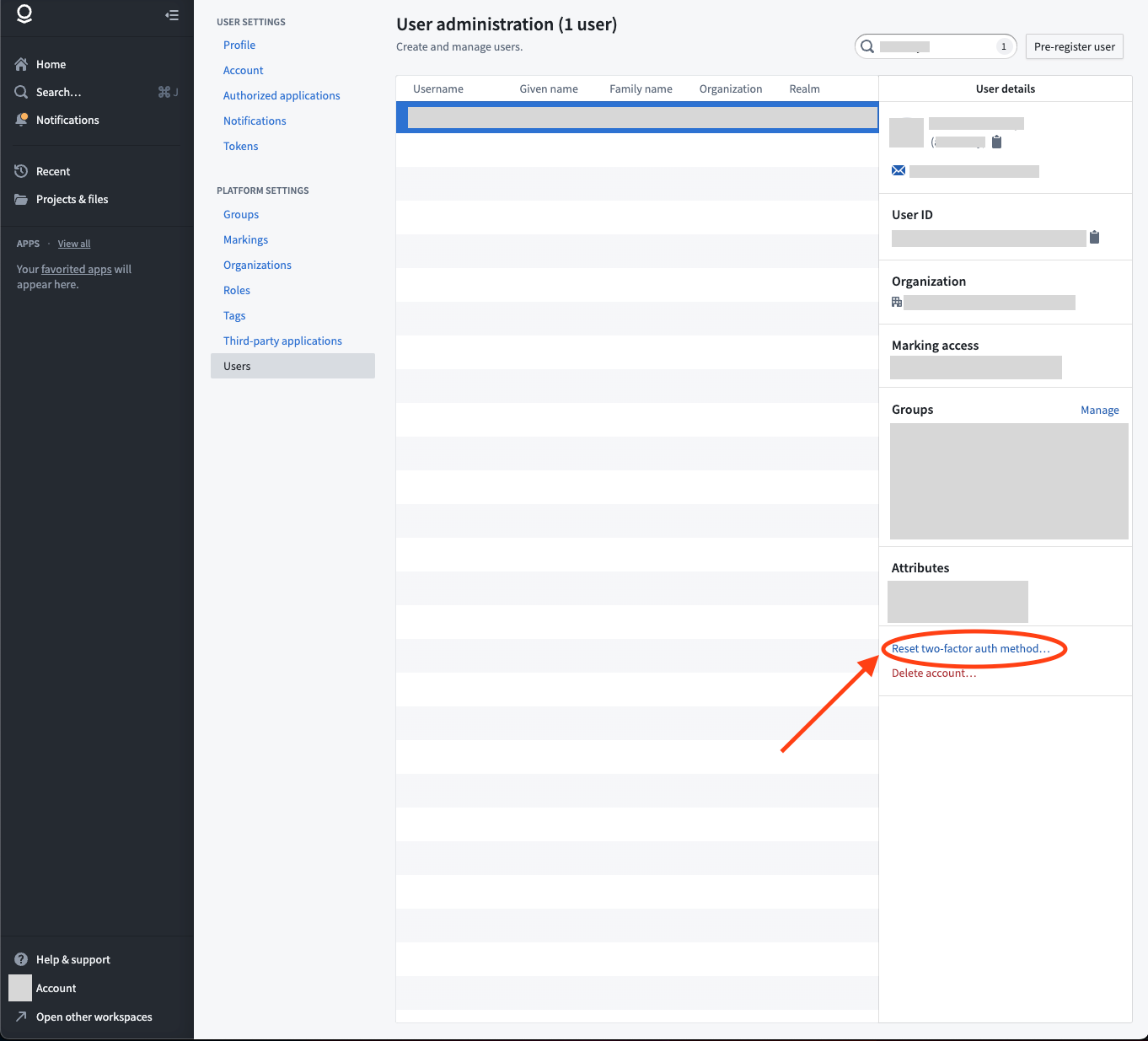
If your multi-factor authentication is managed in Foundry A Foundry Platform Administrator in your organization can reset two-factor authentication/multi-factor authentication with the following steps:
- In Foundry, go to Account > Settings from the bottom left corner of the browser.
- Under Platform Settings, select Users.
- Search for the user in question, and select their name from the list.
- A sidebar should appear with an option to Reset two-factor auth method.... Select this option.
- In the confirmation screen, confirm you would like to complete the reset.
- Upon confirmation, you will receive a success message and the user should receive communications regarding next steps to reset their multi-factor authentication method.
中文翻译
多因素认证(Multi-factor authentication)
访问 Foundry 需要多因素认证,该认证既可以在 Foundry 中通过基于应用的双因素认证(two-factor authentication)完成,也可以直接在您的身份提供商(identity provider)处完成。了解 Palantir 关于身份安全的建议。
配置 SAML 2.0 集成后,点击页面顶部的返回箭头,展开 多因素认证 部分,为您的用户选择一种多因素认证方法。
完成多因素认证设置后,继续执行组织分配(Organization assignment)。
如果您无法生成多因素认证的验证码,或者您组织中的某位用户需要重置多因素认证,请首先联系您组织的 IT 团队,了解多因素认证的管理方式。
如果您的多因素认证由组织 IT 部门通过身份提供商管理 您的 IT 团队需要处理所有重置请求。
如果您的多因素认证在 Foundry 中管理 您组织中的 Foundry 平台管理员(Platform Administrator)可以按照以下步骤重置双因素认证/多因素认证:
- 在 Foundry 中,从浏览器左下角进入 账户 > 设置。
- 在 平台设置 下,选择 用户。
- 搜索相关用户,并从列表中选择其姓名。
- 应出现一个侧边栏,其中包含 重置双因素认证方法... 选项。选择此选项。
- 在确认界面中,确认您希望完成重置。
- 确认后,您将收到一条成功消息,同时该用户应收到关于重置其多因素认证方法后续步骤的通知。