Organization assignment(组织分配)
Users are assigned their primary Organization upon login. A user's primary Organization is determined in the Organization assignment section of the identity provider integration used to log in. If you have configured provider groups in the identity provider integration, these groups will be marked with one or more Organizations based on that section as well.
Default Organization or advanced rules
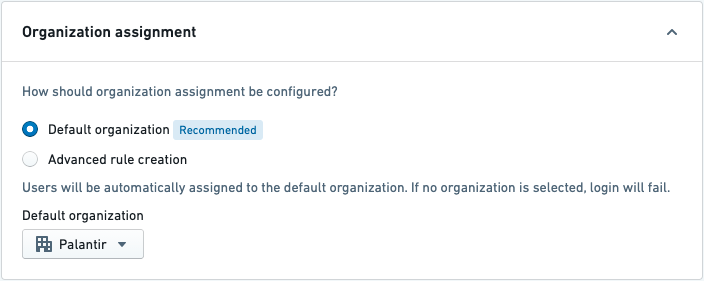
In most cases, all users logging in via a given identity provider integration should be assigned to a single Organization. This is achieved by selecting the Default Organization option. Provider groups, if configured, will also be marked with the same Organization as users.
Advanced rule creation can be used for more complex situations. It allows you to define a series of rules to assign the right Organization with an optional fallback. You can manage the rules for users and for provider groups separately.
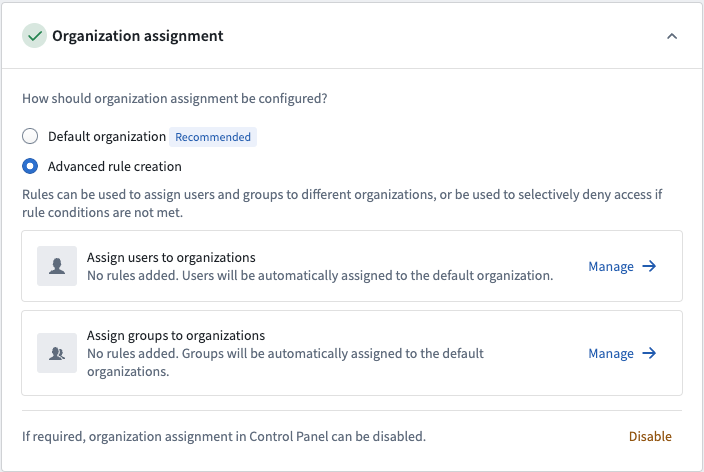
Open the advanced rules editor by clicking Manage for either user or group rules.
Define Organization assignment rules
On the provider management page, expand the Organization assignment section. This allows you to determine which Organizations your users will be a member of when they log in.
For a simple SAML 2.0 integration, choose Default Organization and select your Organization in the dropdown, then save.
User rules
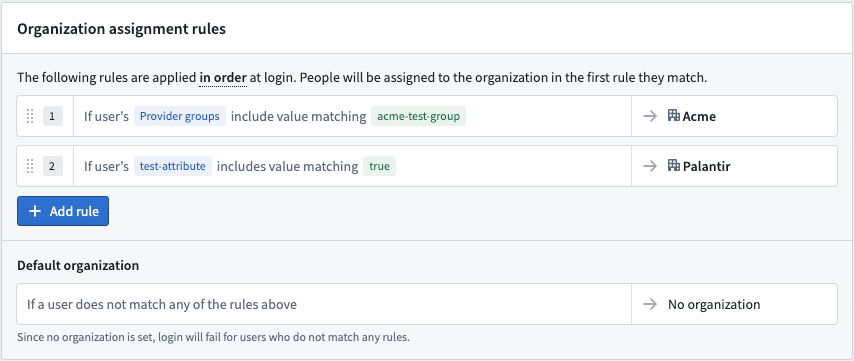
Organization assignment rules for users are configured by writing conditions that match a user’s attributes, internal groups, or provider groups. We strongly recommend using user attributes and/or provider group conditions rather than internal group conditions.
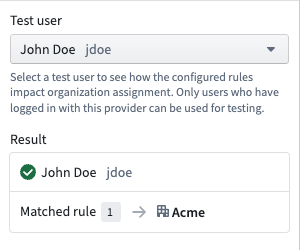
Before saving, you can validate these rules against an existing user. The test panel shows which rule the user matches and the organization to which they would be assigned. Note that only users who have logged in with this provider can be used for testing.
Group rules
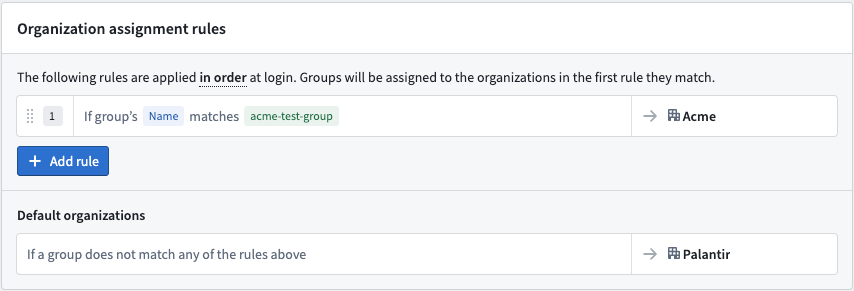
Organization assignment rules for groups are configured by writing conditions that match on a group’s name. The group can be assigned to one or more organizations.
As the matching criteria uses regex, ensure special characters are escaped in the condition.
No organization
If a user is assigned No organization (either via the default Organization functionality or by applying advanced rules), then they will be blocked from logging in.
If a provider group is assigned No organization (either via the Default organization or Advanced rule creation options), then the group will be assigned to the organization of the most recent member to log in.
:::callout{theme="neutral" title="Multipass group AUM rules"} Certain historical identity provider integrations may be using a legacy implementation called Multipass Group AUM rules for assigning users & provider groups to organizations. If organization assignment is not configured in Control Panel, then these rules continue to apply. However, Multipass Group AUM rules will be ignored if organization assignment is configured in Control Panel. Contact your Palantir representative if you are unsure whether this applies to your configuration. :::
To complete setup, enable and test your identity provider integration.
中文翻译
组织分配
用户在登录时会被分配其主要组织。用户的主要组织由用于登录的身份提供商集成中的"组织分配"部分决定。如果在身份提供商集成中配置了提供商组,这些组将根据该部分被标记为一个或多个组织。
默认组织或高级规则
在大多数情况下,通过给定身份提供商集成登录的所有用户应被分配至单个组织。这可以通过选择默认组织选项来实现。如果配置了提供商组,这些组也将被标记为与用户相同的组织。
对于更复杂的情况,可以使用高级规则创建功能。它允许您定义一系列规则,以分配正确的组织,并可选地设置回退规则。您可以分别管理用户和提供商组的规则。
通过点击用户规则或组规则的管理按钮,打开高级规则编辑器。
定义组织分配规则
在提供商管理页面上,展开组织分配部分。这允许您确定用户在登录时将属于哪些组织。
对于简单的 SAML 2.0 集成,选择默认组织,然后在下拉菜单中选择您的组织,最后保存。
用户规则
用户的组织分配规则通过编写匹配用户属性、内部组或提供商组的条件来配置。我们强烈建议使用用户属性和/或提供商组条件,而不是内部组条件。
在保存之前,您可以针对现有用户验证这些规则。测试面板会显示用户匹配的规则以及将被分配的组织。请注意,只有使用此提供商登录过的用户才能用于测试。
组规则
组的组织分配规则通过编写匹配组名称的条件来配置。组可以被分配到一个或多个组织。
由于匹配条件使用正则表达式,请确保条件中的特殊字符已转义。
无组织
如果用户被分配为无组织(无论是通过默认组织功能还是应用高级规则),则他们将被阻止登录。
如果提供商组被分配为无组织(无论是通过默认组织还是高级规则创建选项),则该组将被分配给最近登录成员的组织。
:::callout{theme="neutral" title="Multipass 组 AUM 规则"} 某些历史身份提供商集成可能使用名为 Multipass 组 AUM 规则的旧版实现来将用户和提供商组分配到组织。如果在控制面板中未配置组织分配,则这些规则将继续生效。但是,如果在控制面板中配置了组织分配,Multipass 组 AUM 规则将被忽略。如果您不确定此规则是否适用于您的配置,请联系您的 Palantir 代表。 :::
要完成设置,请启用并测试您的身份提供商集成。