Enable and test identity provider integration(启用并测试身份提供商集成)
Enable authentication
You must enable your SAML or OIDC provider in order to test your integration. If using a Foundry setup link, skip to the next step. Otherwise, go to the Provider Management page and toggle on Enable provider for the desired provider. You can then log in to Foundry using your new integration.

Test integration
To validate the configuration of your identity provider integration, you can create test logins. If using a Foundry setup link, click Log in to Foundry to automatically create a test login.
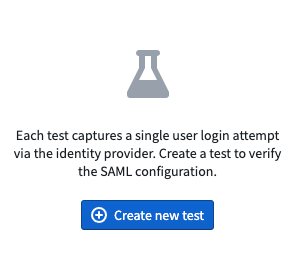
Alternatively, navigate to the SAML or OIDC page in-platform and select Test SAML and then Create new test. There are two options for testing:
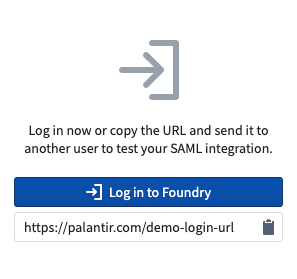
- Select Log in to Foundry to test the integration yourself.
- Use the clipboard to copy the login URL and send it to another person. You’ll be able to see the result in the summary view after they attempt to log in.
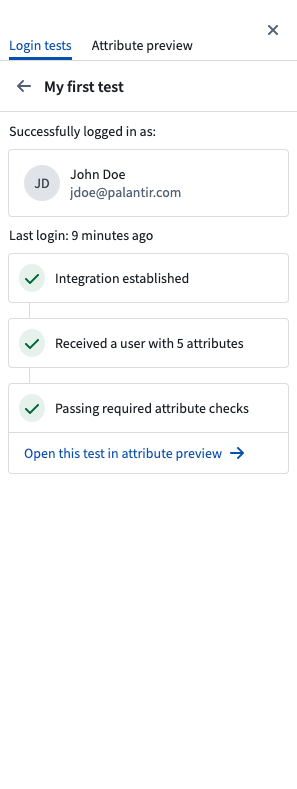
Once you — or the person you sent the URL to — has logged in, you will be able to see the results of the test. These test results state whether the login was successful and capture a snapshot of the user's attributes received from your provider.
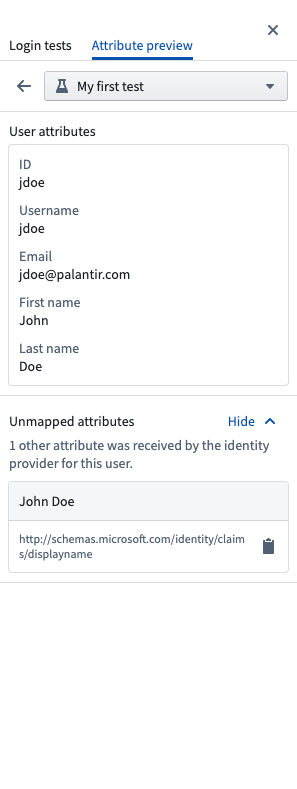
You can preview how these attributes will be mapped in Foundry by opening the test in the Attribute Preview tab. As you make changes to your attribute mapping configuration, the results will be reflected in the panel.
Test results are automatically deleted after one month.
中文翻译
启用并测试身份提供商集成
启用身份验证
您必须启用 SAML 或 OIDC 提供商才能测试集成。如果使用 Foundry 设置链接,请跳至下一步。否则,请前往提供商管理(Provider Management)页面,并为所需提供商开启启用提供商(Enable provider)开关。之后,您即可使用新的集成登录 Foundry。
测试集成
为验证身份提供商集成的配置,您可以创建测试登录。如果使用 Foundry 设置链接,请点击登录 Foundry(Log in to Foundry)以自动创建测试登录。
或者,在平台内导航至 SAML 或 OIDC 页面,选择测试 SAML(Test SAML),然后点击创建新测试(Create new test)。测试提供两种选项:
- 选择登录 Foundry(Log in to Foundry)自行测试集成。
- 使用剪贴板复制登录 URL 并发送给其他人。对方尝试登录后,您可在摘要视图中查看结果。
一旦您(或您发送 URL 的对象)完成登录,即可查看测试结果。这些测试结果会显示登录是否成功,并捕获从提供商处接收的用户属性快照。
您可以通过在属性预览(Attribute Preview)选项卡中打开测试,预览这些属性在 Foundry 中的映射方式。当您修改属性映射配置时,面板中的结果将同步更新。
测试结果将在一个月后自动删除。