Find datasets with a given column(查找包含指定列的数据集)
You can easily search for specific dataset columns within your Data Lineage graph:
-
First, ensure you added all datasets of interest in your pipeline to your lineage graph.
-
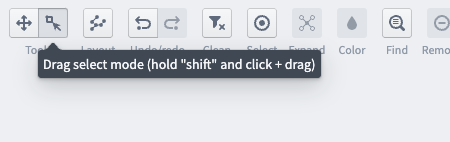
Next, select all datasets of interest by using Drag select mode in the Tools toggle in the upper left hand corner of the app. You can also hold down
Ctrl / Commandto select multiple nodes at once, or useCtrl / Command + Ato select all nodes.
-
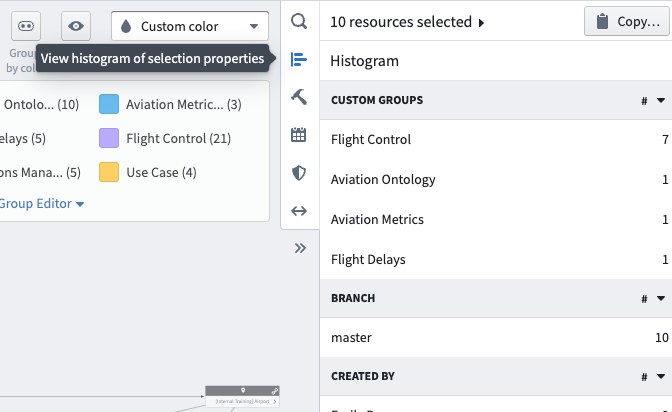
Then, select View histogram of selection properties from the Data Lineage sidebar.
-
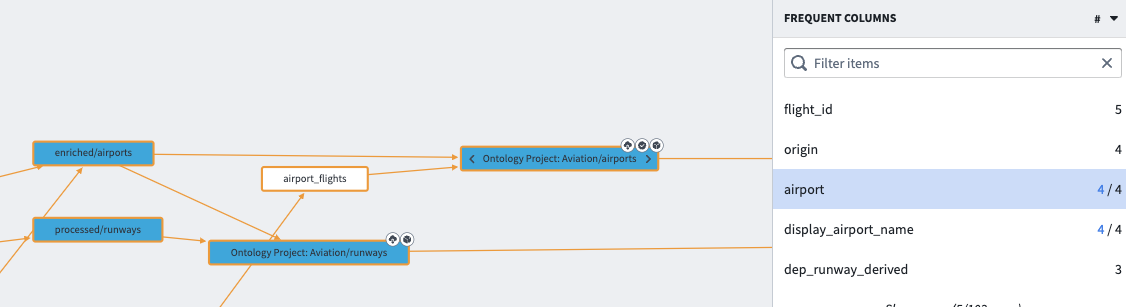
Under the Frequent Columns section, you can see the most frequent columns by name in your selection.
-
Click one of the columns to highlight the datasets in your selection that contain this column.
中文翻译
查找包含指定列的数据集
您可以在数据沿袭(Data Lineage)图中轻松搜索特定的数据集列:
-
首先,确保已将管道中所有感兴趣的数据集添加到沿袭图中。
-
接下来,使用应用左上角工具切换栏中的拖拽选择模式(Drag select mode)选中所有感兴趣的数据集。您也可以按住
Ctrl / Command键同时选择多个节点,或使用Ctrl / Command + A全选所有节点。
-
然后,从数据沿袭(Data Lineage)侧边栏中选择查看选中属性的直方图(View histogram of selection properties)。
-
在高频列(Frequent Columns)部分,您可以查看选中数据集中按名称排序的最常见列。
-
点击其中某一列,即可高亮显示选中数据集中包含该列的数据集。