Manage schedules(管理调度(Schedule))
Data Lineage allows you to easily manage build schedules within your lineage graph. In the right sidebar, select Manage schedules to open the schedule details pane.
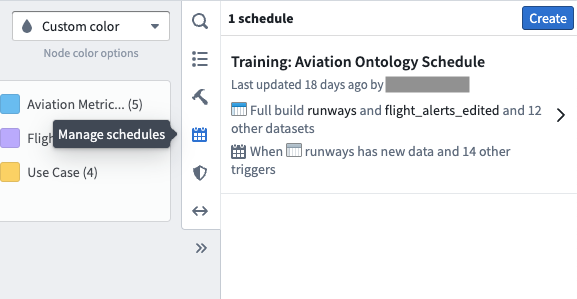
You will see the schedules related to selected datasets in your graph. Click on a schedule to see more details:
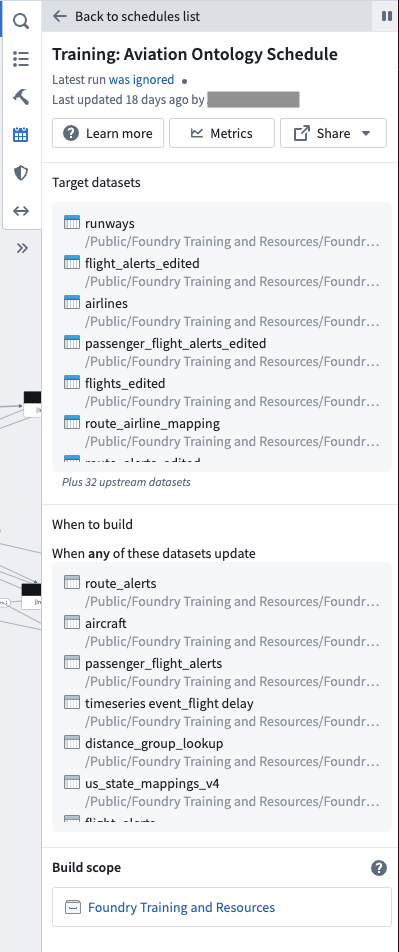
- Latest run: The status of the latest run of the schedule.
- Last update: A timestamp of when the last update took place and the user who made changes
- Target datasets: A list of downstream datasets including in the build schedule.
- When to build: Displays the build schedule trigger determined when creating the build schedule. For example, a build schedule can be set to run when specific datasets update.
- Build scope: Defines the Project or user datasets included in the build and the permissions used to run the build.
Learn more about scheduling builds in the Building pipelines documentation.
中文翻译
管理调度(Schedule)
数据沿袭(Data Lineage)让您能够轻松管理沿袭图中的构建调度。在右侧边栏中选择管理调度(Manage schedules),即可打开调度详情面板。
您将看到与图中选定数据集相关的调度。点击某个调度可查看详细信息:
- 最近运行(Latest run): 该调度的最近一次运行状态。
- 上次更新(Last update): 上次更新的时间戳及执行修改的用户。
- 目标数据集(Target datasets): 构建调度中包含的下游数据集列表。
- 构建时机(When to build): 显示创建构建调度时确定的触发条件。例如,可将构建调度设置为在特定数据集更新时运行。
- 构建范围(Build scope): 定义构建中包含的项目或用户数据集,以及运行构建所使用的权限。
如需了解更多关于调度构建的信息,请参阅构建管道(Building pipelines)文档。