Understand out-of-date datasets(了解过期数据集)
There are a few reasons why your dataset may not be up to date. Common scenarios to explore are:
- Is my dataset build failing?
- Is there an upstream dataset that hasn't built and isn't up to date?
- Have we received up-to-date data from the source?
You can easily answer these questions by using Data Lineage.
- First, verify the status of each of the resources in your pipeline by opening up the dataset of interest in Data Lineage and right-clicking on the node.
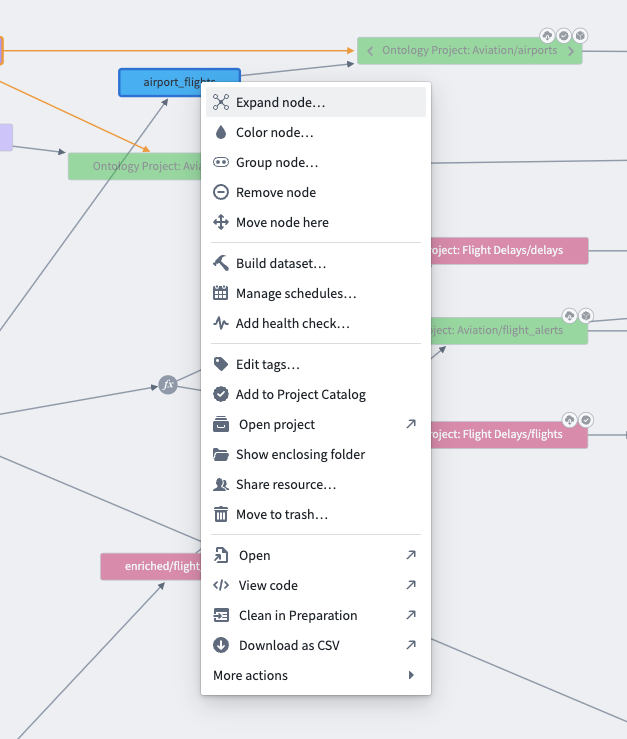
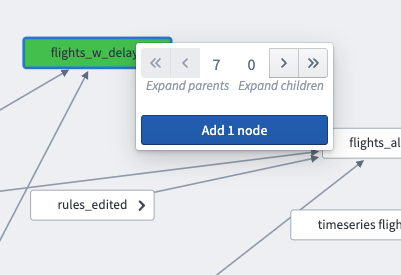
- Then, select Expand node. You can see all of the ancestor nodes for that dataset by clicking the double left arrow above Expand parents.
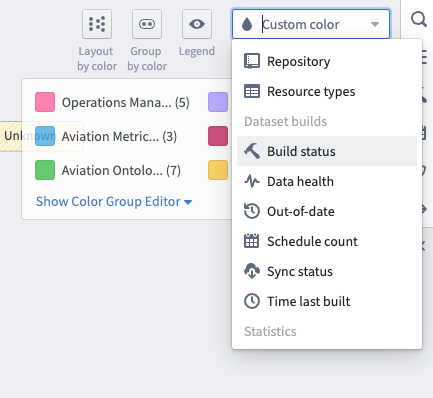
- Next, select the Build status option in the Node color options dropdown in the top right of Data Lineage to see the build status of every resource in your pipeline. This view of your pipeline will make it much easier to diagnose stale datasets.
中文翻译
了解过期数据集
数据集(dataset)未及时更新可能有多种原因。常见的排查场景包括:
- 我的数据集构建是否失败?
- 是否存在尚未构建且未更新的上游数据集?
- 是否已从数据源接收到最新数据?
您可以借助数据血缘(Data Lineage)轻松解答这些问题。
- 首先,在数据血缘中打开目标数据集并右键单击节点,以验证数据管道(pipeline)中各个资源的状态。
- 然后,选择展开节点。点击展开父节点上方的双左箭头,即可查看该数据集的所有祖先节点(ancestor nodes)。
- 接下来,在数据血缘右上角的节点颜色选项下拉菜单中选择构建状态,即可查看数据管道中每个资源的构建状态。通过此视图,您可以更轻松地诊断数据集过期问题。