Manage users(管理用户)
Access the user administration page by going to Account > Settings in the navigation sidebar. Then, select Users in the Platform Settings section of the sidebar.
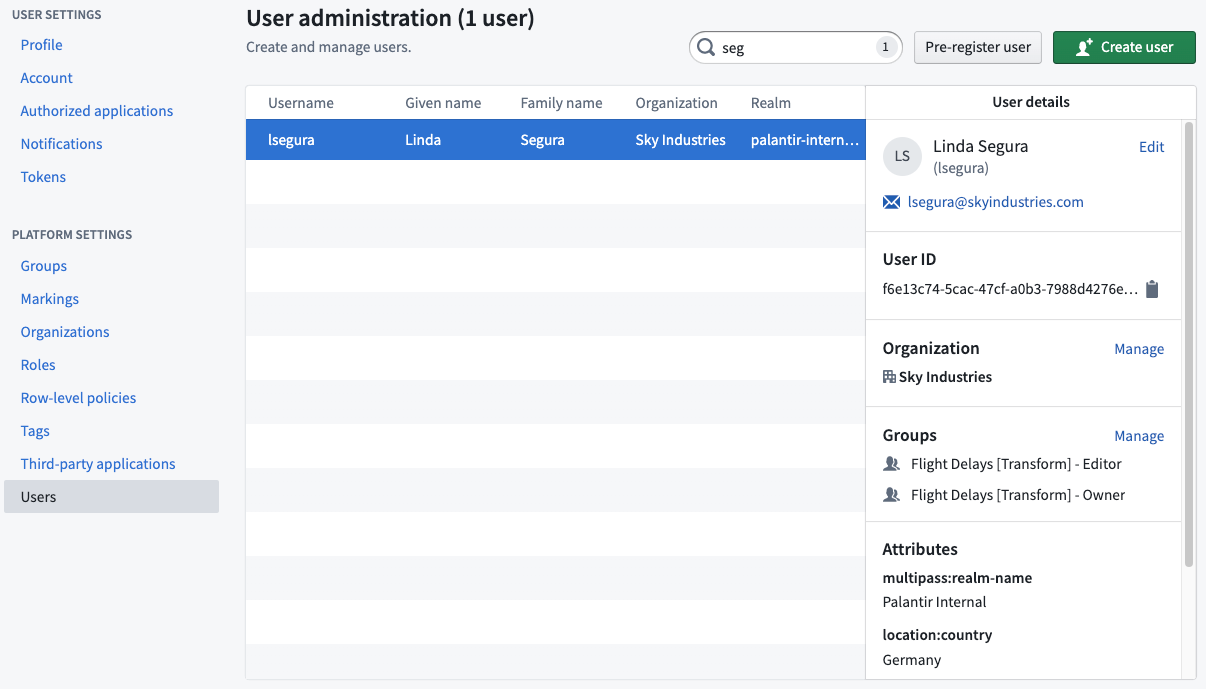
From here, you can view different information about users within Foundry:
- User ID: The permanent unique ID of the user.
- Organization: The Organization to which a user belongs.
- Groups: The list of groups to which a user belongs.
- Attributes: Information about a user represented in a key-value format that is typically used by other Foundry services. For example, a user might have an attribute for geographical region which can be used to restrict what objects in the ontology the user can see.
Learn more about restricted views.
Preregister user
Platform administrators with preregister permissions can perform actions on users before they ever log into Foundry. Administrators can create usernames, give users appropriate group memberships, assign Organization and Marking access, and more to ensure the new user has proper access to resources when they first log in.
:::callout{theme="warning"} The created username needs to match the user’s login username exactly for the preregistered actions to work. :::
User inactivity
Foundry user accounts are automatically considered inactive if no successful login has occurred for 30 days. Inactive accounts behave in the same way as active accounts in Foundry, except that all tokens for the inactive user account are invalid while the account is inactive.
The inactive user account will be automatically set to active after a successful login, which re-enables all disabled tokens. No administrator action is required for this reactivation.
It is possible to exclude users in certain Foundry groups and authentication realms from this inactivity behavior. Contact your Palantir representative for more information about these exclusions.
:::callout{theme="warning"} If a user encounters the message: "Your account has been locked. Contact your support person to unlock it, then try again." upon login, contact your Palantir representative for account unlocking. :::
Troubleshooting
“Your account has been disabled” error
If a login fails with the error Your account has been disabled, it means the user account has been deleted. You can reach out to an administrator to find and "undelete" the account using the getDeletedUsers and undeleteExternalUser endpoints, respectively. Organization administrators with Manage membership permissions are able to call these endpoints. Example curl requests are listed below.
Find the deleted user via getDeletedUsers
This step is optional and only required if the user ID of the deleted user is unknown.
curl -XGET -H "Authorization: Bearer $TOKEN" '<FOUNDRY_URL>/multipass/api/administration/users/deleted?pageSize=<NUMBER_OF_RESULTS_TO_RETURN>&pageToken=<PAGE_START_TOKEN>'
Note: The max page size is 1000.
Undelete the deleted user via undeleteExternalUser
curl -XPOST -H "Authorization: Bearer $TOKEN" '<FOUNDRY_URL>/multipass/api/administration/users/<USER_ID>/undelete/external'
中文翻译
管理用户
通过导航侧边栏中的 账户 > 设置 进入用户管理页面。然后,在侧边栏的 平台设置 部分选择 用户。
在此页面中,您可以查看 Foundry 中用户的不同信息:
- 用户 ID: 用户的永久唯一标识符。
- 组织: 用户所属的组织。
- 组: 用户所属的组列表。
- 属性: 以键值对格式表示的用户信息,通常被其他 Foundry 服务使用。例如,用户可能有一个地理区域的属性,该属性可用于限制用户在本体论(Ontology)中可以看到的对象。
预注册用户
具有预注册权限的平台管理员可以在用户登录 Foundry 之前对其执行操作。管理员可以创建用户名、为用户分配适当的组成员资格、设置组织(Organization)和标记(Marking)访问权限等,以确保新用户在首次登录时能够正确访问资源。
:::callout{theme="warning"} 创建的用户名必须与用户的登录用户名完全一致,预注册操作才能生效。 :::
用户不活跃
如果用户连续 30 天没有成功登录,Foundry 用户账户将自动被视为不活跃。不活跃账户在 Foundry 中的行为与活跃账户相同,但区别在于不活跃账户的所有令牌(Token)在账户不活跃期间均无效。
不活跃的用户账户在成功登录后将自动设置为活跃状态,并重新启用所有已禁用的令牌。此重新激活过程无需管理员操作。
可以将某些 Foundry 组和身份验证领域(Authentication Realm)中的用户排除在此不活跃行为之外。请联系您的 Palantir 代表以获取有关这些排除项的更多信息。
:::callout{theme="warning"} 如果用户在登录时遇到消息:"您的账户已被锁定。请联系您的支持人员解锁后重试。",请联系您的 Palantir 代表进行账户解锁。 :::
故障排除
"您的账户已被禁用"错误
如果登录失败并显示错误 您的账户已被禁用,则表示该用户账户已被删除。您可以联系管理员,分别使用 getDeletedUsers 和 undeleteExternalUser 端点查找并"恢复"该账户。具有 管理成员资格 权限的组织管理员可以调用这些端点。以下列出了示例 curl 请求。
通过 getDeletedUsers 查找已删除的用户
此步骤为可选步骤,仅在不知道已删除用户的用户 ID 时需要执行。
curl -XGET -H "Authorization: Bearer $TOKEN" '<FOUNDRY_URL>/multipass/api/administration/users/deleted?pageSize=<返回结果数量>&pageToken=<页面起始令牌>'
注意: 最大页面大小为 1000。
通过 undeleteExternalUser 恢复已删除的用户
curl -XPOST -H "Authorization: Bearer $TOKEN" '<FOUNDRY_URL>/multipass/api/administration/users/<用户ID>/undelete/external'