Enabling third-party applications(启用第三方应用程序)
Foundry’s third-party application enablement framework allows organizations to maintain control of the third-party applications that they have enabled. Organizations can choose which applications to enable since enablements are Organization-specific; the set of enabled applications for an Organization may include applications managed by other Organizations.
Thus, once a third-party application has been registered in Foundry, it needs to be enabled for an Organization before users in the Organization can use the application. This applies to the Organization that registered the third-party application as well as other organizations; applications are not automatically enabled.
After an application has been enabled, users can perform the OAuth2 authorization flow in order to grant Foundry access to a third-party application. Thus, an application’s access to Foundry resources still requires the user to affirmatively agree to grant access.
Required permissions
If you have the Manage OAuth 2.0 clients permission for your Organization and the third-party application has been made discoverable to that Organization, then you are allowed to enable the application, edit the enablement details of the application, or disable the application.
Enable or disable applications
The enablement settings interface is accessed by selecting Enablement settings from the Actions dropdown to the right of an application in the third-party applications user interface.
The following is the enablement settings interface for an example application:
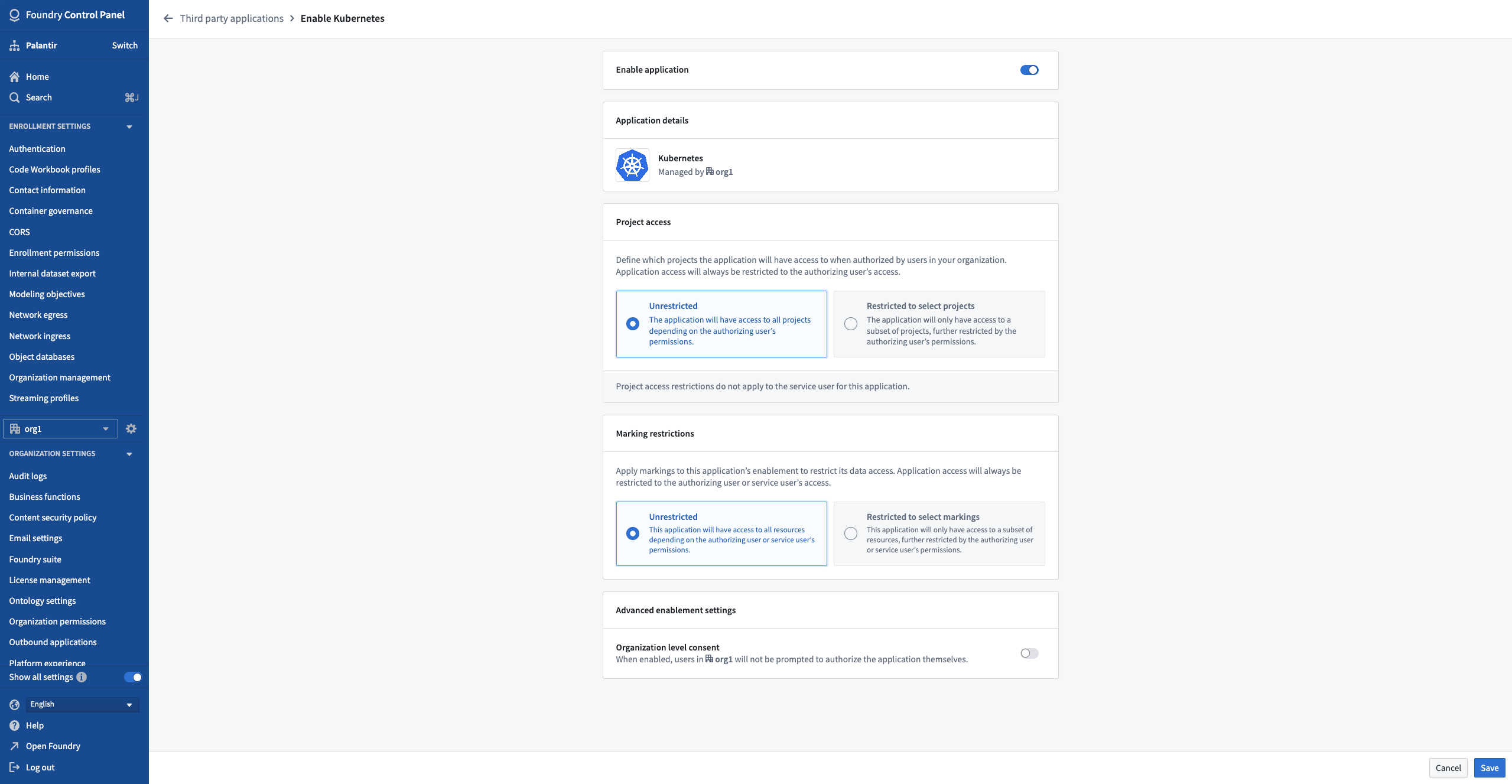
Here, you can enable or disable your application using the toggle at the top of the page.
:::callout{theme="danger" title="Warning"} Disabling an application is not a simple on and off toggle as re-enabling an application requires the application enablement workflow to be completed again. Existing authorizations for the application will not be reactivated and every user must reauthorize the newly-enabled application. :::
Project access
You can also set the scope of Project access for the application. The Project access scope determines the Projects to which the application will have access when authorized on behalf of a Foundry user through the authorization code grant.
- The scope of resources that a third-party application connected to Foundry can access is limited by two factors:
- The Projects to which the authorizing user has access, and
- The Projects that are defined on the enablement interface.
- Applications can only access resources at the intersection between the Projects that the authorizing user can access and the Projects that are specified in the enablement interface. In other words, the enablement interface provides a way to narrow the scope of an application’s access to Foundry.
- We recommend leaving the Project scope to Unrestricted, which grants the application access to all resources that the authorizing user can access.
Marking restrictions
Another way of setting the data access scope of your application is through Marking restrictions. By applying Markings to your application, you can determine the resources the application will have access to when authorized on behalf of a Foundry user through the authorization code grant.
- The scope of resources that a third-party application connected to Foundry can access is limited by two factors:
- The resources to which the authorizing user has access, and
- The Markings that are applied through the enablement interface.
- Applications can only access resources at the intersection between what the user can access and those permitted through the Markings specified in the enablement interface. It is important to note that even when access is restricted, unmarked resources may still be utilized unless the user is denied access to them.
- We recommend leaving Marking restrictions as Unrestricted, which grants the application access to all resources that the authorizing user can access.
Organization level consent
In advanced enablement settings, you can authorize access to Foundry for third-party applications on behalf of your Organization's users.
If enabled, users will not be required to perform the OAuth2 authorization flow, and the third-party application will be authorized to access Foundry for all users in that Organization. Users will not be notified if this is enabled.
:::callout{theme="neutral"} We recommend not enabling Organization level consent unless your use case explicitly requires it. :::
中文翻译
启用第三方应用程序
Foundry的第三方应用程序启用框架允许组织对其已启用的第三方应用程序保持控制。组织可以选择启用哪些应用程序,因为启用操作是特定于组织的;某个组织已启用的应用程序集可能包含由其他组织管理的应用程序。
因此,一旦第三方应用程序在Foundry中注册,就需要为某个组织启用该应用程序,该组织的用户才能使用它。这既适用于注册该第三方应用程序的组织,也适用于其他组织;应用程序不会自动启用。
应用程序启用后,用户可以执行OAuth2授权流程(OAuth2 authorization flow),以授予Foundry访问第三方应用程序的权限。因此,应用程序对Foundry资源的访问仍然需要用户明确同意授予访问权限。
所需权限
如果您拥有所在组织的管理OAuth 2.0客户端权限,并且该第三方应用程序已对该组织公开,那么您就可以启用该应用程序、编辑其启用详情或禁用该应用程序。
启用或禁用应用程序
在第三方应用程序用户界面中,点击应用程序右侧操作下拉菜单中的启用设置,即可访问启用设置界面。
以下是一个示例应用程序的启用设置界面:
在此页面中,您可以使用顶部的开关启用或禁用应用程序。
:::callout{theme="danger" title="警告"} 禁用应用程序并非简单的开关操作,因为重新启用应用程序需要重新完成应用程序启用工作流程。已存在的应用程序授权将不会重新激活,每个用户都必须重新授权新启用的应用程序。 :::
项目访问权限
您还可以设置应用程序的项目访问范围。项目访问范围决定了当通过授权码授权代表Foundry用户授权时,应用程序可以访问哪些项目。
- 连接到Foundry的第三方应用程序可访问的资源范围受两个因素限制:
- 授权用户有权访问的项目,以及
- 在启用界面上定义的项目。
- 应用程序只能访问授权用户可访问项目与启用界面中指定项目之间的交集资源。换句话说,启用界面提供了一种缩小应用程序对Foundry访问范围的方法。
- 我们建议将项目范围保留为无限制,这样应用程序可以访问授权用户能够访问的所有资源。
标记限制
设置应用程序数据访问范围的另一种方法是通过标记限制。通过为应用程序应用标记(Markings),您可以确定当通过授权码授权代表Foundry用户授权时,应用程序可以访问哪些资源。
- 连接到Foundry的第三方应用程序可访问的资源范围受两个因素限制:
- 授权用户有权访问的资源,以及
- 通过启用界面应用的标记。
- 应用程序只能访问用户可访问资源与启用界面中指定标记所允许资源之间的交集。需要注意的是,即使访问受到限制,未标记的资源仍可能被使用,除非用户被拒绝访问这些资源。
- 我们建议将标记限制保留为无限制,这样应用程序可以访问授权用户能够访问的所有资源。
组织级同意
在高级启用设置中,您可以代表组织用户授权第三方应用程序访问Foundry。
如果启用此功能,用户将无需执行OAuth2授权流程(OAuth2 authorization flow),第三方应用程序将被授权访问该组织中所有用户的Foundry资源。启用此功能时,用户不会收到通知。
:::callout{theme="neutral"} 除非您的用例明确需要,否则我们建议不要启用组织级同意。 :::