User-generated tokens(用户生成的令牌)
:::callout{theme="danger" title="Danger"} These tokens are associated with your personal Foundry user account and must not be used in production applications or committed to shared or public code repositories. We recommend you store test API tokens as environment variables during development. For authorizing production applications, register an OAuth2 application. :::
Foundry supports token-based authentication. Tokens are strings of characters that serve as secure identification for a specific user. Possession of these tokens is equivalent to possessing a user's username and password, and they should be handled securely and secretly.
Generation
Tokens are generated from the settings dashboard. Navigate to Account at the bottom of the sidebar, click Settings, then click Tokens.
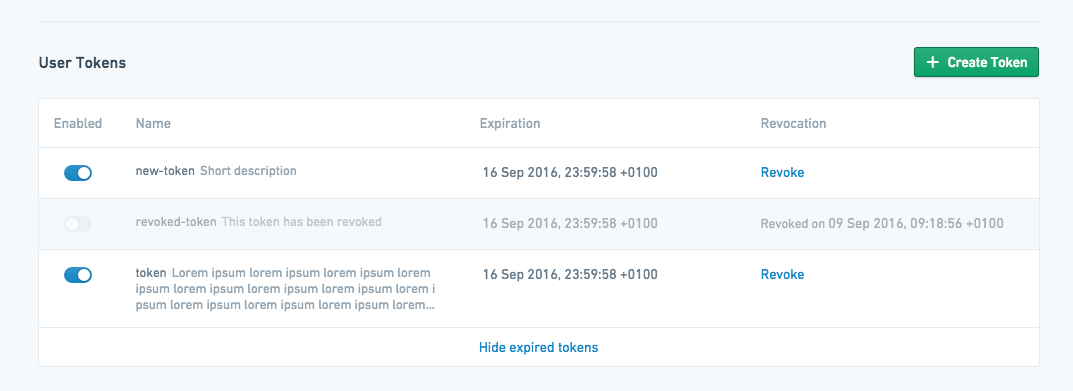
This interface shows user-generated tokens that have been created for the current user and information on their current state and expiration date. Existing tokens can be disabled from this interface, which temporarily deactivates them, or revoked, which permanently invalidates them. To generate a new token, click Create Token. This will open a token creation dialog:
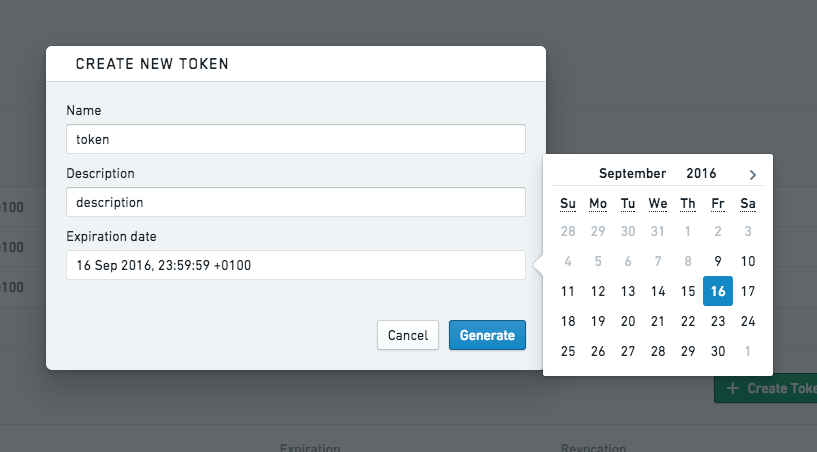
Give the token a useful name, provide a description, and specify the date when the token should expire. After clicking Generate, the token will be displayed one time only for security purposes. It can be copied and used as needed, but should not be stored in any insecure manner.
Revoke
You can revoke individual tokens in the same interface by clicking Revoke.

Inactive users
By default, Foundry user accounts are automatically deactivated after 30 days of a user not logging in. When a user is deactivated, user-generated API tokens and tokens issued to OAuth2 clients become invalid.
The user will otherwise appear fully active, and work scheduled by that user will continue to run. For instance, schedules owned by an inactive user will continue to run.
For a user to be reactivated, they simply need to log in to Foundry again.
Specific users can be exempted from automatic deactivation. For more information on this, contact your Palantir representative.
中文翻译
用户生成的令牌
:::callout{theme="danger" title="危险"} 这些令牌与您的个人Foundry用户账户关联,不得用于生产环境应用程序,也不得提交到共享或公共代码仓库中。 我们建议您在开发过程中将测试API令牌存储为环境变量。 如需授权生产环境应用程序,请注册一个OAuth2应用程序。 :::
Foundry支持基于令牌的身份验证。令牌(token)是由字符组成的字符串,用于特定用户的安全身份标识。持有这些令牌等同于持有用户的用户名和密码,因此必须安全、保密地处理。
生成令牌
令牌通过设置面板生成。导航至侧边栏底部的账户,点击设置,然后点击令牌。
该界面显示当前用户已创建的用户生成令牌,以及它们当前状态和过期日期的信息。在此界面中可以禁用现有令牌(临时停用)或撤销令牌(永久失效)。要生成新令牌,请点击创建令牌。这将打开一个令牌创建对话框:
为令牌指定一个有用的名称,提供描述,并设置令牌的过期日期。点击生成后,出于安全考虑,令牌将仅显示一次。您可以复制并按需使用,但不得以任何不安全的方式存储。
撤销令牌
您可以在同一界面中点击撤销来撤销单个令牌。
非活跃用户
默认情况下,如果用户连续30天未登录,Foundry用户账户将自动停用。当用户被停用时,用户生成的API令牌以及颁发给OAuth2客户端的令牌将失效。
除此之外,该用户在其他方面仍显示为完全活跃状态,且该用户已安排的工作将继续运行。例如,由非活跃用户拥有的调度任务将继续执行。
用户只需重新登录Foundry即可重新激活账户。
特定用户可以免于自动停用。如需了解更多信息,请联系您的Palantir代表。