Writing OAuth2 clients for Foundry(为 Foundry 编写 OAuth2 客户端)
This documentation is intended for Foundry users or administrators who wish to write OAuth2 clients to connect to Foundry. This page provides a description of the OAuth 2.0 Authorization Framework ↗ and details about Foundry’s implementation of OAuth2. Additionally, the Foundry Third-Party Application & API Agreement governs the use of third-party applications on the Foundry platform and should be understood by creators and administrators of third-party applications.
OAuth2 overview
The OAuth2 authorization framework enables third-party applications to obtain controlled access to a service. OAuth2 improves on the traditional client-server authorization model by providing a layer that enables clients (like a third-party application) to request access through the use of a specifically-issued access tokens and refresh tokens, rather than a user’s credentials or static bearer tokens. OAuth2 manages this access through the use of grants, which are methods of obtaining access tokens.
Supporting OAuth2 integration
The following sections describe how to support OAuth2 in a third-party application. Throughout the document, client refers to the third-party application, authorization server refers to Foundry’s authorization server, and user refers to the end-user of the third-party application.
To use OAuth2 with Foundry, you must register your application by following the Registering Third-Party Applications instructions and choose one of the authorization options in the next sub-sections.
Authorization code grant
The authorization code grant allows the client to act on behalf of existing Foundry users. The application must request the set of Foundry permissions they need access to, then a Foundry user must explicitly grant the client access to those permissions on their account. Foundry allows the client to be restricted to a limited set of resources, or to all the resources a user can access.
The authorization code grant works as follows:
- The client creates a
code_verifierandcode_challenge. This is recommended but not required for confidential clients ↗, such as server-based applications, that can safely store a client secret. It is required for public clients ↗, such as native apps, that cannot safely store a client secret. - The
code_verifieris a cryptographically random string that contains A-Z, a-z, 0-9,-(hyphen),.(period),_(underscore), and~(tilde), and is 43 to 128 characters long. - The
code_challengeis derived by performing the SHA256 of thecode_verifierand then converting that to a Base64-URL-encoded value without padding. - The client application should open a browser and send the user to the authorization endpoint URL with the following parameters added as query parameters:
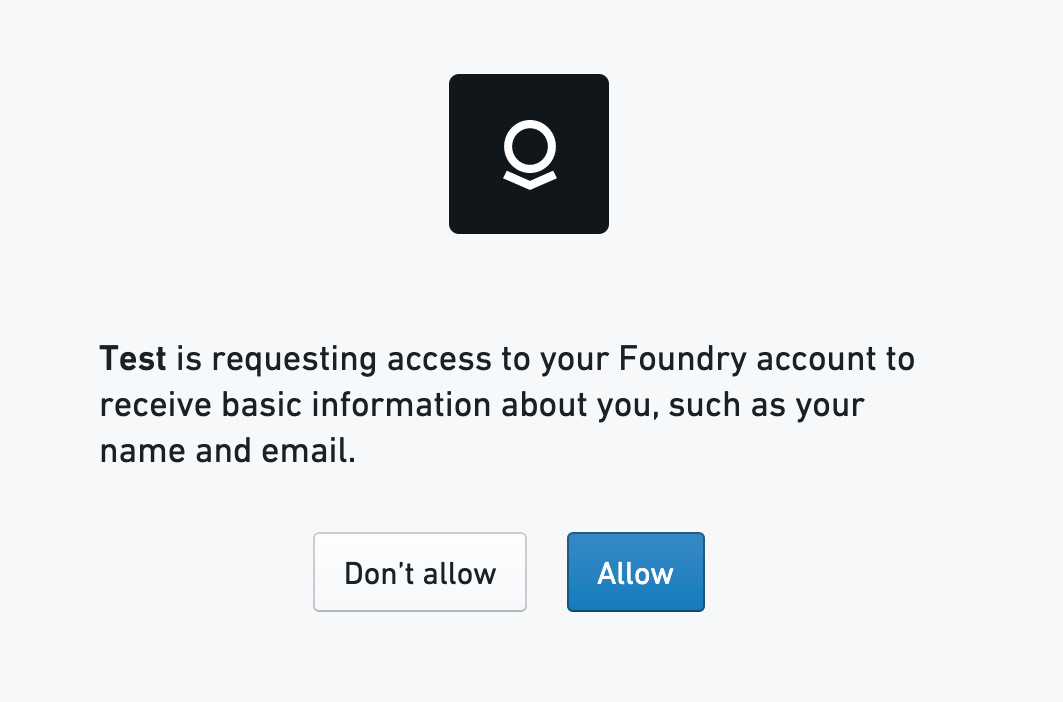
response_type: This should be set tocode.client_id: This should be set to the ID generated when the third-party application was registered in Foundry.redirect_uri: This tells the authorization server where to redirect the user after the user approves the request. If not specified, it will default to the first redirect URI value in the Third-Party application setting in Foundry.scope: This defines the permissions requested. Scopes for public APIs are in the API documentation. Add theoffline_accessscope to get a refresh token. If you want multiple scopes, concatenate the scopes using a space as a delimiter.state: This is a random string generated by the application that will be passed back to the application as is. The application should check that the value returned matches the original string to prevent CSRF attacks.code_challenge: If the client created acode_challenge, it should populate this parameter. The authorization server will internally associate thecode_challengeparameter with the authorization code it generates.code_challenge_method: This should be set toS256.- When the user visits the URL, the authorization server presents the user with a prompt similar to the following and the user then can choose to approves the app’s request.
- If the request is successful, the authorization server then redirects the user to the redirect URI that was specified along with the following parameters added as query parameters:
code: This is the authorization code that the authorization server generates.state: This is the same parameter the client passed in the authorization request. The client should check that it matches the originalstateparameter that was sent in the request.- The client should then exchange the authorization code for an access token by calling the token endpoint. The following parameters should be sent using the
application/x-www-form-urlencodedformat in the request body: grant_type: This should be set toauthorization_code.code: The code that was received from the authorization server.redirect_uri: The absolute URI that the user agent will be redirected to.client_id: This should be set to the ID generated when the third-party application was registered in Foundry.code_verifier: If the client generated acode_verifier, it should send it in this request. The authorization server will verify that thecode_verifiermatches thecode_challengethat was sent in the previous request.- The authorization server then responds with an access token which can then be used by the client to access the requested resources such as REST APIs. The response contains the following parameters:
access_token: The token that can be used by the client to access the requested resources.token_type: The type of the token that was issued.expires_in: The lifetime in seconds of the access token.refresh_token: This is returned only if the requested scope includedoffline_access. This should be used if the client wants to refresh the access token without the user being present to authorize the request. For more information, see Refreshing an access token.
Client credentials grant
The client credentials grant is designed for non-interactive service-user style workflows where actions the client makes are not associated to normal Foundry users. The client does not act on behalf of normal Foundry users.
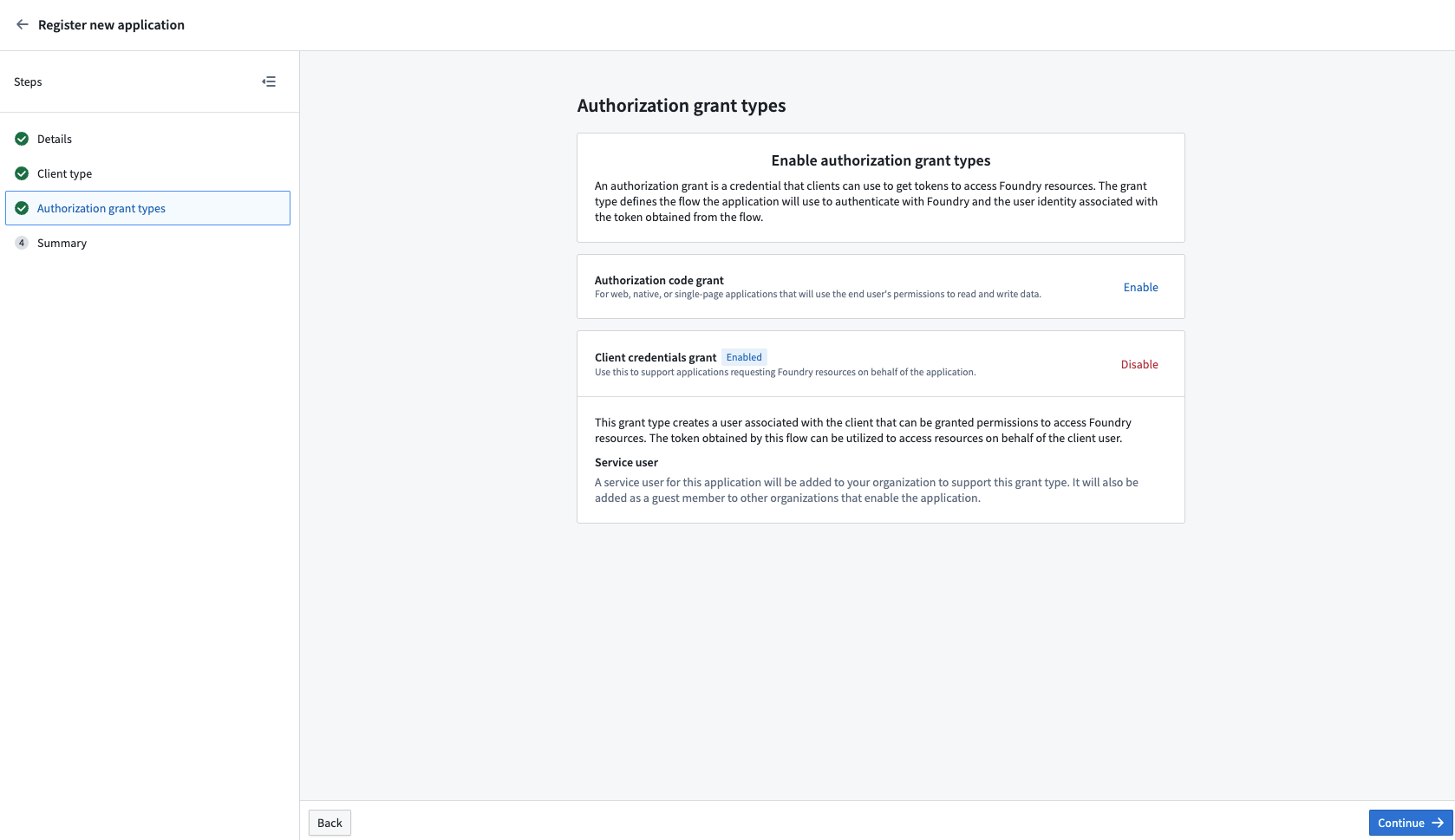
Instead, this grant type automatically creates a Foundry service user associated with the client that can then be granted permissions to access Foundry resources. The token obtained by this grant can be used to access resources on behalf of the created service user. The username of the service user account is the same as the client ID of the application.
:::callout{theme="neutral"} By default, the service account does not have access to any resources. A Foundry administrator must assign the desired roles and permissions to the service user account for the client to perform actions in Foundry. :::
The client credentials grant works as follows:
- The client calls the token endpoint. The following parameters should be sent using the
application/x-www-form-urlencodedformat in the request body: grant_type: This should be set toclient_credentials.client_id: This should be set to the ID generated when the third-party application was registered in Foundry.client_secret: This should be set to the client secret that was generated when the third-party application was registered in Foundry.- The authorization server then responds back with the following:
access_token: The token that can be used by the client to access the requested resources.token_type: The type of the token that was issued.expires_in: The lifetime in seconds of the access token.- The client can then use the access token to access the requested resources.
Refreshing an access token
Access tokens expire after some time and will need to be obtained again. Any client that needs access to the Foundry API when the user is not present will need to refresh the token.
This can be done by following these steps:
- The client should follow the steps outlined in Authorization Code Grant and specify
offline_accessas part of the requestedscopeparameter. - The client should save the returned
refresh_tokenthat was returned in the final step of Authorization Code Grant. - If the access token expires, the client can then refresh the token by calling the token endpoint endpoint using the following parameters:
grant_type: This should be set torefresh_token.refresh_token: The access token that was obtained previously for the given user.client_id: This should be set to the ID generated when the third-party application was registered in Foundry.client_secret: This should be set to the client secret that was generated when the third-party application was registered in Foundry.- The authorization server will then respond with the following:
access_tokenThe token that can be used by the client to access the requested resources.token_type: The type of the token that was issued.expires_in: The lifetime in seconds of the access token.refresh_token: The refresh token that can be used to refresh the access token. Note that Foundry rotates the refresh token each time the previously issued refresh token is used. Make sure you save both theaccess_tokenand therefresh_token.
Refresh token rotation
Refresh tokens can be used to obtain new access tokens. Foundry reduces the risk associated with refresh tokens by rotating the refresh tokens each time the previously issued refresh token is used. A reuse detection protection mechanism ensures that if a refresh token is reused after one minute of its initial use, all access tokens created from this grant are invalidated and a new authorization flow is required. A one minute interval of reuse is allowed to account for possible transient errors like network failures. Additionally, inactive refresh tokens over 30 days old are automatically invalidated. These safeguards reduce risk from potentially compromised tokens by ensuring there are no long-lived refresh tokens.
OAuth2 API reference
The following endpoints can be used to obtain OAuth2 tokens.
Authorization endpoint
GET /multipass/api/oauth2/authorize
The authorization endpoint, used by the client to obtain an authorization code.
Query parameters
| Parameter name | Type | Description |
|---|---|---|
| response_type | String | This must be set to code. |
| client_id | String | The unique identifier of the client. |
| redirect_uri | String | The absolute URI that the user agent will be redirected to. This must match one of the Redirect URIs that was specified in the Control Panel. You can access this URI again by navigating to the Manage Application screen. |
| scope | String | The scope of the permissions to be requested. Scopes for public APIs are in the API documentation and should be listed as a space-separated string. |
| state | String (optional) | An arbitrary string passed to the server that gets passed back to the client as is. This helps prevent cross-site request forgery. |
| code_challenge | String (optional) | The code challenge generated by the client; used with Authorization Code Grant with Proof Key for Code Exchange (PKCE) |
| code_challenge_method | String (optional) | This should be set S256 if code_challenge is used. |
Redirect query parameters
If the request is successful, the user’s browser is redirected to the redirect URI specified in the Third-Party application settings or in the redirect URI passed in the request. The following query parameters will be present in the redirect request URI:
| Parameter name | Type | Description |
|---|---|---|
| code | String | The authorization code that was generated. This code will expire after 10 minutes. |
| state | String (optional) | If the state parameter was present in the authorization request, this will contain that exact value. |
Token endpoint
POST /multipass/api/oauth2/token
The token endpoint is used by the client to obtain an access token by presenting its authorization grant or refresh token.
Header parameters
| Parameter name | Description |
|---|---|
| Content-Type | Must be application/x-www-form-urlencoded. |
Request body parameters
| Parameter name | Type | Description |
|---|---|---|
| grant_type | String | Value must be authorization_code, refresh_token, or client_credentials |
| code | String (optional) | The authorization code received from the authorization endpoint. This is required if the grant type is authorization_code |
| refresh_token | String (optional) | This is required when grant_type is refresh_token. The value should be the refresh_token that was obtained in the original request when the authorization code was obtained. |
| redirect_uri | String (optional/required) | The absolute URI that the user agent will be redirected to. This is required if a redirect URI was specified in the Authorization Request. |
| scope | String (optional) | The scope of the permissions to be requested. Scopes for public APIs are in the API documentation and should be listed as a space-separated string. |
| client_id | String | The unique identifier of the client. |
| client_secret | String (optional) | The application's client secret that was issued during application registration. This is required when grant_type is client_credentials. |
| code_verifier | String (optional) | The code verifier used for the PKCE request that the application generated before the authorization request. |
Response body
The response JSON has the following fields.
| Field name | type | Description |
|---|---|---|
| access_token | String | The credentials used to access resources. |
| token_type | String | The type of the token issued. |
| expires_in | String | The lifetime in seconds of the access token. |
| refresh_token | String (optional) | The credentials used to obtain new access tokens. Foundry rotates refresh_token every time a refresh_token grant is called. Make sure you save both the access_token and the refresh_token. |
Endpoint errors
Error response body
If the request fails, the user’s browser will only be redirected if the access request is denied. In all other cases, an HTML error page is returned which includes the fields below.
| Field name | Type | Description |
|---|---|---|
| error | String | The error code as defined in the next section. |
| error_description | String | The human-readable description of the error |
Error codes
| Error code value | Description |
|---|---|
invalid_request |
The request was invalid. |
unauthorized_client |
The client is not authorized to request an authorization code. |
access_denied |
The sever denied the request. |
unsupported_response_type |
The provided response type is not supported. |
invalid_scope |
The requested scope is invalid, unknown, or malformed |
server_error |
There was an unexpected server error. |
中文翻译
为 Foundry 编写 OAuth2 客户端
本文档面向希望编写 OAuth2 客户端以连接 Foundry 的 Foundry 用户或管理员。本页提供了 OAuth 2.0 授权框架 ↗ 的描述以及 Foundry 实现 OAuth2 的详细信息。此外,Foundry 第三方应用与 API 协议 规定了在 Foundry 平台上使用第三方应用的相关事宜,第三方应用的创建者和管理员应理解该协议。
OAuth2 概述
OAuth2 授权框架使第三方应用能够获得对服务的受控访问。OAuth2 改进了传统的客户端-服务器授权模型,它提供了一个层,使客户端(如第三方应用)能够通过使用专门颁发的访问令牌(access token)和刷新令牌(refresh token)来请求访问,而不是使用用户的凭据或静态持有者令牌(bearer token)。OAuth2 通过使用授权许可(grant)来管理这种访问,授权许可是获取访问令牌的方法。
支持 OAuth2 集成
以下章节描述了如何在第三方应用中支持 OAuth2。在本文档中,客户端(client) 指第三方应用,授权服务器(authorization server) 指 Foundry 的授权服务器,用户(user) 指第三方应用的最终用户。
要使用 OAuth2 与 Foundry 集成,您必须按照注册第三方应用 的说明注册您的应用,并选择下一小节中的一种授权选项。
授权码许可(Authorization code grant)
授权码许可允许客户端代表现有的 Foundry 用户执行操作。应用必须请求其需要访问的一组 Foundry 权限,然后 Foundry 用户必须明确授予客户端在其账户上访问这些权限的权限。Foundry 允许将客户端限制为访问有限的资源集,或用户可访问的所有资源。
授权码许可的工作流程如下:
- 客户端创建一个
code_verifier和code_challenge。对于能够安全存储客户端密钥(client secret)的 机密客户端(confidential clients)↗(例如基于服务器的应用),这是推荐但非必需的。对于无法安全存储客户端密钥的 公共客户端(public clients) ↗(例如原生应用),这是必需的。code_verifier是一个加密随机字符串,包含 A-Z、a-z、0-9、-(连字符)、.(句点)、_(下划线)和~(波浪号),长度为 43 到 128 个字符。code_challenge是通过对code_verifier执行 SHA256 哈希,然后将其转换为无填充的 Base64-URL 编码值而得到的。
- 客户端应用应打开一个浏览器,并将用户引导至授权端点(authorization endpoint) URL,并将以下参数作为查询参数添加:
response_type:应设置为code。client_id:应设置为在 Foundry 中注册第三方应用时生成的 ID。redirect_uri:告知授权服务器在用户批准请求后将用户重定向到哪里。如果未指定,将默认为 Foundry 中第三方应用设置中的第一个重定向 URI 值。scope:定义请求的权限。公共 API 的作用域(scope)在 API 文档 中。添加offline_access作用域以获取刷新令牌。如果需要多个作用域,请使用空格作为分隔符连接它们。state:由应用生成的随机字符串,将原样传递回应用。应用应检查返回的值是否与原始字符串匹配,以防止 CSRF 攻击。code_challenge:如果客户端创建了code_challenge,则应填充此参数。授权服务器将在内部将code_challenge参数与其生成的授权码关联起来。code_challenge_method:应设置为S256。
- 当用户访问该 URL 时,授权服务器会向用户显示类似下图的提示,用户可以选择批准应用的请求。
- 如果请求成功,授权服务器会将用户重定向到指定的重定向 URI,并附带以下参数作为查询参数:
code:这是授权服务器生成的授权码。state:这是客户端在授权请求中传递的相同参数。客户端应检查它是否与请求中发送的原始state参数匹配。
- 然后,客户端应通过调用令牌端点(token endpoint) 来交换授权码以获取访问令牌。应使用
application/x-www-form-urlencoded格式在请求体中发送以下参数:grant_type:应设置为authorization_code。code:从授权服务器接收到的授权码。redirect_uri:用户代理将被重定向到的绝对 URI。client_id:应设置为在 Foundry 中注册第三方应用时生成的 ID。code_verifier:如果客户端生成了code_verifier,则应在此请求中发送它。授权服务器将验证code_verifier是否与先前请求中发送的code_challenge匹配。
- 然后,授权服务器会响应一个访问令牌,客户端可以使用该令牌访问请求的资源,例如 REST API。响应包含以下参数:
access_token:客户端可用于访问请求资源的令牌。token_type:已颁发令牌的类型。expires_in:访问令牌的生命周期(以秒为单位)。refresh_token:仅当请求的作用域包含offline_access时才返回。如果客户端希望在用户不在场授权请求的情况下刷新访问令牌,则应使用此参数。更多信息,请参阅刷新访问令牌。
客户端凭证许可(Client credentials grant)
客户端凭证许可专为非交互式服务用户类型的工作流设计,其中客户端执行的操作不与普通的 Foundry 用户关联。客户端不代表普通的 Foundry 用户执行操作。
相反,此许可类型会自动创建一个与客户端关联的 Foundry 服务用户(service user),然后可以授予该用户访问 Foundry 资源的权限。通过此许可获得的令牌可用于代表创建的服务用户访问资源。服务用户账户的用户名与应用客户端 ID 相同。
:::callout{theme="neutral"} 默认情况下,服务账户无权访问任何资源。Foundry 管理员必须为服务用户账户分配所需的角色和权限,客户端才能在 Foundry 中执行操作。 :::
客户端凭证许可的工作流程如下:
- 客户端调用令牌端点。应使用
application/x-www-form-urlencoded格式在请求体中发送以下参数:grant_type:应设置为client_credentials。client_id:应设置为在 Foundry 中注册第三方应用时生成的 ID。client_secret:应设置为在 Foundry 中注册第三方应用时生成的客户端密钥。
- 然后,授权服务器会响应以下内容:
access_token:客户端可用于访问请求资源的令牌。token_type:已颁发令牌的类型。expires_in:访问令牌的生命周期(以秒为单位)。
- 然后,客户端可以使用访问令牌访问请求的资源。
刷新访问令牌
访问令牌会在一段时间后过期,需要重新获取。任何需要在用户不在场时访问 Foundry API 的客户端都需要刷新令牌。
可以通过以下步骤完成:
- 客户端应遵循授权码许可中概述的步骤,并将
offline_access指定为请求的scope参数的一部分。 - 客户端应保存授权码许可最后一步中返回的
refresh_token。 - 如果访问令牌过期,客户端可以通过调用令牌端点 端点来刷新令牌,使用以下参数:
grant_type:应设置为refresh_token。refresh_token:先前为给定用户获取的访问令牌。client_id:应设置为在 Foundry 中注册第三方应用时生成的 ID。client_secret:应设置为在 Foundry 中注册第三方应用时生成的客户端密钥。
- 然后,授权服务器将响应以下内容:
access_token:客户端可用于访问请求资源的令牌。token_type:已颁发令牌的类型。expires_in:访问令牌的生命周期(以秒为单位)。refresh_token:可用于刷新访问令牌的刷新令牌。请注意,每次使用先前颁发的刷新令牌时,Foundry 都会轮换刷新令牌。请确保同时保存access_token和refresh_token。
刷新令牌轮换
刷新令牌可用于获取新的访问令牌。Foundry 通过每次使用先前颁发的刷新令牌时轮换刷新令牌来降低与刷新令牌相关的风险。 重用检测保护机制确保,如果在首次使用后一分钟内重用刷新令牌,则从此许可创建的所有访问令牌都将失效,并且需要新的授权流程。 允许一分钟的重用间隔,以应对可能的瞬时错误,例如网络故障。此外,超过 30 天未使用的刷新令牌会自动失效。这些安全措施通过确保不存在长期有效的刷新令牌,降低了潜在令牌泄露的风险。
OAuth2 API 参考
以下端点可用于获取 OAuth2 令牌。
授权端点
GET /multipass/api/oauth2/authorize
授权端点,客户端用于获取授权码。
查询参数
| 参数名 | 类型 | 描述 |
|---|---|---|
| response_type | 字符串 | 必须设置为 code。 |
| client_id | 字符串 | 客户端的唯一标识符。 |
| redirect_uri | 字符串 | 用户代理将被重定向到的绝对 URI。必须与控制面板中指定的重定向 URI 之一匹配。您可以通过导航到管理应用 屏幕再次访问此 URI。 |
| scope | 字符串 | 请求权限的作用域。公共 API 的作用域在 API 文档 中,应列为空格分隔的字符串。 |
| state | 字符串(可选) | 传递给服务器的任意字符串,将原样传递回客户端。这有助于防止跨站请求伪造。 |
| code_challenge | 字符串(可选) | 客户端生成的代码挑战(code challenge);与带有代码交换证明密钥(PKCE)的授权码许可一起使用 |
| code_challenge_method | 字符串(可选) | 如果使用了 code_challenge,则应设置为 S256。 |
重定向查询参数
如果请求成功,用户的浏览器将被重定向到第三方应用设置中指定的重定向 URI,或请求中传递的重定向 URI。重定向请求 URI 中将包含以下查询参数:
| 参数名 | 类型 | 描述 |
|---|---|---|
| code | 字符串 | 生成的授权码。此代码将在 10 分钟后过期。 |
| state | 字符串(可选) | 如果授权请求中存在 state 参数,则此参数将包含该确切值。 |
令牌端点
POST /multipass/api/oauth2/token
令牌端点由客户端用于通过提供其授权许可或刷新令牌来获取访问令牌。
头部参数
| 参数名 | 描述 |
|---|---|
| Content-Type | 必须为 application/x-www-form-urlencoded。 |
请求体参数
| 参数名 | 类型 | 描述 |
|---|---|---|
| grant_type | 字符串 | 值必须为 authorization_code、refresh_token 或 client_credentials |
| code | 字符串(可选) | 从授权端点接收的授权码。如果授权类型为 authorization_code,则此为必需项。 |
| refresh_token | 字符串(可选) | 当 grant_type 为 refresh_token 时此为必需项。该值应为在获取授权码的原始请求中获得的 refresh_token。 |
| redirect_uri | 字符串(可选/必需) | 用户代理将被重定向到的绝对 URI。如果在授权请求中指定了重定向 URI,则此为必需项。 |
| scope | 字符串(可选) | 请求权限的作用域。公共 API 的作用域在 API 文档 中,应列为空格分隔的字符串。 |
| client_id | 字符串 | 客户端的唯一标识符。 |
| client_secret | 字符串(可选) | 应用注册时颁发的应用客户端密钥。当 grant_type 为 client_credentials 时此为必需项。 |
| code_verifier | 字符串(可选) | 应用在授权请求之前为 PKCE 请求生成的代码验证器(code verifier)。 |
响应体
响应 JSON 包含以下字段。
| 字段名 | 类型 | 描述 |
|---|---|---|
| access_token | 字符串 | 用于访问资源的凭据。 |
| token_type | 字符串 | 已颁发令牌的类型。 |
| expires_in | 字符串 | 访问令牌的生命周期(以秒为单位)。 |
| refresh_token | 字符串(可选) | 用于获取新访问令牌的凭据。每次调用 refresh_token 许可时,Foundry 都会轮换 refresh_token。请确保同时保存 access_token 和 refresh_token。 |
端点错误
错误响应体
如果请求失败,仅当访问请求被拒绝时,用户的浏览器才会被重定向。在所有其他情况下,将返回一个包含以下字段的 HTML 错误页面。
| 字段名 | 类型 | 描述 |
|---|---|---|
| error | 字符串 | 下一节中定义的错误代码。 |
| error_description | 字符串 | 人类可读的错误描述 |
错误代码
| 错误代码值 | 描述 |
|---|---|
invalid_request |
请求无效。 |
unauthorized_client |
客户端未被授权请求授权码。 |
access_denied |
服务器拒绝了请求。 |
unsupported_response_type |
提供的响应类型不受支持。 |
invalid_scope |
请求的作用域无效、未知或格式错误 |
server_error |
发生了意外的服务器错误。 |