Best practices(最佳实践)
Sensitive Data Scanner (SDS) automates a configurable integration of many of Foundry's most powerful capabilities (such as Markings), so should be used by those with some baseline proficiency of Foundry. The following are a set of best practices and guidelines to have in mind when using the tool.
Optimizing compute
As SDS can be configured to scan across an entire space, concerns about the compute cost / time of each one-time or recurring scan may arise. There are two factors to consider when thinking about compute time: the number of datasets, and the type of match condition. We have provided scan optimization guidelines for both of these factors below:
(A) Optimize the number of datasets scanned:
- Scan only where data enters the platform (also known as "boundary" datasets).
- Exclude entire subfolders from being scanned, if sensitivity of content is already known.
- Exclude datasets with certain markings from being scanned, if, for example, they have a PII or PHI marking indicating the presence of sensitive data.
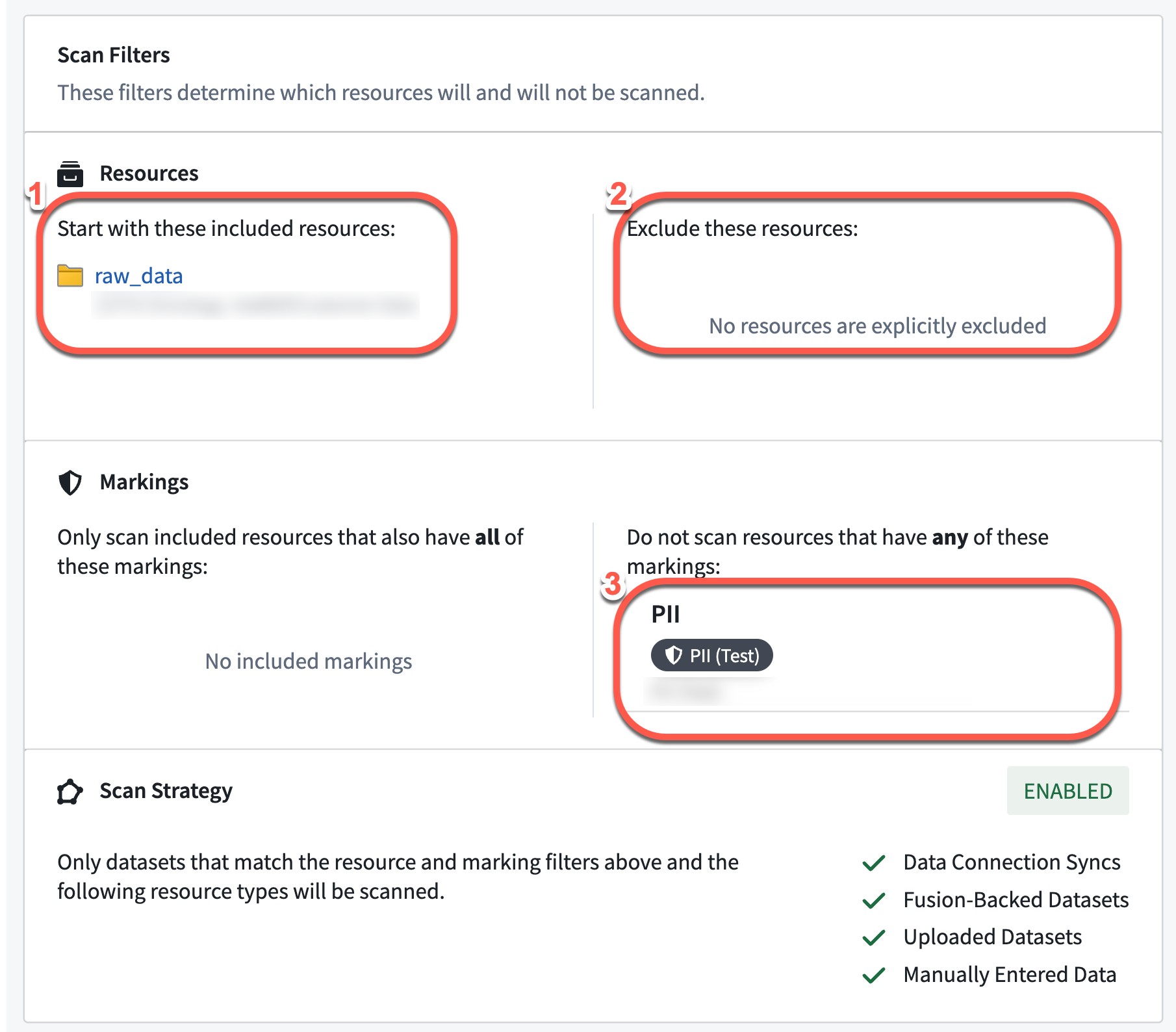
(B) Optimize the match condition applied to each scan
Running a content-based regex search over the entire dataset is exhaustive and often resource-intensive. SDS optimizes compute by biasing toward checking the schema for column names prior to performing a content-based regex search. In practice, this means that SDS prevents builds if there is no possibility of a match based on columns when using either of the following regex match conditions:
- Match column name only
- Match both column name and content
Markings
The provision of access to a Marking is binary (all-or-nothing). Regardless of role, a user cannot access a resource unless they satisfy all Marking requirements. Learn more about Markings. When a scan finds matching datasets, it applies markings automatically. Mistakenly using restrictive markings can block users from essential workflows and be hard to fix. Users should be careful and limit the match action's scope to a specific subset.
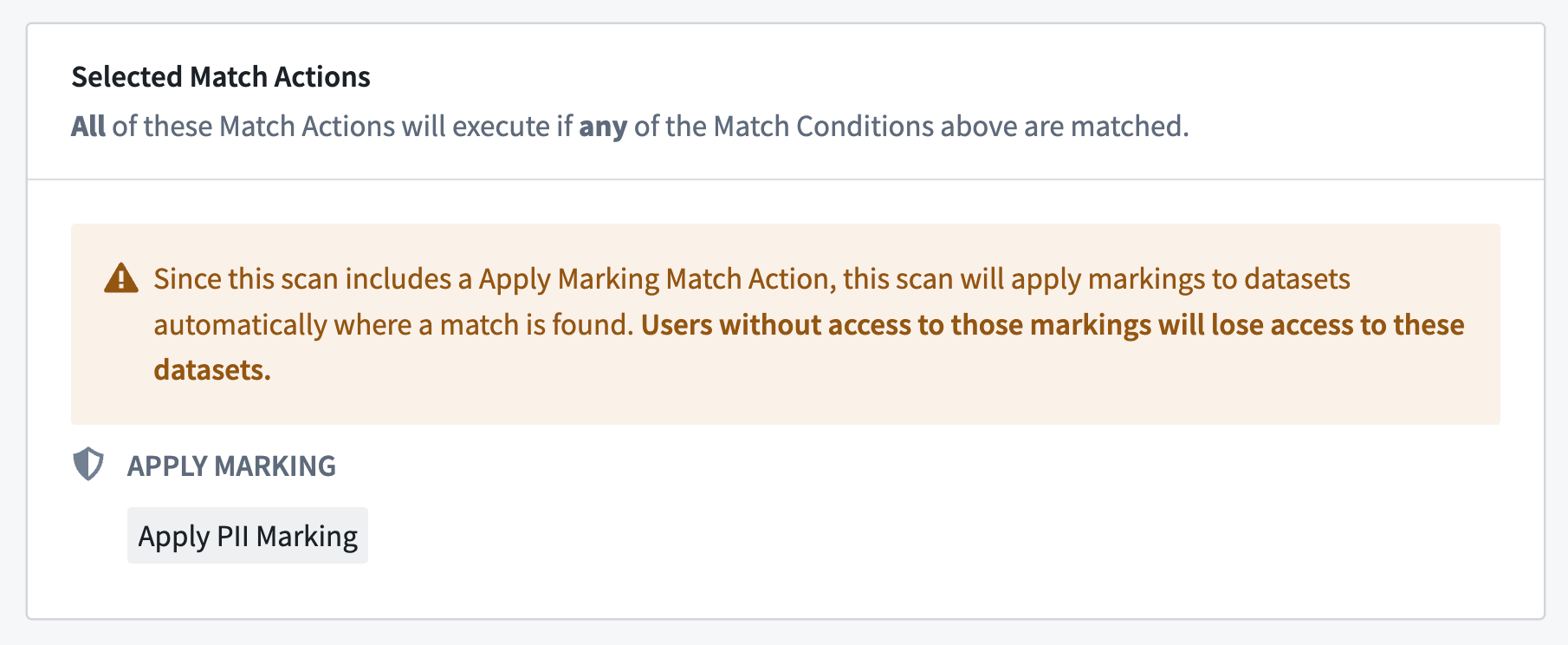
Permission Model in Sensitive Data Scanner
Sensitive Data Scanner finds and protects sensitive data in Foundry. Permissions are carefully set so a user can only do what they are allowed to with SDS without exceeding their individual permissions on the resource. Data Governance Officers can monitor the whole organization's data without needing risky Owner permissions on every resource.
This following section presents the two ways a user can interact with Foundry resources using SDS:
- Through specific Space Roles
- By being designated as the Data Governance Officer of the an organization, and having Viewer role on the space
| Action | Data Governance Officer + Space Viewer | Space Owner | Space Editor | Space Viewer (Only) |
|---|---|---|---|---|
| Configure MC & MA | ✔️ | ✔️ | ||
| Manage recurring scans | ✔️ | ✔️ | ||
| Run sensitive data scans | ✔️ | ✔️ | ||
| Cancel sensitive data scans | ✔️ | ✔️ | ||
| View sensitive data scan status | ✔️ | ✔️ | ✔️ | ✔️ |
| View MC / MA | ✔️ | ✔️ | ✔️ | ✔️ |
As a resource Owner, a user has full control over SDS scanning and can manage interactions with the resource, including configuring settings and canceling scans. Editors can only request SDS interactions based on the Owner's preferences - such as running a scan with pre-configured match conditions, while Viewers can only see SDS outcomes. However, a "Data Governance Officer" role grants scanning privileges like a Space Owner.
中文翻译
最佳实践
敏感数据扫描器(Sensitive Data Scanner, SDS)可自动配置并集成 Foundry 多项最强大的功能(如标记系统),因此建议具备 Foundry 基础能力的用户使用。以下是使用该工具时应遵循的最佳实践与指导原则。
优化计算性能
由于 SDS 可配置为扫描整个空间的数据,单次或周期性扫描的计算成本与耗时可能成为关注点。影响计算时间的因素主要有两个:数据集数量与匹配条件类型。以下针对这两方面提供扫描优化指南:
(A) 优化扫描数据集数量:
- 仅扫描数据进入平台的节点(即"边界"数据集)。
- 若已知内容敏感度,可排除整个子文件夹不参与扫描。
- 若数据集已包含PII或PHI等标记表明存在敏感数据,可排除带有特定标记的数据集不参与扫描。
(B) 优化每次扫描的匹配条件
对整个数据集执行基于内容的正则表达式搜索会消耗大量资源。SDS 通过优先检查列名模式(在执行内容正则搜索前)来优化计算。实际操作中,当使用以下任一正则匹配条件时,若根据列名判断无匹配可能,SDS 将阻止构建:
- 仅匹配列名
- 同时匹配列名与内容
标记系统
标记的访问权限是二元的(全有或全无)。无论用户角色如何,除非满足所有标记要求,否则无法访问资源。了解更多关于标记系统的信息。 当扫描发现匹配数据集时,系统会自动应用标记。误用限制性标记可能阻碍用户执行关键工作流,且难以修复。用户应谨慎操作,将匹配操作的范围限制在特定子集内。
敏感数据扫描器中的权限模型
敏感数据扫描器用于发现并保护 Foundry 中的敏感数据。权限设置经过精心设计,确保用户在使用 SDS 时仅能执行其被允许的操作,且不会超出其对资源的个人权限。数据治理官(Data Governance Officer)可在无需承担资源所有者风险的情况下监控整个组织的数据。
以下部分介绍用户通过 SDS 与 Foundry 资源交互的两种方式:
| 操作 | 数据治理官 + 空间查看者 | 空间所有者 | 空间编辑者 | 仅空间查看者 |
|---|---|---|---|---|
| 配置匹配条件与匹配操作 | ✔️ | ✔️ | ||
| 管理周期性扫描 | ✔️ | ✔️ | ||
| 运行敏感数据扫描 | ✔️ | ✔️ | ||
| 取消敏感数据扫描 | ✔️ | ✔️ | ||
| 查看敏感数据扫描状态 | ✔️ | ✔️ | ✔️ | ✔️ |
| 查看匹配条件与匹配操作 | ✔️ | ✔️ | ✔️ | ✔️ |
作为资源所有者,用户对 SDS 扫描拥有完全控制权,可管理资源交互(包括配置设置和取消扫描)。编辑者只能根据所有者的偏好请求 SDS 交互(例如使用预配置的匹配条件运行扫描),而查看者仅能查看 SDS 结果。但"数据治理官"角色可像空间所有者一样获得扫描权限。