Create match conditions(创建匹配条件)
Sensitive Data Scanner comes with a set of built-in match conditions; you can also define your own custom match conditions to use with Sensitive Data Scanner.
Built-in match conditions
Sensitive Data Scanner provides a range of built-in match conditions to detect common types of PII, such as Social Security numbers, e-mail addresses, or phone numbers. You can find these by selecting the arrow to expand the Built-in Match Conditions section in the right sidebar:
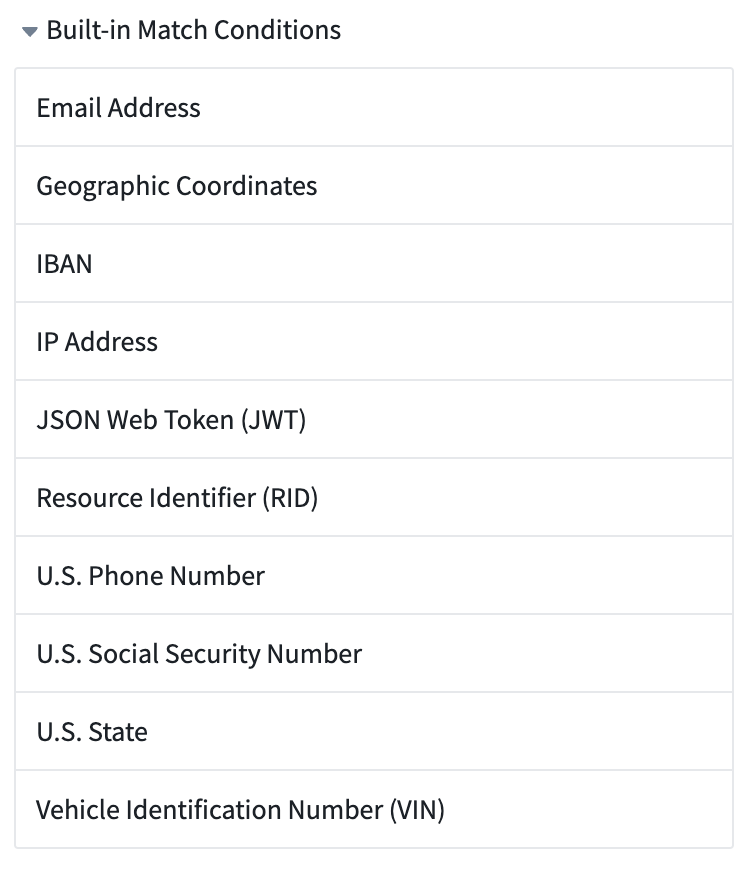
Built-in match conditions are designed to detect common types of personal data. However, their effectiveness varies based on your specific data structure and format. Ensure these conditions align with your unique data standards, potentially creating custom conditions as needed. Consult your data protection officer if you have further questions.
Create custom match conditions
To create a custom match condition for your space, there are two ways to get started:
- From the Sensitive Data Scanner landing page.
- While creating a sensitive data scan.
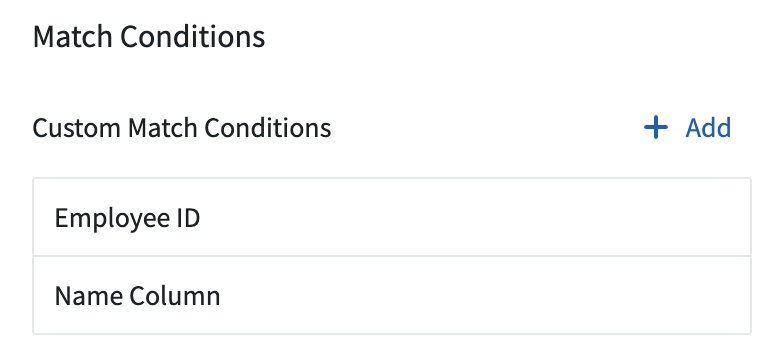
From the landing page, select Add above the Custom Match Conditions listed in the match conditions sidebar.
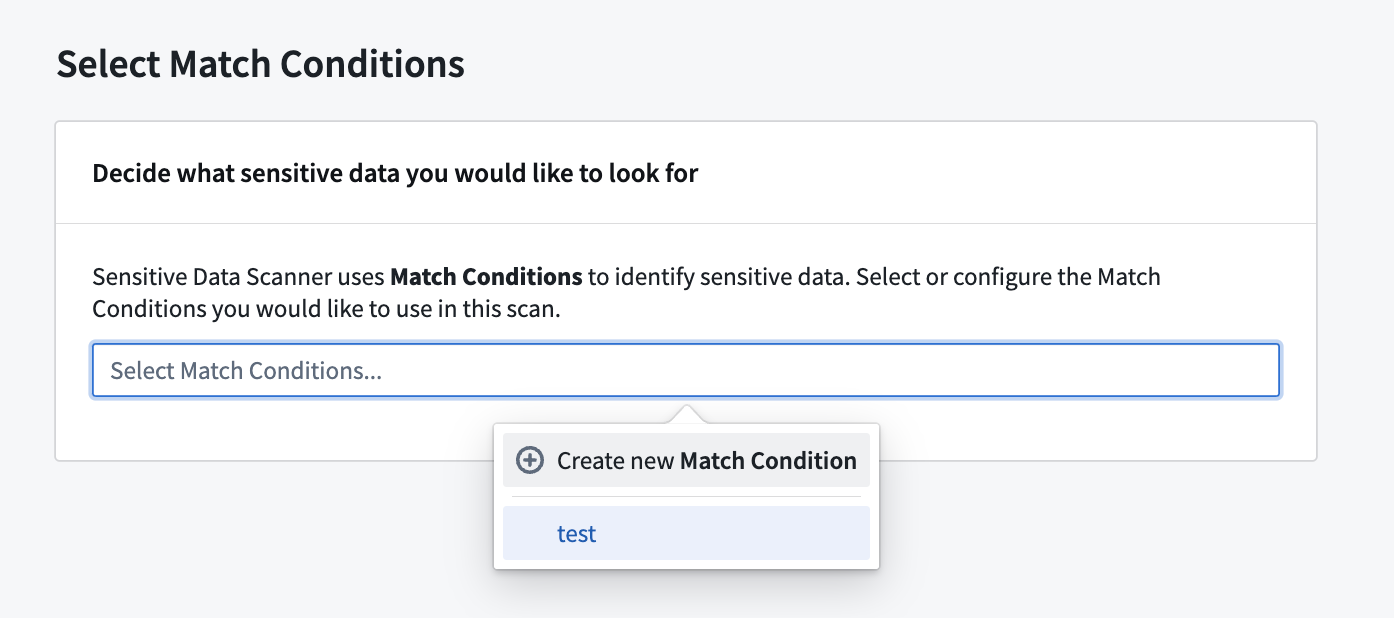
While creating a sensitive data scan, on the Select match conditions page, you can also create a new match condition and immediately use it in your scan by selecting Create new match condition.
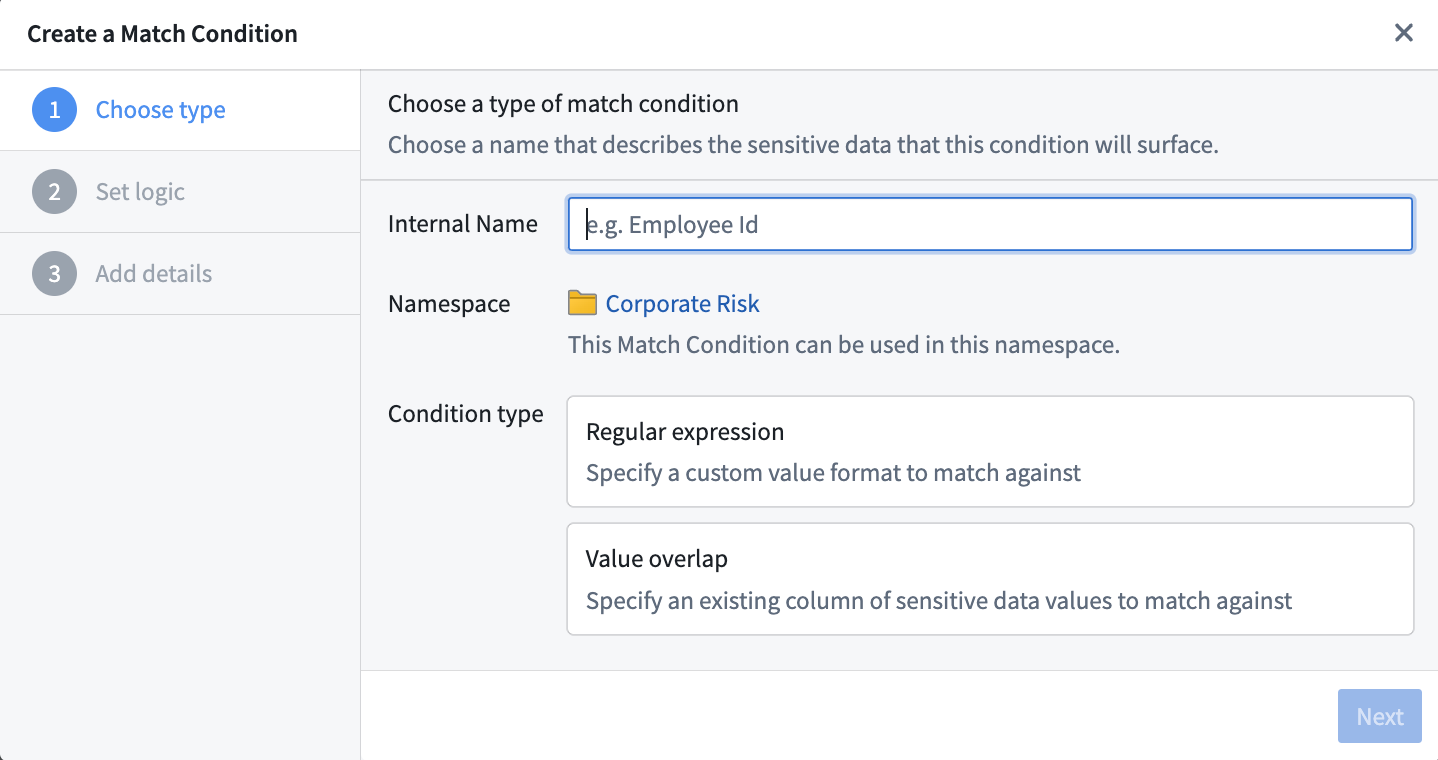
Both of these starting points open the same match condition creation process. From there, you can choose whether to create a regex (Regular expression) match condition, or an overlap (Value overlap) match condition.
Create a regex match condition
When creating a regular expression (regex) match condition, there are two types of regex options you can specify; content regex and column name regex.
- Content regex: A regex that Sensitive Data Scanner will check against the content of a dataset (not the column names of the dataset).
- Column name regex: A regex that Sensitive Data Scanner will check against the column names of a dataset (not the content itself).
Sensitive Data Scanner allows you to combine these two regex options for maximum specificity:
- Highlight a dataset if the content regex matches.
- Highlight a dataset if the column name regex matches.
- Highlight a dataset if both content and column name regexes match.
- Highlight a dataset if either content or column name regexes match.
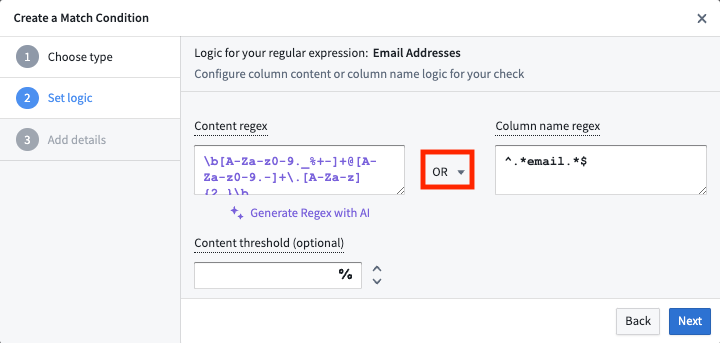
The content regex contains an optional content threshold field in which you can specify a number greater than 0 and less than or equal to 100; this content threshold is the percentage of the cells in a particular column of a given dataset that must match the content regex in order for that dataset to be highlighted as a match. The content threshold field is optional. If no value is specified, Sensitive Data Scanner will highlight a dataset as a match if there is at least one match of the content regex.
Regex generation with AIP
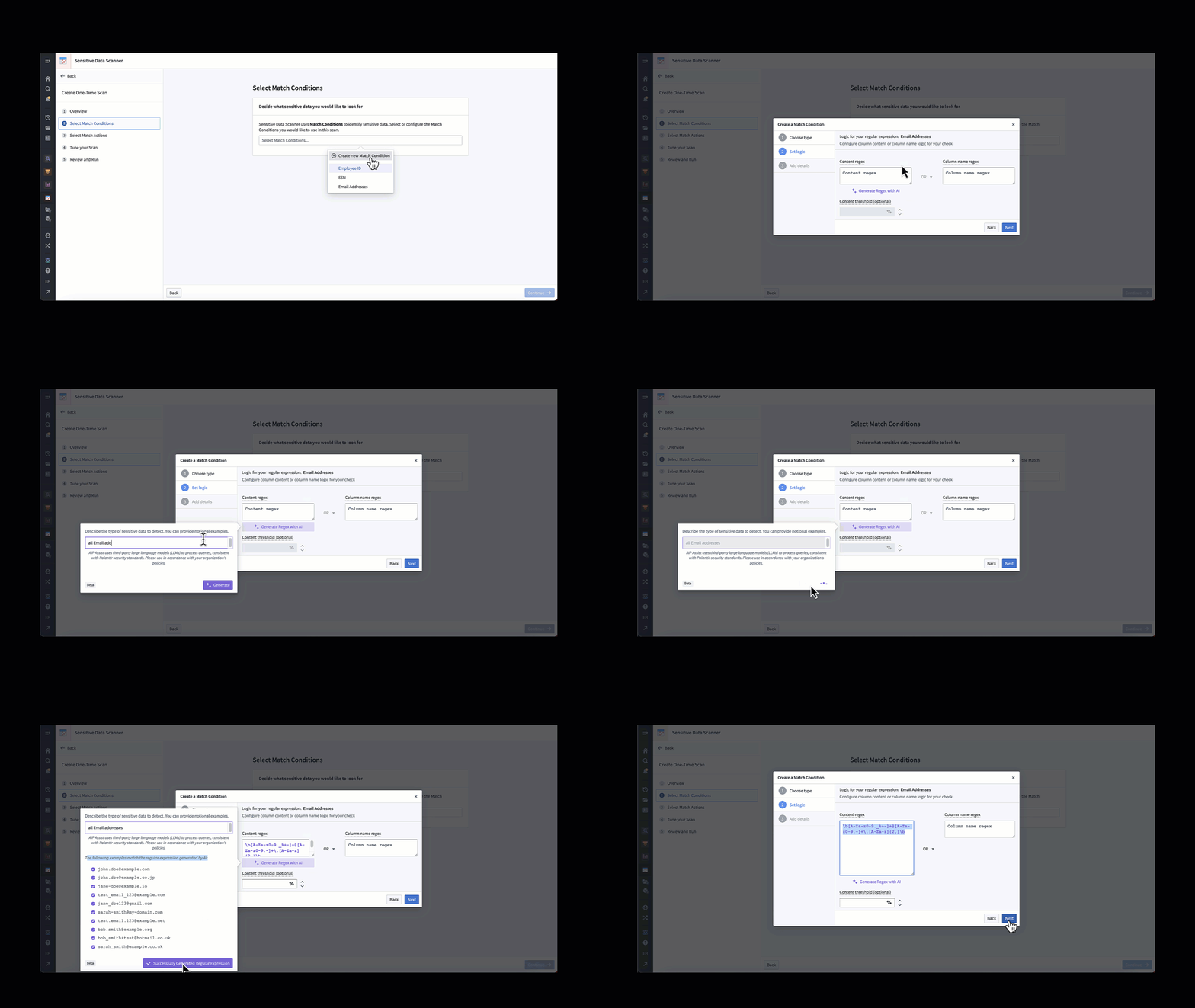
If AIP is enabled for your enrollment in Foundry, you also have the ability to specify the content regex with the help of AI. You can do this with the Generate Regex with AI button. Selecting this button will prompt you to describe the type of sensitive data to detect, for instance "all email addresses", show you examples that match the proposed regex, and then generate the regex for use in the application. The graphic below demonstrates this process.
Create an overlap match condition
Overlap match conditions are useful when looking for sensitive data that cannot be distilled into regex. For example, it can be difficult to create a content regex to match names, although creating a column name regex can be sufficient in some instances. However, the overlap match condition can be useful if you already have a dataset with an exhaustive list of sensitive data that you want to scan for.
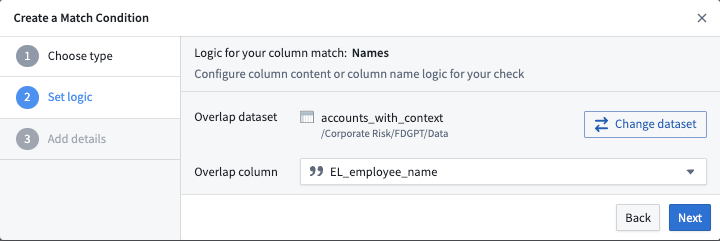
The screenshot below is an example of how to select a specific column. In this example, the EL_employee_name column of the accounts_with_context dataset is set as the overlap column to which we will match other data. If any cell in the overlap column matches any other cell in another dataset, that other dataset will be highlighted as a match for this match condition.
中文翻译
创建匹配条件
Sensitive Data Scanner 提供了一组内置匹配条件,您也可以定义自己的自定义匹配条件以供 Sensitive Data Scanner 使用。
内置匹配条件
Sensitive Data Scanner 提供了一系列内置匹配条件,用于检测常见类型的 PII(个人身份信息),例如社会安全号码、电子邮件地址或电话号码。您可以通过选择右侧边栏中的箭头展开内置匹配条件部分来找到它们:
内置匹配条件旨在检测常见类型的个人数据。然而,其有效性取决于您的具体数据结构和格式。请确保这些条件符合您的独特数据标准,必要时可创建自定义条件。如有进一步疑问,请咨询您的数据保护官。
创建自定义匹配条件
要为您的空间创建自定义匹配条件,有两种方式可以开始:
- 从 Sensitive Data Scanner 首页。
- 在创建敏感数据扫描时。
从首页开始,选择匹配条件侧边栏中自定义匹配条件上方的添加按钮。
在创建敏感数据扫描时,在选择匹配条件页面上,您也可以通过选择创建新的匹配条件来创建新的匹配条件并立即在扫描中使用。
这两种起点都会打开相同的匹配条件创建流程。在此流程中,您可以选择创建正则表达式(Regex)匹配条件,或重叠(Value overlap)匹配条件。
创建正则表达式匹配条件
在创建正则表达式(regex)匹配条件时,您可以指定两种类型的正则表达式选项:内容正则表达式和列名正则表达式。
- 内容正则表达式: Sensitive Data Scanner 将根据数据集的内容(而非数据集的列名)进行检查的正则表达式。
- 列名正则表达式: Sensitive Data Scanner 将根据数据集的列名(而非内容本身)进行检查的正则表达式。
Sensitive Data Scanner 允许您组合这两种正则表达式选项以实现最大精确度:
- 如果内容正则表达式匹配,则高亮显示数据集。
- 如果列名正则表达式匹配,则高亮显示数据集。
- 如果同时匹配内容正则表达式和列名正则表达式,则高亮显示数据集。
- 如果任一内容正则表达式或列名正则表达式匹配,则高亮显示数据集。
内容正则表达式包含一个可选的内容阈值字段,您可以在其中指定一个大于 0 且小于或等于 100 的数字;此内容阈值是指给定数据集中特定列必须匹配内容正则表达式的单元格百分比,以便将该数据集高亮显示为匹配项。内容阈值字段为可选字段。如果未指定值,则只要内容正则表达式至少匹配一次,Sensitive Data Scanner 就会将数据集高亮显示为匹配项。
使用 AIP 生成正则表达式
如果您的 Foundry 注册已启用 AIP,您还可以借助 AI 指定内容正则表达式。您可以通过使用 AI 生成正则表达式按钮来实现。选择此按钮后,系统会提示您描述要检测的敏感数据类型,例如"所有电子邮件地址",向您展示与建议正则表达式匹配的示例,然后生成可在应用程序中使用的正则表达式。下图演示了这一过程。
创建重叠匹配条件
当查找无法简化为正则表达式的敏感数据时,重叠匹配条件非常有用。例如,创建匹配名称的内容正则表达式可能很困难,尽管在某些情况下创建列名正则表达式可能就足够了。然而,如果您已经拥有一个包含要扫描的敏感数据详尽列表的数据集,重叠匹配条件可能会很有用。
下面的截图是一个如何选择特定列的示例。在此示例中,accounts_with_context 数据集的 EL_employee_name 列被设置为重叠列,我们将以此匹配其他数据。如果重叠列中的任何单元格与另一个数据集中的任何其他单元格匹配,则该另一个数据集将被高亮显示为此匹配条件的匹配项。