Apply Cipher operations to columns of datasets(对数据集列应用 Cipher 操作)
Cipher allows you to encrypt, decrypt, and hash full columns of datasets. This is supported in Pipeline Builder, Contour, and Python transforms.
:::callout{theme="warning"} When using Preview in Code Repositories or Preview in Pipeline Builder, users will not be able to see the real output of Cipher operations. Instead, users in Preview will see the placeholder value. It is important to note that data will be encrypted at build time. To see the real output of Cipher operations, users should run a build. :::
Pipeline Builder
Pipeline Builder is a data integration application that aims to make it easier to perform high-quality data integrations in Foundry. This section demonstrates how to deploy Cipher operations to obfuscate columns of datasets in Pipeline Builder. To run a Cipher operation in Pipeline Builder, users must have access to a Cipher Data Manager License or Admin License.
Encryption
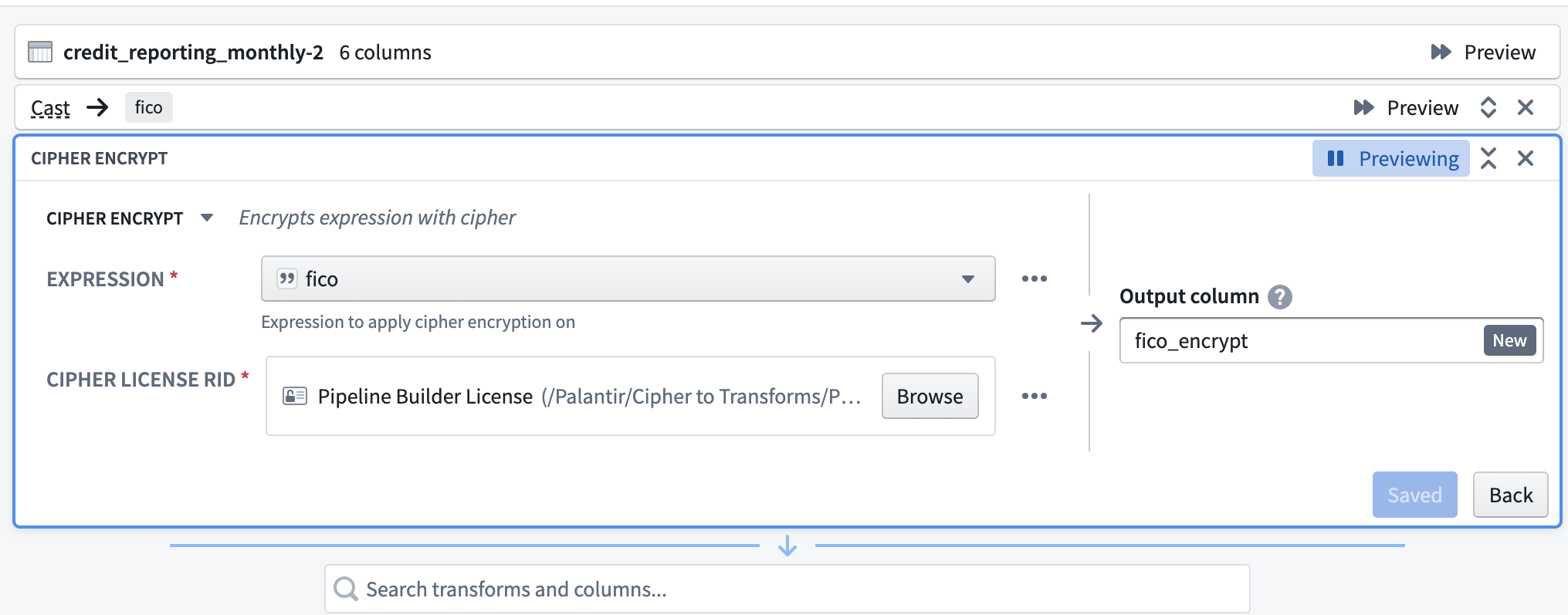
First, select the Cipher encrypt transform. Then, select an Expression (the column to be encrypted). Next, select a Data Manager License with encrypt permission, typically found in the Project folder after previous issuance in the Cipher application. Finally, name the output column.
Decryption
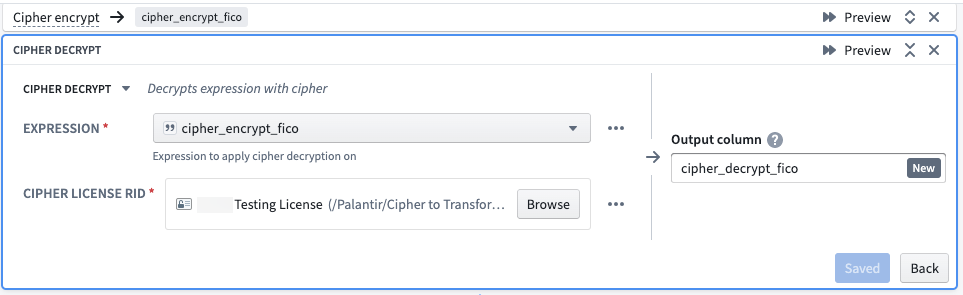
First, select the Cipher decrypt transform. When selecting an Expression, specify a column that has already been encrypted via a Cipher transform. For the Cipher License RID, select a Data Manager License with decrypt permission, typically found in the Project folder after previous issuance in the Cipher application. Note that the License must be part of the same Cipher Channel used to encrypt the relevant column. Finally, name the output column.
Hashing
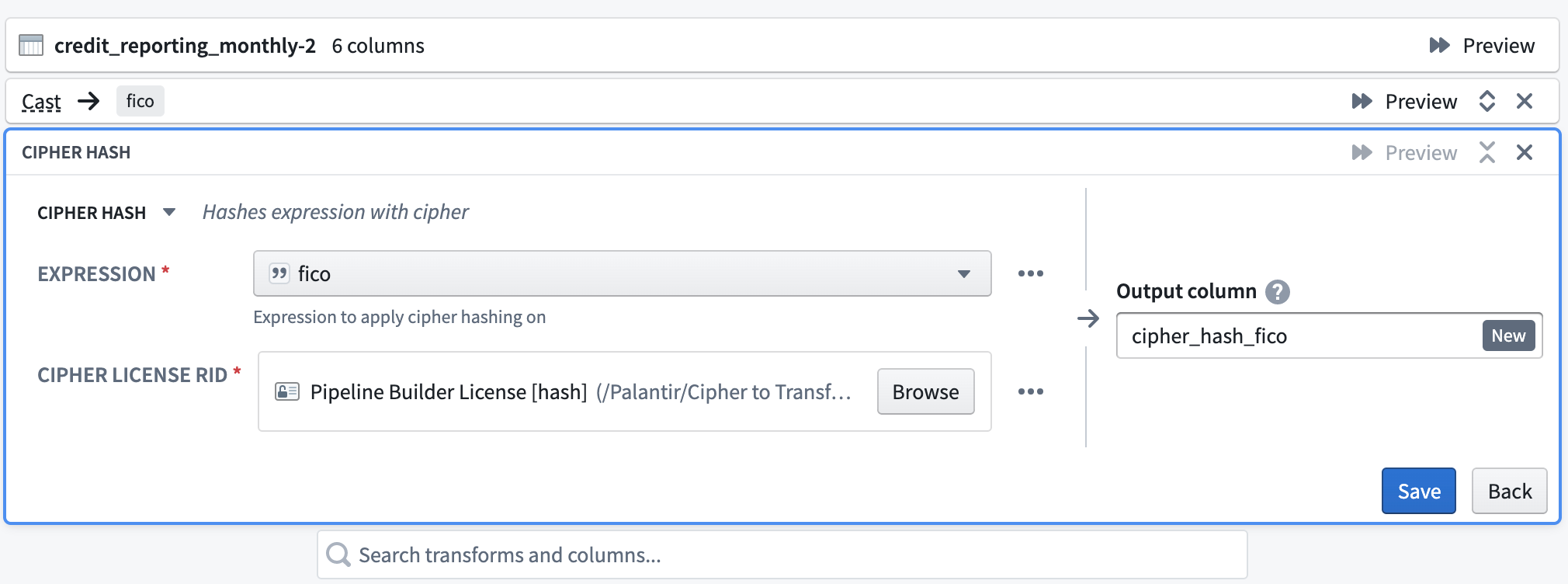
Select the Cipher hash transform. For the Expression, specify the column to hash. Next, select a Data Manager License with permission to encrypt from a hash Cipher Channel. The License would have been issued in the Cipher application and then saved in a Project folder. Finally, name the output column.
How to encrypt pipelines with Cipher (Admin and Data Manager Licenses only)
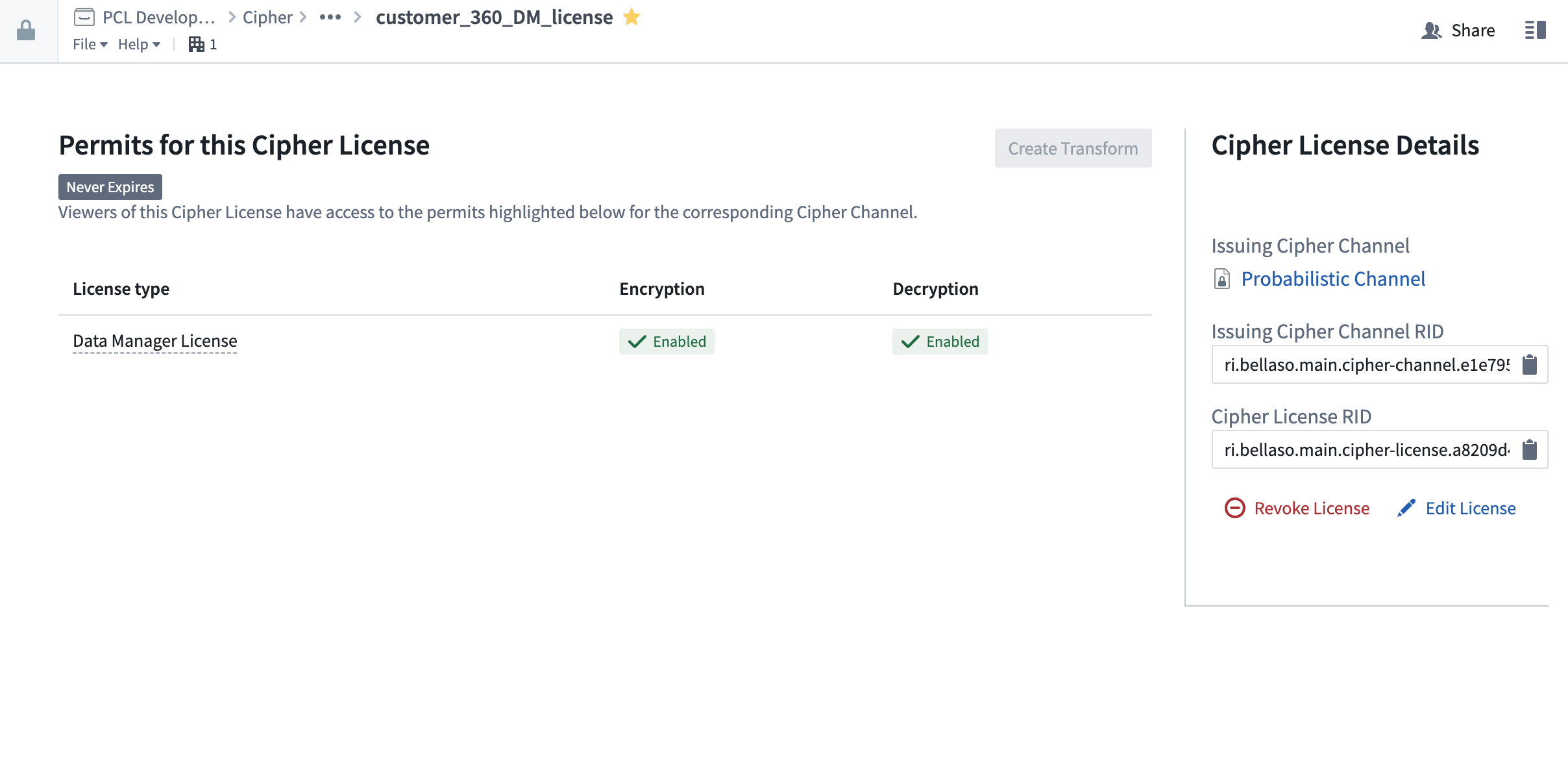
First, open a Cipher License with encrypt permission; licenses are typically found in the Project folder after previous issuance in the Cipher application. Then, select 'Create Pipeline' at the top right.
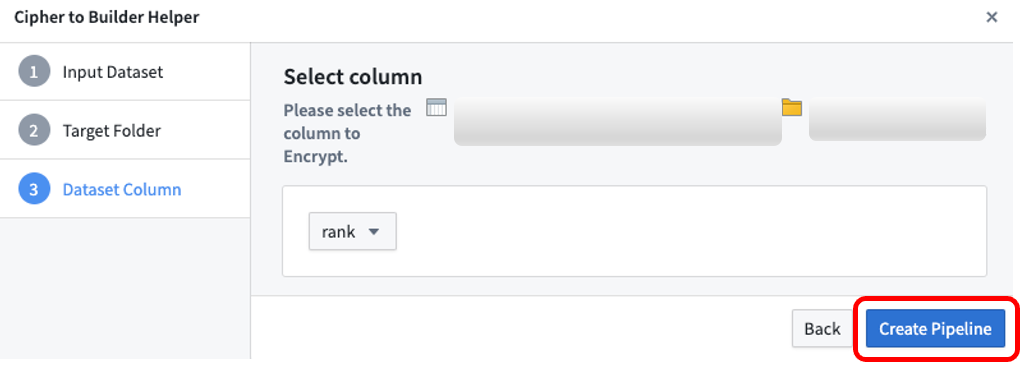
Select the input dataset to encrypt, then the target folder in which the pipeline will be saved, and then the dataset column you want to encrypt. Note that only String columns are available for encryption; if you need to encrypt another column, first cast it to String. After selecting Create Pipeline, Cipher will automatically generate a new pipeline and encrypt the column you previously selected.
Contour
Contour provides a point-and-click user interface to perform data analysis on tables at scale. This section demonstrates how to use Cipher operations to (de)obfuscate columns of datasets in a Contour Analysis. To run a Cipher operation in Contour, users must have access to a Cipher Data Manager License or Admin License. To begin, use the Contour toolbar search mode to add a Cipher board to an analysis.
:::callout{theme="neutral"} Contour's table board and table panel can be used to see the result of the Cipher operation. :::
:::callout{theme="neutral"} A Contour analysis path that uses a Cipher board cannot be saved as a dataset. :::
Encryption
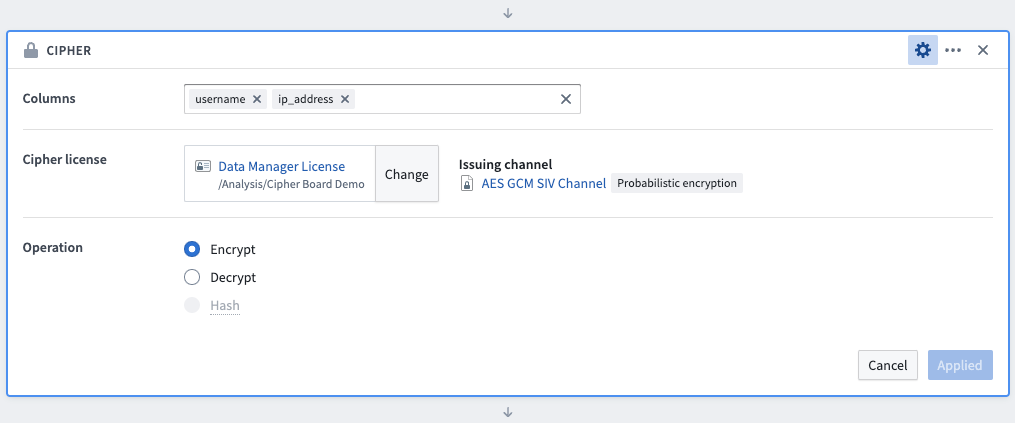
To use the Cipher board to encrypt data, first select the columns to be encrypted (the order in which the columns are selected has no impact on the operation). Next, select a Data Manager License or Admin License with encrypt permission, typically found in the Project folder after previous issuance in the Cipher application. Select the Encrypt operation and save the board. Column values will be updated by this transformation, but column names will remain unmodified.
Decryption
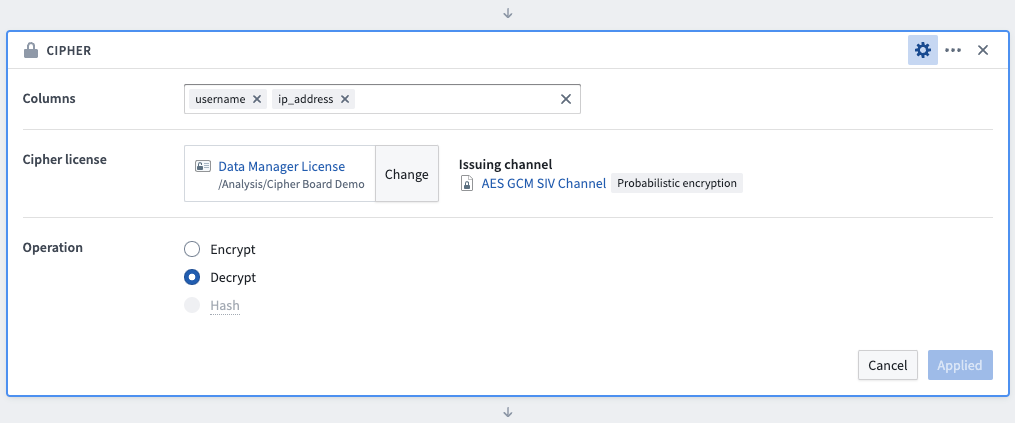
To use the Cipher board to encrypt data, first select the columns to be decrypted (the order in which the columns are selected has no impact on the operation). Next, select a Data Manager License or Admin License with decrypt permission, typically found in the Project folder after previous issuance in the Cipher application. Select the Decrypt operation and save the board. Column values will be updated by this transformation, but column names will remain unmodified.
Hashing
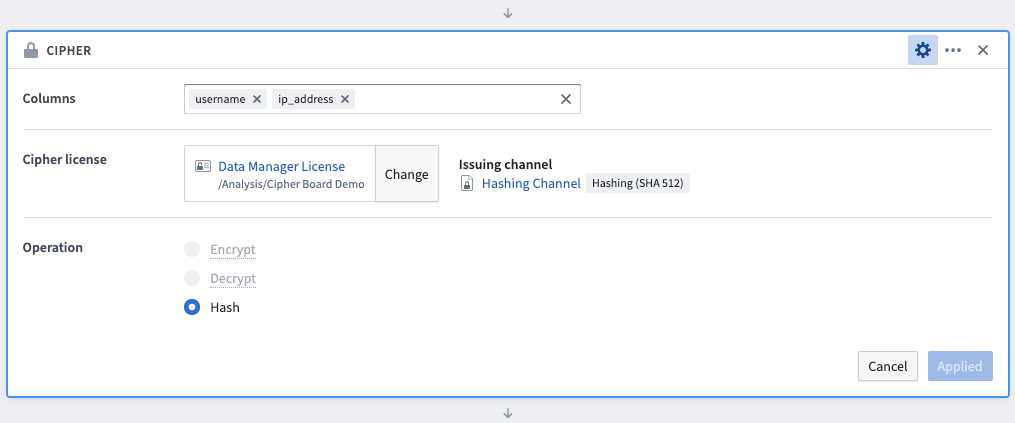
To use the Cipher board to hash data, first select the columns to be hashed (the order in which the columns are selected has no impact on the operation). Next, select a Data Manager License or Admin License with hashing permission, typically found in the Project folder after previous issuance in the Cipher application. Select the Hash operation and save the board. Column values will be updated by this transformation, but column names will remain unmodified.
Python transforms
:::callout{theme="warning" title="Deprecated methods"}
As of version 0.75.0, all pre-existing methods in bellaso-python-lib have been deprecated in favor of new implementations that increase stability and improve performance. These deprecated methods will be removed in a future release but are still available, and Foundry will display deprecation warnings when they are used.
:::
Replace deprecated bellaso-python-lib methods
If you are still using the deprecated methods in bellaso-python-lib, update your code according to the table below, with exceptions identified in the string-level operations section.
| Deprecated method | Replacement |
|---|---|
encrypt() |
encrypt_column() |
decrypt() |
decrypt_column() |
hash() |
hash_column() |
encrypt_all_matches() |
encrypt_all_matches_column() |
hash_all_matches() |
hash_all_matches_column() |
encrypt_image() |
obfuscate_image() |
decrypt_image() |
deobfuscate_image() |
Set up a repository
Add bellaso-python-lib in the requirements.run block in conda_recipe/meta.yml. You can also do this automatically by adding it in the Libraries panel of your Code Repository environment. Note that an Admin License is necessary to perform Cipher operations in Transforms.
Encryption
To encrypt a column, you will need to define an EncrypterInput in the @transforms block. The EncrypterInput takes either the RID or the filesystem path to the Cipher License. Note that the Cipher License must have encryption permission.
Example:
from transforms.api import transform, Input, Output
from pyspark.sql.functions import col
from bellaso_python_lib.encryption.encrypter_input import EncrypterInput

@transform(
    encrypter=EncrypterInput("/path/to/cipher/license"),
    output=Output("/path/to/output/dataset"),
    input_dataset=Input("/path/to/input/dataset")
)
def encrypt_column(ctx, input_dataset, output, encrypter):
    encrypted_df = input_dataset.dataframe().withColumn("your_column_name", encrypter.dataframe().encrypt_column(col("your_column_name"), ctx))
    output.write_dataframe(encrypted_df)
Decryption
To decrypt a column, you will need to define a DecrypterInput in the @transforms block. The DecrypterInput takes either the RID or the filesystem path to the Cipher License. Note that the Cipher License must have decryption permission.
Example:
from transforms.api import transform, Input, Output
from pyspark.sql.functions import col
from bellaso_python_lib.decryption.decrypter_input import DecrypterInput

@transform(
    decrypter=DecrypterInput("/path/to/cipher/license"),
    output=Output("/path/to/output/dataset"),
    input_dataset=Input("/path/to/input/dataset")
)
def decrypt_column(ctx, input_dataset, output, decrypter):
    decrypted_df = input_dataset.dataframe().withColumn("your_column_name", decrypter.dataframe().decrypt_column(col("your_column_name"), ctx))
    output.write_dataframe(decrypted_df)
Hashing
To hash a column, you will need to define an HasherInput in the @transforms block. The HasherInput takes either the RID or the filesystem path to the Cipher License. Note that the Cipher License must have hashing permission.
Example:
from transforms.api import transform, Input, Output
from pyspark.sql.functions import col
from bellaso_python_lib.encryption.hasher_input import HasherInput

@transform(
    hasher=HasherInput("/path/to/cipher/license"),
    output=Output("/path/to/output/dataset"),
    input_dataset=Input("/path/to/input/dataset")
)
def hash_column(ctx, input_dataset, output, hasher):
    hashed_df = input_dataset.dataframe().withColumn("your_column_name", hasher.dataframe().hash_column(col("your_column_name"), ctx))
    output.write_dataframe(hashed_df)
:::callout{theme="neutral"} To encrypt or hash data upon ingestion, you can use Cipher's Python library along with external transforms. :::
Incremental transforms
To use Cipher in an incremental transform, you must list all encrypters, decrypters, and hashers as snapshot inputs.
Example:
from transforms.api import transform, incremental, Input, Output
from bellaso_python_lib.encryption.encrypter_input import EncrypterInput
from pyspark.sql.functions import col


@incremental(
    snapshot_inputs=['encrypter']
)
@transform(
    encrypter=EncrypterInput("<YOUR_CIPHER_LICENSE_RID>"),
    output=Output("/path/to/output/dataset")
    input_dataset=Input("/path/to/input/dataset")
)
def encrypt_column(ctx, input_dataset, output, encrypter):
    encrypted_df = input_dataset.dataframe().withColumn("encrypted_column", encrypter.dataframe().encrypt_column(col("<YOUR_COLUMN_NAME>"), ctx))
    output.write_dataframe(encrypted_df)
Visual obfuscation
To hash a column, you will need to define an EncrypterInput in the @transforms block. The EncrypterInput takes either the RID or the filesystem path to the Cipher License. Note that the Cipher License must have encryption permission.
Example:
from transforms.mediasets import MediaSetInput, MediaSetOutput
import io
from bellaso_python_lib.encryption.encrypter_input import EncrypterInput
from bellaso_python_lib.types import Coordinate

@transform(
    mediaset_in=MediaSetInput("</path/to/input/media/set"),
    mediaset_out=MediaSetOutput("</path/to/output/media/set"),
    encrypter=EncrypterInput("/path/to/cipher/license"),
    polygons=Input("/path/to/polygon/dataset"),
)
def compute(mediaset_in, mediaset_out, encrypter, polygons, ctx,):

    media_references = mediaset_in.list_media_items_by_path_with_media_reference(
        ctx
    ).collect()  # noqa

    for row in media_references:
        image_file = mediaset_in.get_media_item(row["mediaItemRid"])

        plainview_image = image_file.read()

        # Encrypt a square in the top left of the image, 100 px by 100 px.
        polygon = [Coordinate({"x": 0, "y": 0}), Coordinate({"x": 100, "y": 0}), Coordinate({"x": 100, "y": 100}), Coordinate({"x": 0, "y": 100})]

        polygon_list = [polygon]

        if plainview_image:
            encrypted_image = encrypter.obfuscate_image(plainview_image, polygon_list, ctx)

            mediaset_out.put_media_item(io.BytesIO(encrypted_image), row["path"])
String-level operations
The bellaso-python-lib library provides string-level methods that operate on plain Python strings rather than PySpark columns. Use these methods when working in contexts that are incompatible with PySpark user-defined functions, such as inside nested functions or when using F.transform() for array columns.
The following string-level methods are available:
| Class | Method | Description |
|---|---|---|
TransformsEncrypter |
encrypt_string(plaintext) |
Encrypt a single string value |
TransformsEncrypter |
encrypt_all_matches_string(plaintext, regex) |
Encrypt all regex matches in a string |
TransformsDecrypter |
decrypt_string(ciphertext) |
Decrypt a single string value |
TransformsHasher |
hash_string(plaintext) |
Hash a single string value |
TransformsHasher |
hash_all_matches_string(plaintext, regex) |
Hash all regex matches in a string |
Example:
from transforms.api import transform, Input, Output
from pyspark.sql import functions as F
from pyspark.sql.functions import col
from bellaso_python_lib.encryption.encrypter_input import EncrypterInput

@transform(
    encrypter=EncrypterInput("/path/to/cipher/license"),
    output=Output("/path/to/output/dataset"),
    input_dataset=Input("/path/to/input/dataset")
)
def encrypt_nested_values(ctx, input_dataset, output, encrypter):
    enc = encrypter.dataframe()
    encrypted_df = input_dataset.dataframe().withColumn(
        "encrypted_array",
        F.transform(col("string_array"), lambda x: F.lit(enc.encrypt_string(x)))
    )
    output.write_dataframe(encrypted_df)
中文翻译
对数据集列应用 Cipher 操作
Cipher 允许您对数据集的整列数据进行加密、解密和哈希处理。该功能在 Pipeline Builder、Contour 和 Python transforms 中均受支持。
:::callout{theme="warning"} 在代码仓库预览或 Pipeline Builder 预览中,用户将无法看到 Cipher 操作的真实输出。预览中的用户将看到的是占位值。请注意,数据将在构建时进行加密。要查看 Cipher 操作的真实输出,用户应运行一次构建。 :::
Pipeline Builder
Pipeline Builder 是一个数据集成应用,旨在简化在 Foundry 中执行高质量数据集成的过程。本节演示如何在 Pipeline Builder 中部署 Cipher 操作以混淆数据集的列。要在 Pipeline Builder 中运行 Cipher 操作,用户必须拥有 Cipher 数据管理员许可证或管理员许可证。
加密
首先,选择 Cipher 加密转换。然后,选择一个 Expression(要加密的列)。接着,选择具有加密权限的数据管理员许可证,该许可证通常位于项目文件夹中(之前在 Cipher 应用中签发)。最后,为输出列命名。
解密
首先,选择 Cipher 解密转换。在选择 Expression 时,指定一个已通过 Cipher 转换加密的列。对于 Cipher 许可证 RID,选择具有解密权限的数据管理员许可证,该许可证通常位于项目文件夹中(之前在 Cipher 应用中签发)。请注意,该许可证必须与用于加密相关列的 Cipher Channel 属于同一通道。最后,为输出列命名。
哈希
选择 Cipher 哈希转换。对于 Expression,指定要哈希的列。接着,选择具有从哈希 Cipher Channel 加密权限的数据管理员许可证。该许可证将在 Cipher 应用中签发,然后保存在项目文件夹中。最后,为输出列命名。
如何使用 Cipher 加密管道(仅限管理员和数据管理员许可证)
首先,打开一个具有加密权限的 Cipher 许可证;许可证通常位于项目文件夹中(之前在 Cipher 应用中签发)。然后,点击右上角的"创建管道"。
选择要加密的输入数据集,然后选择管道保存的目标文件夹,再选择要加密的数据集列。请注意,只有 String 类型的列可用于加密;如果需要加密其他类型的列,请先将其转换为 String。选择创建管道后,Cipher 将自动生成一个新管道并加密您之前选择的列。
Contour
Contour 提供点击式用户界面,用于对大规模表格进行数据分析。本节演示如何在 Contour 分析中使用 Cipher 操作来(解)混淆数据集的列。要在 Contour 中运行 Cipher 操作,用户必须拥有 Cipher 数据管理员许可证或管理员许可证。首先,使用 Contour 工具栏的搜索模式向分析中添加一个 Cipher 面板。
:::callout{theme="neutral"} Contour 的表格面板和表格子面板可用于查看 Cipher 操作的结果。 :::
:::callout{theme="neutral"} 使用 Cipher 面板的 Contour 分析路径无法保存为数据集。 :::
加密
要使用 Cipher 面板加密数据,首先选择要加密的列(列的选择顺序不影响操作)。接着,选择具有加密权限的数据管理员许可证或管理员许可证,该许可证通常位于项目文件夹中(之前在 Cipher 应用中签发)。选择加密操作并保存面板。此转换将更新列的值,但列名保持不变。
解密
要使用 Cipher 面板解密数据,首先选择要解密的列(列的选择顺序不影响操作)。接着,选择具有解密权限的数据管理员许可证或管理员许可证,该许可证通常位于项目文件夹中(之前在 Cipher 应用中签发)。选择解密操作并保存面板。此转换将更新列的值,但列名保持不变。
哈希
要使用 Cipher 面板哈希数据,首先选择要哈希的列(列的选择顺序不影响操作)。接着,选择具有哈希权限的数据管理员许可证或管理员许可证,该许可证通常位于项目文件夹中(之前在 Cipher 应用中签发)。选择哈希操作并保存面板。此转换将更新列的值,但列名保持不变。
Python transforms
:::callout{theme="warning" title="已弃用的方法"}
从版本 0.75.0 开始,bellaso-python-lib 中所有先前存在的方法均已弃用,取而代之的是提高稳定性和性能的新实现。这些已弃用的方法在未来的版本中将被移除,但目前仍可使用,Foundry 会在使用它们时显示弃用警告。
:::
替换已弃用的 bellaso-python-lib 方法
如果您仍在使用 bellaso-python-lib 中已弃用的方法,请根据下表更新代码,字符串级操作部分中标识的例外情况除外。
| 已弃用的方法 | 替换方法 |
|---|---|
encrypt() |
encrypt_column() |
decrypt() |
decrypt_column() |
hash() |
hash_column() |
encrypt_all_matches() |
encrypt_all_matches_column() |
hash_all_matches() |
hash_all_matches_column() |
encrypt_image() |
obfuscate_image() |
decrypt_image() |
deobfuscate_image() |
设置仓库
在 conda_recipe/meta.yml 的 requirements.run 块中添加 bellaso-python-lib。您也可以通过代码仓库环境的库面板自动添加。请注意,在 Transforms 中执行 Cipher 操作需要管理员许可证。
加密
要加密一列,您需要在 @transforms 块中定义一个 EncrypterInput。EncrypterInput 接受 Cipher 许可证的 RID 或文件系统路径。请注意,Cipher 许可证必须具有加密权限。
示例:
from transforms.api import transform, Input, Output
from pyspark.sql.functions import col
from bellaso_python_lib.encryption.encrypter_input import EncrypterInput

@transform(
    encrypter=EncrypterInput("/path/to/cipher/license"),
    output=Output("/path/to/output/dataset"),
    input_dataset=Input("/path/to/input/dataset")
)
def encrypt_column(ctx, input_dataset, output, encrypter):
    encrypted_df = input_dataset.dataframe().withColumn("your_column_name", encrypter.dataframe().encrypt_column(col("your_column_name"), ctx))
    output.write_dataframe(encrypted_df)
解密
要解密一列,您需要在 @transforms 块中定义一个 DecrypterInput。DecrypterInput 接受 Cipher 许可证的 RID 或文件系统路径。请注意,Cipher 许可证必须具有解密权限。
示例:
from transforms.api import transform, Input, Output
from pyspark.sql.functions import col
from bellaso_python_lib.decryption.decrypter_input import DecrypterInput

@transform(
    decrypter=DecrypterInput("/path/to/cipher/license"),
    output=Output("/path/to/output/dataset"),
    input_dataset=Input("/path/to/input/dataset")
)
def decrypt_column(ctx, input_dataset, output, decrypter):
    decrypted_df = input_dataset.dataframe().withColumn("your_column_name", decrypter.dataframe().decrypt_column(col("your_column_name"), ctx))
    output.write_dataframe(decrypted_df)
哈希
要哈希一列,您需要在 @transforms 块中定义一个 HasherInput。HasherInput 接受 Cipher 许可证的 RID 或文件系统路径。请注意,Cipher 许可证必须具有哈希权限。
示例:
from transforms.api import transform, Input, Output
from pyspark.sql.functions import col
from bellaso_python_lib.encryption.hasher_input import HasherInput

@transform(
    hasher=HasherInput("/path/to/cipher/license"),
    output=Output("/path/to/output/dataset"),
    input_dataset=Input("/path/to/input/dataset")
)
def hash_column(ctx, input_dataset, output, hasher):
    hashed_df = input_dataset.dataframe().withColumn("your_column_name", hasher.dataframe().hash_column(col("your_column_name"), ctx))
    output.write_dataframe(hashed_df)
:::callout{theme="neutral"} 要在数据摄取时进行加密或哈希,您可以将 Cipher 的 Python 库与外部转换结合使用。 :::
增量转换
要在增量转换中使用 Cipher,您必须将所有加密器、解密器和哈希器列为快照输入。
示例:
from transforms.api import transform, incremental, Input, Output
from bellaso_python_lib.encryption.encrypter_input import EncrypterInput
from pyspark.sql.functions import col


@incremental(
    snapshot_inputs=['encrypter']
)
@transform(
    encrypter=EncrypterInput("<YOUR_CIPHER_LICENSE_RID>"),
    output=Output("/path/to/output/dataset")
    input_dataset=Input("/path/to/input/dataset")
)
def encrypt_column(ctx, input_dataset, output, encrypter):
    encrypted_df = input_dataset.dataframe().withColumn("encrypted_column", encrypter.dataframe().encrypt_column(col("<YOUR_COLUMN_NAME>"), ctx))
    output.write_dataframe(encrypted_df)
视觉混淆
要哈希一列,您需要在 @transforms 块中定义一个 EncrypterInput。EncrypterInput 接受 Cipher 许可证的 RID 或文件系统路径。请注意,Cipher 许可证必须具有加密权限。
示例:
from transforms.mediasets import MediaSetInput, MediaSetOutput
import io
from bellaso_python_lib.encryption.encrypter_input import EncrypterInput
from bellaso_python_lib.types import Coordinate

@transform(
    mediaset_in=MediaSetInput("</path/to/input/media/set"),
    mediaset_out=MediaSetOutput("</path/to/output/media/set"),
    encrypter=EncrypterInput("/path/to/cipher/license"),
    polygons=Input("/path/to/polygon/dataset"),
)
def compute(mediaset_in, mediaset_out, encrypter, polygons, ctx,):

    media_references = mediaset_in.list_media_items_by_path_with_media_reference(
        ctx
    ).collect()  # noqa

    for row in media_references:
        image_file = mediaset_in.get_media_item(row["mediaItemRid"])

        plainview_image = image_file.read()

        # 加密图像左上角一个 100x100 像素的正方形区域。
        polygon = [Coordinate({"x": 0, "y": 0}), Coordinate({"x": 100, "y": 0}), Coordinate({"x": 100, "y": 100}), Coordinate({"x": 0, "y": 100})]

        polygon_list = [polygon]

        if plainview_image:
            encrypted_image = encrypter.obfuscate_image(plainview_image, polygon_list, ctx)

            mediaset_out.put_media_item(io.BytesIO(encrypted_image), row["path"])
字符串级操作
bellaso-python-lib 库提供了字符串级方法,这些方法操作的是纯 Python 字符串而非 PySpark 列。当在无法兼容 PySpark 用户自定义函数的上下文中使用时(例如在嵌套函数内部或对数组列使用 F.transform() 时),请使用这些方法。
可用的字符串级方法如下:
| 类 | 方法 | 描述 |
|---|---|---|
TransformsEncrypter |
encrypt_string(plaintext) |
加密单个字符串值 |
TransformsEncrypter |
encrypt_all_matches_string(plaintext, regex) |
加密字符串中所有匹配正则表达式的内容 |
TransformsDecrypter |
decrypt_string(ciphertext) |
解密单个字符串值 |
TransformsHasher |
hash_string(plaintext) |
哈希单个字符串值 |
TransformsHasher |
hash_all_matches_string(plaintext, regex) |
哈希字符串中所有匹配正则表达式的内容 |
示例:
from transforms.api import transform, Input, Output
from pyspark.sql import functions as F
from pyspark.sql.functions import col
from bellaso_python_lib.encryption.encrypter_input import EncrypterInput

@transform(
    encrypter=EncrypterInput("/path/to/cipher/license"),
    output=Output("/path/to/output/dataset"),
    input_dataset=Input("/path/to/input/dataset")
)
def encrypt_nested_values(ctx, input_dataset, output, encrypter):
    enc = encrypter.dataframe()
    encrypted_df = input_dataset.dataframe().withColumn(
        "encrypted_array",
        F.transform(col("string_array"), lambda x: F.lit(enc.encrypt_string(x)))
    )
    output.write_dataframe(encrypted_df)