Use CipherText properties in Functions and Actions(在 Functions 和 Actions 中使用 CipherText 属性)
:::callout{theme="neutral"} Use of Cipher in Functions requires an Operational User License. If checkpoints are configured for this operation (hashing, encrypting, decrypting), the license must be allowed to bypass checkpoints. :::
Functions code repositories can be used to interact with CipherText object properties, enabling sophisticated logic like bulk encryption or bulk decryption. To get started with Functions, see this tutorial.
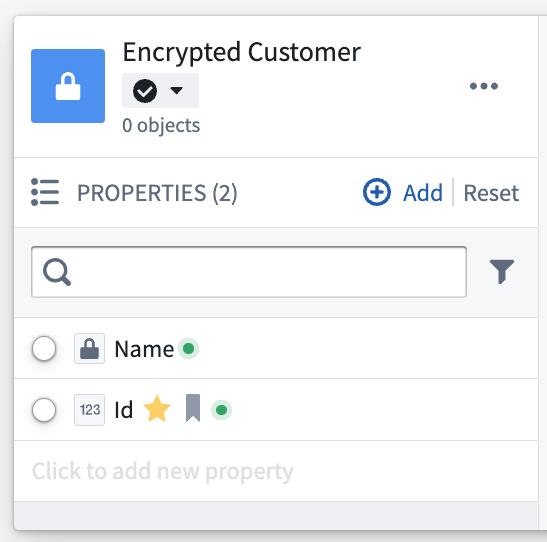
For the examples below assume we have an EncryptedCustomer object with the following properties:
- An encrypted CipherText
name - A unique, unencrypted integer
id
We will be writing two functions to interact with this object:
decryptEncryptedCustomer()will take in anEncryptedCustomerobject and return the plaintext name.updateEncryptedName()will take in anEncryptedCustomerobject and anewNameand update the encrypted name of that object to thenewName.
Decrypting CipherText Properties in Functions
In this example we decrypt and return the name property of an EncryptedCustomer object.
import { Function, Integer, OntologyEditFunction, Edits } from "@foundry/functions-api";
import { Objects, EncryptedCustomers } from "@foundry/ontology-api";

@Function()
public async decryptEncryptedCustomer(customer: EncryptedCustomers): Promise<string | undefined> {
    return await customer.name?.decryptAsync();
}
Updating CipherText Properties in Functions
In the example below, we update the name property of an EncryptedCustomer object. Note that the function in this example, like any function that updates objects, must be annotated with @OntologyEditFunction() and @Edits(EncryptedCustomers). Also note that running this function in preview will not actually edit the object.
import { Function, Integer, OntologyEditFunction, Edits } from "@foundry/functions-api";
import { Objects, EncryptedCustomers } from "@foundry/ontology-api";

@OntologyEditFunction()
@Edits(EncryptedCustomers)
public async updateEncryptedName(customer: EncryptedCustomers, newName: string): Promise<void> {
    await customer.name?.updateAsync(newName);
}
中文翻译
在 Functions 和 Actions 中使用 CipherText 属性
:::callout{theme="neutral"} 在 Functions 中使用 Cipher 需要操作员用户许可证。如果为此操作(哈希、加密、解密)配置了检查点,则必须允许该许可证绕过检查点。 :::
Functions 代码仓库可用于与 CipherText 对象属性进行交互,从而实现批量加密或批量解密等复杂逻辑。要开始使用 Functions,请参阅本教程。
以下示例假设我们有一个 EncryptedCustomer 对象,包含以下属性:
- 一个加密的 CipherText 类型
name - 一个唯一的、未加密的整数类型
id
我们将编写两个函数来与此对象交互:
decryptEncryptedCustomer()将接收一个EncryptedCustomer对象并返回明文名称。updateEncryptedName()将接收一个EncryptedCustomer对象和一个newName,并将该对象的加密名称更新为newName。
在 Functions 中解密 CipherText 属性
在此示例中,我们解密并返回 EncryptedCustomer 对象的 name 属性。
import { Function, Integer, OntologyEditFunction, Edits } from "@foundry/functions-api";
import { Objects, EncryptedCustomers } from "@foundry/ontology-api";

@Function()
public async decryptEncryptedCustomer(customer: EncryptedCustomers): Promise<string | undefined> {
    return await customer.name?.decryptAsync();
}
在 Functions 中更新 CipherText 属性
在下面的示例中,我们更新 EncryptedCustomer 对象的 name 属性。请注意,此示例中的函数与任何更新对象的函数一样,必须使用 @OntologyEditFunction() 和 @Edits(EncryptedCustomers) 进行注解。同时请注意,在预览模式下运行此函数不会实际编辑对象。
import { Function, Integer, OntologyEditFunction, Edits } from "@foundry/functions-api";
import { Objects, EncryptedCustomers } from "@foundry/ontology-api";

@OntologyEditFunction()
@Edits(EncryptedCustomers)
public async updateEncryptedName(customer: EncryptedCustomers, newName: string): Promise<void> {
    await customer.name?.updateAsync(newName);
}