Getting started(入门指南)
This guide includes the following sections:
Create a Cipher Channel
When creating a Cipher Channel you will first be asked to choose a cryptographic algorithm before creating a secret. There are two ways to create a new Cipher Channel:
Option 1: Create a Cipher Channel through the platform filesystem
Navigate to the Project of your choice and create a new Cipher Channel by selecting + New > Cipher Channel. Select the algorithm of your choice; we recommend AES SIV to perform joins on encrypted values.

:::callout{theme="neutral"} If you do not have the ability to create a Cipher Channel in your Foundry filesystem, contact your Palantir representative for assistance. :::
Option 2: Create a Cipher Channel through the Cipher application
Navigate to the left side of the panel and look for Cipher under Platform Apps > Data Governance, and follow the same instructions as under Option 1.

How to choose your cryptographic algorithm
The on-screen guide will walk you through the process of creating a Cipher Channel with your desired protocols. The following are additional details that may assist you in deciding which configuration to choose from for your use case:
- Algorithm: Cipher currently supports the following algorithms:
- Text-based: AES_GCM_SIV Probabilistic Encryption Algorithm, AES_SIV Deterministic Encryption Algorithm, SHA-256 Hashing Algorithm (with a pepper), and SHA-512 Hashing Algorithm (with a pepper).
- Image-based: Visual Obfuscation Image Scrambling.
The key difference between hashing and encryption is that encrypted values can be decrypted if a user has proper permissions, while hashed values cannot be de-obfuscated or re-identified through a cryptographic operation. If your use case requires re-identification, we recommend using encryption.
The key difference between probabilistic and deterministic encryption is the following:
- Probabilistic encryption: The same input will always lead to a different output.
- Deterministic encryption: The same input will always lead to the same output.
- Hashing: Always deterministic.
The Visual Obfuscation Image Scrambling algorithm is deterministic and reversible.
Some considerations that should be taken into account when choosing between deterministic and probabilistic algorithms are:
- If you need to perform joins or aggregations on encrypted data, you need a deterministic algorithm.
- If the data you want to encrypt has low cardinality or well-known statistical distribution, you may want to choose a probabilistic algorithm in order to limit the risk of dictionary or statistical attacks against the encrypted data.
How to Configure your Cryptosystem Keys
The on-screen guide will walk you through the process of configuring your cryptosystem. Depending on which cryptographic algorithm you previously chose, you will have different secret formats to choose from to protect your sensitive data.
- Secrets:
- Encryption: There are two key retrieval methods that allow you to derive a key from your secret:
- Stretching key derivation (Recommended): The Cipher service will derive a key from your secret by applying a method that traditionally strengthens the key. Note that you can randomly generate a secret by clicking on the key button.
- Single key: This methodology does not include derivation functions. We recommend using this if you already have a well-designed AES_SIV key that you would like to use as the key itself. This should be inputted as a base64-encoded string of length 64.
- Hashing: Hash secret creation:
- We recommend creating a hash secret yourself by running a command in your terminal (minimum 14 characters and randomly generated).
- Alternatively, you can randomly generate a secret by clicking on the key button.
- Visual Obfuscation: Image scrambling seed:
- Provide a long, random number that will be used as a seed to generate the sequence to rearrange and modify the pixels in the image.
Clicking on Create cipher channel will conclude the Cipher Channel creation process.
Issue a License
To issue Cipher Licenses, navigate to a Cipher Channel and click on the Create New Cipher License button.
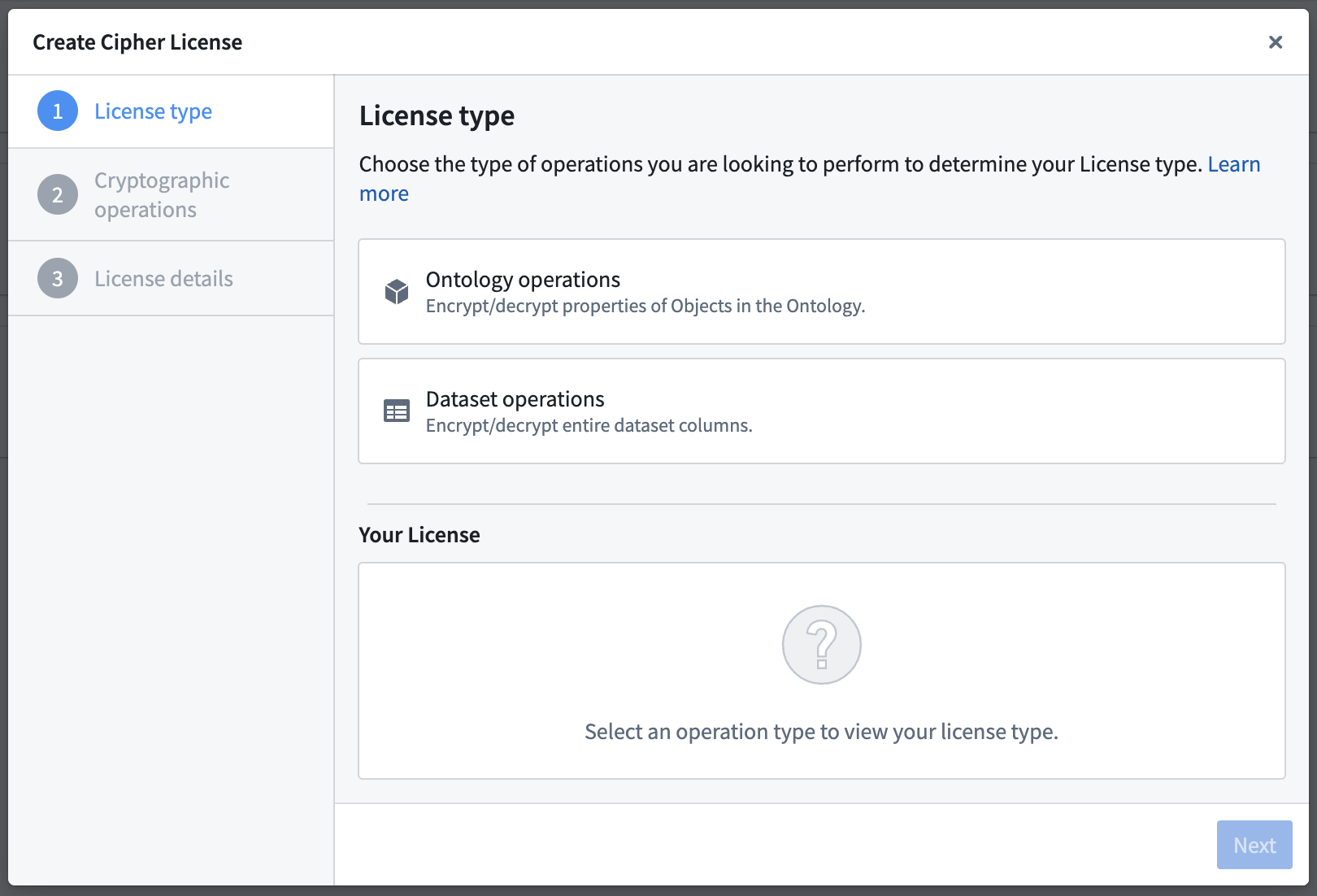
:::callout{theme="warning"} To grant a user access to the operations permitted by a Cipher License, give them View access to the License. :::
You can choose between three types of Licenses:
| Operational User License | Data Manager License | Admin License | |
|---|---|---|---|
| Auditable at the cell level | ✅ | ❌ | ❌ |
| Can enforce a rate limit | ✅ | ❌ | ❌ |
| Used to encrypt/decrypt entire columns | ❌ | ✅ | ✅ |
| Effectively grants access to cryptographic keys | ❌ | ❌ | ⚠️ |
| Usable in | |||
| Object Layer (Workshop, Object Explorer, ...) | ✅ | ❌ | ❌ |
| Functions (see bypassing checkpoints) | ✅ | ❌ | ❌ |
| Pipeline Builder | ❌ | ✅ | ✅ |
| Contour | ❌ | ✅ | ✅ |
| Code Authoring | ❌ | ❌ | ✅ |
Operational User License
An Operational User License (formerly "Frontend License") enables Foundry users to encrypt or decrypt individual values.
The two configurable permissions for Operational User Licenses are:
- Encryption/hashing of individual values: Single-value encryption or hashing through the Foundry applications. You can set a rate limit counter for this operation.
- Decryption of individual values: Single-value decryption through the Foundry applications. You can set a rate limit counter for this operation. This configuration can be helpful to allow users to view specific encrypted values through frontends such as Workshop and Object Explorer.
:::callout{theme="neutral"} A rate limit is an optional configuration which indicates the number of single-value cryptographic operations an individual is allowed in the configured time. Should a user exceed the limit, they will be blocked until the period resets. :::
:::callout{theme="neutral"} Operations performed using an Operational User License are fully auditable. :::
Bypass checkpoints
Allowing a license to bypass checkpoints means the license can be used in places where checkpoints cannot be shown, such as Functions or a direct API call. Use of this license is still auditable at the cell level and rate-limited.
Data Manager License
A Data Manager License (formerly "High Trust License") enables Foundry users to encrypt or decrypt entire columns of datasets using tools such as Pipeline Builder and Contour. This configuration can be helpful for users who benefit from point-and-click tools, as well as users with strict security concerns. Learn more about using Cipher in Pipeline Builder.
The two configurable permissions for Data Manager Licenses are:
- Column-level encryption/hashing: Encrypting or hashing of dataset columns through tools such as Pipeline Builder and Contour.
- Column-level decryption: Decrypting of dataset columns through tools such as Pipeline Builder and Contour.
Admin License
An Admin License (formerly "Transforms License") enables Foundry users to encrypt or decrypt entire columns of datasets in Code Repositories and grants them access to the cryptographic keys.
:::callout{theme="warning"} Allowing operations in Transforms effectively grants users access to the cryptographic keys. Ensure that access to this License is only granted to users with elevated permissions. :::
The two configurable permissions for Admin Licenses are:
- Encryption/hashing Admin: Encryption or hashing of dataset columns in Code Repositories and encryption key access.
- Decryption Admin: Decryption of dataset columns in Code Repositories and decryption key access.
Walkthrough Guide
Once you have familiarized yourself with the steps above, refer to this tutorial to walk you through the process on how to use the Cipher application to perform encryption actions.
:::callout{theme="neutral"} This tutorial uses notional employee data. All information shared in this documentation such as but not limited to images and accompanying datasets are notional. :::
Steps to reproduce
Before you begin, download the notional employee dataset and upload it to Foundry.
- Create a Cipher Channel in your landing Project.
- Create a Data Manager License with an encryption permit.
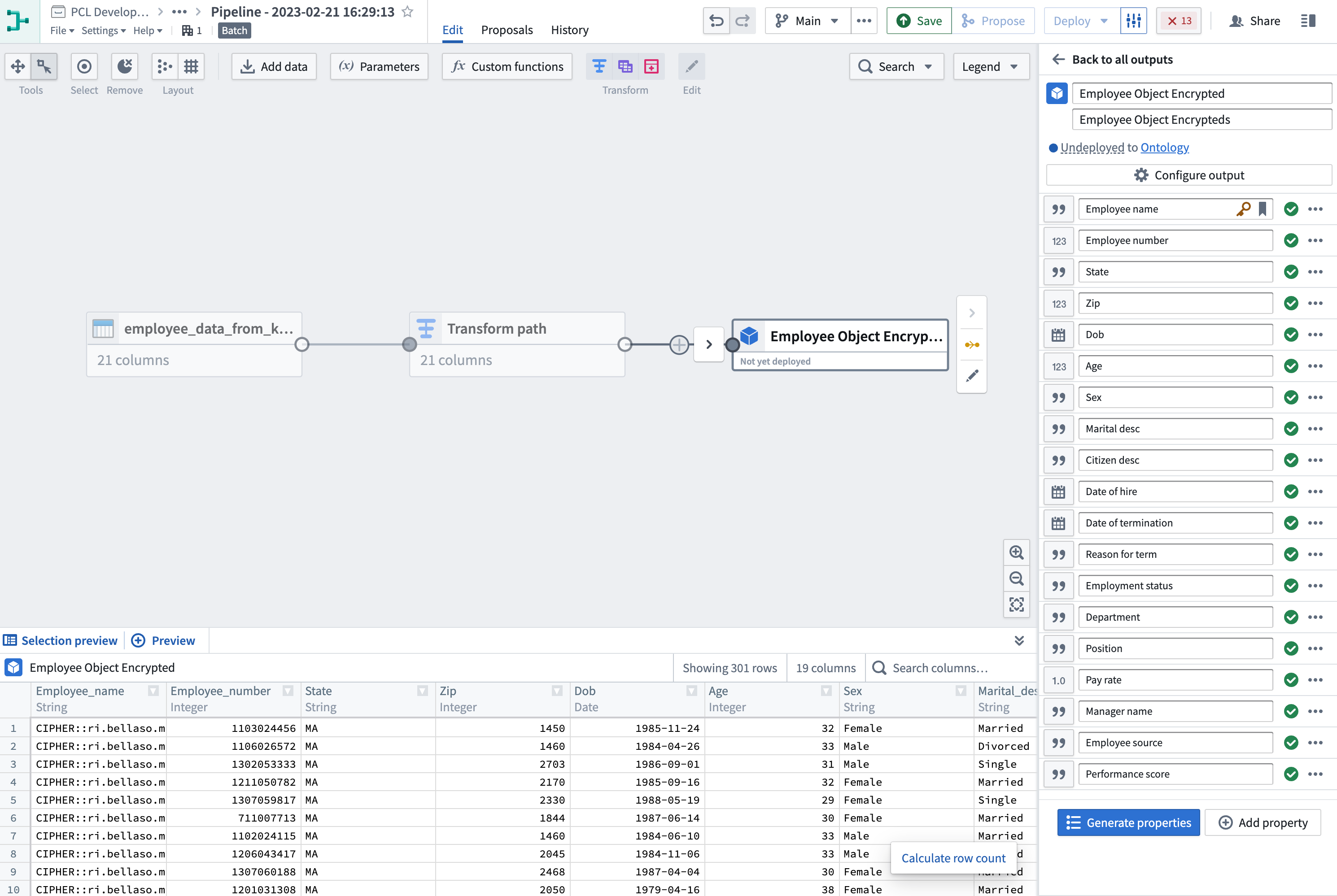
- Encrypt the sensitive column with Pipeline Builder: Create a new pipeline and select + New > Pipeline in the upper-right corner to import the employee dataset to Pipeline Builder. Then, choose the
Cipher encrypttransform using the Data Manager License you just created and apply it on theEmployee_namecolumn of the dataset. The column should now be encrypted. Once encryption is complete, you can add anObject typepipeline output with your dataset and useEmployee_numberas the primary key and title. (Learn more about Pipeline Builder)
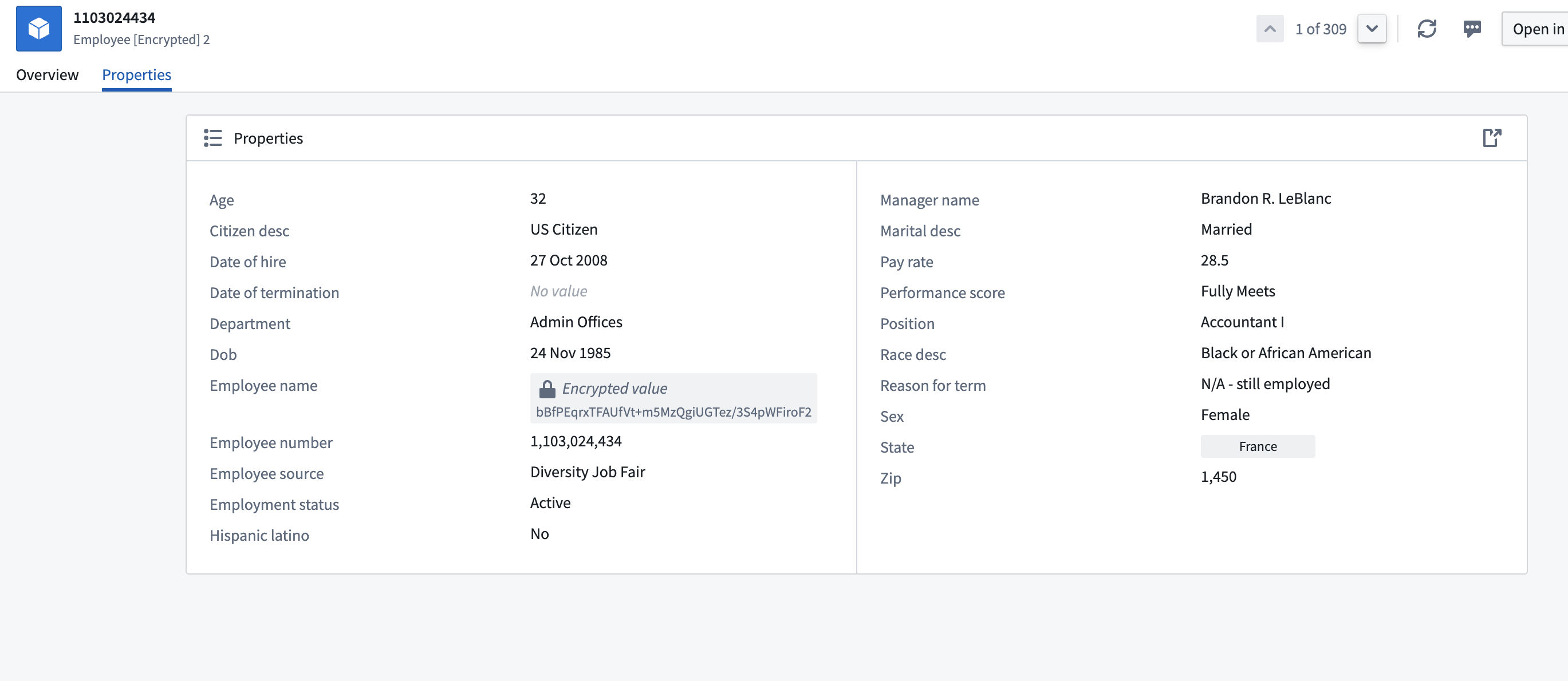
- Add Object Output: Navigate to Output settings on the rotary icon under
Pipeline outputs. Select theTarget ontologyand theOutput folderand Save. Upon accessing any object within this dataset, you will notice the set of values you previously encrypted is now rendered inaccessible and cannot be viewed. The next step will provide instructions on how to decrypt these values.
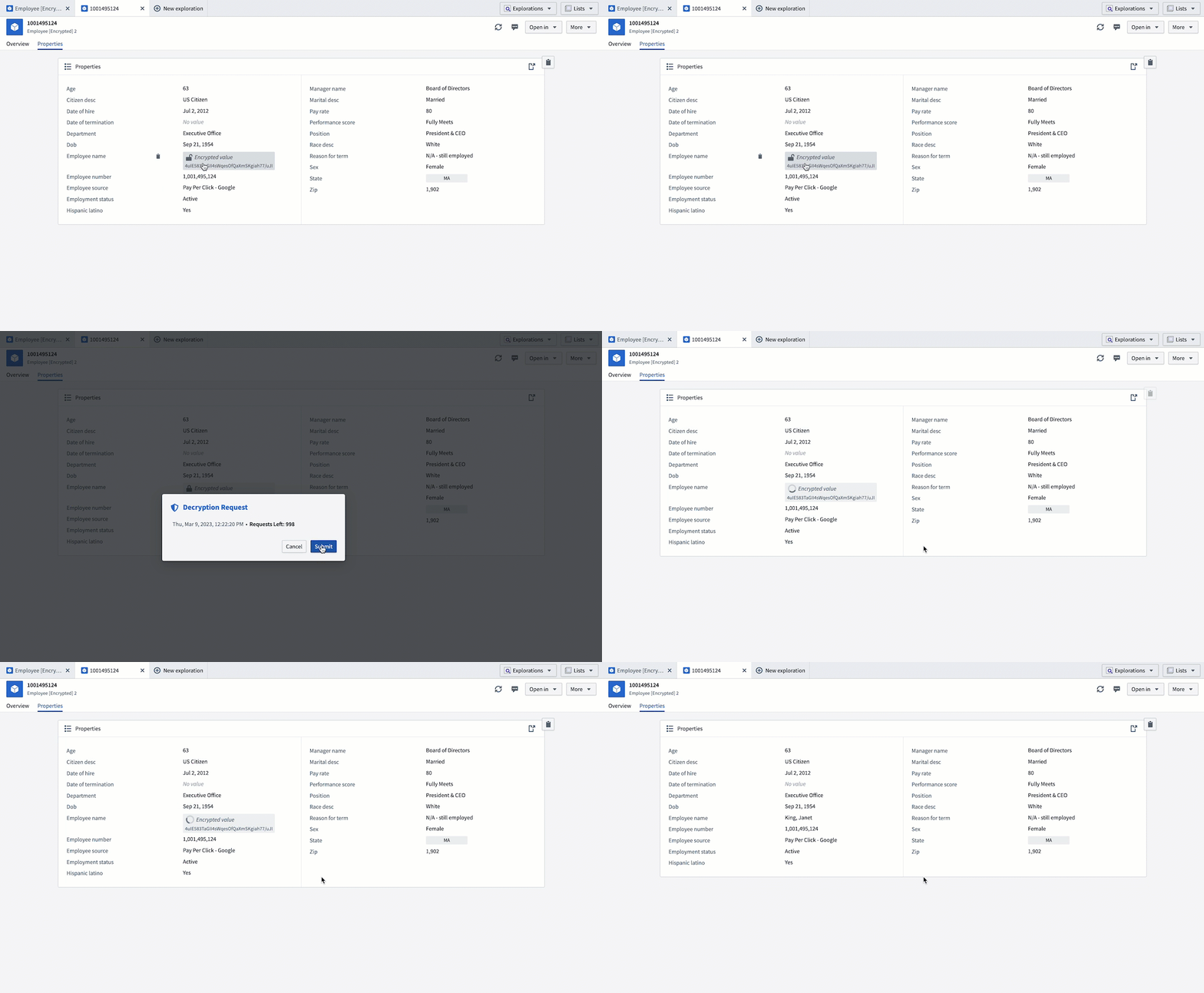
- Create an Operational User License: Return to your Cipher Channel and create a new Operational User License with a decryption permit. This license will allow you to perform decryptions on objects. Performing the same actions as above, you should now be able to decrypt the value of the object.
中文翻译
入门指南
本指南包含以下章节:
创建密码通道
创建密码通道时,系统会首先要求您选择一种加密算法,然后再创建密钥。创建新密码通道有两种方式:
方式一:通过平台文件系统创建密码通道
导航至您选择的项目,通过选择 + 新建 > 密码通道 来创建新的密码通道。选择您所需的算法;我们建议使用 AES SIV 对加密值执行连接操作。
:::callout{theme="neutral"} 如果您无法在 Foundry 文件系统中创建密码通道,请联系您的 Palantir 代表寻求帮助。 :::
方式二:通过 Cipher 应用程序创建密码通道
导航至面板左侧,在 平台应用 > 数据治理 下找到 Cipher,然后按照方式一中的相同说明进行操作。
如何选择加密算法
屏幕上的指南将引导您完成使用所需协议创建密码通道的过程。以下是一些额外细节,可帮助您根据用例决定选择哪种配置:
- 算法: Cipher 目前支持以下算法:
- 基于文本:AES_GCM_SIV 概率加密算法、AES_SIV 确定性加密算法、SHA-256 哈希算法(带胡椒)、SHA-512 哈希算法(带胡椒)。
- 基于图像:视觉混淆图像置乱。
哈希和加密之间的主要区别在于,加密后的值如果用户拥有适当权限则可以解密,而哈希后的值无法通过加密操作去混淆或重新识别。如果您的用例需要重新识别,我们建议使用加密。
概率加密和确定性加密之间的主要区别如下:
- 概率加密: 相同的输入始终会产生不同的输出。
- 确定性加密: 相同的输入始终会产生相同的输出。
- 哈希: 始终是确定性的。
视觉混淆图像置乱算法是确定性的且可逆的。
在确定性和概率算法之间进行选择时,需要考虑以下几点:
- 如果您需要对加密数据执行连接或聚合操作,则需要使用确定性算法。
- 如果您要加密的数据具有低基数或已知的统计分布,您可能需要选择概率算法,以限制对加密数据进行字典攻击或统计攻击的风险。
如何配置密码系统密钥
屏幕上的指南将引导您完成配置密码系统的过程。根据您之前选择的加密算法,您将有不同的密钥格式可供选择,以保护您的敏感数据。
- 密钥:
- 加密: 有两种密钥检索方法允许您从密钥中派生密钥:
- 拉伸密钥派生(推荐):Cipher 服务将通过应用一种传统上增强密钥强度的方法,从您的密钥中派生出一个密钥。请注意,您可以通过点击密钥按钮随机生成一个密钥。
- 单密钥:此方法不包括派生函数。如果您已经有一个设计良好的 AES_SIV 密钥并希望直接将其用作密钥,我们建议使用此方法。输入格式应为长度为 64 的 base64 编码字符串。
- 哈希: 哈希密钥创建:
- 我们建议您通过在终端中运行命令来自己创建哈希密钥(最少 14 个字符且随机生成)。
- 或者,您可以通过点击密钥按钮随机生成一个密钥。
- 视觉混淆: 图像置乱种子:
- 提供一个长随机数,该数将用作种子来生成重新排列和修改图像像素的序列。
点击 创建密码通道 将完成密码通道的创建过程。
颁发许可证
要颁发 Cipher 许可证,请导航至一个密码通道,然后点击 创建新 Cipher 许可证 按钮。
:::callout{theme="warning"} 要授予用户访问 Cipher 许可证所允许操作的权限,请授予他们对许可证的查看权限。 :::
您可以在三种类型的许可证中进行选择:
| 操作用户许可证 | 数据管理员许可证 | 管理员许可证 | |
|---|---|---|---|
| 可在单元格级别审计 | ✅ | ❌ | ❌ |
| 可强制执行速率限制 | ✅ | ❌ | ❌ |
| 用于加密/解密整个列 | ❌ | ✅ | ✅ |
| 有效授予加密密钥访问权限 | ❌ | ❌ | ⚠️ |
| 可用于 | |||
| 对象层(Workshop、Object Explorer 等) | ✅ | ❌ | ❌ |
| Functions(参见绕过检查点) | ✅ | ❌ | ❌ |
| Pipeline Builder | ❌ | ✅ | ✅ |
| Contour | ❌ | ✅ | ✅ |
| 代码编写 | ❌ | ❌ | ✅ |
操作用户许可证
操作用户许可证(原"前端许可证")使 Foundry 用户能够加密或解密单个值。
操作用户许可证的两个可配置权限是:
- 单个值的加密/哈希: 通过 Foundry 应用程序进行单值加密或哈希。您可以为此操作设置速率限制计数器。
- 单个值的解密: 通过 Foundry 应用程序进行单值解密。您可以为此操作设置速率限制计数器。此配置有助于允许用户通过诸如 Workshop 和 Object Explorer 等前端查看特定的加密值。
:::callout{theme="neutral"} 速率限制是一个可选配置,表示在配置的时间段内允许单个用户执行的单值加密操作次数。如果用户超过限制,他们将被阻止,直到时间段重置。 :::
:::callout{theme="neutral"} 使用操作用户许可证执行的操作是完全可审计的。 :::
绕过检查点
允许许可证绕过检查点意味着该许可证可用于无法显示检查点的地方,例如 Functions 或直接 API 调用。使用此许可证仍然在单元格级别可审计且受速率限制。
数据管理员许可证
数据管理员许可证(原"高信任度许可证")使 Foundry 用户能够使用 Pipeline Builder 和 Contour 等工具加密或解密数据集的整个列。此配置对于受益于点选式工具的用户以及有严格安全顾虑的用户很有帮助。了解更多关于在 Pipeline Builder 中使用 Cipher 的信息。
数据管理员许可证的两个可配置权限是:
- 列级加密/哈希: 通过 Pipeline Builder 和 Contour 等工具加密或哈希数据集列。
- 列级解密: 通过 Pipeline Builder 和 Contour 等工具解密数据集列。
管理员许可证
管理员许可证(原"转换许可证")使 Foundry 用户能够在代码仓库中加密或解密数据集的整个列,并授予他们对加密密钥的访问权限。
:::callout{theme="warning"} 允许在 Transforms 中进行操作实际上授予了用户对加密密钥的访问权限。请确保只有具有提升权限的用户才能获得此许可证的访问权限。 :::
管理员许可证的两个可配置权限是:
- 加密/哈希管理: 在代码仓库中加密或哈希数据集列以及加密密钥访问权限。
- 解密管理: 在代码仓库中解密数据集列以及解密密钥访问权限。
操作指南
在熟悉上述步骤后,请参考本教程,它将引导您完成使用 Cipher 应用程序执行加密操作的过程。
:::callout{theme="neutral"} 本教程使用虚构的员工数据。本文档中共享的所有信息(包括但不限于图像和随附数据集)均为虚构。 :::
复现步骤
开始之前,请下载虚构员工数据集并将其上传到 Foundry。
- 在您的着陆项目中 创建一个密码通道。
- 创建一个数据管理员许可证,并赋予加密许可。
- 使用 Pipeline Builder 加密敏感列: 创建一个新管道,选择右上角的 + 新建 > 管道,将员工数据集导入 Pipeline Builder。然后,选择
Cipher encrypt转换,使用您刚刚创建的数据管理员许可证,并将其应用于数据集的Employee_name列。该列现在应该已被加密。加密完成后,您可以添加一个对象类型管道输出,使用您的数据集,并将Employee_number设为主键和标题。(了解更多关于 Pipeline Builder 的信息)
- 添加对象输出: 导航至
管道输出下旋转图标上的 输出设置。选择目标本体和输出文件夹,然后点击 保存。在访问此数据集中的任何对象时,您会注意到之前加密的值集现在无法访问且无法查看。下一步将提供如何解密这些值的说明。
- 创建一个操作用户许可证: 返回您的密码通道,创建一个新的操作用户许可证,并赋予解密许可。此许可证将允许您对对象执行解密操作。执行与上述相同的操作,您现在应该能够解密对象的值。