Linked products(关联产品(Linked products))
You can modularize a complete workflow into a set of linked products in a Marketplace store. This allows smaller products to be iterated upon and upgraded in isolation.
Using linked products allows you to ensure:
- Automatic mapping between one product’s content and another product’s inputs
- Semantically-versioned dependencies between products
- Less duplicate content upon installation, as overlapping content in multiple products can be separated into one upstream product for consumption downstream
For example, if your workflow contains data-cleaning pipelines and object types backed by the clean data, then the pipelines and object types may be packaged into separate products. A connection between the pipeline and Ontology products enables their simultaneous installation, automatically mapping the clean datasets content from the pipeline product to the required inputs of the Ontology product.
Linked products sources
There are several different sources from which DevOps generates linked products:
- Same-store linked products: DevOps automatically detects and links products within the same store based on shared source entities. See Packaging linked products.
- Cross-store linked products: DevOps links products across multiple stores using configured store links, which are useful for shared upstream products consumed by other Marketplace stores. See Cross-store linked products.
- Installation-based linked products: DevOps automatically detects and links products based on existing installations on the enrollment that share the same source entities. See Installation-based linked products.
Packaging linked products
DevOps inspects the source entities that are packaged to determine the links between products. By default, DevOps looks for linked products within the same store, but you can also configure cross-store linked products to link products across multiple stores. In the following notional example, there is a data pipeline which outputs a dataset and an object type which is backed by the dataset.
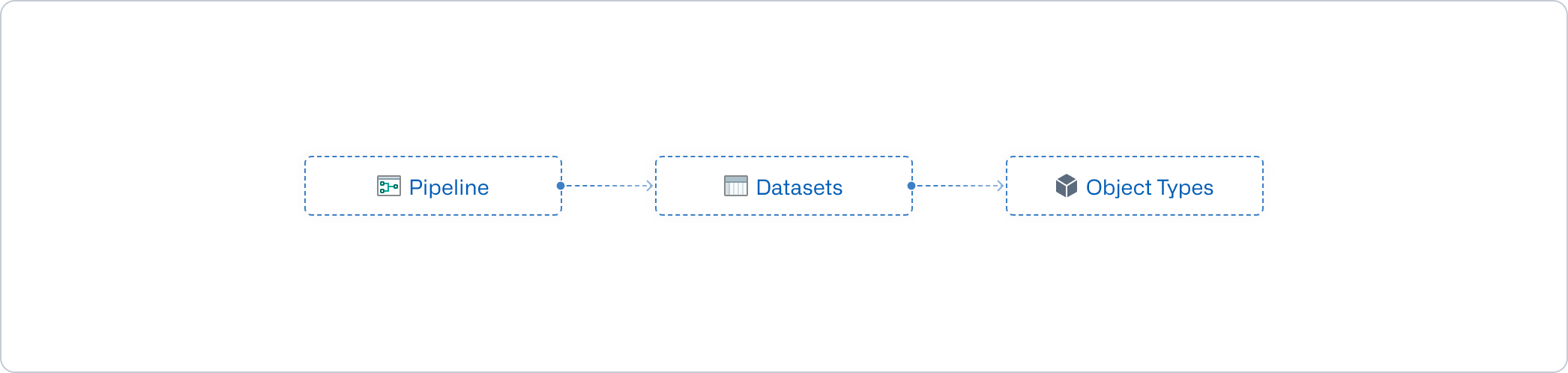
The pipeline and object type can be packaged as individual products, and DevOps will ensure that the output dataset of the Pipeline product meets the dataset input requirements of the Ontology product. This link is derived from the source entities.
For example, if your product contains a Workshop application that has a dependency on the Airplane object type, then DevOps will only link products which contain the exact same Airplane object type as content.
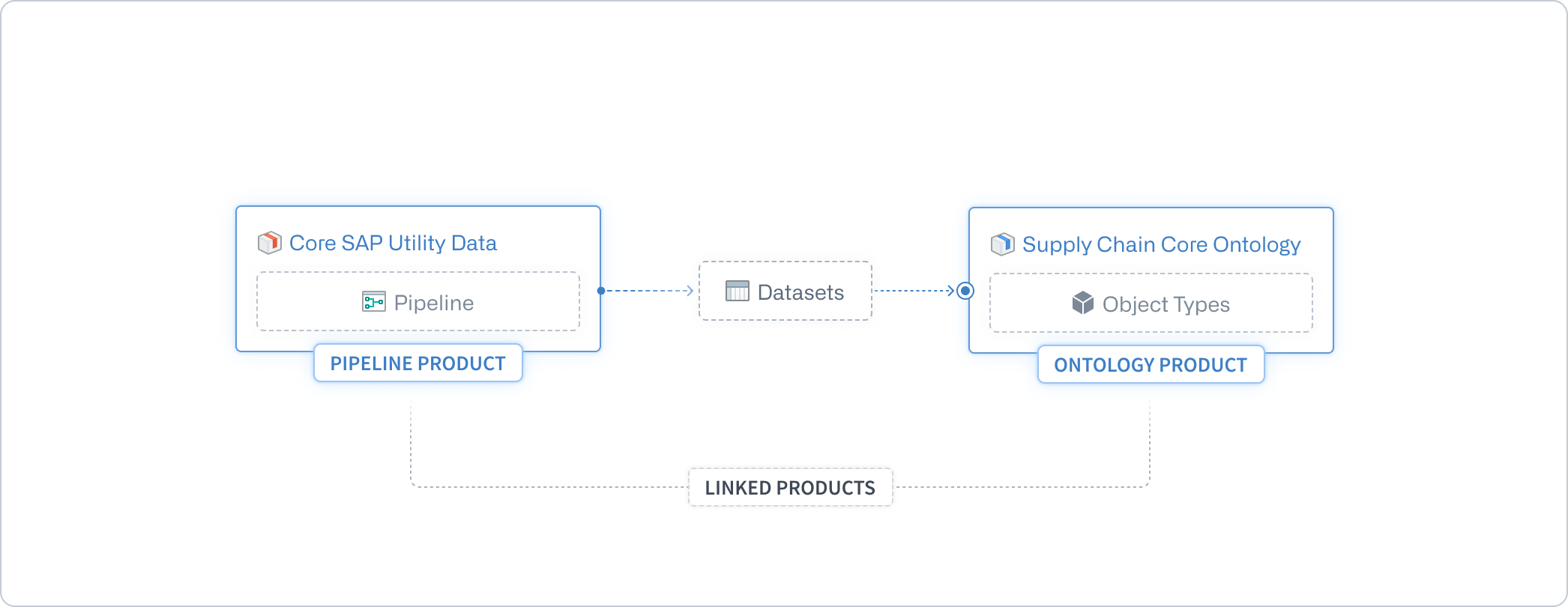
DevOps creates the product links when the downstream product is packaged. This is demonstrated in the image above with the Ontology product. In other words, DevOps looks for products which have content fulfilling inputs of the product draft being published. By default, only products in the same store are considered, but cross-store linked products can extend this to include products from linked stores. If the upstream product is repackaged to produce new outputs and these outputs can be consumed by the downstream product, then the downstream product must also be repackaged to regenerate the link to ensure an up-to-date workflow.
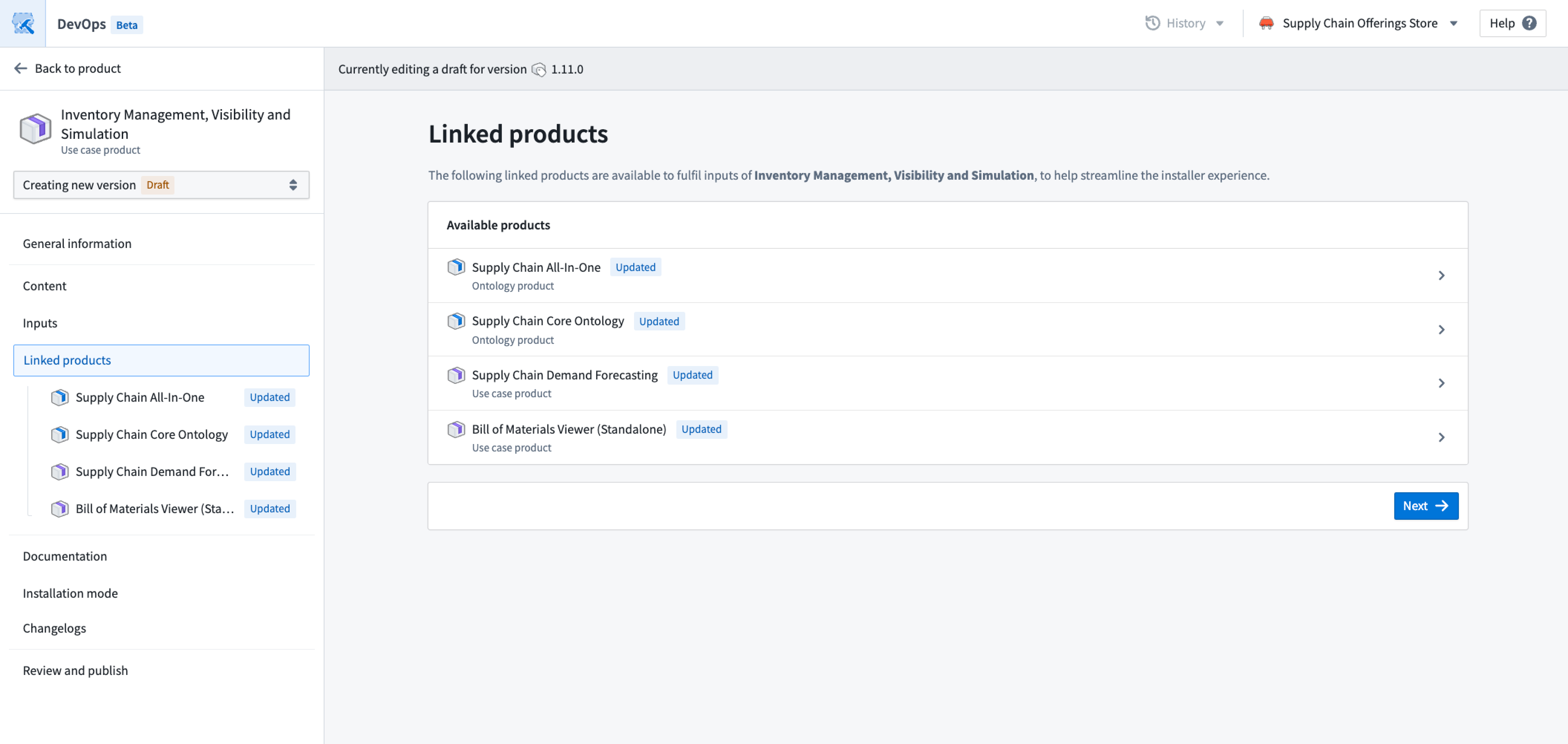
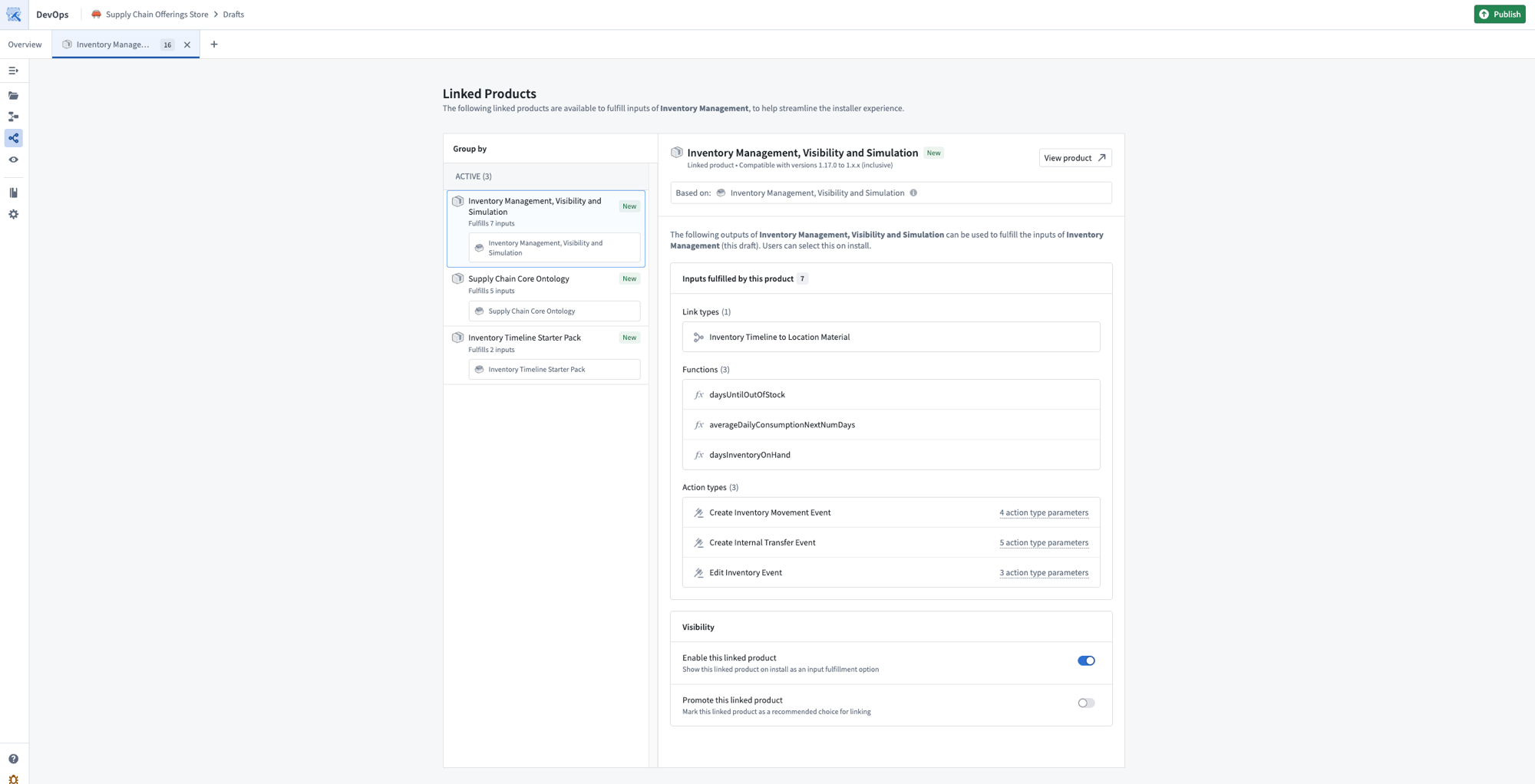
While packaging a product, you can see which other products can provide inputs to the packaging draft. You can open each linked product to see the mapping between the two products.
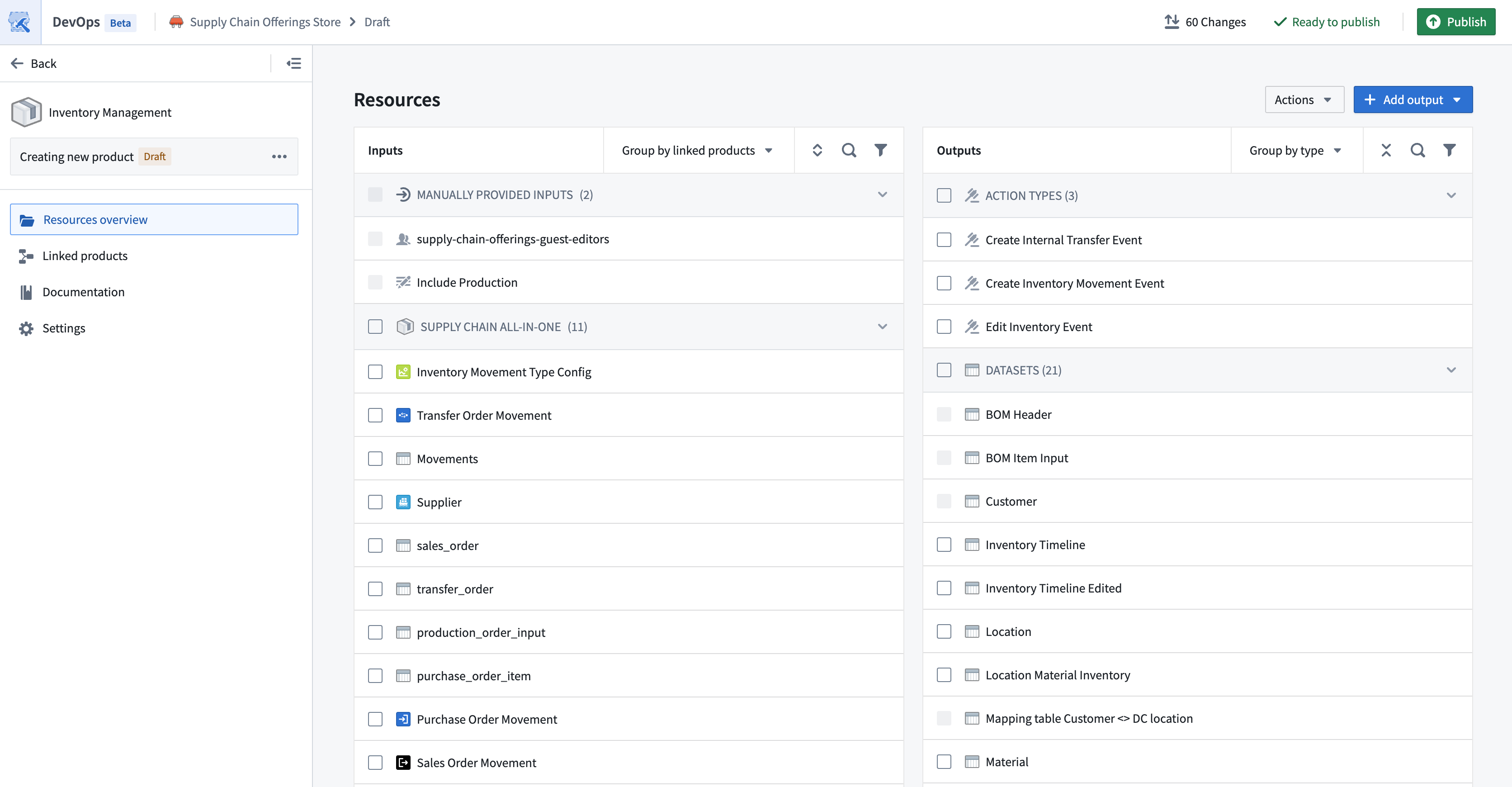
You can also use the Group by linked products option in the Inputs panel to preview the inputs provided by each of the upstream linked products.
Breaking changes
A breaking change to a product is one which would cause dependent workflows of the product’s content to no longer function correctly. For example, a breaking change may be the removal of content or a type change of a dataset column. This means that any dependent workflows need to be adjusted to account for these new changes.
When breaking changes are present, major version increments (such as 2.0.0 to 3.0.0) are recommended to inform installers that there are backwards-incompatible changes in a product’s content. To ensure that downstream products can continue to use the published product as a linked product, packagers will likely need to account for the breaking changes by updating the downstream products. For example, updates may be needed to ensure that a modified dataset column type is being correctly consumed, or to remove inputs that are no longer provided.
:::callout{theme="warning"} Major version increments make the published version of a product incompatible with any existing downstream linked products. To reinstate linked product compatibility, all downstream linked products must be repackaged. :::
If a minor version increment is selected when there are breaking changes, installers will be able to select the linked product, but will likely run into errors on install.
The safest procedure to follow is to repackage any downstream products of a recently-published product, so that all linked product mappings are regenerated.
Installing linked products
When a user installs a product, inputs can be fulfilled by choosing another installation or draft of a linked product. To see which linked products are available, visit the Inputs page of the installation draft.
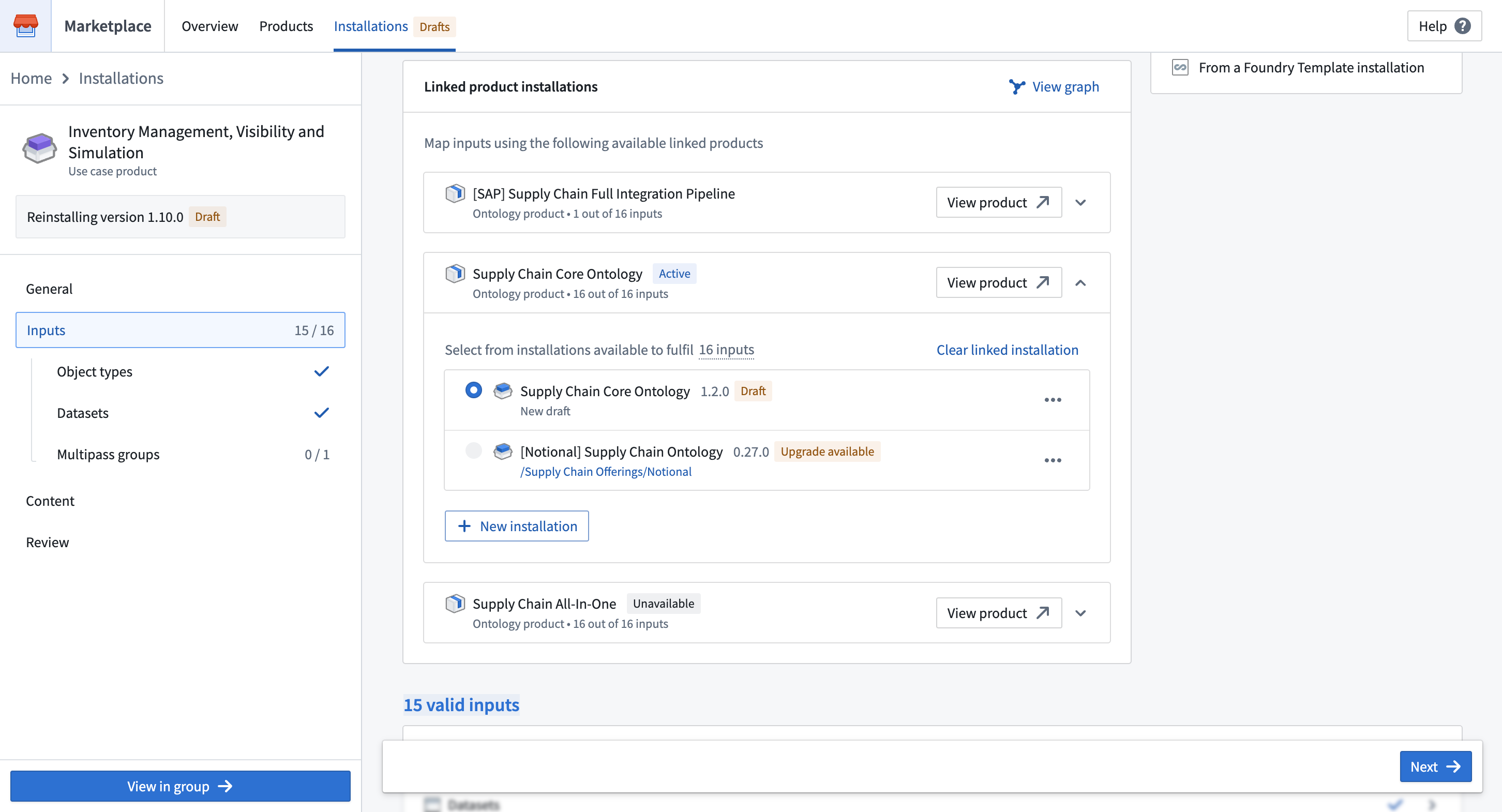
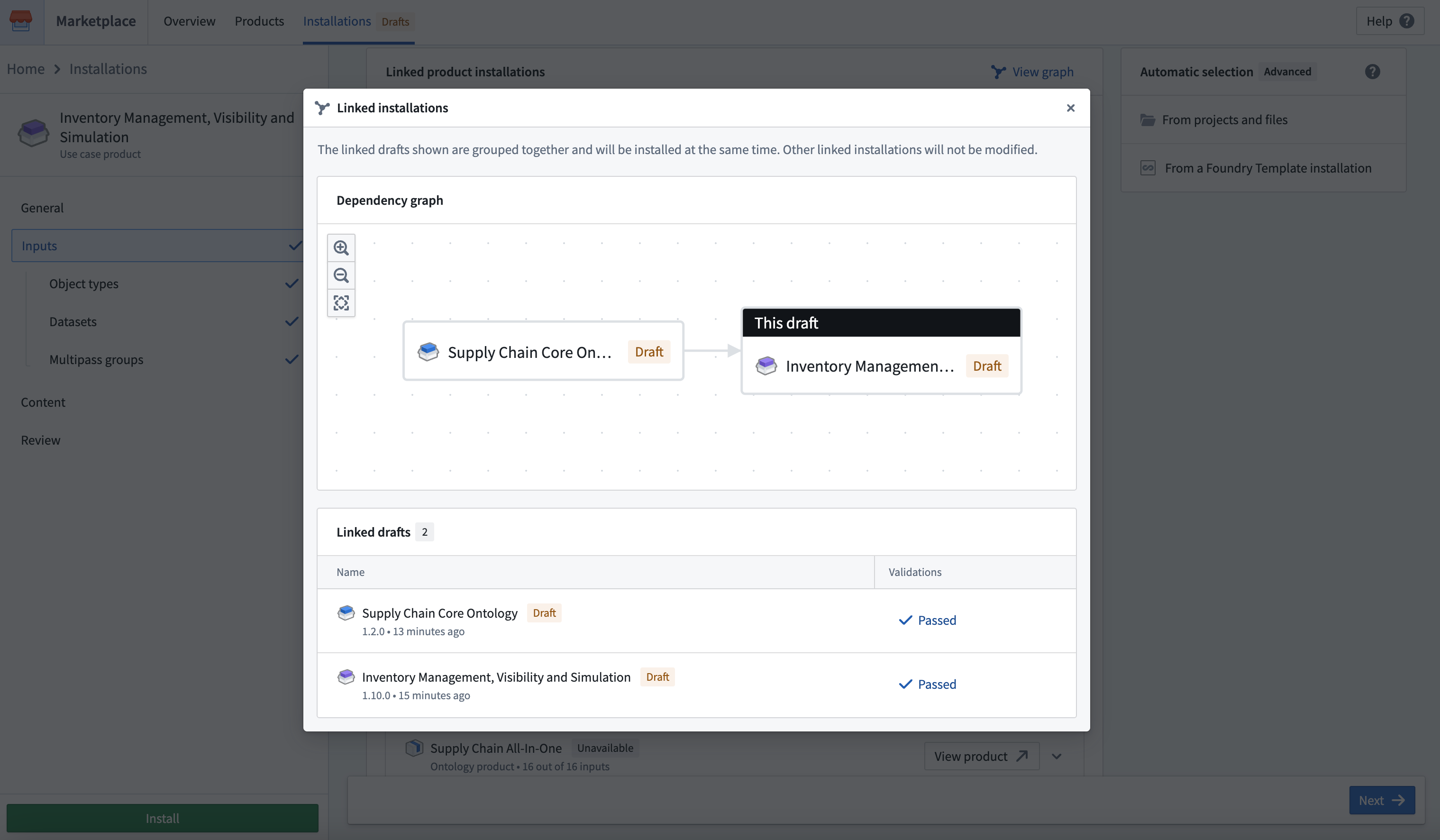
To see the linked installations and drafts, select View graph.
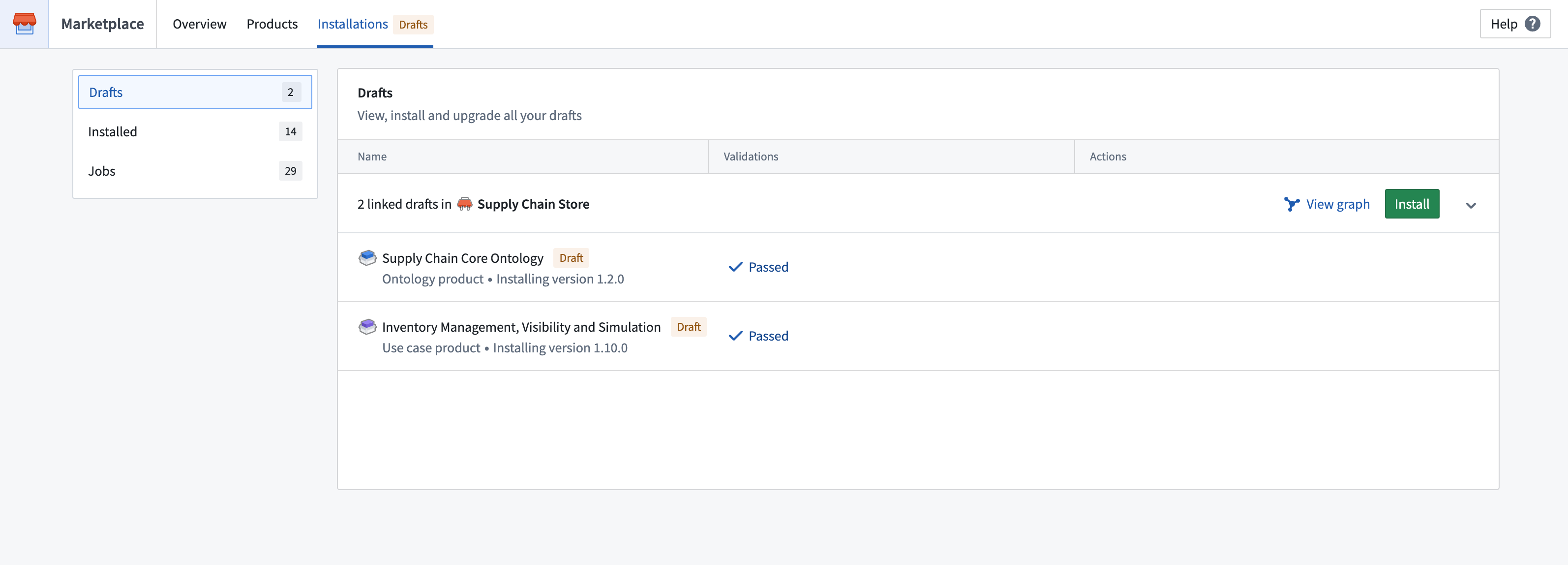
Linked drafts are shown as an installation group on the drafts homepage.
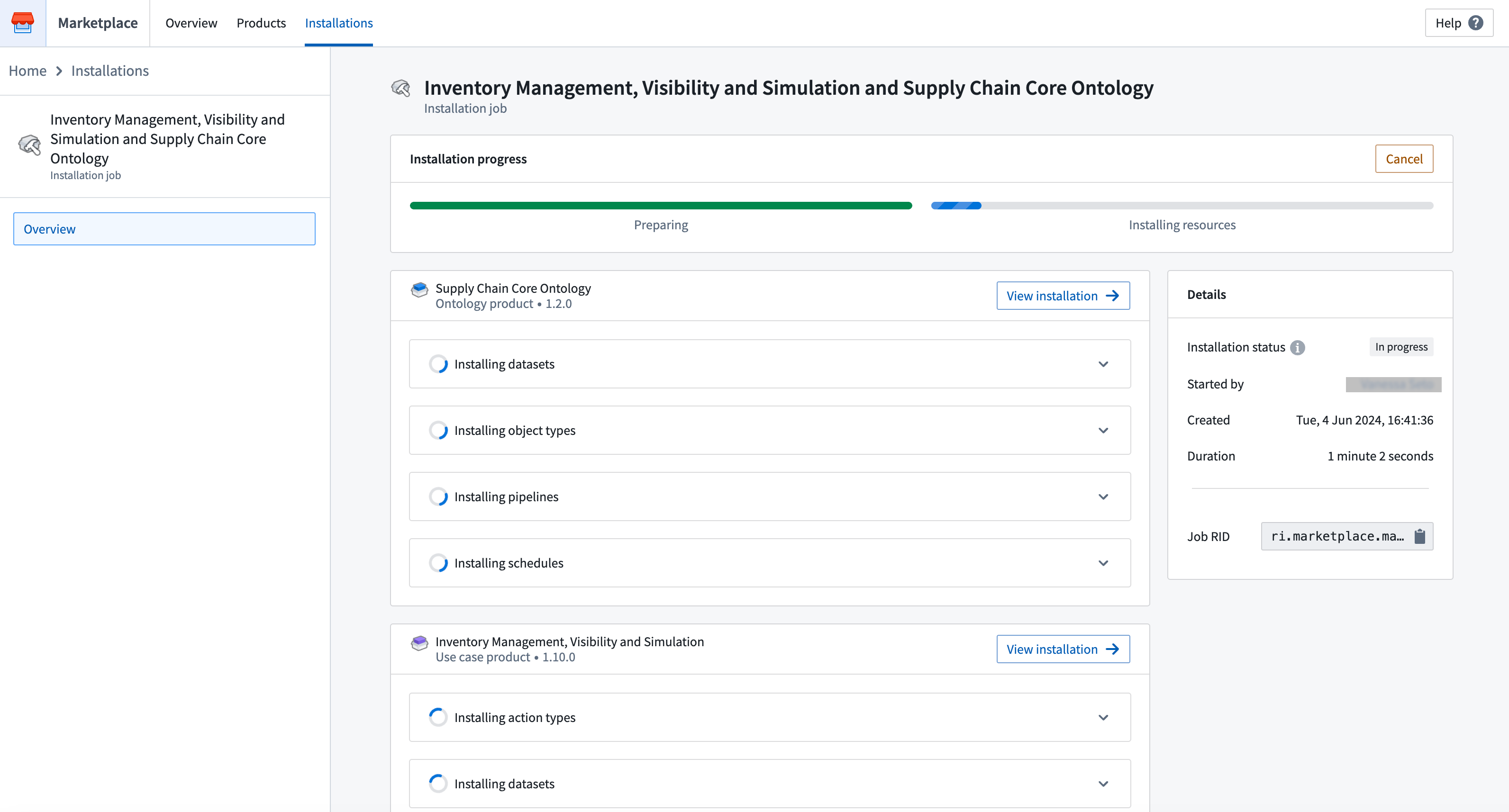
Linked installation drafts are installed together during a single job, with pre-existing installations serving as input without being affected. After starting the installation, you will be redirected to the Job page, where you can keep track of the job status.
Splitting up a product
Often, large products contain distinct stages of a workflow (e.g. data-cleaning and application). Such a product can be split into smaller products, to allow more rapid iteration and releases of each part.
By separating some of the large product's content into another product, you can install both products together using the automatic mapping between them. However, this can lead to duplicate resources in existing installations.
Installing the newly-created product will create new resources, instead of reusing the installed resources of the original, larger product.
Best practices for product linkage
The following are some tips to consider when linking products, to ensure that your product remain serviceable:
- Package products from upstream to downstream. This ensures the generated product links are most up-to-date.
- Indicate breaking product changes with a major version increment.
- Repackage downstream product consumers to regenerate the product link.
Cross-store linked products
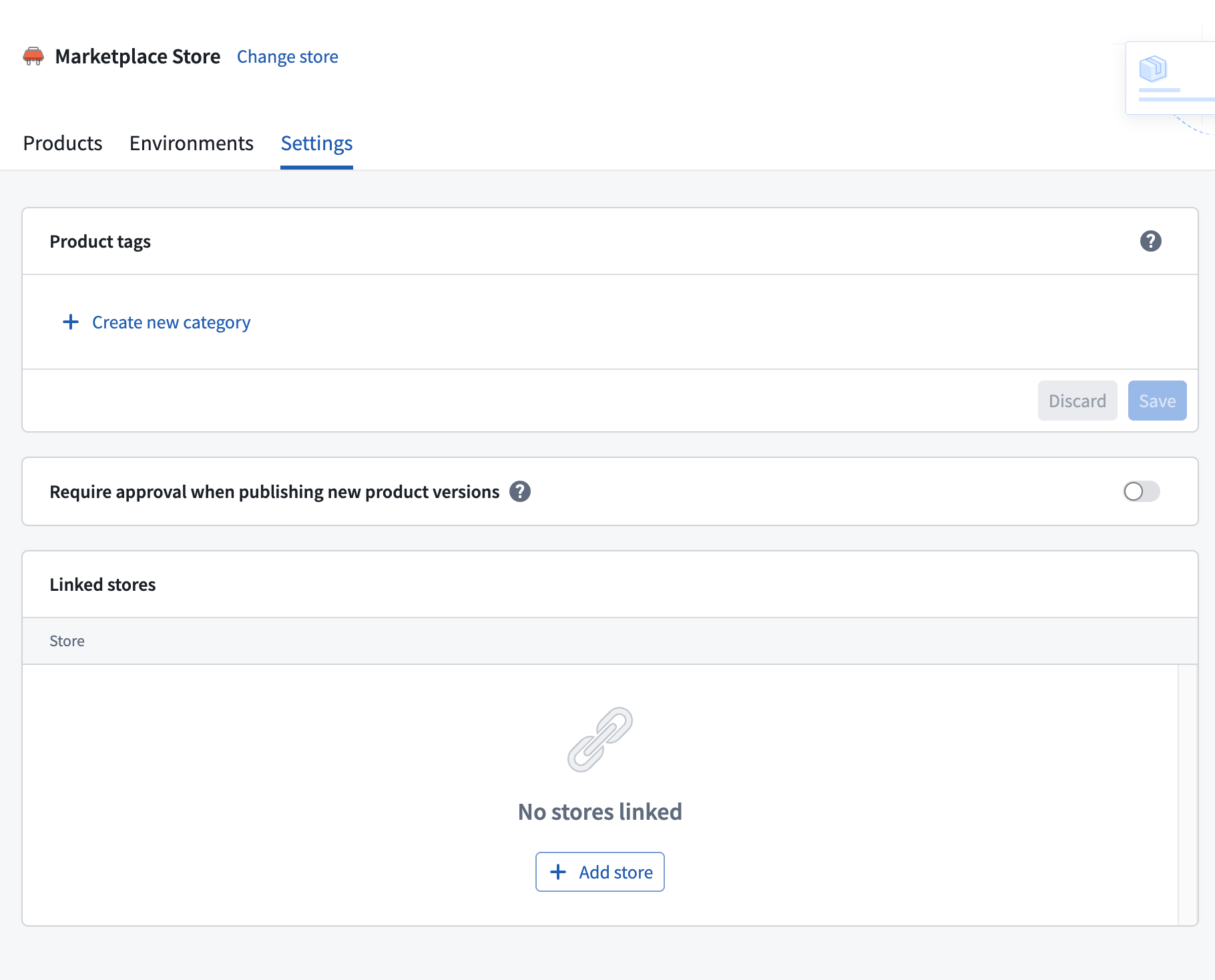
By default, linked products are only generated between products within the same store. However, you can configure store links to enable linked products across multiple stores. This is useful when you have shared upstream products (such as common data pipelines or ontology definitions) that are consumed by products in other stores.
How store links work
Store links are one-way connections that allow downstream products in your store to link to upstream products in another store. When you link to another store, DevOps will consider products from that store as potential upstream dependencies when packaging products in your store.
Configuring store links
To configure store links, navigate to the Store settings for the store that should receive linked products from another store. This requires the marketplace:link-to-local-marketplace operation on the target store, which is granted to store viewers by default.
Installation-based linked products
By default, linked products are generated when the source entities of one product's outputs directly reference the same resource as another product's inputs. Installation-based linked products extend this behavior by detecting cases where an existing upstream installation on the enrollment has output resources that reference the same input resources of a downstream product.
This is useful when builders create products based on resources that were installed from an upstream product, rather than building directly against the original source entities. In these cases, the downstream product's inputs reference installed resources rather than the upstream product's packaged content. DevOps detects that the installed resources originate from an upstream product and generates the linked product relationship automatically.
中文翻译
关联产品(Linked products)
您可以将完整的工作流模块化,在Marketplace商店中将其组织为一组关联产品。这样可以让较小的产品独立迭代和升级。
使用关联产品可以确保:
- 一个产品的内容与另一个产品的输入之间自动映射
- 产品之间具有语义化版本控制的依赖关系
- 安装时减少重复内容,因为多个产品中的重叠内容可以分离到上游产品中供下游使用
例如,如果工作流包含数据清洗管道(Data-cleaning pipelines)和基于清洗数据的对象类型(Object types),则可以将管道和对象类型打包为独立的产品。管道产品与本体论(Ontology)产品之间的连接可以实现同时安装,自动将管道产品中的清洗数据集内容映射到本体论产品所需的输入。
关联产品来源(Linked products sources)
DevOps从以下几个不同来源生成关联产品:
- 同商店关联产品(Same-store linked products): DevOps根据共享的源实体自动检测并关联同一商店内的产品。请参阅打包关联产品。
- 跨商店关联产品(Cross-store linked products): DevOps使用配置的商店链接关联多个商店中的产品,这对于被其他Marketplace商店使用的共享上游产品非常有用。请参阅跨商店关联产品。
- 基于安装的关联产品(Installation-based linked products): DevOps根据注册(Enrollment)上共享相同源实体的现有安装自动检测并关联产品。请参阅基于安装的关联产品。
打包关联产品(Packaging linked products)
DevOps检查被打包的源实体以确定产品之间的关联。默认情况下,DevOps在同一商店内查找关联产品,但您也可以配置跨商店关联产品来关联多个商店中的产品。在以下示例中,有一个数据管道输出数据集,以及一个基于该数据集的对象类型。
管道和对象类型可以打包为独立产品,DevOps将确保管道产品的输出数据集满足本体论产品的数据集输入要求。此关联源自源实体。
例如,如果您的产品包含一个依赖于Airplane对象类型的Workshop应用程序,则DevOps只会关联包含完全相同Airplane对象类型作为内容的产品。
DevOps在下游产品打包时创建产品关联。上图通过本体论产品展示了这一点。换句话说,DevOps会查找其内容能够满足正在发布的产品草稿输入的产品。默认情况下,仅考虑同一商店中的产品,但跨商店关联产品可以扩展此范围,包括来自关联商店的产品。如果上游产品重新打包以产生新的输出,并且这些输出可以被下游产品使用,则下游产品也必须重新打包以重新生成关联,确保工作流保持最新。
在打包产品时,您可以查看哪些其他产品可以为打包草稿提供输入。您可以打开每个关联产品查看两个产品之间的映射。
您还可以使用输入(Inputs)面板中的按关联产品分组(Group by linked products)选项预览每个上游关联产品提供的输入。
破坏性变更(Breaking changes)
产品的破坏性变更是指会导致产品内容的依赖工作流无法正常运行的变更。例如,删除内容或更改数据集列类型都属于破坏性变更。这意味着需要调整所有依赖工作流以适应这些新变更。
当存在破坏性变更时,建议使用主版本号递增(如从2.0.0到3.0.0),以告知安装者产品中存在向后不兼容的变更。为确保下游产品能够继续将已发布产品作为关联产品使用,打包者可能需要通过更新下游产品来处理破坏性变更。例如,可能需要更新以确保正确消费修改后的数据集列类型,或删除不再提供的输入。
:::callout{theme="warning"} 主版本号递增会使产品的已发布版本与任何现有的下游关联产品不兼容。要恢复关联产品兼容性,必须重新打包所有下游关联产品。 :::
如果在存在破坏性变更时选择了次版本号递增,安装者将能够选择关联产品,但在安装时很可能会遇到错误。
最安全的做法是重新打包最近发布产品的所有下游产品,以便重新生成所有关联产品映射。
安装关联产品(Installing linked products)
当用户安装产品时,可以通过选择另一个安装或关联产品的草稿来满足输入需求。要查看可用的关联产品,请访问安装草稿的输入(Inputs)页面。
要查看关联的安装和草稿,请选择查看图表(View graph)。
关联草稿在草稿首页上显示为一个安装组。
关联的安装草稿在单个作业中一起安装,已有的安装作为输入而不受影响。开始安装后,您将被重定向到作业(Job)页面,在那里可以跟踪作业状态。
拆分产品(Splitting up a product)
大型产品通常包含工作流的不同阶段(例如数据清洗和应用程序)。这样的产品可以拆分为更小的产品,以便每个部分能够更快地迭代和发布。
通过将大型产品的部分内容分离到另一个产品中,您可以使用两者之间的自动映射同时安装这两个产品。但是,这可能导致现有安装中出现重复资源。
安装新创建的产品将创建新资源,而不是重用原始大型产品已安装的资源。
产品关联的最佳实践(Best practices for product linkage)
以下是一些关联产品时的建议,以确保产品保持可维护性:
- 按从上游到下游的顺序打包产品。这确保生成的产品关联是最新的。
- 通过主版本号递增来指示产品的破坏性变更。
- 重新打包下游产品消费者以重新生成产品关联。
跨商店关联产品(Cross-store linked products)
默认情况下,关联产品仅在同一商店内的产品之间生成。但是,您可以配置商店链接以启用跨多个商店的关联产品。当您有被其他商店中的产品使用的共享上游产品(如通用数据管道或本体论定义)时,这非常有用。
商店链接的工作原理
商店链接是单向连接,允许您商店中的下游产品链接到其他商店中的上游产品。当您链接到另一个商店时,DevOps在打包您商店中的产品时会将该商店的产品视为潜在的上游依赖项。
配置商店链接
要配置商店链接,请导航到应接收来自其他商店关联产品的商店的商店设置(Store settings)。这需要在目标商店上拥有marketplace:link-to-local-marketplace操作权限,默认情况下商店查看者拥有此权限。
基于安装的关联产品(Installation-based linked products)
默认情况下,当一个产品输出的源实体直接引用与另一个产品输入相同的资源时,会生成关联产品。基于安装的关联产品扩展了此行为,检测注册上已有的上游安装的输出资源引用下游产品相同输入资源的情况。
当构建者基于从上游产品安装的资源创建产品,而不是直接基于原始源实体构建时,这非常有用。在这种情况下,下游产品的输入引用的是已安装的资源,而不是上游产品打包的内容。DevOps检测到这些已安装的资源源自上游产品,并自动生成关联产品关系。