Frequently asked questions(常见问题解答)
This page details frequently asked questions about Peer Manager.
Why am I unable to see the markings on a peer connection?
If you are unable to see the markings on a peer connection, then you may not have view access to the markings themselves. When this is the case, Peer Manager displays the Unknown marking icon. While data secured across Foundry with a marking you do not have access to will be hidden from your view, you can view the connection the data will travel across in Peer Manager but not its underlying data.
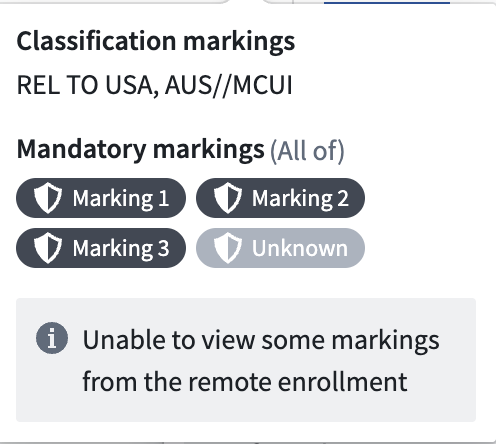
In many cases, this is caused by markings peered from a remote enrollment. When a remote enrollment adds markings to a peer connection, peering automatically maps those markings to local markings. If no matching local marking exists, then peering creates a new local marking with the same name.
While the act of peering creates new markings, peering does not grant local users access to the marking. Only enrollment administrators may govern who has access to markings on a given enrollment. To resolve this, contact an enrollment administrator who can view all markings and request that they provide you view access to the new markings.
中文翻译
常见问题解答
本页详细解答了关于 Peer Manager 的常见问题。
为什么我无法查看对等连接(peer connection)上的标记(markings)?
如果你无法查看对等连接上的标记,则可能你没有这些标记本身的查看权限。在这种情况下,Peer Manager 会显示 Unknown 标记图标。虽然通过 Foundry 使用你无权访问的标记保护的数据将从你的视图中隐藏,但你可以在 Peer Manager 中查看数据所经过的连接,但无法查看其底层数据。
在许多情况下,这是由于来自远程注册(remote enrollment)的对等标记(peered markings)造成的。当远程注册向对等连接添加标记时,对等操作会自动将这些标记映射到本地标记。如果不存在匹配的本地标记,则对等操作会创建一个同名的新本地标记。
虽然对等操作会创建新标记,但该操作不会授予本地用户对这些标记的访问权限。只有注册管理员(enrollment administrators)才能管理谁有权访问特定注册上的标记。要解决此问题,请联系能够查看所有标记的注册管理员,并请求他们为你提供对新标记的查看权限。