Budgets(预算 (Budgets))
:::callout{theme="neutral"} The Resource Management budget functionality is only available for customers who have an active usage-based contract with Palantir. :::
Resource Management's budget functionality allows users to track usage spend over some period of time. Budgets can also be configured to notify users when usage exceeds some pre-determined amount.
Budget properties
- Budgeted amount: The amount to be tracked, expressed in a currency; this typically represents a real-world estimate of expenses.
- Frequency: The rate at which this budget repeats; can be monthly, quarterly, yearly or non-recurring.
- Notification threshold(s): Expressed as a percentage of the budgeted amount; when the budget exceeds a notification threshold, the users will be notified.
- Scope: A set of resources (expressed as a specific Usage account or all usage) that this budget tracks; see budget scope for more details.
- Start date: The date on which this budget starts; for non-recurring budgets, an end date must also be specified.
- User(s) to notify: The list of users who will be notified (in Foundry or through email) when the budget exceeds a notification threshold. Whenever the budget exceeds a notification threshold, a notification is sent to the list of users.
Whenever the budget exceeds a notification threshold, a notification is sent to the list of users.
:::callout{theme="warning"} Budget notifications are sent after the budget has exceeded the threshold. Due to the process of measuring and calculating usage, there may be latency between the time that the budget passes the threshold and the time of notification (for example, specifying a notification threshold of 70% may result in a notification sent at 75%). In some rare cases, this latency could be up to 26 hours. :::
Budget scope
Budgets currently support two different scopes:
- All usage: The budget tracks all usage across all Usage accounts.
- Usage account: The budget tracks usage from projects within a specific Usage account.
Budget permissions
To use budgets, one or more of the following roles are required:
Enrollment administrator: View, create, edit, and delete budgets.Resource management administrator: View, create, edit, and delete budgets.
Roles are granted through the Enrollment permissions page in Control Panel.
View all budgets
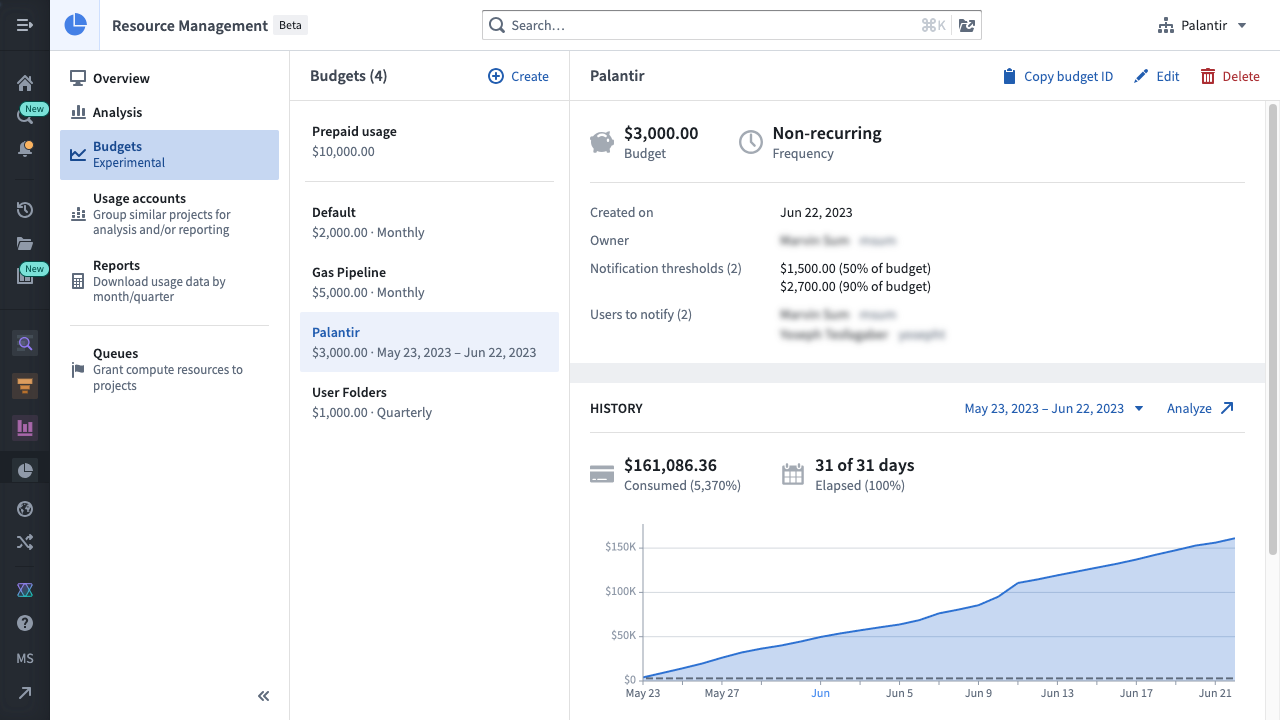
In Resource Management, select Budgets in the left sidebar. This will display a list of budgets available in your enrollment. Select a single budget to view its details, history, and notifications.
Create a budget
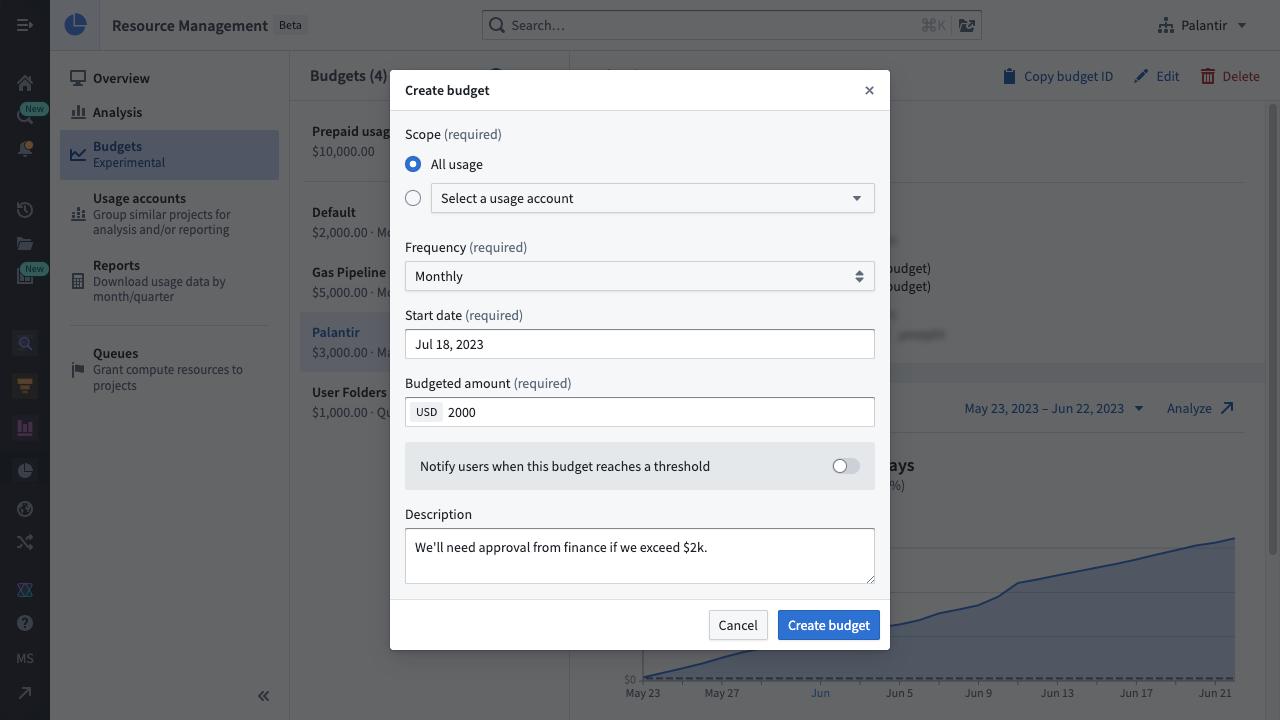
To create a budget, select the Create button above the list of budgets. You will then be able to specify the budget's scope, frequency, start date (and end date, for non-recurring budgets), budgeted amount, and description.
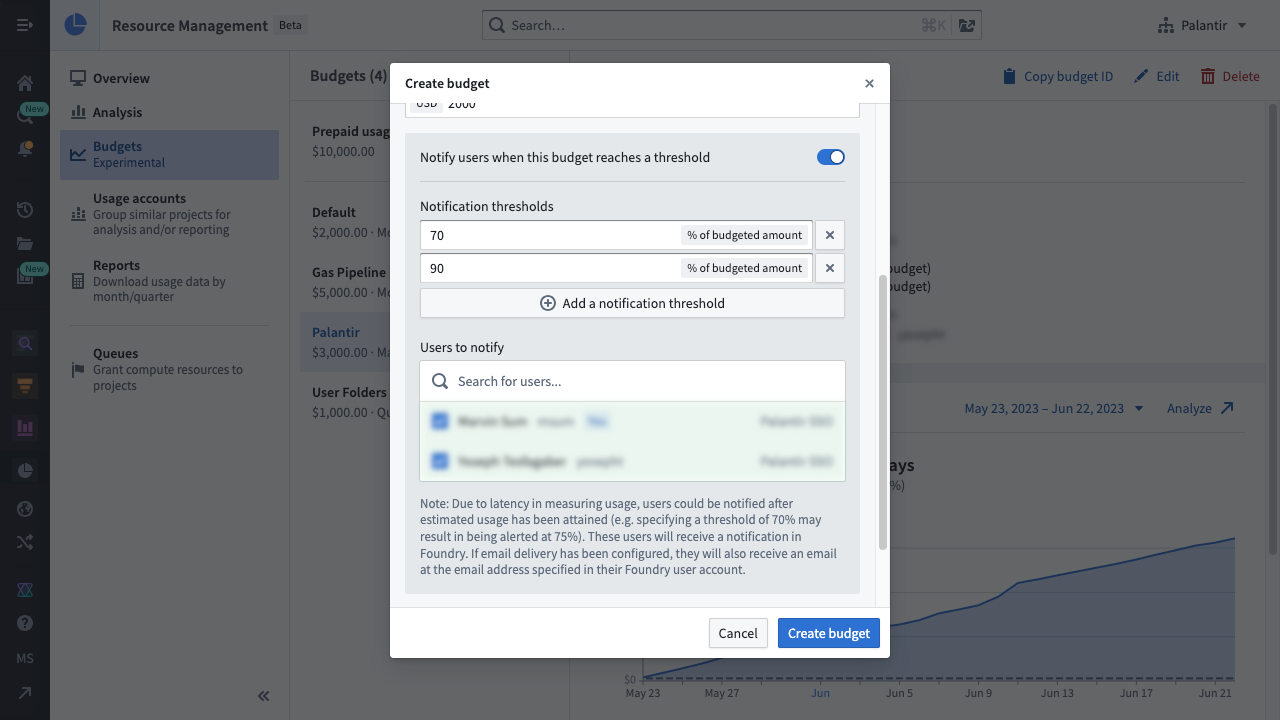
To notify users whenever a notification threshold is reached, select the notification toggle to reveal the notification options. Specify the notification thresholds and the list of users who should be notified. Then select Create budget to complete the process.
Delete a budget
:::callout{theme="danger"} Deleting a budget also deletes its existing notifications and prevents future notifications from being sent to the users. This action cannot be undone. :::
While viewing a single budget, select the Delete button. When the warning dialog appears, select Delete budget.
中文翻译
预算 (Budgets)
:::callout{theme="neutral"} 资源管理 (Resource Management) 的预算功能仅适用于与 Palantir 签订了有效按用量付费合同的客户。 :::
资源管理的预算功能允许用户跟踪一段时间内的用量支出。预算还可以配置为在用量超过预设金额时通知用户。
预算属性 (Budget properties)
- 预算金额 (Budgeted amount): 以货币形式表示的待跟踪金额;通常代表对实际支出的估算。
- 频率 (Frequency): 预算重复的周期;可以是每月、每季度、每年或非重复性。
- 通知阈值 (Notification threshold(s)): 以预算金额的百分比表示;当预算超过通知阈值时,将通知用户。
- 范围 (Scope): 此预算跟踪的一组资源(以特定用量账户 (Usage account) 或所有用量表示);更多详情请参见预算范围。
- 开始日期 (Start date): 预算开始的日期;对于非重复性预算,还必须指定结束日期。
- 通知用户 (User(s) to notify): 当预算超过通知阈值时,将收到通知(在 Foundry 中或通过电子邮件)的用户列表。每当预算超过通知阈值时,都会向该用户列表发送通知。
每当预算超过通知阈值时,都会向该用户列表发送通知。
:::callout{theme="warning"} 预算通知是在预算超过阈值后发送的。由于测量和计算用量的过程,预算超过阈值的时间与通知时间之间可能存在延迟(例如,指定 70% 的通知阈值可能导致在 75% 时发送通知)。在极少数情况下,此延迟可能长达 26 小时。 :::
预算范围 (Budget scope)
预算目前支持两种不同的范围:
- 所有用量 (All usage): 预算跟踪所有用量账户中的全部用量。
- 用量账户 (Usage account): 预算跟踪特定用量账户内项目的用量。
预算权限 (Budget permissions)
要使用预算,需要具备以下一个或多个角色:
注册管理员 (Enrollment administrator):查看、创建、编辑和删除预算。资源管理管理员 (Resource management administrator):查看、创建、编辑和删除预算。
角色通过控制面板 (Control Panel) 中的注册权限页面授予。
查看所有预算
在资源管理中,选择左侧边栏中的 预算 (Budgets)。这将显示您的注册中可用的预算列表。选择单个预算以查看其详细信息、历史记录和通知。
创建预算
要创建预算,请选择预算列表上方的 创建 (Create) 按钮。然后,您可以指定预算的范围、频率、开始日期(以及非重复性预算的结束日期)、预算金额和描述。
要在达到通知阈值时通知用户,请选择通知开关以显示通知选项。指定通知阈值和应接收通知的用户列表。然后选择 创建预算 (Create budget) 以完成该过程。
删除预算
:::callout{theme="danger"} 删除预算也会删除其现有的通知,并阻止将来向用户发送通知。此操作无法撤消。 :::
在查看单个预算时,选择 删除 (Delete) 按钮。当警告对话框出现时,选择 删除预算 (Delete budget)。