Compass
Compass is the filesystem for the Palantir platform. You can use Compass to organize and manage your projects, resources, and folders.
The most basic units in the platform are resources, which are analogous to a file in a traditional filesystem. You can store resources in projects, which are collaborative spaces that organize people, resources, and folders for a particular purpose. The Files page allows you to browse, share, secure, and organize your resources and projects in one place.
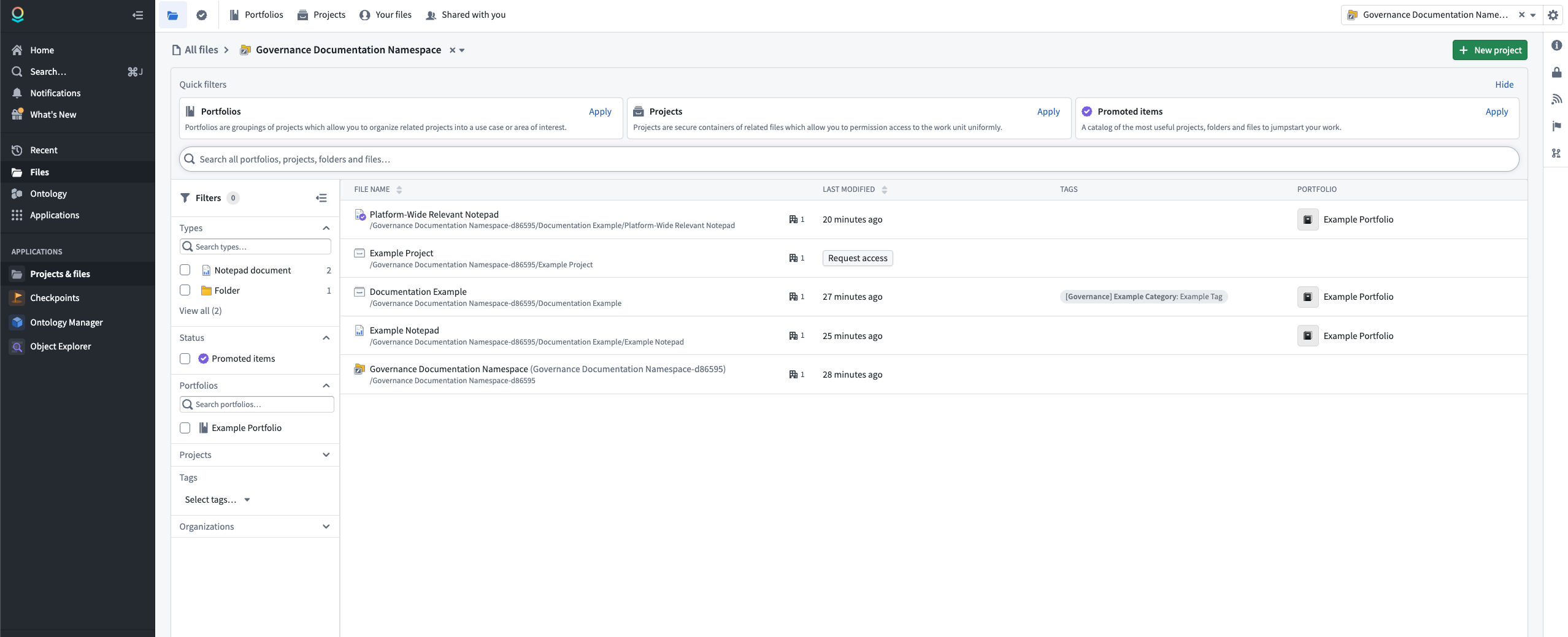
To find your resources, select Files in the workspace navigation sidebar. At the top of the page, you can use tabs to navigate between Portfolios, Projects, Your files (visible only to you), and Shared with you.
Below the tabs, quick filter cards allow you to filter the view by portfolios, projects, or Promoted items. If you need access to a project, select Request access to submit an access request.
You can further refine the file list using the Filters panel in the left sidebar. Filter options include resource type, status, portfolio, project, organization, and tag. Select a project to access the project dashboard, or create a new project.
When you open a project dashboard, you can view the following areas: Files, Autosaved, References (file and external), Trash, and Sensitive Data Scanner.
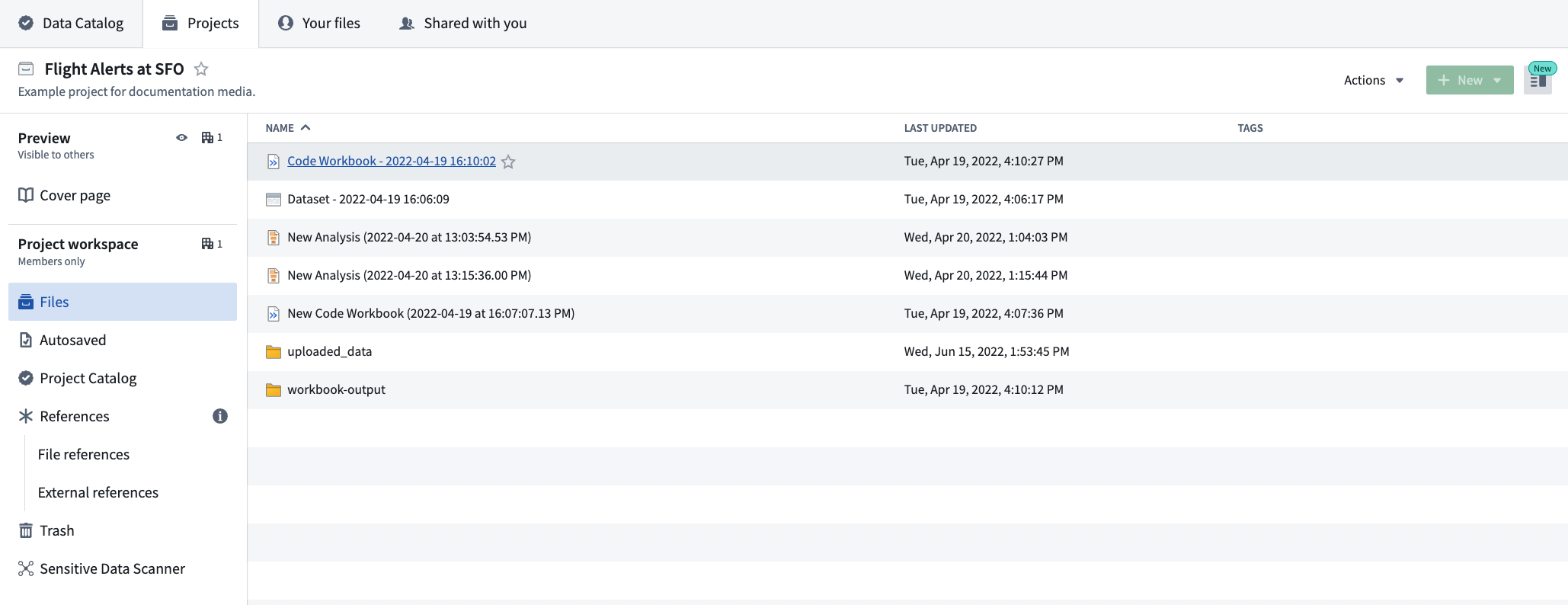
- Files: A collection of all resources within a project. Pinned resources appear at the top for quick access.
- Autosaved: Resources created within the project that were automatically saved without a designated location.
- References: A collection of resources that flow into the project, including file references and external references.
- Trash: Resources deleted from the project that are available for recovery or permanent deletion.
- Sensitive Data Scanner: A view for operational users to review personally identifiable information (PII) detections.
中文翻译
Compass
Compass 是 Palantir 平台的文件系统。您可以使用 Compass 来组织和管理您的项目、资源及文件夹。
平台中最基本的单元是 资源(resources),类似于传统文件系统中的文件。您可以将资源存储在 项目(projects) 中,这些项目是为特定目的而组织人员、资源和文件夹的协作空间。文件(Files) 页面允许您在一个位置浏览、共享、保护并组织您的资源和项目。
要查找您的资源,请在工作区导航侧边栏中选择 文件(Files)。在页面顶部,您可以使用选项卡在 投资组合(Portfolios)、项目(Projects)、您的文件(Your files)(仅您可见)和 与您共享(Shared with you) 之间导航。
在选项卡下方,快速筛选卡片允许您按投资组合、项目或 推广项(Promoted items) 筛选视图。如果您需要访问某个项目,请选择 请求访问(Request access) 提交访问请求。
您还可以使用左侧边栏中的 筛选器(Filters) 面板进一步细化文件列表。筛选选项包括资源类型、状态、投资组合、项目、组织和标签。选择一个项目以访问项目仪表板,或 创建一个新项目。
当您打开项目仪表板时,可以查看以下区域:文件(Files)、自动保存(Autosaved)、引用(References)(文件和外部引用)、回收站(Trash) 和 敏感数据扫描器(Sensitive Data Scanner)。
- 文件(Files): 项目内所有资源的集合。置顶资源显示在顶部以便快速访问。
- 自动保存(Autosaved): 在项目中创建但未指定位置而自动保存的资源。
- 引用(References): 流入项目的资源集合,包括文件引用和外部引用。
- 回收站(Trash): 从项目中删除的资源,可恢复或永久删除。
- 敏感数据扫描器(Sensitive Data Scanner): 供操作用户查看 个人身份信息(PII) 检测结果的视图。