Release management(发布管理)
Release management is the process of managing multiple versions of resources across distinct environments that serve different purposes, also known as the principle of environment separation. Typically, the environments serve as isolated locations for resources at different stages of being released, such as: feature development, feature testing, and feature deployment to production.
For example, developers at your organization can collaborate in the development environment on new features, while user acceptance testers and automated testing scripts can test developed features yet to be validated for production that are in the testing environment, ahead of releasing them to production. This can happen while the existing functionality running in production remains available for users and is unaffected by the ongoing development and testing in the other environments.
The separation of resources into environments allows changes to be tested and validated in a controlled environment that does not affect the functionality running in production. When the resources have been tested, they can then be promoted to production if ready, or further developed if required.
:::callout{theme="neutral"} Using DevOps and Marketplace is one way to implement a release management process. There are other ways to do this in the Palantir platform, such as using Global Branching. :::
Environment separation in DevOps and Marketplace
Spaces are a flexible primitive in the Palantir platform that allow for environment separation in Foundry. Environment separation is the practice of maintaining distinct spaces for different stages of development and deployment, such as development, testing, and production. This separation ensures that changes can be tested and validated in a controlled environment before being promoted to production, thereby minimizing the risk of introducing errors or issues into production workflows.
You can create as many environments as necessary for a workflow, allowing for custom release management models.
A typical environment setup consists of the following three environments, each represented as a “space” in the Palantir platform:
- Development: Environment for developing new features
- Test: Environment for manual or automated testing of features once the features have been developed in the previous environment.
- Production: Environment for features that have been developed and tested in the previous environments by end users.
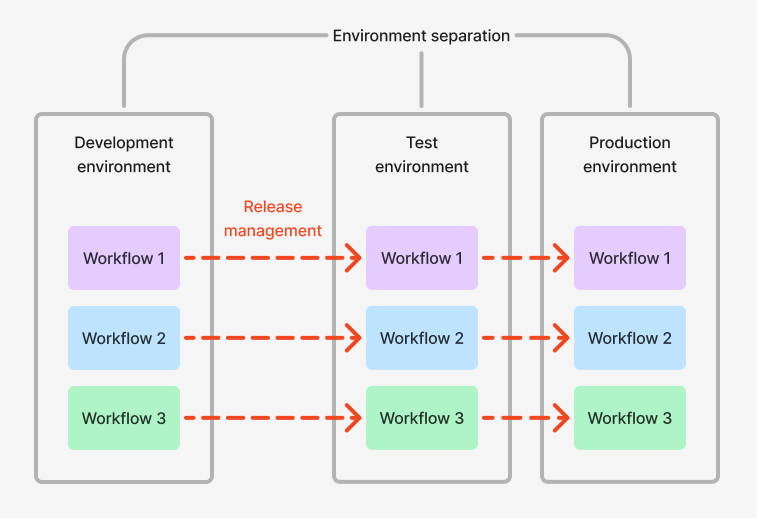
Generally, as products are promoted through your environments, the functionality within those products will become available in the given environment/space. You can configure the following differences across your environments:
- Environment-specific data: For example, the development environment may use notional data, while the test environment may use a subset of real data, and the production environment uses the full scale of real data.
- Environment-specific behavior: The behavior in non-productions environments may differ to the behavior in the production environment. For example, email notifications sent to the relevant users within the production environment may be sent to a different group in other environments. Similarly, approval workflows in non-production environments may allow a different set of users, such as testers and developers, to provide approval where in the production environment it would be the true approvers.
- Environment-specific integrations: For example, the development environment may connect to development-level databases and call out to APIs of other development-level systems. The production environment will typically connect to production databases and call out to other production-level systems.
Global Branching vs. release management
Global Branching enables development and testing of workflow changes on an isolated branch, and is ideal for managing changes within an environment by allowing multiple developers to work in isolation. Changes are only merged to the main branch when the feature is complete and by users with the right level of permissions.
Global Branching is ideal for rapid iteration, providing the ability to easily test newly developed features. However, due to the short-lived nature of branches and limited coverage of resource types, it does not always fulfill all of the needs of release management.
Benefits of using DevOps and Marketplace for release management include the abilities to:
- Integrate with different source systems in different environments
- Maintain different security policies across environments
- Roll back to a previous release
- Configure release channels
- Support long-lived environments
Benefits of using Global Branching for release management include the abilities to:
- Rapidly iterate on new features and easily release them to end users
- Easily create and release a hotfix into an environment
- Lower the cost of infrastructure due to branches being automatically deleted when not used
Learn more about how to use DevOps for release management.
中文翻译
发布管理
发布管理(Release management)是指在不同用途的独立环境中管理多个版本资源的过程,也称为环境隔离原则。通常,这些环境作为资源在不同发布阶段的隔离位置,例如:功能开发、功能测试以及功能部署至生产环境。
例如,贵组织的开发人员可以在开发环境中协作开发新功能,而用户验收测试人员和自动化测试脚本可以在测试环境中测试已开发但尚未验证可投入生产环境的功能,之后再将其发布至生产环境。在此过程中,生产环境中运行的现有功能仍可正常供用户使用,且不受其他环境中持续开发与测试的影响。
将资源按环境隔离,可以在不影响生产环境功能的前提下,在受控环境中测试和验证变更。当资源完成测试后,若准备就绪则可提升至生产环境,若需进一步完善则可继续开发。
:::callout{theme="neutral"} 使用 DevOps 和 Marketplace 是实现发布管理流程的一种方式。在 Palantir 平台中还有其他实现方式,例如使用全局分支。 :::
DevOps 和 Marketplace 中的环境隔离
空间是 Palantir 平台中的灵活基础组件,可在 Foundry 中实现环境隔离。环境隔离是指为不同开发和部署阶段(如开发、测试和生产)维护独立空间的做法。这种隔离确保变更在提升至生产环境前,能在受控环境中进行测试和验证,从而最大限度降低将错误或问题引入生产工作流的风险。
您可以根据工作流需要创建任意数量的环境,从而实现自定义的发布管理模型。
典型的环境设置包含以下三个环境,每个环境在 Palantir 平台中均以"空间"形式呈现:
- 开发环境(Development):用于开发新功能的环境
- 测试环境(Test):在上一环境完成功能开发后,用于手动或自动测试功能的环境
- 生产环境(Production):供最终用户使用已在之前环境中完成开发和测试的功能的环境
通常,随着产品在各环境中的提升,这些产品中的功能将在相应环境/空间中可用。您可以在各环境中配置以下差异:
- 环境特定数据: 例如,开发环境可能使用模拟数据,测试环境可能使用真实数据的子集,而生产环境则使用全量真实数据。
- 环境特定行为: 非生产环境中的行为可能与生产环境不同。例如,生产环境中发送给相关用户的邮件通知,在其他环境中可能发送给不同的用户组。同样,非生产环境中的审批工作流可能允许不同用户(如测试人员和开发人员)进行审批,而生产环境中则应由真正的审批人操作。
- 环境特定集成: 例如,开发环境可能连接开发级数据库并调用其他开发级系统的 API。生产环境通常连接生产数据库并调用其他生产级系统。
全局分支与发布管理
全局分支支持在隔离分支上开发和测试工作流变更,通过允许多个开发人员独立工作,非常适合在单个环境内管理变更。只有当功能完成且由具有适当权限的用户操作时,变更才会合并到主分支。
全局分支非常适合快速迭代,能够轻松测试新开发的功能。但由于分支生命周期短且资源类型覆盖有限,它并不总能满足发布管理的全部需求。
使用 DevOps 和 Marketplace 进行发布管理的优势包括:
- 在不同环境中集成不同的源系统
- 跨环境维护不同的安全策略
- 回滚至先前版本
- 配置发布渠道
- 支持长期存在的环境
使用全局分支进行发布管理的优势包括:
- 快速迭代新功能并轻松发布给最终用户
- 轻松创建并发布热修复至环境
- 由于分支在不使用时自动删除,可降低基础设施成本