Code-defined input filtering(代码定义的输入过滤)
Apart from the Sampled and Full dataset input strategy configurations discussed in the preview transforms documentation, VS Code preview also supports a Code-defined filters option. This allows you to write custom Python functions that control exactly what data gets loaded during transform preview. Instead of relying on random sampling or full dataset loading, you define the precise logic for what subset of data should be used.
When applicable, these filters leverage pushdown predicates ↗ to ensure that only the most relevant data samples are loaded. The Palantir extension for Visual Studio Code automatically discovers all eligible functions that can be used as filters in your repository and displays them in a dropdown menu when configuring your preview.
Why use code-defined filters?
Test specific scenarios: Focus on edge cases or specific data conditions that matter for your development without sorting through irrelevant data.
Create reusable logic: Write a filter once and use it across multiple preview sessions, making your development workflow more consistent.
Fine-tune performance: For large datasets where even full dataset loading is slow, you can optimize exactly what data gets filtered.
Combine multiple filters: Select and chain multiple filters in any order to create sophisticated sampling strategies.
How to use code-defined filters
Select filters for preview
- Select Configure input strategy in the Preview panel.
- Choose the
Code-defined filtersoption. - Select from a list of built-in filters, or choose a filter authored by you.
- Arrange filters in your preferred order; they will be applied sequentially.
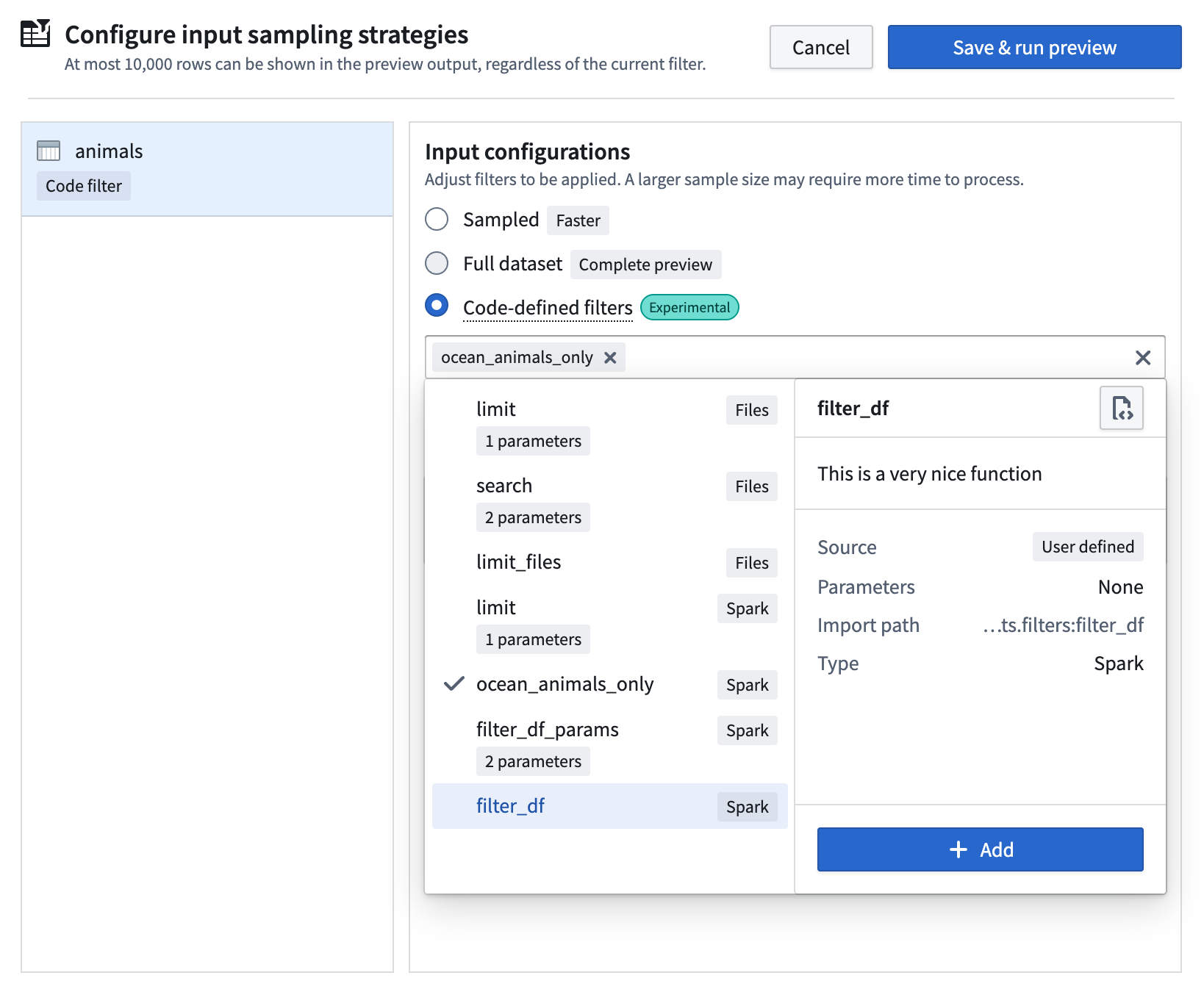
The extension automatically discovers all eligible filters anywhere in your project codebase and displays them in the selection dropdown menu.
Create filter functions
To create an eligible preview filter from a Python function, the rules listed below must be followed.
Function requirements
The function must be
- directly defined in the global scope of its module
- fully type-annotated with one of the following signatures:
- For Spark transforms:
(pyspark.sql.DataFrame) -> pyspark.sql.DataFrame - For lightweight transforms:
(polars.LazyFrame) -> polars.LazyFrame - For raw files:
(collections.abc.Iterator[transforms.api.FileStatus]) -> collections.abc.Iterator[transforms.api.FileStatus]
The function should NOT
- be nested
- be guarded by
if,with,foror other statements - be part of a class
- be imported from somewhere else
- be a variable assigned to a function
- be an
asyncor private function (function names cannot start with_) - have any decorators applied
Example filter functions
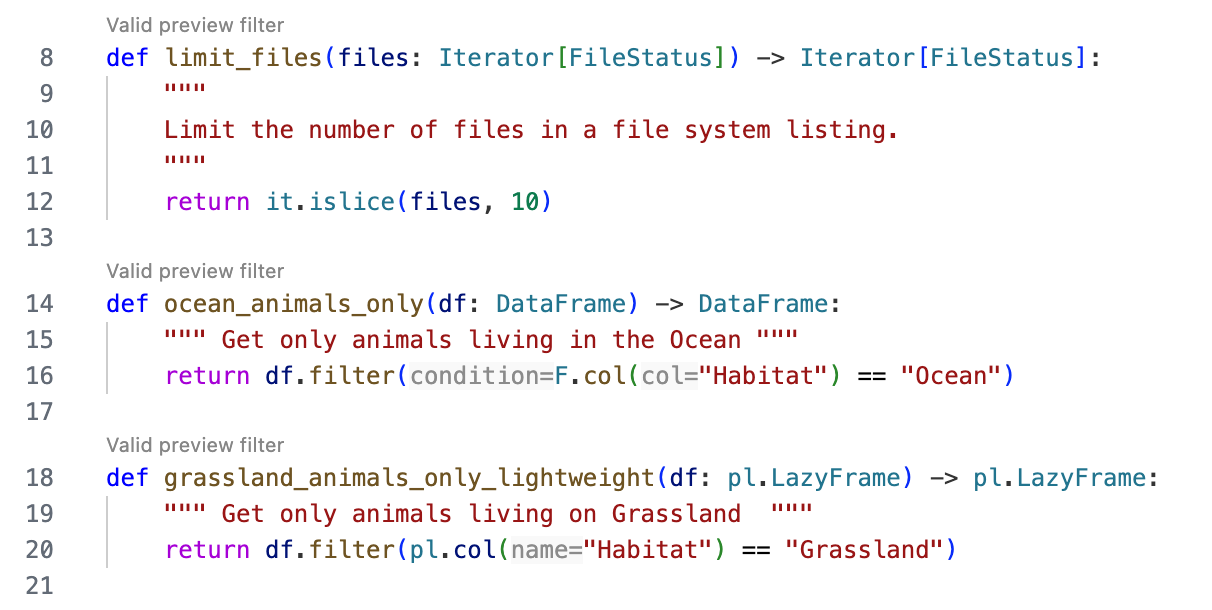
The following example lists some valid preview filter functions:
from pyspark.sql import DataFrame
from pyspark.sql import functions as F
from collections.abc import Iterator
from transforms.api import FileStatus
import itertools as it
import polars as pl


def limit_files(files: Iterator[FileStatus]) -> Iterator[FileStatus]:
    """ Limit the number of files in a file system listing."""
    return it.islice(files, 10)

def ocean_animals_only(df: DataFrame) -> DataFrame:
    """ Get only animals living in the Ocean """
    return df.filter(F.col("Habitat") == "Ocean")

def grassland_animals_only_lightweight(df: pl.LazyFrame) -> pl.LazyFrame:
    """ Get only animals living on Grassland  """
    return df.filter(pl.col("Habitat") == "Grassland")
You will receive immediate feedback on whether your functions are eligible for use through the CodeLens hint that appears above the filter functions:
Add parameters to filters
You can make your filters more flexible by adding parameters. This allows you to create generic, reusable filter functions that adapt to different scenarios.
How to add parameters
- Define parameters in the function signature with type annotations.
- Mark them as keyword-only arguments by adding a
*symbol before the parameters. - The extension will automatically detect these parameters and prompt for values when you select the filter.
The following is an example with a parameter:
from pyspark.sql import DataFrame
from pyspark.sql import functions as F

def filter_animals_by_habitat(df: DataFrame, *, habitat: str) -> DataFrame:
    """ Get only animals living in the Ocean """
    return df.filter(F.col("Habitat") == habitat)
Note the * symbol before the habitat parameter; this classifies it as a keyword-only argument.
Supported parameter types
Currently supported parameter types are the following:
strintfloatbool
Provide default values
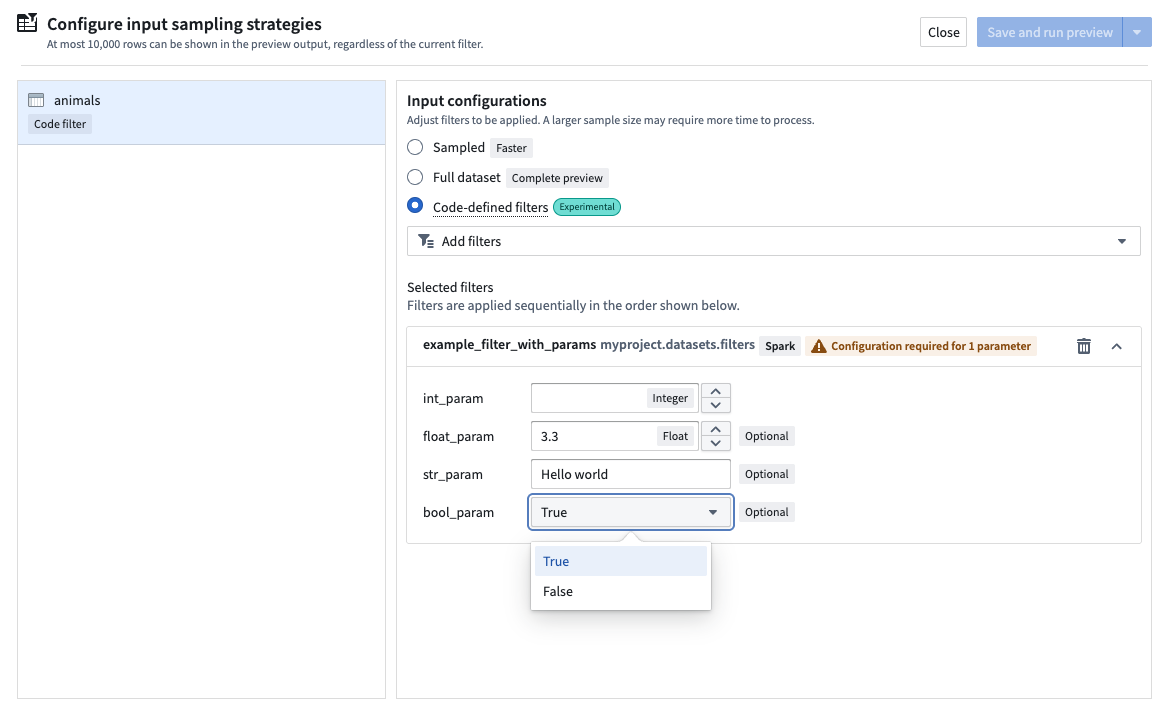
You can provide default values for parameters in the function signature. If a default value is provided, the parameter becomes optional, and the default value will be used if you do not enter a value at configuration time:
from pyspark.sql import DataFrame
from pyspark.sql import functions as F

def example_filter_with_params(
    df: DataFrame, *, int_param: int, float_param: float = 3.3, str_param: str = "Hello world", bool_param: bool = True
) -> DataFrame:
    """This is an example function with many parameters of different types"""
    print(f"int_param: {int_param}, float_param: {float_param}, str_param: {str_param}, bool_param: {bool_param}")
    return df.limit(int_param)
When you select a filter with parameters for preview, a prompt will appear for each parameter:
Supported input types
The filter selection dropdown menu will show filters available for use; however, based on your transforms context, selecting a specific filter type might be more suitable.
- When working with structured inputs in Spark transforms: Use
DataFramefilters. - When working with structured inputs in lightweight transforms: Use
LazyFramefilters. - When working with unstructured inputs (raw files) in Spark or lightweight: Use
Iterator[FileStatus]filters.
中文翻译
代码定义的输入过滤
除了预览转换文档中讨论的Sampled和Full dataset输入策略配置外,VS Code预览还支持Code-defined filters(代码定义过滤器)选项。这允许您编写自定义Python函数,精确控制在转换预览期间加载哪些数据。您无需依赖随机采样或全数据集加载,而是可以定义精确的逻辑来决定应使用哪些数据子集。
在适用的情况下,这些过滤器会利用谓词下推优化器 ↗(pushdown predicates),确保仅加载最相关的数据样本。Palantir Visual Studio Code扩展会自动发现代码库中所有可用作过滤器的函数,并在配置预览时将其显示在下拉菜单中。
为什么要使用代码定义的过滤器?
测试特定场景: 专注于对开发至关重要的边缘情况或特定数据条件,无需筛选无关数据。
创建可复用逻辑: 编写一次过滤器,即可在多个预览会话中使用,使开发工作流更加一致。
精细调优性能: 对于即使全数据集加载也很慢的大型数据集,您可以精确优化需要过滤的数据。
组合多个过滤器: 按任意顺序选择和串联多个过滤器,创建复杂的采样策略。
如何使用代码定义的过滤器
为预览选择过滤器
- 在预览面板中选择配置输入策略。
- 选择
Code-defined filters(代码定义过滤器)选项。 - 从内置过滤器列表中选择,或选择您自己编写的过滤器。
- 按您偏好的顺序排列过滤器;它们将按顺序应用。
该扩展会自动发现项目代码库中所有符合条件的过滤器,并将其显示在选择下拉菜单中。
创建过滤器函数
要从Python函数创建符合条件的预览过滤器,必须遵循以下规则。
函数要求
函数必须:
- 直接定义在其模块的全局作用域中
- 具有以下签名之一的完整类型注解:
- 对于Spark转换:
(pyspark.sql.DataFrame) -> pyspark.sql.DataFrame - 对于轻量级转换:
(polars.LazyFrame) -> polars.LazyFrame - 对于原始文件:
(collections.abc.Iterator[transforms.api.FileStatus]) -> collections.abc.Iterator[transforms.api.FileStatus]
函数不应:
- 是嵌套函数
- 被
if、with、for或其他语句保护 - 是类的一部分
- 从其他地方导入
- 是赋值给函数的变量
- 是
async函数或私有函数(函数名不能以_开头) - 应用任何装饰器
过滤器函数示例
以下示例列出了一些有效的预览过滤器函数:
from pyspark.sql import DataFrame
from pyspark.sql import functions as F
from collections.abc import Iterator
from transforms.api import FileStatus
import itertools as it
import polars as pl


def limit_files(files: Iterator[FileStatus]) -> Iterator[FileStatus]:
    """ 限制文件系统列表中的文件数量。"""
    return it.islice(files, 10)

def ocean_animals_only(df: DataFrame) -> DataFrame:
    """ 仅获取生活在海洋中的动物 """
    return df.filter(F.col("Habitat") == "Ocean")

def grassland_animals_only_lightweight(df: pl.LazyFrame) -> pl.LazyFrame:
    """ 仅获取生活在草原上的动物 """
    return df.filter(pl.col("Habitat") == "Grassland")
您将通过过滤器函数上方显示的CodeLens提示(CodeLens hint)立即获得关于函数是否符合条件的反馈:
为过滤器添加参数
您可以通过添加参数使过滤器更加灵活。这允许您创建通用的、可复用的过滤器函数,以适应不同的场景。
如何添加参数
- 在函数签名中使用类型注解定义参数。
- 通过在参数前添加
*符号,将其标记为仅关键字参数(keyword-only arguments)。 - 扩展会自动检测这些参数,并在您选择过滤器时提示输入值。
以下是一个带参数的示例:
from pyspark.sql import DataFrame
from pyspark.sql import functions as F

def filter_animals_by_habitat(df: DataFrame, *, habitat: str) -> DataFrame:
    """ 仅获取生活在海洋中的动物 """
    return df.filter(F.col("Habitat") == habitat)
请注意habitat参数前的*符号;这将其归类为仅关键字参数。
支持的参数类型
目前支持的参数类型如下:
strintfloatbool
提供默认值
您可以在函数签名中为参数提供默认值。如果提供了默认值,该参数变为可选参数,如果您在配置时未输入值,将使用默认值:
from pyspark.sql import DataFrame
from pyspark.sql import functions as F

def example_filter_with_params(
    df: DataFrame, *, int_param: int, float_param: float = 3.3, str_param: str = "Hello world", bool_param: bool = True
) -> DataFrame:
    """这是一个包含多种类型参数的示例函数"""
    print(f"int_param: {int_param}, float_param: {float_param}, str_param: {str_param}, bool_param: {bool_param}")
    return df.limit(int_param)
当您选择带参数的过滤器进行预览时,每个参数都会出现提示:
支持的输入类型
过滤器选择下拉菜单会显示可用的过滤器;但是,根据您的转换上下文,选择特定的过滤器类型可能更为合适。
- 在Spark转换中处理结构化输入时: 使用
DataFrame过滤器。 - 在轻量级转换中处理结构化输入时: 使用
LazyFrame过滤器。 - 在Spark或轻量级转换中处理非结构化输入(原始文件)时: 使用
Iterator[FileStatus]过滤器。