Upgrade Assistant notifications(升级助手通知)
Upgrade Assistant sends email and in-platform notifications to alert relevant users on pending upgrades requiring action.
There are three types of upgrade assistant notifications, which are summarized below:
| Notification type | Audience | Purpose | Scope | Frequency |
|---|---|---|---|---|
| Status change | Maintenance Operators | Announce a new platform change | For each platform change impacting your Organization | When an upgrade campaign becomes Pre-Published or Published |
| Summary | Users with at least one assigned resource | Summarize all platform changes where the user has a pending action | One summary including all platform changes where the user is assigned an open action that is not ignored | Every 30 days per user |
| Reminder | Users with at least one assigned resource | Announce new upgrade campaign | For each platform change where the user is assigned an open action that is not ignored | 30, 21, 14, 7, 5, 3, 2, 1 days before deadline * |
* Note: The above table documents the standard reminder notification frequency. On rare occasions, your Organization may have configured a custom reminder frequency for a particular platform change.
Status change notifications
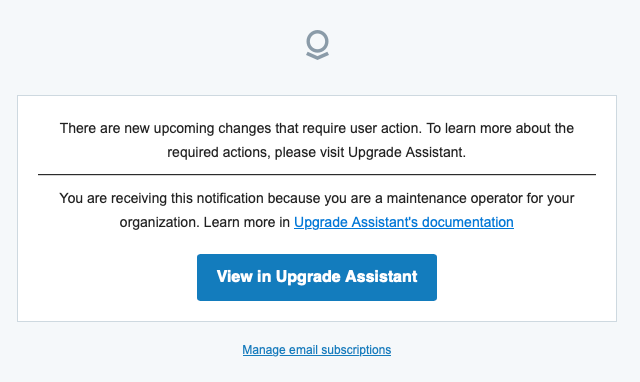
Status change notifications are sent only to Maintenance Operators. In the case where a platform change enters the Pre-published status, the subject of the email is "Review the new upgrade to Palantir Foundry: Published status, the subject of the email is "User action is required for new upcoming changes".
Status change notifications are intended to provide awareness of platform changes that have recently been added to Upgrade Assistant. No specific action is required of Operators that receive these notifications.
Summary notifications
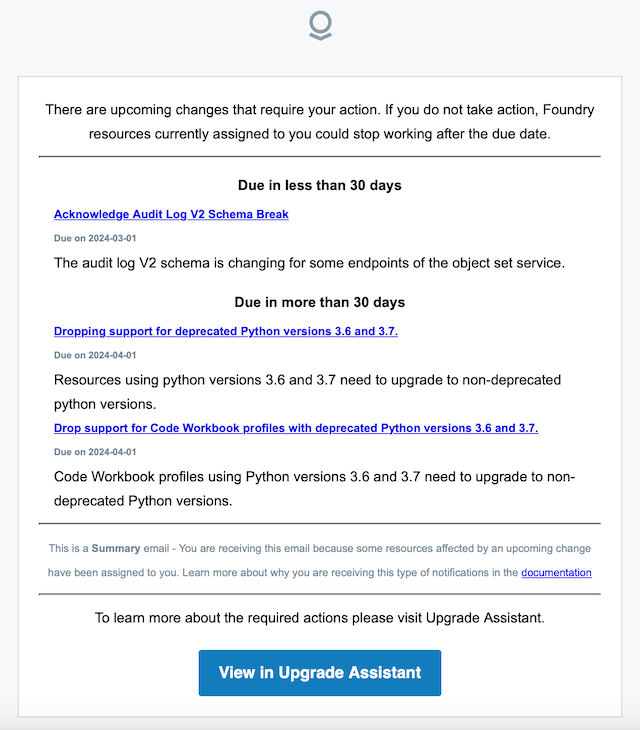
Summary notifications are sent, at maximum, once per a month. The subject of a summary notification email is "Your action is required for X upcoming changes". Summary notifications are intended to provide awareness of all ongoing platform changes where the user has been assigned at least one open action.
Reminder notifications
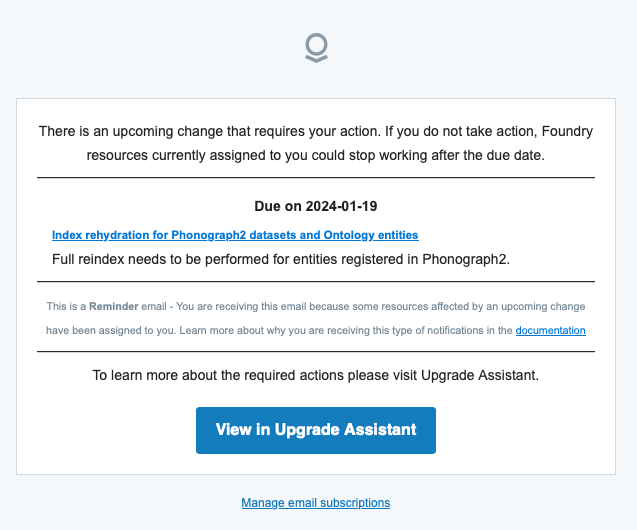
Reminder notifications are specific to each platform change and warn users that resources will break unless appropriate action is taken. By default, reminder notifications are sent more frequently as the due date for taking action approaches. These notifications are sent to all users who have at least one assigned, pending resource to action for the upgrade.
Reminder notification emails are typically titled "A change affecting X resources assigned to you and due on Y is coming soon".
Unsubscribing from notifications
If you no longer wish to receive notifications, you can unsubscribe from all further Upgrade Assistant notifications. We discourage unsubscribing as failing to meet platform change deadlines can disrupt workflows and cause problems with resources.
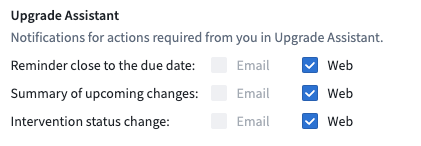
To unsubscribe from notification emails, follow the Manage email subscription link in a notification email or navigate to Settings > Notifications in Foundry, then make a selection for notification preference.
中文翻译
升级助手通知
升级助手(Upgrade Assistant)会发送电子邮件和平台内通知,提醒相关用户处理待处理的升级事项。
升级助手通知共有三种类型,如下表所示:
| 通知类型 | 受众 | 目的 | 范围 | 频率 |
|---|---|---|---|---|
| 状态变更 | 维护操作员 | 宣布新的平台变更 | 影响您组织的每项平台变更 | 当升级活动(upgrade campaign)进入预发布或已发布状态时 |
| 摘要 | 至少拥有一个已分配资源的用户 | 汇总用户有待处理操作的所有平台变更 | 一份摘要,涵盖用户被分配了未忽略的待处理操作的所有平台变更 | 每位用户每30天一次 |
| 提醒 | 至少拥有一个已分配资源的用户 | 宣布新的升级活动 | 针对用户被分配了未忽略的待处理操作的每项平台变更 | 截止日期前30、21、14、7、5、3、2、1天* |
*注:上表记录了标准的提醒通知频率。在极少数情况下,您的组织可能为特定平台变更配置了自定义提醒频率。
状态变更通知
状态变更通知仅发送给维护操作员。当平台变更为预发布状态时,邮件主题为"请审阅 Palantir Foundry 的新升级:<平台变更名称>"。当平台变更为已发布状态时,邮件主题为"即将到来的新变更需要用户操作"。
状态变更通知旨在让相关人员了解最近添加到升级助手(Upgrade Assistant)中的平台变更。收到这些通知的操作员无需执行特定操作。
摘要通知
摘要通知每月最多发送一次。摘要通知邮件的主题为"您需要对 X 项即将到来的变更进行操作"。摘要通知旨在让用户了解所有正在进行中的平台变更,其中用户被分配了至少一个待处理操作。
提醒通知
提醒通知针对每项平台变更单独发送,警告用户如果不采取适当操作,资源将出现问题。默认情况下,随着操作截止日期的临近,提醒通知的发送频率会逐渐增加。这些通知发送给所有至少有一个已分配待处理资源需要为升级采取行动的用户。
提醒通知邮件的标题通常为"一项影响分配给您的 X 个资源且截止日期为 Y 的变更即将到来"。
取消订阅通知
如果您不再希望接收通知,可以取消订阅所有后续的升级助手(Upgrade Assistant)通知。我们不建议取消订阅,因为未能满足平台变更截止日期可能会中断工作流程并导致资源问题。
要取消订阅通知邮件,请点击通知邮件中的管理电子邮件订阅链接,或导航至 Foundry 中的设置 > 通知,然后选择通知偏好设置。