Maintenance Operator and Technical Compliance Officer(维护操作员与技术合规官)
Certain users are granted special permissions to assist with tracking ongoing platform upgrades and supporting other users in making necessary changes for a smooth upgrade process. These users are known as Maintenance Operators who have a unique set of permissions shown as the Oversee progress in Upgrade Assistant workflow in Control Panel.
Maintenance Operators receive additional notifications alerting them to new upgrades as they become available on the platform. They also have access to comprehensive metadata, which aids them in tracking and understanding the progress of remediation for ongoing upgrades.
In addition, Maintenance Operators are given a preview of upcoming changes before they are officially published to the platform. This allows them to prepare and plan for these changes in advance.
Becoming a Maintenance Operator
Maintenance Operator permissions are granted by Organization Administrators. These permissions can be accessed from the Organization permission section of Control Panel.
By default, these permissions are associated with two roles:
- Organization Administrator
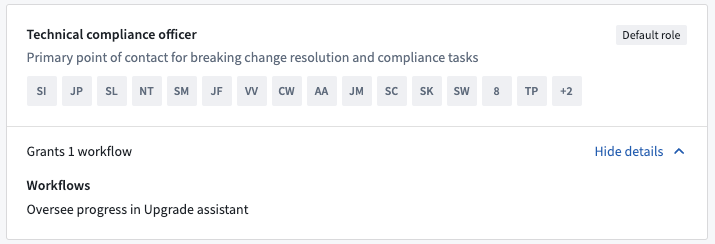
- Technical Compliance Officer
A user assigned to either role will automatically receive the Oversee progress in Upgrade Assistant workflow, designating them as a Maintenance Operator.
For effective management of ongoing changes in the Upgrade Assistant, we recommend that Administrators appoint one or more Technical Compliance Officers specifically for this task.
Review Pre-published status platform changes
Where possible, Palantir teams may make certain platform changes available for early review by Maintenance Operators by "pre-publishing" the platform change communications.
During the Pre-published period (typically 14 days), the platform change communications and list of affected resources will be available for Maintenance Operators to review, ahead of the information being Published for all affected Palantir users.
The Pre-published period provides an opportunity for Maintenance Owners to make inquiries with support, re-assign resources, or ignore resources ahead of the broader publication date.
Reassign any resources
Maintenance Operators can reassign any resource to another user. This is useful for resources that might have been wrongly assigned when using our heuristics.
Admin view
Maintenance Operators can switch to an Admin view from the Upgrade Assistant home page.
The admin view shows the total number of actions across all Organizations required for upcoming upgrades including:
- Actions not assigned to the current user
- Actions beyond the current user's permission scope
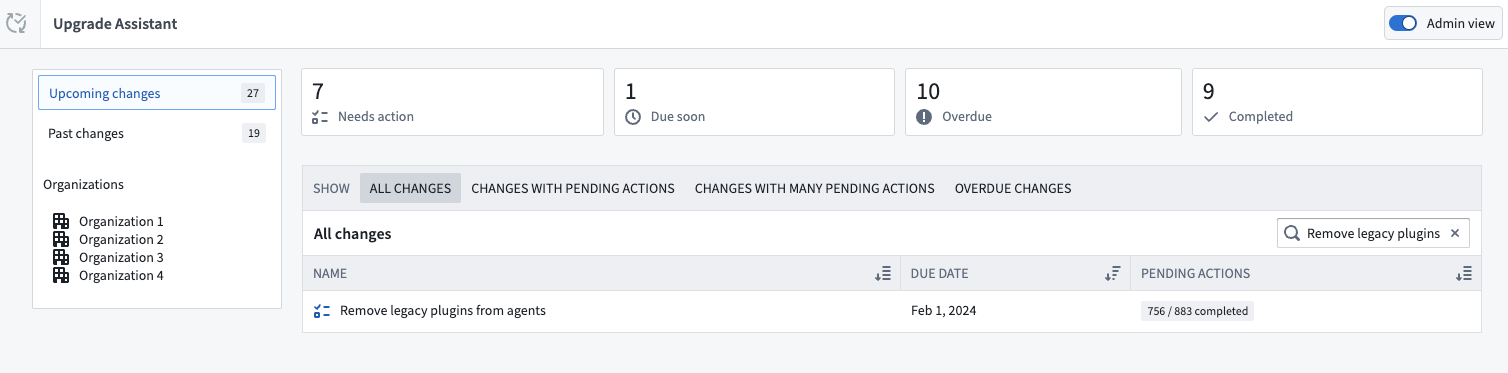
If the option does not appear on your screen, you lack the necessary permissions and will need to contact your Organization Administrator to request the Technical Compliance Officer role.
Organization summary
Selecting an upgrade shows a summary of each Organization's progress. The numbers here represent aggregates across the entire Organization, regardless of the current user's permissions.

Project summary
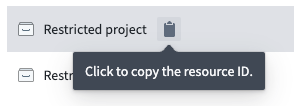
Selecting an organization reveals a summary of each affected Project's progress. This is only available for Compass Resources upgrades. If the Maintenance Operator lacks access to some Projects, these Projects are listed as Restricted projects. However, the Maintenance Operator can still view and copy the unique resource identifier of the Project.
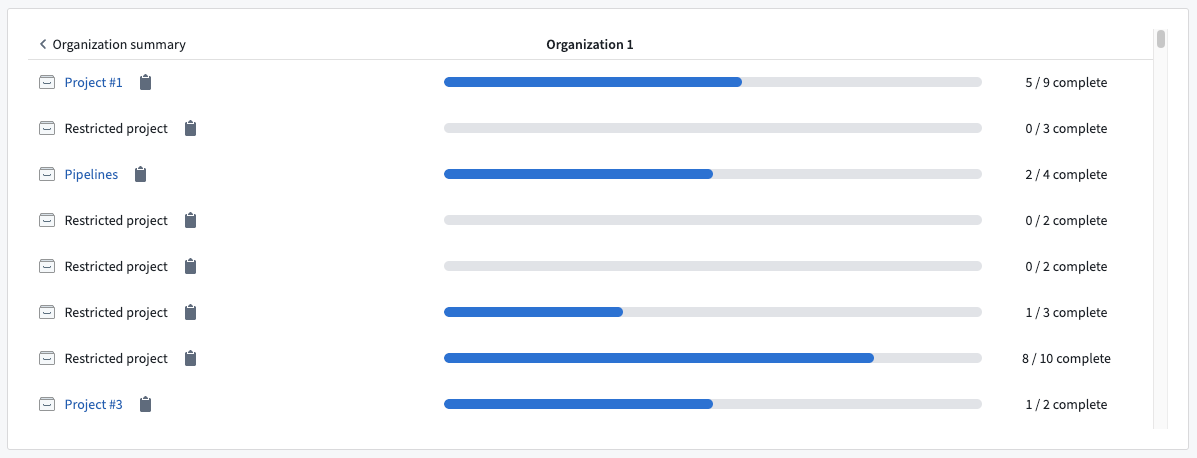
The Admin view is designed for Maintenance Operators to monitor the overall progress of ongoing upgrades. The view provides aggregate information and does not display individual resource details. This design allows the Upgrade Assistant to show data about the upgrade's impact on resources to which the Maintenance Operator may not have direct access.
Export summary
Maintenance Operators can download a summary of the admin view data by selecting the Export summary option in the top-right corner. This action generates a CSV file detailing the remediation progress for the Organizations overseen.
中文翻译
维护操作员与技术合规官
某些用户被授予特殊权限,以协助跟踪持续进行的平台升级,并支持其他用户进行必要的变更,确保升级过程顺利进行。这些用户被称为维护操作员(Maintenance Operator),他们在控制面板(Control Panel)中拥有一组独特的权限,以"监督升级助手进度(Oversee progress in Upgrade Assistant)"工作流的形式呈现。
维护操作员会收到额外的通知,提醒他们平台上可用的新升级。他们还可以访问全面的元数据,这有助于他们跟踪和了解正在进行中的升级修复进度。
此外,维护操作员可以在变更正式发布到平台之前预览即将到来的变更。这使他们能够提前准备和规划这些变更。
成为维护操作员
维护操作员权限由组织管理员(Organization Administrators)授予。这些权限可以从控制面板的组织权限(Organization permission)部分进行访问。
默认情况下,这些权限与两个角色相关联:
- 组织管理员(Organization Administrator)
- 技术合规官(Technical Compliance Officer)
被分配至任一角色的用户将自动获得"监督升级助手进度(Oversee progress in Upgrade Assistant)"工作流,从而被指定为维护操作员。
为了有效管理升级助手(Upgrade Assistant)中持续进行的变更,我们建议管理员专门为此任务指派一名或多名技术合规官。
审查"预发布(Pre-published)"状态的平台变更
在可能的情况下,Palantir团队可以通过"预发布"平台变更通知,让某些平台变更可供维护操作员提前审查。
在"预发布"期间(通常为14天),平台变更通知和受影响资源列表将可供维护操作员审查,这些信息随后才会"发布(Published)"给所有受影响的Palantir用户。
"预发布"期间为维护操作员提供了一个机会,可以在更广泛的发布日期之前向支持团队咨询、重新分配资源,或忽略某些资源。
重新分配任何资源
维护操作员可以将任何资源重新分配给其他用户。这对于在使用我们的启发式算法(heuristics)时可能被错误分配的资源非常有用。
管理员视图(Admin view)
维护操作员可以从升级助手主页切换到管理员视图(Admin view)。
管理员视图显示所有组织中即将进行的升级所需操作的总数,包括:
- 未分配给当前用户的操作
- 超出当前用户权限范围的操作
如果该选项未出现在您的屏幕上,说明您缺少必要的权限,需要联系您的组织管理员以请求"技术合规官"角色。
组织摘要(Organization summary)
选择某个升级会显示每个组织的进度摘要。这里的数字代表整个组织的汇总数据,无论当前用户的权限如何。
项目摘要(Project summary)
选择某个组织会显示每个受影响项目的进度摘要。此功能仅适用于指南针资源(Compass Resources)升级。如果维护操作员无法访问某些项目,这些项目将被列为受限项目(Restricted projects)。不过,维护操作员仍然可以查看和复制这些项目的唯一资源标识符。
管理员视图旨在让维护操作员监控持续升级的整体进度。该视图提供汇总信息,不显示单个资源的详细信息。这种设计使得升级助手能够展示关于升级对资源影响的数据,即使维护操作员可能没有直接访问这些资源的权限。
导出摘要(Export summary)
维护操作员可以通过选择右上角的导出摘要(Export summary)选项来下载管理员视图数据的摘要。此操作会生成一个CSV文件,详细说明所管理组织的修复进度。