Impact tracking(影响追踪)
The Linter impact tracking interface allows you to track progress on actioned recommendations and savings estimates. You can reach the impact tracking page by selecting Impact Tracking on the Linter home page. You can use filters to see metrics across a selected time range, rule and project.
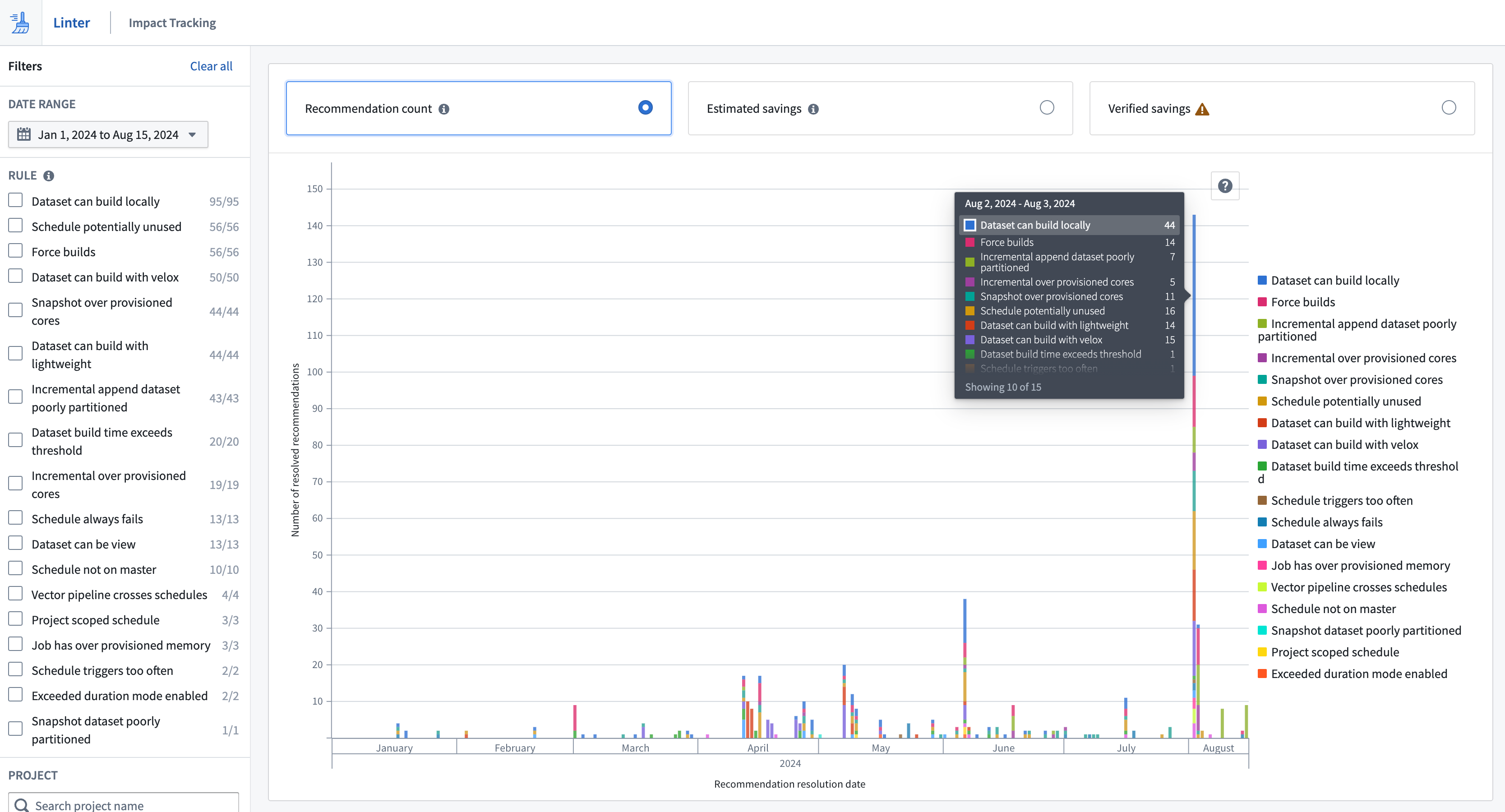
Three metrics are surfaced in impact tracking:
- Recommendation count: Displays the number of resolved recommendations. When a user selects a recommendation from the recommendation table for the first time, it transitions to an
Under Investigationstatus and a snapshot of the current recommendation is taken. Recommendations that a user has not selected will have anOpenstatus and disappear in the next sweep. These recommendations are not tracked and will not show up in impact tracking. - Estimated impact: Displays the compute hour reduction that Linter predicted prior to actioning the recommendation. This estimation is normalized to thirty days and is identical to the monthly estimated savings figures in the recommendation table.
- Verified impact: Displays the difference in estimated monthly usage before and after the recommendation was actioned. Linter builds the verified estimate by taking the usage for the week before the fix, subtracting the usage for the week after the fix, and normalizing the difference to 30 days of usage. Note that the week before and after the fix are not guaranteed to be representative of resource usage affected by the recommendation.
Verification typically takes seven days, so an action's verified impact will not be immediately visible on the impact tracking page. All estimates on savings are calculated based on visibility and access provided by APIs. This means that there can be double counting of resources across Linter estimations due to shared resources across rules, for example, a schedule potentially unused rule can cover a dataset that is also mentioned by an incremental append dataset too many files rule. Users should consider this when summing recommendation figures.
Disparities between impact metrics
Estimated impact and verified impact are estimations that use resource management. The difference in estimation methodologies between the two metrics is that if an action is taken quickly upon recommendation by Linter, the estimated savings will be higher than the verified savings.
For example, assume a Schedule potentially unused recommendation is created on day one:
- You pause the schedule one day after the alert is created, on day two.
- The verified impact estimation subtracts the usage for seven days after the fix (normal usage) from the usage for seven days before the fix (six days of normal and one day of high usage).
- The difference is normalized to thirty days.
- The estimated impact will be dramatically higher than the verified impact because the estimated impact is based on the savings that would have happened if this had run for a month with the problem and then another month with the fix.
中文翻译
影响追踪
Linter 影响追踪界面(impact tracking interface)允许您跟踪已处理建议的进展和节省估算。您可以通过在 Linter 主页上选择影响追踪来进入影响追踪页面。您可以使用筛选器查看选定时间范围、规则和项目内的指标。
影响追踪中会呈现三个指标:
- 建议数量(Recommendation count): 显示已解决的建议数量。当用户首次从建议表中选择某条建议时,该建议会转变为
调查中状态,并生成当前建议的快照。用户未选择的建议将保持开放状态,并在下一次扫描中消失。这些建议不会被追踪,也不会显示在影响追踪中。 - 预估影响(Estimated impact): 显示 Linter 在处理建议前预测的计算小时减少量。该估算以三十天为周期进行归一化处理,与建议表中的月度预估节省数值一致。
- 已验证影响(Verified impact): 显示建议处理前后预估月度使用量的差异。Linter 通过取修复前一周的使用量减去修复后一周的使用量,并将差值归一化为三十天的使用量来构建已验证估算。请注意,修复前后的一周不一定能代表受建议影响的资源使用情况。
验证通常需要七天时间,因此操作后的已验证影响不会立即显示在影响追踪页面上。所有节省估算均基于 API 提供的可见性和访问权限计算。这意味着由于不同规则间存在共享资源,Linter 估算中可能出现资源重复计算的情况,例如,计划可能未使用规则可能覆盖某个数据集,而该数据集同时也被增量追加数据集文件过多规则提及。用户在汇总建议数据时应考虑这一点。
影响指标之间的差异
预估影响和已验证影响都是使用资源管理进行的估算。这两种指标在估算方法上的区别在于:如果用户在 Linter 提出建议后迅速采取行动,预估节省将高于已验证节省。
例如,假设第一条建议计划可能未使用在第一天生成:
- 您在警报创建后的第二天(即第二天)暂停了该计划。
- 已验证影响估算用修复前七天的使用量(六天正常使用加一天高使用量)减去修复后七天的使用量(正常使用)。
- 将差值归一化为三十天。
- 预估影响将远高于已验证影响,因为预估影响基于这样的假设:如果问题持续运行一个月,然后修复后再运行一个月,本应实现的节省。