Sweep schedules(扫描计划(Sweep schedules))
A Linter sweep schedule is a Linter configuration that defines the following:
- Resource scope: The set of Foundry resources that will be swept according to schedule.
- Rule scope: The set of rules that will be run against the resource scope.
Sweep schedules must belong to a space, and rules are run against Foundry resources in Projects that belong to that space. You can view, edit, or create a new Linter configuration from the Linter Configuration tab under enrollment settings in Control Panel. From here you can configure sweep schedules. These schedules will only work on the space specified in the bar at the top left of the page.
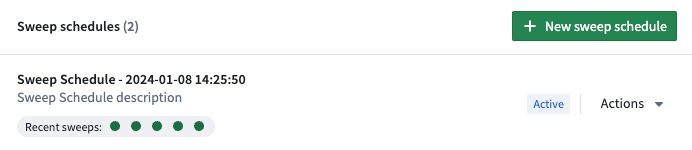
The Linter configuration page lists existing sweep schedules for your specified space. Here, you can see the status of recent sweeps and create new sweep schedules. Each schedule can be edited, paused, triggered, or deleted from the Actions dropdown.
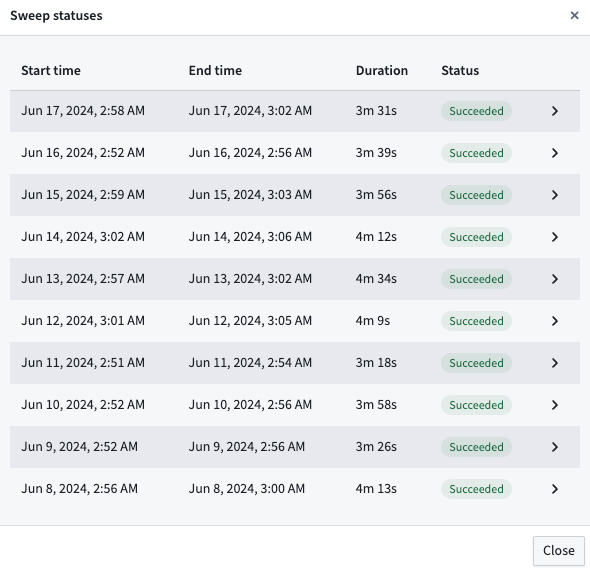
You can also see a detailed status of the 10 most recent sweeps by selecting Recent sweeps.
Edit a sweep schedule

You can edit schedule metadata such as the name and description and also change the rule scope in the Edit sweep schedule page.
Rule scopes
Rule scopes allow users to define the rules that will be used by a sweep schedule. There are three ways to define the rule scope:
- Rule Presets: A bundle of recommended rules that can be added in bulk. For example, adding the
PIPELINE_COST_RULESpreset would add all cost related rules. - Rules: You can multi-select specific rules to include in the rule scope.
- Exclude Rules: You can specify rules to be removed from the sweep schedule.
The order of operations follows the order listed above: first, the rule presets are applied, then individual rules are added, and then excluded rules are removed from the rule scope.
Resource scope
The resource scope defines which Projects are within the scope of the sweep schedule. By default, all Projects in the current space are in scope for the sweep. Users can also reduce the scope to include only selected Projects.
中文翻译
扫描计划(Sweep schedules)
Linter 扫描计划是一种 Linter 配置,用于定义以下内容:
- 资源范围(Resource scope): 将按计划进行扫描的 Foundry 资源集合。
- 规则范围(Rule scope): 将针对资源范围执行的规则集合。
扫描计划必须属于某个空间(Space),规则将针对属于该空间的项目(Projects)中的 Foundry 资源执行。您可以在控制面板(Control Panel)的注册设置中,通过 Linter 配置(Linter Configuration) 选项卡查看、编辑或创建新的 Linter 配置。在此处,您可以配置扫描计划。这些计划仅对页面左上角栏中指定的空间生效。
Linter 配置(Linter configuration) 页面列出了指定空间的现有扫描计划。在此处,您可以查看最近扫描的状态并创建新的扫描计划。每个计划都可以通过 操作(Actions) 下拉菜单进行编辑、暂停、触发或删除。
您还可以通过选择 最近扫描(Recent sweeps) 来查看最近 10 次扫描的详细状态。
编辑扫描计划(Edit a sweep schedule)
在 编辑扫描计划(Edit sweep schedule) 页面中,您可以编辑计划元数据(如名称和描述),也可以更改规则范围。
规则范围(Rule scopes)
规则范围允许用户定义扫描计划将使用的规则(Rules)。定义规则范围有三种方式:
- 规则预设(Rule Presets): 一组可批量添加的推荐规则。例如,添加
PIPELINE_COST_RULES预设将添加所有与成本相关的规则。 - 规则(Rules): 您可以多选特定规则以包含在规则范围中。
- 排除规则(Exclude Rules): 您可以指定要从扫描计划中移除的规则。
操作顺序遵循上述顺序:首先应用规则预设,然后添加单个规则,最后从规则范围中移除排除的规则。
资源范围(Resource scope)
资源范围定义了哪些项目属于扫描计划的范围。默认情况下,当前空间中的所有项目都在扫描范围内。用户也可以缩小范围,仅包含选定的项目。