Branch security(分支安全(Branch security))
Access to a branch in Global Branching is primarily governed by two mechanisms: roles and organizations.
Roles
Roles control what actions a user can perform on a branch.
Owner
Each branch must have at least one Owner. The user who creates a branch is automatically assigned the Owner role, but the role may also be assigned. Owners have full control over the branch and can:
- Edit branch and proposal metadata (the branch name, proposal name, and description)
- Assign and manage roles on the branch
- Create proposals
- Close existing proposals
- Manage the branch's organizations
- Remove the inactive label from the branch
- Archive or restore the branch
- Apply or remove the Do not merge setting on the branch's proposals
Administrators of the space that a branch belongs to have the same permissions as the Owner role.
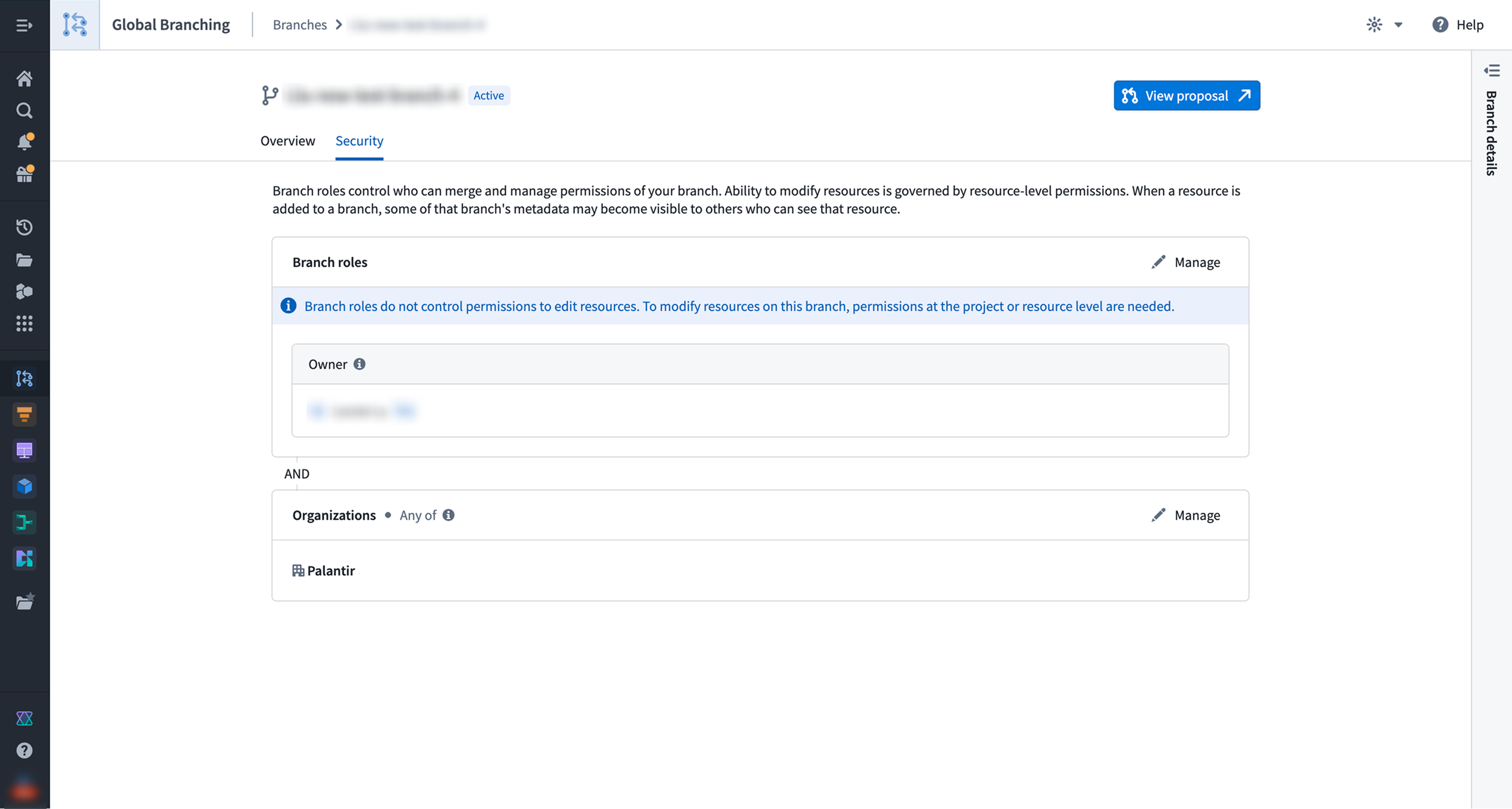
:::callout{theme="note"} Branch roles control access to branch management actions only and do not grant permissions to edit resources on the branch. To modify resources, a user must have the appropriate permissions at the project or resource level. To see resources on a branch or a proposal, you must be able to view that resource. :::
Managing roles
Roles can be managed by navigating to the Security tab on the branch page in the Global Branching application. Only owners and space administrators can modify role assignments.
Merge permissions
Any user who can view a proposal can merge it, as long as resource-level approvals and checks are satisfied and the Do not merge setting is not applied.
Owners retain meaningful control over the merge of the branch through use of approvals and the Do not merge setting.
:::callout{theme="note"} The person who merges may be submitting changes to resources that they cannot edit themselves. This is by design: edit permissions are still required to modify the branched resource in the first place; reviewers can be designated to verify and approve the change; and merging only applies pre-authored and approved changes. :::
Ontology resources that have not yet been migrated to projects do not currently enforce the constraint that only editors can modify a resource on a branch. In this case, an approval from an editor is required.
Resource-level approvals
A protected resource requires designated reviewers to approve all changes before they can be merged. Resource-level protection is set by resource owners, and approval policies are defined by project owners. For Code Repositories and Pipeline Builder pipelines, the approval policy is defined within the resource. Learn more about resource protection and approval policies.
Do not merge setting
Branch owners can apply the Do not merge setting to proposals on the branch. This setting prevents the proposal from being merged until it is removed. It can only be removed by a branch owner.
Organizations
In addition to role requirements, a user must be a member of at least one of the organizations listed on a branch in order to access it. Organizations act as an access gate to the branch itself. The organizations for a branch must be a subset of those associated with the space that the branch belongs to.
:::callout{theme="note"} Branch metadata such as the branch name may be visible on resources added to the branch, even when those resources are not protected by the same organization markings. :::
Creating a branch
When creating a branch, choose a name that does not include sensitive information, as branch names may be visible outside the branch's organization restrictions.

Ontology
The ontology selected at creation determines where you can make modifications on the branch. You cannot make changes outside the selected ontology, and the ontology cannot be changed after the branch has been created.
Space
In most cases, no additional configuration is required — the branch will automatically be assigned to the space associated with the selected ontology. However, if you select the default ontology, you will need to manually select a space.
The space affects the branch in several ways:
- It determines which organizations can be granted access to the branch.
- Administrators of the space have permissions equivalent to the owner role on the branch.
- It determines which retention policy is applicable to the branch.
Organizations
Organizations determine which users can access the branch. You can select from the organizations associated with the chosen space. The default selection is determined as follows:
- If the space has no organizations, or if your own organization is among those associated with the space, your organization will be pre-selected.
- Otherwise, all organizations associated with the space will be pre-selected.
You can adjust the selection before completing branch creation.
中文翻译
分支安全(Branch security)
在全局分支(Global Branching)中,对分支的访问主要通过两种机制控制:角色(Roles)和组织(Organizations)。
角色(Roles)
角色控制用户可以对分支执行的操作。
所有者(Owner)
每个分支必须至少有一个Owner。创建分支的用户会自动被分配Owner角色,但该角色也可以被分配。所有者对分支拥有完全控制权,可以:
- 编辑分支和提案元数据(分支名称、提案名称和描述)
- 在分支上分配和管理角色
- 创建提案
- 关闭现有提案
- 管理分支的组织
- 移除分支的非活跃标签
- 归档或恢复分支
- 在分支的提案上应用或移除禁止合并(Do not merge)设置
分支所属空间的Administrators拥有与Owner角色相同的权限。
:::callout{theme="note"} 分支角色仅控制分支管理操作的访问权限,并不授予编辑分支上资源的权限。要修改资源,用户必须在项目或资源级别拥有适当的权限。要查看分支或提案上的资源,您必须能够查看该资源。 :::
管理角色(Roles)
可以通过导航到全局分支应用中分支页面的安全(Security)选项卡来管理角色。只有所有者和空间管理员可以修改角色分配。
合并权限(Merge permissions)
任何能够查看提案的用户都可以合并它,只要满足资源级别的审批和检查,并且未应用禁止合并设置。
所有者通过使用审批和禁止合并设置,对分支的合并保持有意义的控制。
:::callout{theme="note"} 执行合并的人可能正在提交他们自己无法编辑的资源的更改。这是有意为之:首先仍然需要编辑权限才能修改分支资源;可以指定审阅者来验证和批准更改;而合并仅应用预先编写和批准的更改。 :::
尚未迁移到项目的本体论(Ontology)资源目前不强制执行只有编辑者才能修改分支上资源的约束。在这种情况下,需要编辑者的审批。
资源级别审批(Resource-level approvals)
受保护的资源需要指定的审阅者批准所有更改后才能合并。资源级别的保护由资源所有者设置,审批策略由项目所有者定义。对于代码仓库(Code Repositories)和流水线构建器(Pipeline Builder)流水线,审批策略在资源内部定义。了解更多关于资源保护和审批策略的信息。
禁止合并设置(Do not merge setting)
分支所有者可以在分支的提案上应用禁止合并设置。此设置阻止提案被合并,直到该设置被移除。只有分支所有者才能移除该设置。
组织(Organizations)
除了角色要求外,用户必须是分支上列出的至少一个组织的成员才能访问该分支。组织充当分支本身的访问门禁。分支的组织必须是分支所属空间关联组织的子集。
:::callout{theme="note"} 分支元数据(如分支名称)可能在添加到分支的资源上可见,即使这些资源不受相同组织标记的保护。 :::
创建分支(Creating a branch)
创建分支时,请选择不包含敏感信息的名称,因为分支名称可能在分支的组织限制之外可见。
本体论(Ontology)
创建时选择的本体论决定了您可以在分支上进行修改的位置。您不能在所选本体论之外进行更改,并且分支创建后本体论无法更改。
空间(Space)
在大多数情况下,无需额外配置——分支将自动分配给与所选本体论关联的空间。但是,如果您选择默认本体论,则需要手动选择一个空间。
空间在以下几个方面影响分支:
- 它决定了哪些组织可以被授予对分支的访问权限。
- 空间的管理员拥有与分支所有者角色等效的权限。
- 它决定了适用于分支的保留策略。
组织(Organizations)
组织决定了哪些用户可以访问分支。您可以从所选空间关联的组织中进行选择。默认选择按以下方式确定:
- 如果空间没有组织,或者您自己的组织在空间关联的组织中,则您的组织将被预选。
- 否则,空间关联的所有组织都将被预选。
您可以在完成分支创建之前调整选择。