Publish and deploy custom endpoints(发布与部署自定义端点)
After configuring your custom endpoints, you can test and deploy them by cutting a new release of your endpoint set. Each new release is a snapshot of your current configuration, and can be managed with semantic versioning. See endpoint set publishing for more information.
Publish and deploy a new endpoint set release
Follow the instructions below to publish a new endpoint set release:
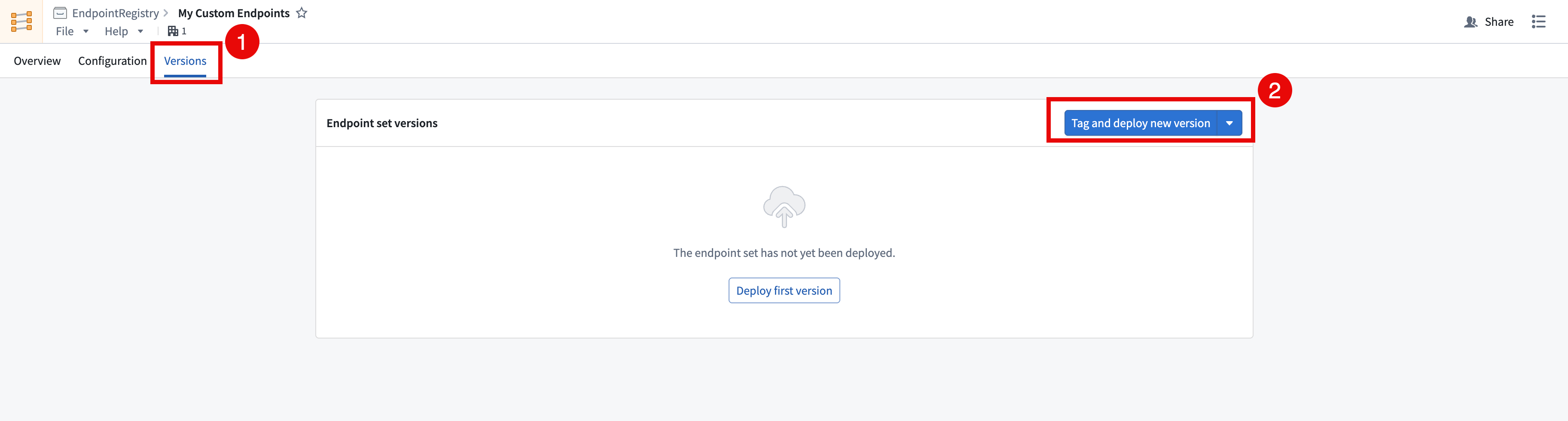
- Open the endpoint set to be published in the Custom Endpoints application and navigate to the Versions tab.
- Select Tag and deploy new version in the top right of the Endpoint set versions table to create a new endpoint set release. To avoid automatically deploying this version, select Tag without deploying.
Test your custom endpoints
Versions should be accessible on approved subdomains immediately after the version is published and deployed. Follow the instructions below to test your custom endpoints:
- Get the
FOUNDRY_TOKENenvironment variable in your terminal with a user-generated token with the following command, or the equivalent for your operating system.
export FOUNDRY_TOKEN=<token>
-
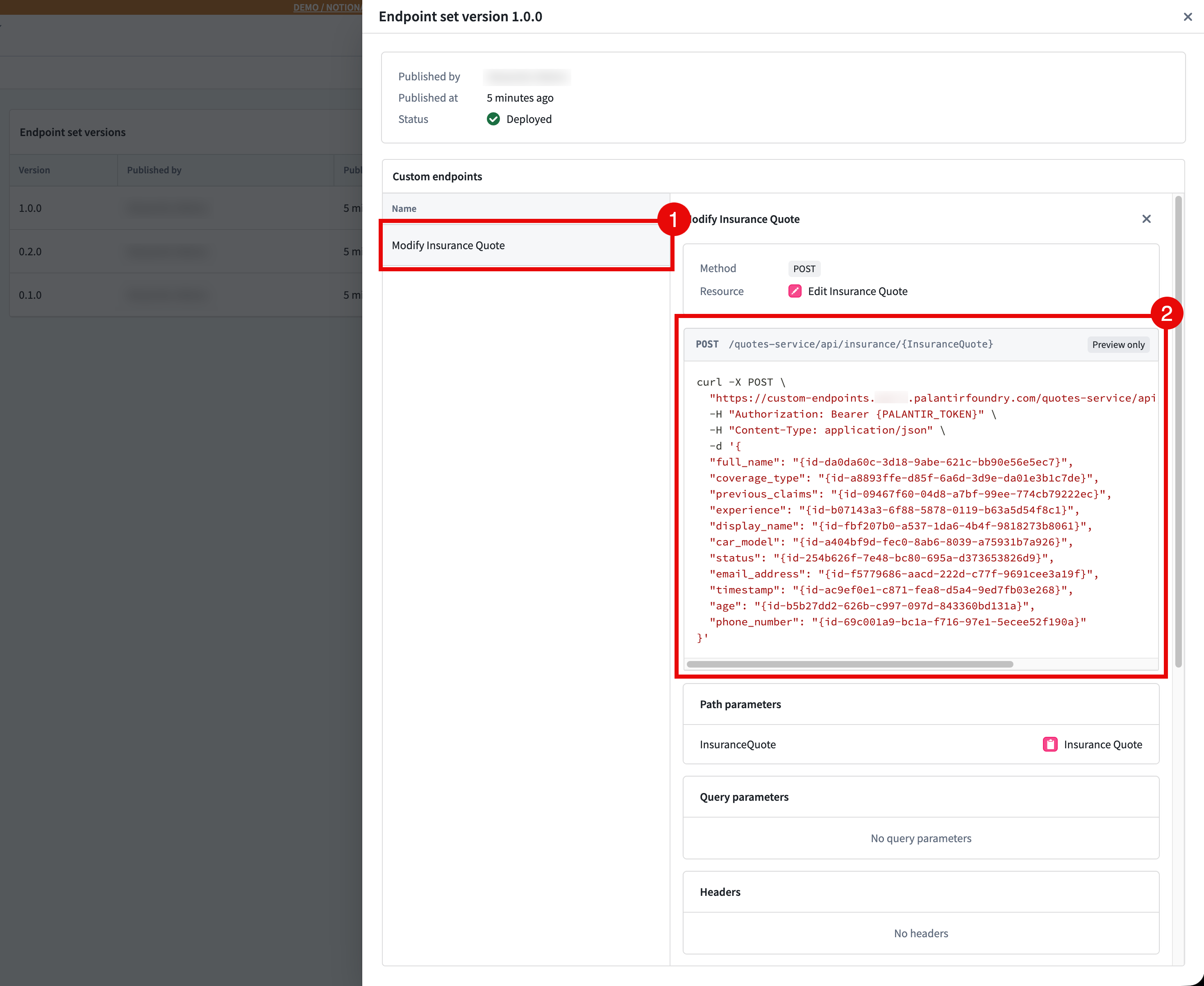
In the Versions tab of your endpoint set, select your Deployed Version > Custom Endpoint and copy the example CURL request provided. You can also view the endpoint configuration here.
-
Run the CURL command, and you should now be able to interact directly with the ontology using your custom endpoint.
For details on using custom endpoints in production, refer to Using custom endpoints in your applications.
Manage releases through multi-version deployment
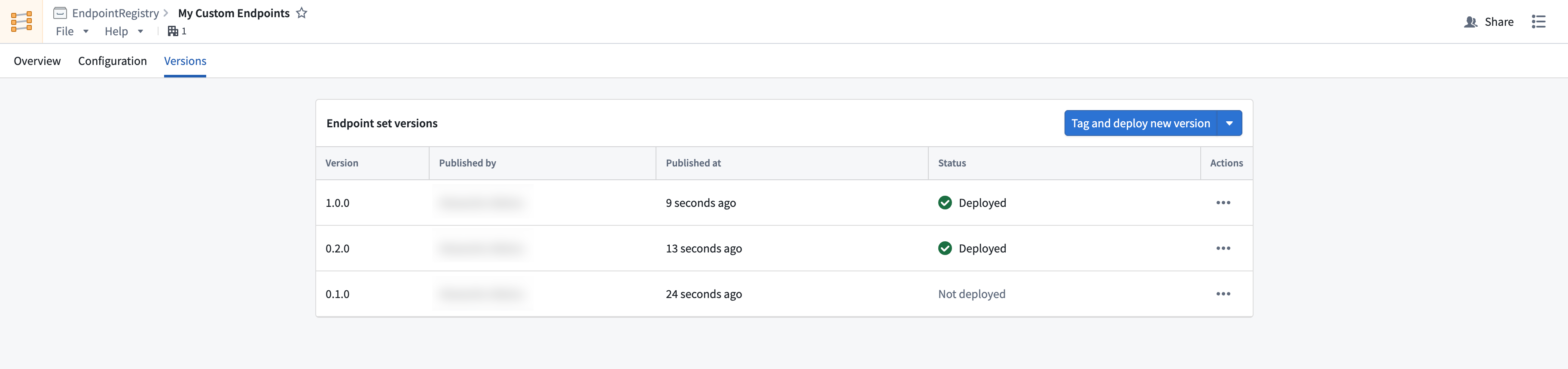
You can manage your releases, ensure stability, and test your endpoints with multi-version deployment. This offering allows beta, stable, and legacy versions to all be accessible on a single subdomain. You can access an endpoint's deployed version by passing in an endpoint-api-version header in your request.
中文翻译
发布与部署自定义端点
配置自定义端点后,您可以通过发布端点集的新版本来测试和部署这些端点。每个新版本都是当前配置的快照,并可通过语义化版本控制(semantic versioning)进行管理。更多信息请参阅端点集发布。
发布并部署新的端点集版本
请按照以下步骤发布新的端点集版本:
- 在自定义端点(Custom Endpoints)应用中打开待发布的端点集,并导航至版本(Versions)选项卡。
- 在端点集版本(Endpoint set versions)表格的右上角选择标记并部署新版本(Tag and deploy new version)以创建新的端点集版本。如需避免自动部署此版本,请选择仅标记不部署(Tag without deploying)。
测试自定义端点
版本发布并部署后,应能立即在已批准的子域名上访问。请按照以下步骤测试自定义端点:
- 在终端中通过用户生成令牌(user-generated token)获取
FOUNDRY_TOKEN环境变量,使用以下命令(或适用于您操作系统的等效命令):
export FOUNDRY_TOKEN=<token>
-
在端点集的版本(Versions)选项卡中,选择已部署版本(Deployed Version)> 自定义端点(Custom Endpoint),并复制提供的示例 CURL 请求。您也可以在此处查看端点配置。
-
运行 CURL 命令,您现在应能通过自定义端点直接与本体(ontology)进行交互。
有关在生产环境中使用自定义端点的详细信息,请参阅在应用程序中使用自定义端点。
通过多版本部署管理发布
您可以通过多版本部署(multi-version deployment)管理发布、确保稳定性并测试端点。此功能允许在单个子域名上同时访问测试版(beta)、稳定版(stable)和旧版(legacy)版本。您可以通过在请求中传入 endpoint-api-version 标头来访问端点的已部署版本。