Pilot
:::callout{theme="neutral" title="Beta"} Pilot is in the beta phase of development and may not be available on your enrollment. Functionality may change during active development. To enable Pilot, contact your platform administrator to modify application access in Control Panel. :::
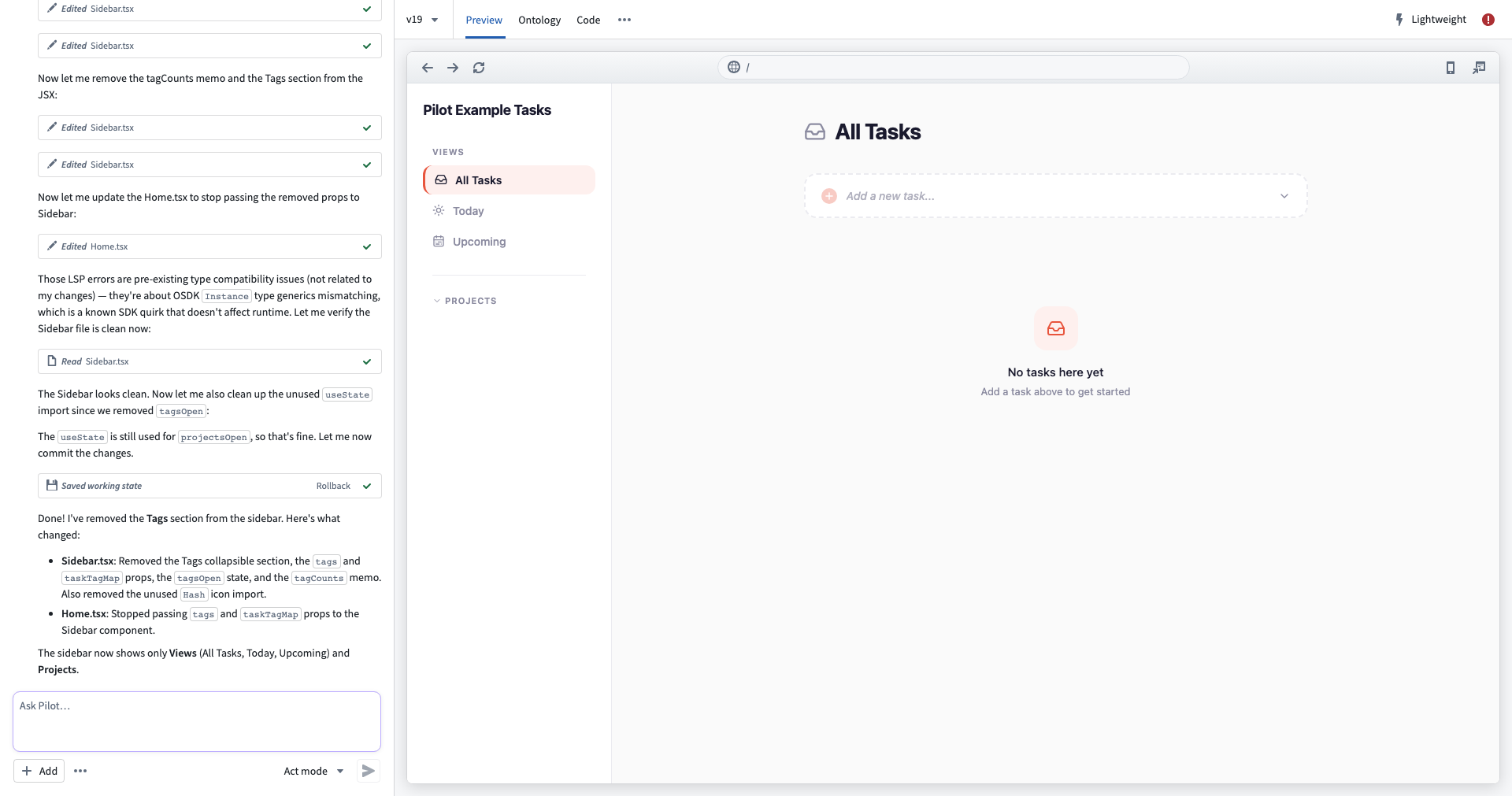
Pilot is an AI-powered application builder in Foundry that creates applications from natural language prompts. You can describe the application you want to build, and Pilot automatically generates the ontology entities, design specification, frontend code, and seed data. Applications built with Pilot use the OSDK and React, and are deployed through Developer Console as production-grade hosted applications.
Key capabilities
Pilot manages the full application lifecycle with specialized AI agents that can perform the following operations:
- Ontology generation: Pilot analyzes your prompt and creates the object types, action types, link types, properties, and relationships that your application needs.
- Design specification: A design agent produces the design specification covering color palette, typography, layout, and interaction patterns.
- Frontend generation: An application building agent implements a React application using OSDK hooks, with a live preview inside the Pilot workspace.
- Seed data generation: Pilot generates sample data in an isolated container, so AI agents never access real enterprise data during the build process.
- Guided deployment: A step-by-step deployment panel walks you through ontology promotion, Developer Console configuration, CI checks, and release.
- Multiple AI models: Choose from Claude, GPT, or Gemini model families depending on your enrollment configuration.
- Context attachments: Provide existing ontology entities, documents, or images to guide how Pilot builds your application.
How Pilot works
Pilot follows an end-to-end workflow from prompt to production.
- Prompt-driven build: Describe the application you want to build. Using your description, Pilot creates an isolated container and generates the necessary ontology, design, code, and seed data required to build your application.
- Ontology alignment: Pilot generates or reuses object types and actions. Those ontology entities are promoted to the main ontology through Global Branching and proposals.
- Developer Console configuration: Pilot creates a Developer Console application tied to your project, requests a subdomain, and sets application restrictions to include the required ontology entities.
- CI and deployment: Pilot generates deployment files and CI configuration. CI checks run and must pass before you can tag and release a version.
- Hosted production application: The application is served at the registered subdomain. Users authorize through OAuth and can immediately use the application with real data.
Prerequisites
Ensure that you meet the criteria below to use Pilot:
- You are on a Foundry enrollment with Pilot enabled.
- You have existing ontology entities or a project with ontology write permissions.
- You have the
Editorrole or higher on the project, enabling deployment.
Next steps
- Getting started: Open Pilot, create your first application, and explore the workspace.
- Build an application: Walk through the build lifecycle, from ontology generation to seed data.
- Deploy an application: Promote ontology entities, configure Developer Console, run CI checks, and release to production.
中文翻译
Pilot
:::callout{theme="neutral" title="Beta"} Pilot 目前处于 beta 开发阶段,可能未在你的环境中开放使用。功能在活跃开发期间可能会发生变化。如需启用 Pilot,请联系你的平台管理员,在控制面板中修改应用访问权限。 :::
Pilot 是 Foundry 中一款基于 AI 的应用构建器,能够根据自然语言提示创建应用。你可以描述想要构建的应用,Pilot 会自动生成本体实体、设计规范、前端代码和种子数据。使用 Pilot 构建的应用基于 OSDK 和 React,并通过开发者控制台部署为生产级托管应用。
核心功能
Pilot 通过专门的 AI 代理管理完整的应用生命周期,可执行以下操作:
- 本体生成: Pilot 分析你的提示,创建应用所需的对象类型、操作类型、链接类型、属性和关系。
- 设计规范: 设计代理生成涵盖配色方案、排版、布局和交互模式的设计规范。
- 前端生成: 应用构建代理使用 OSDK 钩子实现 React 应用,并在 Pilot 工作区内提供实时预览。
- 种子数据生成: Pilot 在隔离容器中生成样本数据,确保 AI 代理在构建过程中永远不会访问真实企业数据。
- 引导式部署: 分步部署面板将引导你完成本体提升、开发者控制台配置、CI 检查和发布。
- 多种 AI 模型: 根据你的环境配置,可选择 Claude、GPT 或 Gemini 模型系列。
- 上下文附件: 提供现有的本体实体、文档或图像,以指导 Pilot 构建你的应用。
Pilot 的工作原理
Pilot 遵循从提示到生产的端到端工作流程。
- 提示驱动构建: 描述你想要构建的应用。Pilot 根据你的描述创建隔离容器,并生成构建应用所需的本体、设计、代码和种子数据。
- 本体对齐: Pilot 生成或复用对象类型和操作。这些本体实体通过全局分支和提案提升到主本体。
- 开发者控制台配置: Pilot 创建与项目关联的开发者控制台应用,请求子域名,并设置应用限制以包含所需的本体实体。
- CI 与部署: Pilot 生成部署文件和 CI 配置。CI 检查必须运行并通过,才能标记和发布版本。
- 托管生产应用: 应用在注册的子域名下提供服务。用户通过 OAuth 授权,即可立即使用真实数据操作应用。
前提条件
请确保满足以下条件才能使用 Pilot:
- 你所在的 Foundry 环境已启用 Pilot。
- 你拥有现有的本体实体,或具有本体写入权限的项目。
- 你在项目中拥有
Editor角色或更高权限,以便进行部署。