Connect data to Machinery(将数据连接到 Machinery(Machinery))
By connecting a process to a datasource, you can bridge the gap between an abstract process definition and real-world observations. This data can be used to conduct initial process mining or to monitor performance and find bottlenecks.
Machinery connects to two types of object data in the ontology: process objects and log objects. The side panel for data configuration is accessible through the main toolbox or from process containers.
Process objects
A process object is an entity that goes through a process.
For example, this may be an Employee for an onboarding process, or an Invoice for a purchase-to-pay process. The state of the entity is explicitly tracked by a string property, typically called state. The values of the state property (for instance, "created" or "approved") are represented by state nodes on the graph.
:::callout{theme="neutral"} A state value may have dependencies, like submission criteria in actions or automations that are triggered by a certain state condition. Changing the state value in Machinery does not update these dependencies, nor does it change the values in the ontology data. :::
In the multi-process setting, each process container captures exactly one state property on an object type.
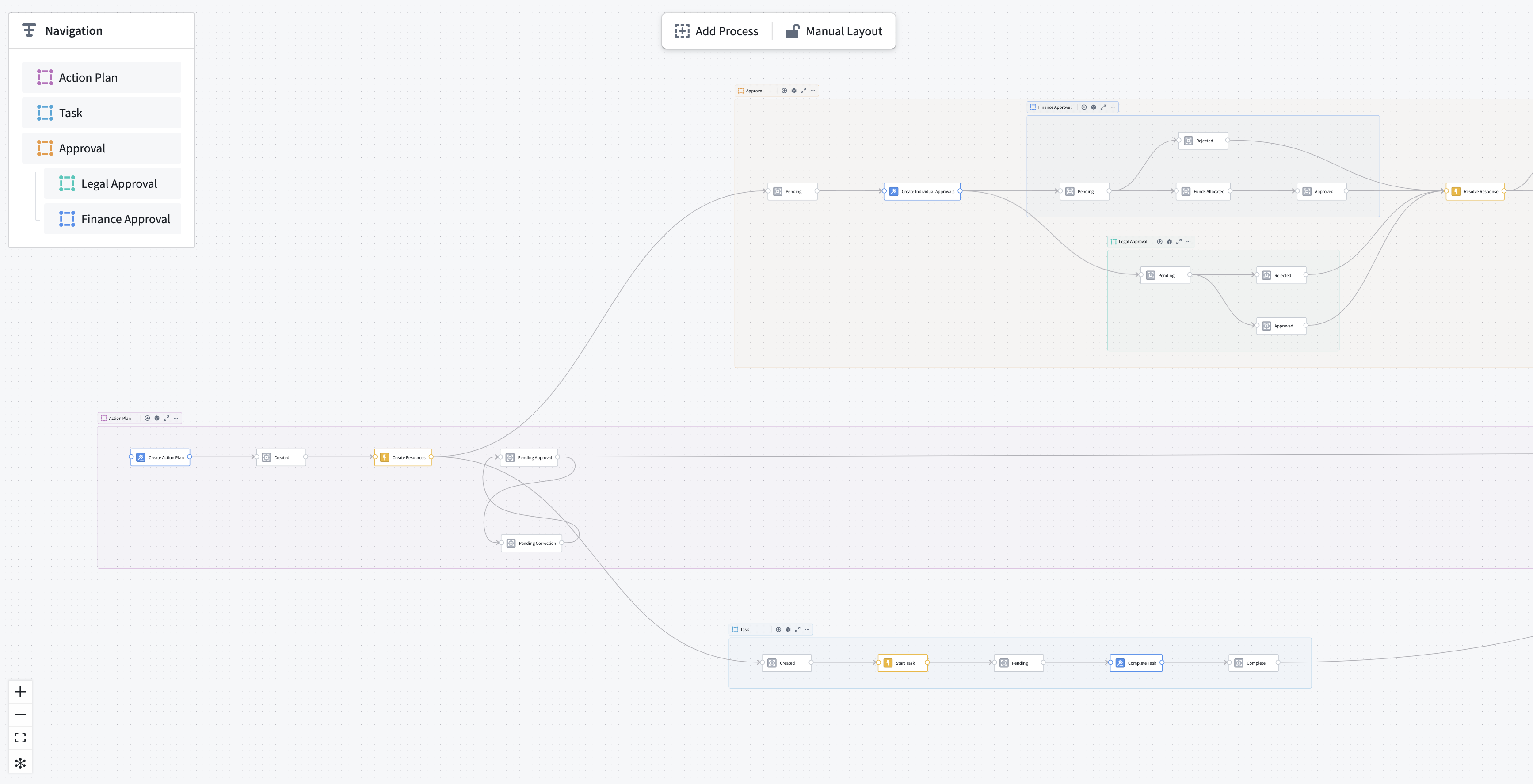
As in the resource example screenshot above, an object type can have multiple state properties; for instance, a coarse state and a granular state.
The process object type represents the latest state of the entity, and therefore cannot inform on state transitions and temporal patterns.

Log objects
A log object represents an individual change to an entity’s state. Log objects contain a reference to the process entity, its previous state, its new state, and the timing of the transitions.
- Log ID (string) [required]: The primary key of the log object.
- Process ID (string) [required]: The primary key of the process object that is being tracked. Use when setting up an Ontology link between the process object and the Log object.
- Old state (string) [required]: The start state of the transition.
- New state (string) [required]: The end state of the transition.
- Timestamp (timestamp) [required]: Timestamp of entering the end state.
- isLatest (boolean) [optional]: True if this log is the most recent for the process object, otherwise False.
- Duration (long) [optional]: Duration in milliseconds since entering the old state.
- Path (string) [optional]: A list of all states encountered so far, including the current state. Must be a serialized JSON string.
- Action type RID (string) [optional]: An identifier of the action type that caused the transition. Typically,
NULLfor external changes. - Owning RID (string) [optional]: An identifier of the application from which the action was executed. Allows discrimination between manual and automated Actions.
NULLfor external changes.
Maintaining such a log requires orchestration when edits are made. Machinery provides a standard solution that can be installed from within the application. Setting up a log object type requires a process object type.

A dialog will guide you through the setup. You can choose which source of edits you want to track:
- If the process object type receives changes from external datasource, you can select and configure a changelog dataset.
- If the process object type can be edited in the platform, you can choose to enable edit history on the process object type and include those edits in the log object type. Machinery will automatically create a materialization dataset of the edit history to make it available for aggregated analysis.
:::callout{theme="neutral"} Tracking logs from platform edits for object types with multiple datasources or row-level permissions is currently not supported. :::
If you want to track changes from external datasources, you must select a dataset in standard changelog format, which is a simpler version of Machinery’s log object type schema. That dataset is typically upstream of the object type datasource, and contains the following columns:
- processId (string) [required]: A unique identifier of the process entity.
- state (string) [required]: The new state the process has entered.
- timestamp (timestamp) [required]: The timestamp at which the transition occurred.
- isDeleted (boolean) [optional]: Property that flags an entity as deleted. If isDeleted of the latest log is
True, that object will not appear in the ontology.
On confirmation, Machinery will install a Marketplace product into a folder of your choosing. This product contains a Pipeline Builder pipeline that computes log entries from the configured sources into the correct format. The product also deploys the log object type itself with an ontology link to your process object type.
After the installation is complete, the pipeline needs to complete an initial build, and the log object type needs to be indexed in the databases before the data is available for mining and monitoring.
:::callout{theme="neutral"} The deployed pipeline is scheduled to run on every change to any of its datasources. As a result, the log object type lags behind the process object type by one build and one indexing job, typically about 2-5 minutes. If you require real-time updates, you need to maintain a custom log object type. :::
You can manually map a custom log object type if it fulfills the minimal schema.
中文翻译
将数据连接到 Machinery(Machinery)
通过将流程连接到数据源,您可以弥合抽象流程定义与现实世界观测之间的差距。这些数据可用于进行初始的流程挖掘,或用于监控性能并发现瓶颈。
Machinery 连接到本体(ontology)中的两类对象数据:流程对象和日志对象。数据配置的侧面板可通过主工具箱或流程容器访问。
流程对象(Process objects)
流程对象是指经历某个流程的实体。
例如,入职流程中的 Employee(员工),或采购到付款流程中的 Invoice(发票)。实体的状态通过一个字符串属性(通常称为 state)进行显式跟踪。state 属性的值(例如"已创建"或"已批准")在图表中由状态节点表示。
:::callout{theme="neutral"} 状态值可能具有依赖关系,例如操作中的提交条件或由特定状态条件触发的自动化。在 Machinery 中更改状态值不会更新这些依赖关系,也不会更改本体数据中的值。 :::
在多流程设置中,每个流程容器仅捕获对象类型上的一个状态属性。
如上方的资源示例截图所示,一个对象类型可以有多个状态属性;例如,一个粗粒度状态和一个细粒度状态。
流程对象类型表示实体的最新状态,因此无法提供状态转换和时间模式的信息。
日志对象(Log objects)
日志对象表示实体状态的单次变更。日志对象包含对流程实体的引用、其先前状态、新状态以及转换的时间信息。
- 日志 ID(字符串)[必填]: 日志对象的主键。
- 流程 ID(字符串)[必填]: 被跟踪的流程对象的主键。用于在流程对象和日志对象之间建立本体链接(Ontology link)。
- 旧状态(字符串)[必填]: 转换的起始状态。
- 新状态(字符串)[必填]: 转换的结束状态。
- 时间戳(timestamp)[必填]: 进入结束状态的时间戳。
- isLatest(布尔值)[可选]: 如果此日志是该流程对象的最新日志,则为 True,否则为 False。
- 持续时间(长整型)[可选]: 自进入旧状态以来的持续时间(毫秒)。
- 路径(字符串)[可选]: 到目前为止遇到的所有状态的列表,包括当前状态。必须是序列化的 JSON 字符串。
- 操作类型 RID(字符串)[可选]: 导致转换的操作类型的标识符。对于外部更改,通常为
NULL。 - 所属 RID(字符串)[可选]: 执行操作的应用程序的标识符。用于区分手动操作和自动化操作。对于外部更改,为
NULL。
维护此类日志需要在编辑时进行编排。Machinery 提供了一个标准解决方案,可从应用程序内部安装。设置日志对象类型需要一个流程对象类型。
一个对话框将引导您完成设置。您可以选择要跟踪的编辑来源:
- 如果流程对象类型从外部数据源接收更改,您可以选择并配置一个变更日志数据集(changelog dataset)。
- 如果流程对象类型可以在平台内编辑,您可以选择启用流程对象类型的编辑历史,并将这些编辑包含在日志对象类型中。Machinery 将自动创建一个编辑历史的物化数据集(materialization dataset),以便进行聚合分析。
:::callout{theme="neutral"} 目前不支持跟踪来自平台编辑的日志(针对具有多个数据源或行级权限的对象类型)。 :::
如果您想跟踪来自外部数据源的更改,必须选择一个采用标准变更日志格式的数据集,该格式是 Machinery 日志对象类型模式的简化版本。该数据集通常位于对象类型数据源的上游,并包含以下列:
- processId(字符串)[必填]: 流程实体的唯一标识符。
- state(字符串)[必填]: 流程进入的新状态。
- timestamp(时间戳)[必填]: 转换发生的时间戳。
- isDeleted(布尔值)[可选]: 将实体标记为已删除的属性。如果最新日志的 isDeleted 为
True,则该对象不会出现在本体中。
确认后,Machinery 会将一个市场产品安装到您选择的文件夹中。该产品包含一个管道构建器管道,用于从配置的源计算日志条目并将其转换为正确格式。该产品还会部署日志对象类型本身,并与您的流程对象类型建立本体链接。
安装完成后,管道需要完成初始构建,并且日志对象类型需要在数据库中建立索引,之后数据才能用于挖掘和监控。
:::callout{theme="neutral"} 部署的管道会在其任何数据源发生更改时自动运行。因此,日志对象类型会比流程对象类型延迟一个构建和一个索引作业的时间,通常约为 2-5 分钟。如果您需要实时更新,则需要维护自定义的日志对象类型。 :::
如果自定义日志对象类型满足最小模式要求,您可以手动映射它。