Process mining(流程挖掘(Process mining))
There are several ways to create a model of a process using the Machinery application: you can define a process manually by drawing states and transitions, or you can derive a process model automatically from historical observations by process mining.
Process mining is supported as a dedicated mode in Machinery. The process mining workflow is accessible through the main toolbar once a data connection has been configured.
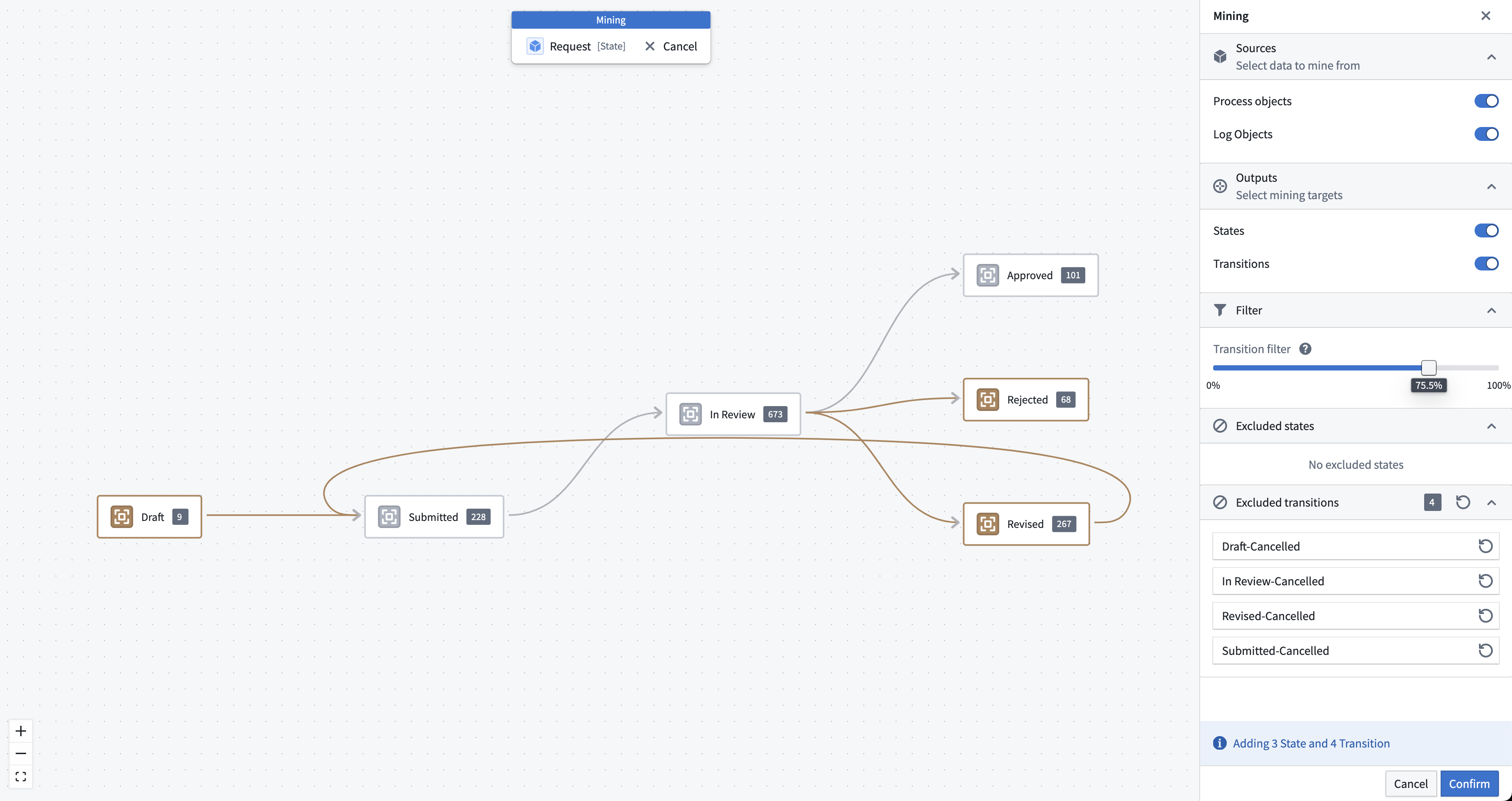
In mining mode, you will see your existing process definition overlaid with states and transitions as they occur in the data. The styling indicates the following:
- Amber: The mining result. These elements will be added to your process definition once you confirm.
- Gray: These elements occur in data but already exist in your process definition.
- Dashed line: Elements from the current process definition that have no reference in the data. This may indicate an issue with your process definition.
Settings
At the top of the mining side panel, you can configure which data source should be used for mining: process objects, log objects, or both. While it is possible to mine only the latest state values from the process object type, a log object type is recommended.
In addition, you can select what elements should be mined: states, transitions, or both. Typically, you should mine both states and transitions if the relevant datasources are available.

Filtering
Collected data often contains noise and errors. The raw output from mining can be too complex or contain unexpected results. Machinery allows you to filter states and transitions from the data to help you produce a more usable representation of your process.

At the bottom of the mining side panel, you can configure filters.
- Transition filter: This filter sorts all transitions by their occurrence, with the most frequent transitions ranked highest. It then computes a cumulative sum of all those values and keeps the top x % of all transitions. This cuts off the tail-end of infrequent transitions.
- Excluded elements: A list of erroneous state values or transitions that should not be accepted into the process definition. These excluded values are persisted when saving and can be managed over time.
中文翻译
流程挖掘(Process mining)
使用 Machinery 应用程序创建流程模型有多种方式:您可以手动绘制状态和转换来定义流程,也可以通过流程挖掘从历史观测数据中自动推导出流程模型。
流程挖掘作为 Machinery 中的专用模式提供。一旦配置好数据连接,即可通过主工具栏访问流程挖掘工作流。
在挖掘模式下,您将看到现有流程定义上叠加了数据中出现的状态和转换。样式含义如下:
- 琥珀色: 挖掘结果。确认后,这些元素将被添加到您的流程定义中。
- 灰色: 这些元素在数据中出现,但已存在于您的流程定义中。
- 虚线: 当前流程定义中在数据中无对应引用的元素。这可能表明您的流程定义存在问题。
设置(Settings)
在挖掘侧面板顶部,您可以配置用于挖掘的数据源:流程对象(process objects)、日志对象(log objects),或两者兼用。虽然可以仅从流程对象类型挖掘最新状态值,但建议使用日志对象类型。
此外,您还可以选择要挖掘的元素:状态(states)、转换(transitions),或两者兼用。通常情况下,如果相关数据源可用,应同时挖掘状态和转换。
过滤(Filtering)
收集的数据通常包含噪声和错误。挖掘的原始输出可能过于复杂或包含意外结果。Machinery 允许您过滤数据中的状态和转换,以帮助生成更实用的流程表示。
在挖掘侧面板底部,您可以配置过滤器。
- 转换过滤器(Transition filter): 此过滤器按出现频率对所有转换进行排序,频率最高的转换排名最前。然后计算所有值的累积总和,并保留排名前 x% 的转换。这将截断出现频率较低的尾部转换。
- 排除元素(Excluded elements): 不应纳入流程定义的错误状态值或转换列表。这些排除值在保存时会持久化,并可随时间进行管理。