Transforms Excel Parser(Transforms Excel Parser(Excel解析器转换))
There are many ways to extract tabular data from a schemaless dataset containing Microsoft Excel files in Foundry, including Pipeline Builder, Python file-based transforms using open-source libraries like openpyxl ↗, and Java file-based transforms using open-source libraries like Apache POI ↗.
In addition to these options, Palantir provides a library called transforms-excel-parser, which wraps Apache POI with sensible default behavior to make it easy to use in a transforms-java repository with minimal configuration.
Some examples of the useful features and behavior provided by this library include the following:
- Processing an input dataset containing files with partially overlapping but inconsistent schemas, inferring the schemas from the table headers.
- Extracting data from multiple sheets (or different tables from the same sheet) and writing the result into multiple output datasets while only reading the file into memory once.
- Providing a fluent API for defining extraction of fields from non-tabular, "form-style" sheets (where data is located above, below, or adjacent to labels).
- Setting appropriate global parameters that resolve common Apache POI issues such as incorrect "zip bomb" detection or failures due to exceeding "max byte array size."
- Supporting both fail-fast and fail-safe behavior with the
errorDataframe()method on theParseResultclass, which can be checked at runtime to fail a job or alternatively written to a separate output and checked asynchronously. - Providing appropriate configuration options and utility functions for incremental pipelines in order to handle common edge cases such as inconsistent schemas between incremental batches.
:::callout{theme="neutral" title="Spreadsheet" media sets} For source of truth workflows and unstructured excel files, see spreadsheet media sets. :::
Setup
1. Confirm availability of transforms-excel-parser-bundle and add it as a backing repository
Search for transforms-excel-parser in the repository's Maven library panel.

Select the latest version available.

This will show a dialog for importing transforms-excel-parser-bundle as an additional backing repository. Select "Add library".

:::callout{theme="neutral"}
You may see eddie-spark-module-bundle and/or ri.eddie.artifacts.repository.bundles in addition to transforms-excel-parser-bundle as dropdown options.
The backing repositories with eddie in their name are intended for the exclusive use of the Pipeline Builder application, so they are not the appropriate choice, and using them may lead to issues in the future.
If you do not see transforms-excel-parser-bundle as an option, contact your Palantir representative for installation.
:::
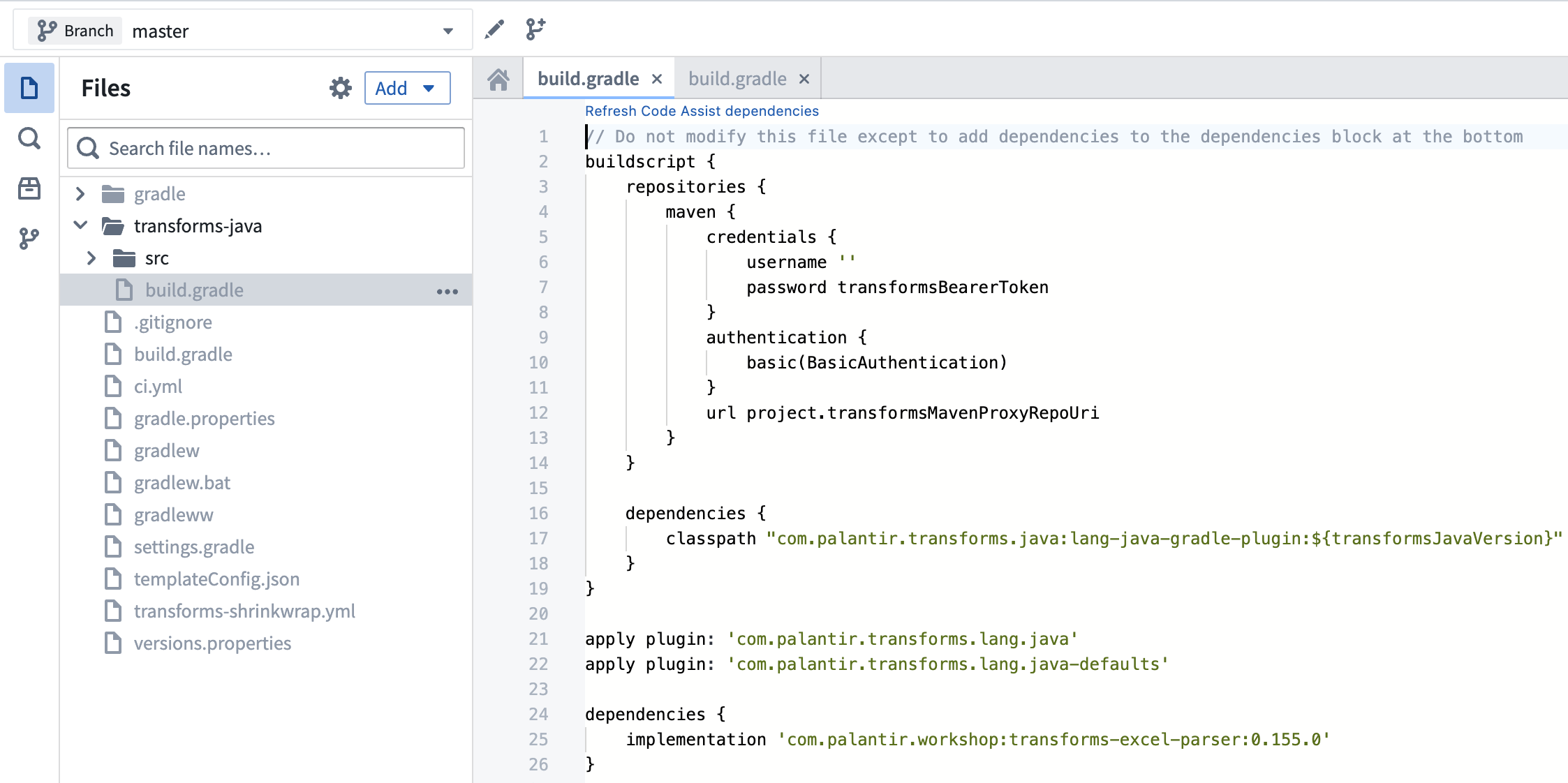
2. Add dependency to build.gradle
Add the latest version available to your transforms-java/build.gradle file as below.
:::callout{theme="neutral"}
transforms-java/build.gradle is a hidden file, so you will need to toggle the Show hidden files setting in order to see it.
:::
API documentation
For detailed API documentation, download the javadoc archive, unzip it, and view the contained HTML files in a web browser.
The best place to start when reading the javadoc is com/palantir/transforms/excel/package-summary.html.
Known issues and caveats
Supported file types
The following file formats are currently supported:
- xls
- xlt
- xltm
- xltx
- xlsx
- xlsm
Note that xlsb files are not currently supported.
Code Assist preview instability
When running Code Assist preview, you may observe an issue where the first run after workspace startup succeeds and the second run fails with an error similar to the below:
java.lang.ClassCastException: class com.palantir.transforms.excel.KeyedParsedRecord cannot be cast to class com.palantir.transforms.excel.KeyedParsedRecord (com.palantir.transforms.excel.KeyedParsedRecord is in unnamed module of loader java.net.URLClassLoader @5a5d825a; com.palantir.transforms.excel.KeyedParsedRecord is in unnamed module of loader java.net.URLClassLoader @53dafc50)
This issue is exclusive to the Code Assist preview functionality and does not lead to issues at build time. Refreshing your browser window should allow you to preview again without performing a full Code Assist workspace rebuild.
Memory requirements
The Apache POI library is known for its high memory consumption, which means that even relatively small Excel files can result in a considerable memory footprint when opened. As a result, it is common for default transform Spark profile settings to provide insufficient memory-per-task to accomodate the in-memory objects. Insufficient memory can result in the following issues:
- The transform job fails with an error like
Spark module '{module_rid}' died while job '{job_rid}' was using it. - The transform job stalls for an extended period, neither succeeding nor failing.
A rough guideline for identifying if a job is stalling is whether it takes more than 10 minutes to process a single file, since given sufficient memory, a very large Excel file can take about 8 minutes to process. Note that a single Spark task can process multiple input files, so it is not always straightforward to apply this rule.
Whether the symptom of insufficient memory is job failure or job stalling, it is advisable to resolve the issue by switching to a spark profile combination that provides more memory per task, such as EXECUTOR_MEMORY_LARGE and EXECUTOR_CORES_EXTRA_SMALL.
Usage examples
Simple tabular Excel files
package myproject.datasets;

import com.palantir.transforms.excel.ParseResult;
import com.palantir.transforms.excel.Parser;
import com.palantir.transforms.excel.TransformsExcelParser;
import com.palantir.transforms.excel.table.SimpleHeaderExtractor;
import com.palantir.transforms.excel.table.TableParser;
import com.palantir.transforms.lang.java.api.Compute;
import com.palantir.transforms.lang.java.api.FoundryInput;
import com.palantir.transforms.lang.java.api.FoundryOutput;
import com.palantir.transforms.lang.java.api.Input;
import com.palantir.transforms.lang.java.api.Output;
import java.util.Optional;
import org.apache.spark.sql.Dataset;
import org.apache.spark.sql.Row;

public final class SimpleTabularExcel {

    @Compute
    public void myComputeFunction(
            @Input("<input_dataset_rid>") FoundryInput myInput,
            @Output("<output_dataset_rid>") FoundryOutput myOutput,
            @Output("<error_output_dataset_rid>") FoundryOutput errorOutput
        ) {
        // Create a TableParser with an appropriately configured SimpleHeaderExtractor
        // In this example, the header of the file is on the second row.
        // If the header were on the first row, we would not need to
        // specify rowsToSkip, since the default value is 0, and in fact
        // we could just do TableParser.builder().build() in that case.
        Parser tableParser = TableParser.builder()
                .headerExtractor(
                        SimpleHeaderExtractor.builder().rowsToSkip(1).build())
                .build();

        // Create a TransformsExcelParser with the TableParser
        TransformsExcelParser transformsParser = TransformsExcelParser.of(tableParser);

        // Parse input
        ParseResult result =
                transformsParser.parse(myInput.asFiles().getFileSystem().filesAsDataset());

        // Get the parsed data, which may be empty if there were no rows in the input
        // or an error occurred
        Optional<Dataset<Row>> maybeDf = result.singleResult();

        // If parsed data is not empty, write it to the output dataset
        maybeDf.ifPresent(df -> myOutput.getDataFrameWriter(df).write());

        // Write error information to the error output
        errorOutput.getDataFrameWriter(result.errorDataframe()).write();
}
Tabular Excel files with complex, multi-row headers
package myproject.datasets;

import com.palantir.transforms.excel.ParseResult;
import com.palantir.transforms.excel.Parser;
import com.palantir.transforms.excel.TransformsExcelParser;
import com.palantir.transforms.excel.table.MultilayerMergedHeaderExtractor;
import com.palantir.transforms.excel.table.TableParser;
import com.palantir.transforms.lang.java.api.Compute;
import com.palantir.transforms.lang.java.api.FoundryInput;
import com.palantir.transforms.lang.java.api.FoundryOutput;
import com.palantir.transforms.lang.java.api.Input;
import com.palantir.transforms.lang.java.api.Output;
import java.util.Optional;
import org.apache.spark.sql.Dataset;
import org.apache.spark.sql.Row;

public final class ComplexHeaderExcel {

    @Compute
    public void myComputeFunction(
            @Input("<input_dataset_rid>") FoundryInput myInput,
            @Output("<output_dataset_rid>") FoundryOutput myOutput,
            @Output("<error_output_dataset_rid>") FoundryOutput errorOutput
        ) {
        // Create a TableParser with a MultilayerMergedHeaderExtractor
        Parser tableParser = TableParser.builder()
                .headerExtractor(MultilayerMergedHeaderExtractor.builder()
                        .topLeftCellName("A1")
                        .bottomRightCellName("D2")
                        .build())
                .build();

        // Create a TransformsExcelParser with the TableParser
        TransformsExcelParser transformsParser = TransformsExcelParser.of(tableParser);

        // Parse input
        ParseResult result =
                transformsParser.parse(myInput.asFiles().getFileSystem().filesAsDataset());

        // Get the parsed data, which may be empty if there were no rows in the input
        // or an error occurred
        Optional<Dataset<Row>> maybeDf = result.singleResult();

        // If parsed data is not empty, write it to the output dataset
        maybeDf.ifPresent(df -> myOutput.getDataFrameWriter(df).write());

        // Write error information to the error output
        errorOutput.getDataFrameWriter(result.errorDataframe()).write();
    }
}
Excel files with forms
In this example, we register multiple FormParser instances, but it is also possible to register a mix of FormParser and TableParser instances, and that is a common pattern with complex forms that include tabular elements (within the same sheet or across sheets).
package myproject.datasets;

import com.palantir.transforms.excel.TransformsExcelParser;
import com.palantir.transforms.excel.ParseResult;
import com.palantir.transforms.excel.Parser;
import com.palantir.transforms.excel.form.FieldSpec;
import com.palantir.transforms.excel.form.FormParser;
import com.palantir.transforms.excel.form.Location;
import com.palantir.transforms.excel.form.cellvalue.AdjacentCellAssertion;
import com.palantir.transforms.excel.form.cellvalue.CellValue;
import com.palantir.transforms.excel.functions.RegexSubstringMatchingSheetSelector;
import com.palantir.transforms.lang.java.api.Compute;
import com.palantir.transforms.lang.java.api.FoundryInput;
import com.palantir.transforms.lang.java.api.FoundryOutput;
import com.palantir.transforms.lang.java.api.Input;
import com.palantir.transforms.lang.java.api.Output;

public final class FormStyleExcel {
    private static final String FORM_A_KEY = "FORM_A";
    private static final String FORM_B_KEY = "FORM_B";

    @Compute
    public void myComputeFunction(
            @Input("<input_dataset_rid") FoundryInput myInput,
            @Output("<form_a_output_dataset_rid>") FoundryOutput formAOutput,
            @Output("<form_b_output_dataset_rid>") FoundryOutput formBOutput,
            @Output("<error_output_dataset_rid>") FoundryOutput errorOutput) {
        // Form A parser configuration
        Parser formAParser = FormParser.builder()
                .sheetSelector(new RegexSubstringMatchingSheetSelector("Form_A"))
                .addFieldSpecs(createFieldSpec("form_a_field_1", "B1"))
                .addFieldSpecs(createFieldSpec("form_a_field_2", "B2"))
                .build();

        // Form B parser configuration
        Parser formBParser = FormParser.builder()
                .sheetSelector(new RegexSubstringMatchingSheetSelector("Form_B"))
                .addFieldSpecs(createFieldSpec("form_b_field_1", "B1"))
                .addFieldSpecs(createFieldSpec("form_b_field_2", "B2"))
                .build();

        // TransformsExcelParser with both Form A and Form B parsers
        TransformsExcelParser transformsParser = TransformsExcelParser.builder()
                .putKeyToParser(FORM_A_KEY, formAParser)
                .putKeyToParser(FORM_B_KEY, formBParser)
                .build();

        // Parse input
        ParseResult result =
                transformsParser.parse(myInput.asFiles().getFileSystem().filesAsDataset());

        // Write parsed data to the output datasets
        result.dataframeForKey(FORM_A_KEY)
                .ifPresent(df -> formAOutput.getDataFrameWriter(df).write());
        result.dataframeForKey(FORM_B_KEY)
                .ifPresent(df -> formBOutput.getDataFrameWriter(df).write());

        // Write error information to the error output
        errorOutput.getDataFrameWriter(result.errorDataframe()).write();
    }

    // Helper method to concisely create a FieldSpec with an appropriate assertion
    private static FieldSpec createFieldSpec(String fieldName, String cellLocation) {
        return FieldSpec.of(
                fieldName,
                CellValue.builder()
                        .addAssertions(AdjacentCellAssertion.left(1, fieldName))
                        .location(Location.of(cellLocation))
                        .build());
    }
}
Incremental processing with multiple outputs
package myproject.datasets;

import com.palantir.transforms.excel.ParseResult;
import com.palantir.transforms.excel.Parser;
import com.palantir.transforms.excel.TransformsExcelParser;
import com.palantir.transforms.excel.functions.RegexSubstringMatchingSheetSelector;
import com.palantir.transforms.excel.table.CaseNormalizationOption;
import com.palantir.transforms.excel.table.SimpleHeaderExtractor;
import com.palantir.transforms.excel.table.TableParser;
import com.palantir.transforms.excel.utils.IncrementalUtils;
import com.palantir.transforms.lang.java.api.*;

public final class IncrementalTransform {

    @Compute
    public void myComputeFunction(
            @Input("<input_dataset_rid>") FoundryInput myInput,
            @Output("<sheet_1_output_dataset_rid>") FoundryOutput sheet1Output,
            @Output("<sheet_2_output_dataset_rid>") FoundryOutput sheet2Output) {
        // Define the parsers
        // Specifying either CONVERT_TO_LOWERCASE or CONVERT_TO_UPPERCASE for a
        // CaseNormalizationOption is especially important with incremental processing
        // to avoid subtle issues due to inconsistent casing between input files across
        // incremental batches.
        Parser sheet1Parser = TableParser.builder()
                .headerExtractor(SimpleHeaderExtractor.builder()
                        .caseNormalizationOption(CaseNormalizationOption.CONVERT_TO_LOWERCASE).build())
                .sheetSelector(new RegexSubstringMatchingSheetSelector("Sheet1")).build();
        Parser sheet2Parser = TableParser.builder()
                .headerExtractor(SimpleHeaderExtractor.builder()
                        .caseNormalizationOption(CaseNormalizationOption.CONVERT_TO_LOWERCASE).build())
                .sheetSelector(new RegexSubstringMatchingSheetSelector("Sheet2")).build();
        TransformsExcelParser transformsParser = TransformsExcelParser.builder().putKeyToParser("Sheet1", sheet1Parser)
                .putKeyToParser("Sheet2", sheet2Parser).build();

        // Parse the data
        FoundryFiles foundryFiles = myInput.asFiles();
        ParseResult result = transformsParser.parse(foundryFiles.getFileSystem(ReadRange.UNPROCESSED).filesAsDataset());

        // Check for errors and fail fast
        // With incremental processing in particular, it is often better to fail fast
        // instead of writing the error dataframe to a separate output and
        // checking it asynchronously. If failing fast is not an option and you
        // adopt the "write error dataframe to separate output" approach, note
        // that you will need to either ① re-upload files that had parse errors to the input dataset
        // or ② force a snapshot build of this transform via a manual dummy transaction
        // on one of the output datasets in order to trigger the reprocessing of the
        // files that had parse errors.
        if (result.errorDataframe().count() > 0) {
            throw new RuntimeException("Errors: " + result.errorDataframe().collectAsList().toString());
        }

        // Write parsed data incrementally to the outputs via an APPEND transaction if possible
        // and a merge-and-replace SNAPSHOT transaction if not
        // The below implementation assumes that it is normal and expected for a subset of the
        // parsers to find no data in a given incremental batch of files. If that is not
        // the case, you may want to raise an exception if a subset of the dataframes is
        // absent and there were a non-zero number of unprocessed files in the input.
        // An absent result does not necessarily mean that an error will be present
        // in the error dataframe (for example, a SheetSelector returning an empty
        // collection of sheets is not considered an error).
        FilesModificationType filesModificationType = foundryFiles.modificationType();
        result.dataframeForKey("Sheet1").ifPresent(
                dataframe -> IncrementalUtils.writeAppendingIfPossible(filesModificationType, dataframe, sheet1Output));
        result.dataframeForKey("Sheet2").ifPresent(
                dataframe -> IncrementalUtils.writeAppendingIfPossible(filesModificationType, dataframe, sheet2Output));
    }
}
Custom interface implementations
Most of the configuration methods in the TableParser and FormParser builders, such as sheetSelector and headerExtractor, specify interfaces instead of classes in their argument signatures. Therefore, you can define custom implementations when the built-in implementations, such as RegexSubstringMatchingSheetSelector, SimpleHeaderExtractor, and MultilayerMergedHeaderExtractor, are not sufficient. Additionally, since most of these interfaces have only one method, you can usually use Java lambda expressions ↗ when defining a custom implementation in this way.
For example, the built-in MultilayerMergedHeaderExtractor requires you to specify the top-left and bottom-right cell names statically. However, inconsistencies may exist between input files in the number of empty rows before the header begins. The example below shows how you can define a custom implementation of the HeaderExtractor interface that dynamically identifies the start of the header, uses that information to define a local instance of MultilayerMergedHeaderExtractor, and then returns the result of calling the local MultilayerMergedHeaderExtractor's extractHeader method.
Consult the API documentation for detailed definitions of HeaderExtractor and other interfaces.
package myproject.datasets;

import com.palantir.transforms.excel.ParseResult;
import com.palantir.transforms.excel.Parser;
import com.palantir.transforms.excel.TransformsExcelParser;
import com.palantir.transforms.excel.table.HeaderExtractor;
import com.palantir.transforms.excel.table.MultilayerMergedHeaderExtractor;
import com.palantir.transforms.excel.table.TableParser;
import com.palantir.transforms.excel.utils.WorkbookUtils;
import com.palantir.transforms.lang.java.api.*;
import org.apache.poi.ss.usermodel.Cell;
import org.apache.poi.ss.usermodel.Row;
import org.apache.poi.ss.usermodel.Sheet;
import org.apache.poi.ss.util.CellReference;
import org.apache.spark.sql.Dataset;

import java.util.Optional;

public class CustomHeaderExtractorUsageExample {
    private static Optional<String> getFirstCellValue(Sheet sheet, int rowIndex) {
        Row row = sheet.getRow(rowIndex);
        if (row == null) {
            return Optional.empty();
        }
        Cell cell = row.getCell(0);
        if (cell == null) {
            return Optional.empty();
        }
        String value = WorkbookUtils.getValueAsString(cell);
        if (value == null) {
            return Optional.empty();
        }
        return Optional.of(value);
    }

    @Compute
    public void myComputeFunction(
            @Input("<input_dataset_rid>>") FoundryInput myInput,
            @Output("<output_dataset_rid>") FoundryOutput myOutput,
            @Output("<error_output_dataset_rid>") FoundryOutput errorOutput
    ) {
        HeaderExtractor headerExtractor = sheet -> {
            int rowsInSheet = sheet.getLastRowNum();
            Integer firstHeaderRow = null;
            for (int currentRowIndex = 0; currentRowIndex < rowsInSheet; currentRowIndex += 1) {
                Optional<String> firstCellValue = getFirstCellValue(sheet, currentRowIndex);
                // Assume that we can always identify the start of the header by looking for the first row
                // in which the value in the first cell is the string "record_id".
                if (firstCellValue.isPresent() && firstCellValue.get().equals("record_id")) {
                    firstHeaderRow = currentRowIndex;
                    break;
                }
            }
            if (firstHeaderRow == null) {
                return Optional.empty();
            }
            // Assume that the height of the header is always two rows. We could implement
            // additional logic to attempt to find the height on a per-file basis
            // if that assumption were not valid.
            int lastHeaderRow = firstHeaderRow + 1;
            return MultilayerMergedHeaderExtractor
                    .builder()
                    .topLeftCellName(new CellReference(firstHeaderRow, 0).formatAsString())
                    // Assume that the width of the header is always five columns (the indices in the CellReference
                    // constructor are zero-indexed). We could implement additional logic to attempt to find
                    // the width on a per-file basis if that assumption were not valid.
                    .bottomRightCellName(new CellReference(lastHeaderRow, 4).formatAsString())
                    .build()
                    .extractHeader(sheet);
        };

        Parser tableParser = TableParser.builder()
                .headerExtractor(headerExtractor)
                .build();

        TransformsExcelParser transformsParser = TransformsExcelParser.of(tableParser);

        ParseResult result =
                transformsParser.parse(myInput.asFiles().getFileSystem().filesAsDataset());

        Optional<Dataset<org.apache.spark.sql.Row>> maybeDf = result.singleResult();

        maybeDf.ifPresent(df -> myOutput.getDataFrameWriter(df).write());
        errorOutput.getDataFrameWriter(result.errorDataframe()).write();
    }
}
中文翻译
Transforms Excel Parser(Excel解析器转换)
在Foundry中,有多种方法可以从包含Microsoft Excel文件的无模式数据集中提取表格数据,包括Pipeline Builder(管道构建器)、使用开源库(如openpyxl ↗)的基于Python文件的转换,以及使用开源库(如Apache POI ↗)的基于Java文件的转换。
除了这些选项之外,Palantir还提供了一个名为transforms-excel-parser的库,该库封装了Apache POI并提供了合理的默认行为,使其能够在transforms-java仓库中以最少的配置轻松使用。
该库提供的一些有用功能和行为的示例如下:
- 处理包含部分重叠但不一致模式(schema)的文件的输入数据集,从表头推断模式。
- 从多个工作表(或同一工作表的不同表格)提取数据,并将结果写入多个输出数据集,同时仅将文件读入内存一次。
- 提供流畅的API(fluent API),用于从非表格的"表单样式"工作表(其中数据位于标签的上方、下方或相邻位置)中提取字段。
- 设置适当的全局参数,以解决常见的Apache POI问题,例如错误的"zip炸弹"检测或因超过"最大字节数组大小"而导致的失败。
- 通过
ParseResult类上的errorDataframe()方法支持快速失败(fail-fast)和容错(fail-safe)行为,可以在运行时检查该方法以终止作业,或者将其写入单独的输出并进行异步检查。 - 为增量管道提供适当的配置选项和实用函数,以处理常见的边缘情况,例如增量批次之间不一致的模式。
:::callout{theme="neutral" title="Spreadsheet(电子表格)媒体集"} 有关真实来源工作流和非结构化Excel文件,请参阅电子表格媒体集。 :::
设置(Setup)
1. 确认transforms-excel-parser-bundle的可用性并将其添加为支持仓库
在仓库的Maven库面板中搜索transforms-excel-parser。
选择可用的最新版本。
这将显示一个对话框,用于将transforms-excel-parser-bundle作为额外的支持仓库导入。选择"添加库"。
:::callout{theme="neutral"}
除了transforms-excel-parser-bundle之外,您可能还会看到eddie-spark-module-bundle和/或ri.eddie.artifacts.repository.bundles作为下拉选项。
名称中包含eddie的支持仓库仅供Pipeline Builder(管道构建器)应用程序专用,因此它们不是合适的选择,使用它们可能会导致将来出现问题。
如果您没有看到transforms-excel-parser-bundle作为选项,请联系您的Palantir代表进行安装。
:::
2. 向build.gradle添加依赖项
将可用的最新版本添加到您的transforms-java/build.gradle文件中,如下所示。
:::callout{theme="neutral"}
transforms-java/build.gradle是一个隐藏文件,因此您需要切换显示隐藏文件设置才能看到它。
:::
API文档(API documentation)
有关详细的API文档,请下载javadoc归档文件,解压缩,然后在Web浏览器中查看包含的HTML文件。
阅读javadoc时,最好的起点是com/palantir/transforms/excel/package-summary.html。
已知问题和注意事项(Known issues and caveats)
支持的文件类型(Supported file types)
目前支持以下文件格式:
- xls
- xlt
- xltm
- xltx
- xlsx
- xlsm
请注意,目前不支持xlsb文件。
Code Assist预览不稳定(Code Assist preview instability)
运行Code Assist预览时,您可能会遇到一个问题:工作区启动后的第一次运行成功,但第二次运行失败,并出现类似于以下的错误:
java.lang.ClassCastException: class com.palantir.transforms.excel.KeyedParsedRecord cannot be cast to class com.palantir.transforms.excel.KeyedParsedRecord (com.palantir.transforms.excel.KeyedParsedRecord is in unnamed module of loader java.net.URLClassLoader @5a5d825a; com.palantir.transforms.excel.KeyedParsedRecord is in unnamed module of loader java.net.URLClassLoader @53dafc50)
此问题仅存在于Code Assist预览功能中,不会在构建时导致问题。 刷新浏览器窗口应该允许您再次预览,而无需执行完整的Code Assist工作区重建。
内存要求(Memory requirements)
Apache POI库以其高内存消耗而闻名,这意味着即使相对较小的Excel文件在打开时也可能导致相当大的内存占用。因此,默认的转换Spark配置文件设置通常无法为内存中对象提供足够的每任务内存。内存不足可能导致以下问题:
- 转换作业失败,并出现类似
Spark module '{module_rid}' died while job '{job_rid}' was using it的错误。 - 转换作业长时间停滞,既不成功也不失败。
判断作业是否停滞的一个粗略指导原则是,处理单个文件是否超过10分钟,因为在内存充足的情况下,一个非常大的Excel文件大约需要8分钟来处理。请注意,单个Spark任务可以处理多个输入文件,因此应用此规则并不总是那么简单。
无论内存不足的症状是作业失败还是作业停滞,建议通过切换到提供更多每任务内存的spark profile(Spark配置文件)组合来解决该问题,例如EXECUTOR_MEMORY_LARGE和EXECUTOR_CORES_EXTRA_SMALL。
使用示例(Usage examples)
简单的表格型Excel文件(Simple tabular Excel files)
package myproject.datasets;

import com.palantir.transforms.excel.ParseResult;
import com.palantir.transforms.excel.Parser;
import com.palantir.transforms.excel.TransformsExcelParser;
import com.palantir.transforms.excel.table.SimpleHeaderExtractor;
import com.palantir.transforms.excel.table.TableParser;
import com.palantir.transforms.lang.java.api.Compute;
import com.palantir.transforms.lang.java.api.FoundryInput;
import com.palantir.transforms.lang.java.api.FoundryOutput;
import com.palantir.transforms.lang.java.api.Input;
import com.palantir.transforms.lang.java.api.Output;
import java.util.Optional;
import org.apache.spark.sql.Dataset;
import org.apache.spark.sql.Row;

public final class SimpleTabularExcel {

    @Compute
    public void myComputeFunction(
            @Input("<input_dataset_rid>") FoundryInput myInput,
            @Output("<output_dataset_rid>") FoundryOutput myOutput,
            @Output("<error_output_dataset_rid>") FoundryOutput errorOutput
        ) {
        // 创建一个TableParser,并配置适当的SimpleHeaderExtractor
        // 在此示例中,文件的表头位于第二行。
        // 如果表头在第一行,则无需指定rowsToSkip,
        // 因为默认值为0,实际上在这种情况下我们只需执行TableParser.builder().build()即可。
        Parser tableParser = TableParser.builder()
                .headerExtractor(
                        SimpleHeaderExtractor.builder().rowsToSkip(1).build())
                .build();

        // 使用TableParser创建一个TransformsExcelParser
        TransformsExcelParser transformsParser = TransformsExcelParser.of(tableParser);

        // 解析输入
        ParseResult result =
                transformsParser.parse(myInput.asFiles().getFileSystem().filesAsDataset());

        // 获取解析后的数据,如果输入中没有行或发生错误,则可能为空
        Optional<Dataset<Row>> maybeDf = result.singleResult();

        // 如果解析后的数据不为空,则将其写入输出数据集
        maybeDf.ifPresent(df -> myOutput.getDataFrameWriter(df).write());

        // 将错误信息写入错误输出
        errorOutput.getDataFrameWriter(result.errorDataframe()).write();
}
具有复杂多行表头的表格型Excel文件(Tabular Excel files with complex, multi-row headers)
package myproject.datasets;

import com.palantir.transforms.excel.ParseResult;
import com.palantir.transforms.excel.Parser;
import com.palantir.transforms.excel.TransformsExcelParser;
import com.palantir.transforms.excel.table.MultilayerMergedHeaderExtractor;
import com.palantir.transforms.excel.table.TableParser;
import com.palantir.transforms.lang.java.api.Compute;
import com.palantir.transforms.lang.java.api.FoundryInput;
import com.palantir.transforms.lang.java.api.FoundryOutput;
import com.palantir.transforms.lang.java.api.Input;
import com.palantir.transforms.lang.java.api.Output;
import java.util.Optional;
import org.apache.spark.sql.Dataset;
import org.apache.spark.sql.Row;

public final class ComplexHeaderExcel {

    @Compute
    public void myComputeFunction(
            @Input("<input_dataset_rid>") FoundryInput myInput,
            @Output("<output_dataset_rid>") FoundryOutput myOutput,
            @Output("<error_output_dataset_rid>") FoundryOutput errorOutput
        ) {
        // 创建一个带有MultilayerMergedHeaderExtractor的TableParser
        Parser tableParser = TableParser.builder()
                .headerExtractor(MultilayerMergedHeaderExtractor.builder()
                        .topLeftCellName("A1")
                        .bottomRightCellName("D2")
                        .build())
                .build();

        // 使用TableParser创建一个TransformsExcelParser
        TransformsExcelParser transformsParser = TransformsExcelParser.of(tableParser);

        // 解析输入
        ParseResult result =
                transformsParser.parse(myInput.asFiles().getFileSystem().filesAsDataset());

        // 获取解析后的数据,如果输入中没有行或发生错误,则可能为空
        Optional<Dataset<Row>> maybeDf = result.singleResult();

        // 如果解析后的数据不为空,则将其写入输出数据集
        maybeDf.ifPresent(df -> myOutput.getDataFrameWriter(df).write());

        // 将错误信息写入错误输出
        errorOutput.getDataFrameWriter(result.errorDataframe()).write();
    }
}
包含表单的Excel文件(Excel files with forms)
在此示例中,我们注册了多个FormParser实例,但也可以注册FormParser和TableParser实例的混合,这是处理包含表格元素(在同一工作表内或跨工作表)的复杂表单时的常见模式。
package myproject.datasets;

import com.palantir.transforms.excel.TransformsExcelParser;
import com.palantir.transforms.excel.ParseResult;
import com.palantir.transforms.excel.Parser;
import com.palantir.transforms.excel.form.FieldSpec;
import com.palantir.transforms.excel.form.FormParser;
import com.palantir.transforms.excel.form.Location;
import com.palantir.transforms.excel.form.cellvalue.AdjacentCellAssertion;
import com.palantir.transforms.excel.form.cellvalue.CellValue;
import com.palantir.transforms.excel.functions.RegexSubstringMatchingSheetSelector;
import com.palantir.transforms.lang.java.api.Compute;
import com.palantir.transforms.lang.java.api.FoundryInput;
import com.palantir.transforms.lang.java.api.FoundryOutput;
import com.palantir.transforms.lang.java.api.Input;
import com.palantir.transforms.lang.java.api.Output;

public final class FormStyleExcel {
    private static final String FORM_A_KEY = "FORM_A";
    private static final String FORM_B_KEY = "FORM_B";

    @Compute
    public void myComputeFunction(
            @Input("<input_dataset_rid") FoundryInput myInput,
            @Output("<form_a_output_dataset_rid>") FoundryOutput formAOutput,
            @Output("<form_b_output_dataset_rid>") FoundryOutput formBOutput,
            @Output("<error_output_dataset_rid>") FoundryOutput errorOutput) {
        // 表单A解析器配置
        Parser formAParser = FormParser.builder()
                .sheetSelector(new RegexSubstringMatchingSheetSelector("Form_A"))
                .addFieldSpecs(createFieldSpec("form_a_field_1", "B1"))
                .addFieldSpecs(createFieldSpec("form_a_field_2", "B2"))
                .build();

        // 表单B解析器配置
        Parser formBParser = FormParser.builder()
                .sheetSelector(new RegexSubstringMatchingSheetSelector("Form_B"))
                .addFieldSpecs(createFieldSpec("form_b_field_1", "B1"))
                .addFieldSpecs(createFieldSpec("form_b_field_2", "B2"))
                .build();

        // 同时包含表单A和表单B解析器的TransformsExcelParser
        TransformsExcelParser transformsParser = TransformsExcelParser.builder()
                .putKeyToParser(FORM_A_KEY, formAParser)
                .putKeyToParser(FORM_B_KEY, formBParser)
                .build();

        // 解析输入
        ParseResult result =
                transformsParser.parse(myInput.asFiles().getFileSystem().filesAsDataset());

        // 将解析后的数据写入输出数据集
        result.dataframeForKey(FORM_A_KEY)
                .ifPresent(df -> formAOutput.getDataFrameWriter(df).write());
        result.dataframeForKey(FORM_B_KEY)
                .ifPresent(df -> formBOutput.getDataFrameWriter(df).write());

        // 将错误信息写入错误输出
        errorOutput.getDataFrameWriter(result.errorDataframe()).write();
    }

    // 辅助方法,用于简洁地创建带有适当断言的FieldSpec
    private static FieldSpec createFieldSpec(String fieldName, String cellLocation) {
        return FieldSpec.of(
                fieldName,
                CellValue.builder()
                        .addAssertions(AdjacentCellAssertion.left(1, fieldName))
                        .location(Location.of(cellLocation))
                        .build());
    }
}
具有多个输出的增量处理(Incremental processing with multiple outputs)
package myproject.datasets;

import com.palantir.transforms.excel.ParseResult;
import com.palantir.transforms.excel.Parser;
import com.palantir.transforms.excel.TransformsExcelParser;
import com.palantir.transforms.excel.functions.RegexSubstringMatchingSheetSelector;
import com.palantir.transforms.excel.table.CaseNormalizationOption;
import com.palantir.transforms.excel.table.SimpleHeaderExtractor;
import com.palantir.transforms.excel.table.TableParser;
import com.palantir.transforms.excel.utils.IncrementalUtils;
import com.palantir.transforms.lang.java.api.*;

public final class IncrementalTransform {

    @Compute
    public void myComputeFunction(
            @Input("<input_dataset_rid>") FoundryInput myInput,
            @Output("<sheet_1_output_dataset_rid>") FoundryOutput sheet1Output,
            @Output("<sheet_2_output_dataset_rid>") FoundryOutput sheet2Output) {
        // 定义解析器
        // 为CaseNormalizationOption指定CONVERT_TO_LOWERCASE或CONVERT_TO_UPPERCASE
        // 对于增量处理尤其重要,以避免因增量批次间输入文件的大小写不一致而导致的细微问题。
        Parser sheet1Parser = TableParser.builder()
                .headerExtractor(SimpleHeaderExtractor.builder()
                        .caseNormalizationOption(CaseNormalizationOption.CONVERT_TO_LOWERCASE).build())
                .sheetSelector(new RegexSubstringMatchingSheetSelector("Sheet1")).build();
        Parser sheet2Parser = TableParser.builder()
                .headerExtractor(SimpleHeaderExtractor.builder()
                        .caseNormalizationOption(CaseNormalizationOption.CONVERT_TO_LOWERCASE).build())
                .sheetSelector(new RegexSubstringMatchingSheetSelector("Sheet2")).build();
        TransformsExcelParser transformsParser = TransformsExcelParser.builder().putKeyToParser("Sheet1", sheet1Parser)
                .putKeyToParser("Sheet2", sheet2Parser).build();

        // 解析数据
        FoundryFiles foundryFiles = myInput.asFiles();
        ParseResult result = transformsParser.parse(foundryFiles.getFileSystem(ReadRange.UNPROCESSED).filesAsDataset());

        // 检查错误并快速失败
        // 特别是在增量处理中,通常最好快速失败,而不是将错误数据帧写入单独的输出并异步检查。
        // 如果无法快速失败,并且您采用"将错误数据帧写入单独输出"的方法,请注意
        // 您需要①将具有解析错误的文件重新上传到输入数据集,
        // 或者②通过对其中一个输出数据集进行手动虚拟事务来强制对此转换进行快照构建,
        // 以触发对具有解析错误的文件的重新处理。
        if (result.errorDataframe().count() > 0) {
            throw new RuntimeException("Errors: " + result.errorDataframe().collectAsList().toString());
        }

        // 如果可能,通过APPEND事务将解析后的数据增量写入输出,
        // 否则通过合并替换的SNAPSHOT事务写入
        // 以下实现假设在给定的增量文件批次中,一部分解析器找不到数据是正常且预期的。
        // 如果不是这种情况,并且输入中存在非零数量的未处理文件,您可能希望在部分数据帧缺失时引发异常。
        // 缺失的结果并不一定意味着错误数据帧中存在错误(例如,SheetSelector返回空的工作表集合不被视为错误)。
        FilesModificationType filesModificationType = foundryFiles.modificationType();
        result.dataframeForKey("Sheet1").ifPresent(
                dataframe -> IncrementalUtils.writeAppendingIfPossible(filesModificationType, dataframe, sheet1Output));
        result.dataframeForKey("Sheet2").ifPresent(
                dataframe -> IncrementalUtils.writeAppendingIfPossible(filesModificationType, dataframe, sheet2Output));
    }
}
自定义接口实现(Custom interface implementations)
TableParser和FormParser构建器中的大多数配置方法(例如sheetSelector和headerExtractor)在其参数签名中指定的是接口而不是类。因此,当内置实现(如RegexSubstringMatchingSheetSelector、SimpleHeaderExtractor和MultilayerMergedHeaderExtractor)不足时,您可以定义自定义实现。此外,由于这些接口大多只有一个方法,因此在以这种方式定义自定义实现时,通常可以使用Java lambda表达式 ↗。
例如,内置的MultilayerMergedHeaderExtractor要求您静态指定左上角和右下角的单元格名称。然而,输入文件之间在表头开始之前的空行数量可能存在不一致。下面的示例展示了如何定义HeaderExtractor接口的自定义实现,该实现动态识别表头的起始位置,利用该信息定义MultilayerMergedHeaderExtractor的本地实例,然后返回调用本地MultilayerMergedHeaderExtractor的extractHeader方法的结果。
请查阅API文档以获取HeaderExtractor和其他接口的详细定义。
package myproject.datasets;

import com.palantir.transforms.excel.ParseResult;
import com.palantir.transforms.excel.Parser;
import com.palantir.transforms.excel.TransformsExcelParser;
import com.palantir.transforms.excel.table.HeaderExtractor;
import com.palantir.transforms.excel.table.MultilayerMergedHeaderExtractor;
import com.palantir.transforms.excel.table.TableParser;
import com.palantir.transforms.excel.utils.WorkbookUtils;
import com.palantir.transforms.lang.java.api.*;
import org.apache.poi.ss.usermodel.Cell;
import org.apache.poi.ss.usermodel.Row;
import org.apache.poi.ss.usermodel.Sheet;
import org.apache.poi.ss.util.CellReference;
import org.apache.spark.sql.Dataset;

import java.util.Optional;

public class CustomHeaderExtractorUsageExample {
    private static Optional<String> getFirstCellValue(Sheet sheet, int rowIndex) {
        Row row = sheet.getRow(rowIndex);
        if (row == null) {
            return Optional.empty();
        }
        Cell cell = row.getCell(0);
        if (cell == null) {
            return Optional.empty();
        }
        String value = WorkbookUtils.getValueAsString(cell);
        if (value == null) {
            return Optional.empty();
        }
        return Optional.of(value);
    }

    @Compute
    public void myComputeFunction(
            @Input("<input_dataset_rid>>") FoundryInput myInput,
            @Output("<output_dataset_rid>") FoundryOutput myOutput,
            @Output("<error_output_dataset_rid>") FoundryOutput errorOutput
    ) {
        HeaderExtractor headerExtractor = sheet -> {
            int rowsInSheet = sheet.getLastRowNum();
            Integer firstHeaderRow = null;
            for (int currentRowIndex = 0; currentRowIndex < rowsInSheet; currentRowIndex += 1) {
                Optional<String> firstCellValue = getFirstCellValue(sheet, currentRowIndex);
                // 假设我们总是可以通过查找第一个单元格值为字符串"record_id"的行来识别表头的起始位置。
                if (firstCellValue.isPresent() && firstCellValue.get().equals("record_id")) {
                    firstHeaderRow = currentRowIndex;
                    break;
                }
            }
            if (firstHeaderRow == null) {
                return Optional.empty();
            }
            // 假设表头的高度始终为两行。如果该假设不成立,我们可以实现额外的逻辑来尝试按文件查找高度。
            int lastHeaderRow = firstHeaderRow + 1;
            return MultilayerMergedHeaderExtractor
                    .builder()
                    .topLeftCellName(new CellReference(firstHeaderRow, 0).formatAsString())
                    // 假设表头的宽度始终为五列(CellReference构造函数中的索引是从零开始的)。如果该假设不成立,我们可以实现额外的逻辑来尝试按文件查找宽度。
                    .bottomRightCellName(new CellReference(lastHeaderRow, 4).formatAsString())
                    .build()
                    .extractHeader(sheet);
        };

        Parser tableParser = TableParser.builder()
                .headerExtractor(headerExtractor)
                .build();

        TransformsExcelParser transformsParser = TransformsExcelParser.of(tableParser);

        ParseResult result =
                transformsParser.parse(myInput.asFiles().getFileSystem().filesAsDataset());

        Optional<Dataset<org.apache.spark.sql.Row>> maybeDf = result.singleResult();

        maybeDf.ifPresent(df -> myOutput.getDataFrameWriter(df).write());
        errorOutput.getDataFrameWriter(result.errorDataframe()).write();
    }
}