Download the Palantir Foundry Connector 2.0 for SAP Applications add-on(下载 Palantir Foundry Connector 2.0 for SAP Applications 插件)
You can download the latest Palantir Foundry Connector 2.0 for SAP Applications add-on from your Foundry enrollment, alongside release notes. Once downloaded, share the packages with the team responsible for installing or updating the add-on, such as the SAP Basis team.
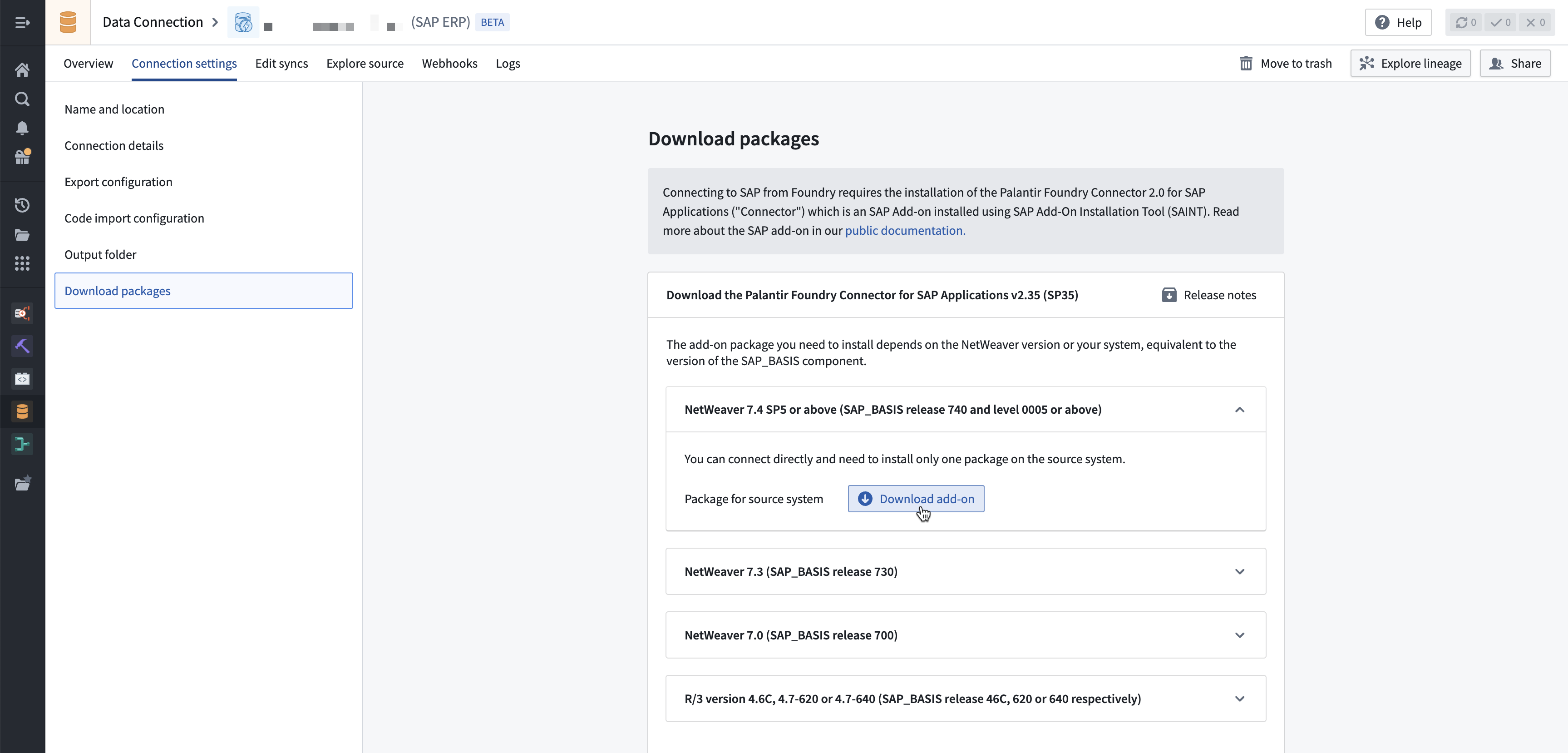
For existing installations, follow the steps below to find this section:
- Navigate to the existing Foundry SAP source.
- Select the Connection settings tab.
- Select the Download packages step in the left panel.
For new installations, follow the steps below to find this section:
- Navigate to Data Connection.
- Select the Sources tab, then New source in the top right.
- Select the SAP ERP or SAP SLT tile, depending on the type of SAP system you are connecting to.
- The second step of the installation wizard is Download packages.
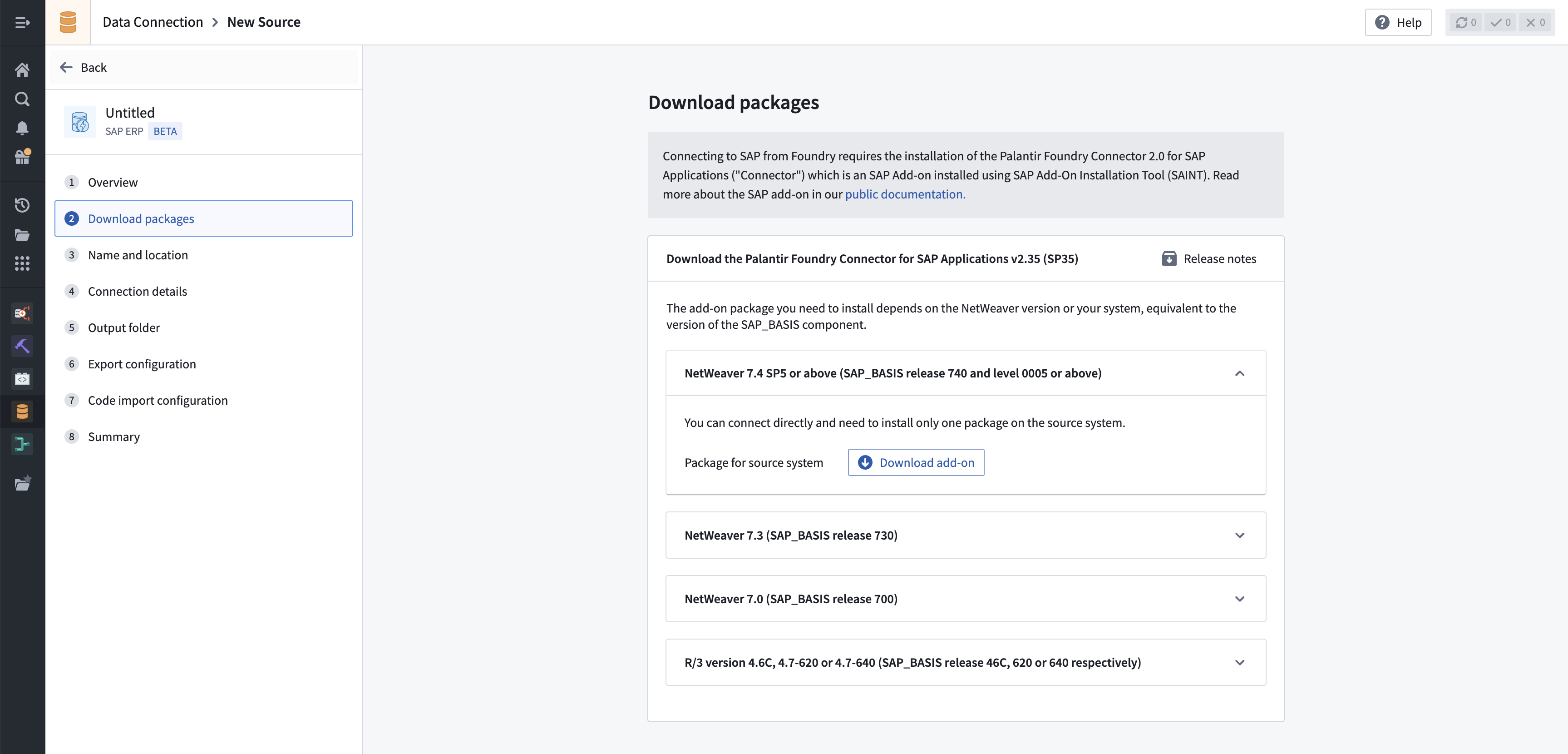
- On the Download packages page, find the section relevant for your installation depending on the SAP_BASIS (the technical component version, applicable to both SAP NetWeaver and SAP S/4HANA systems) version of the SAP system you are connecting to.
- Select Download add-on to download a ZIP file containing the add-on.
- Release notes of the add-on can also be downloaded by selection Release notes at the top right of the page.
:::callout{theme="neutral"} For SAP_BASIS versions below 7.4, a gateway server is required, so two packages need to be downloaded and installed. :::
Review additional information regarding SAP add-on installation.
中文翻译
下载 Palantir Foundry Connector 2.0 for SAP Applications 插件
您可以从 Foundry 注册中下载最新的 Palantir Foundry Connector 2.0 for SAP Applications 插件及其发布说明。下载后,请将软件包分享给负责安装或更新该插件的团队,例如 SAP Basis 团队。
对于现有安装,请按照以下步骤找到此部分:
- 导航至现有的 Foundry SAP 源。
- 选择 连接设置 选项卡。
- 在左侧面板中选择 下载软件包 步骤。
对于全新安装,请按照以下步骤找到此部分:
- 导航至 数据连接。
- 选择 源 选项卡,然后点击右上角的 新建源。
- 根据您要连接的 SAP 系统类型,选择 SAP ERP 或 SAP SLT 磁贴。
- 安装向导的第二步是 下载软件包。
- 在 下载软件包 页面上,根据您要连接的 SAP 系统的 SAP_BASIS(技术组件版本,适用于 SAP NetWeaver 和 SAP S/4HANA 系统)版本,找到与您的安装相关的部分。
- 选择 下载插件 以下载包含该插件的 ZIP 文件。
- 您还可以通过点击页面右上角的 发布说明 来下载插件的发布说明。
:::callout{theme="neutral"} 对于 SAP_BASIS 版本低于 7.4 的系统,需要网关服务器,因此需要下载并安装两个软件包。 :::