Installation of the SAP add-on(SAP 插件安装指南)
The Palantir Foundry Connector 2.0 for SAP Applications ("Connector"), developed in partnership with Diskover Limited ↗, is an ABAP-based data extraction interface for integrating data from SAP systems into Palantir Foundry. The Connector operates on the SAP ABAP platform (formerly known as the SAP NetWeaver Application Server) and serves data over HTTPS via REST API calls.
The Connector can be used to sync data from SAP directly to Foundry, to explore data in SAP, and to write data to SAP via remote functions.
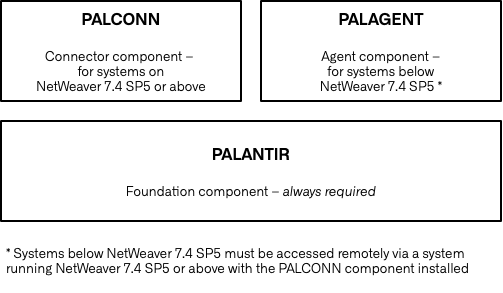
The Connector consists of four application components:
- PALANTIR (required): The Palantir Foundation component contains all the shared objects required by PALCONN (Connector), PALAGENT (Remote Agent), and PALODATA (SLT via OData).
- PALCONN: The Palantir Foundry Connector application component (PALCONN) contains all connector related objects and services. This component is not for Remote Agents and cannot be installed below SAP_BASIS (the technical component version, applicable to both SAP NetWeaver and SAP S/4HANA systems) 7.4 SP05.
- PALAGENT (optional, for SAP_BASIS below 7.4 SP05): The Palantir Foundry Remote Agent application component (PALAGENT) contains all remote agent related objects and services to ingest data from SAP Applications running below SAP_BASIS 7.4 SP05. Systems below SAP_BASIS 7.4 SP5 must be accessed remotely via a system running SAP_BASIS 7.4 SP5 or above with the PALCONN component installed. Review the remote architecture documentation for more details.
- PALODATA (optional, for SLT systems only): The Palantir Foundry OData application component (PALODATA) contains objects and services related to ingesting SLT data via OData APIs, also known as ODP-based data extraction via OData ↗.
:::callout{theme="neutral"} Install the add-on to a development or sandbox system and test thoroughly prior to installing on production. :::
Installation scenarios
There are three installation scenarios available for the Connector.
For all scenarios, ensure that the relevant installation packages have been downloaded before proceeding.
Stand-alone installation
The Connector can be installed directly on the source SAP system. The following object types are supported in this scenario:
- SAP Tables and Views
- InfoProviders
- BEx Queries
- SAP Business Content Extractors
- SAP Functions / BAPIs
- SAP ABAP Based CDS Views
- Writeback via SAP Functions (optionally with user attribution using OAuth 2.0)
For this scenario, follow the guide below:
SLT installation
:::callout{theme="neutral"}
With Connector version 2.34 (SP34) and above, an additional PALODATA component must be installed to connect to SLT.
:::
In this scenario, the Connector is installed on the SAP SLT Replication Server.
Only the SLT object type is supported in this case.
For this scenario, follow the guides below:
Remote Agent installation
The source ERP system may not fulfill the Connector's installation requirements. In this scenario, an SAP ABAP platform with SAP_BASIS version 7.4 SP5 or above should be deployed as a gateway to the source SAP system. The Connector should be installed on the gateway server where it will communicate with the source ERP system over an RFC connection and serve data to Foundry over HTTPS. The Connector's Remote Agent should be installed on the source ERP system to respond to the requests coming from the Connector.
For this scenario, follow the guides below:
- Install the Connector to the gateway server using the main installation guide
- Install the Remote Agent
If the source ERP system is below SAP_BASIS version 7.0 SP32, follow the guide below:
Support Packages and Fix Packs
New features and product fixes for the Connector are delivered as support packages. To apply a support package, follow the steps below:
Sometimes, the Connector's product fixes are delivered out of the support package lifecycle. In these circumstances, follow these instructions:
中文翻译
SAP 插件安装指南
Palantir Foundry SAP应用连接器2.0(Connector,以下简称"连接器")由Palantir与Diskover Limited ↗合作开发,是基于ABAP的数据提取接口,用于将SAP系统数据集成至Palantir Foundry。该连接器运行于SAP ABAP平台(原SAP NetWeaver应用服务器),通过REST API调用经HTTPS协议传输数据。
连接器可实现以下功能:将SAP数据直接同步至Foundry、探索SAP数据、通过远程函数向SAP写入数据。
连接器包含四个应用组件:
- PALANTIR(必需): Palantir基础组件,包含PALCONN(连接器)、PALAGENT(远程代理)和PALODATA(基于OData的SLT)所需的全部共享对象。
- PALCONN: Palantir Foundry连接器应用组件(PALCONN),包含所有连接器相关对象和服务。该组件不适用于远程代理,且无法安装在低于SAP_BASIS(技术组件版本,适用于SAP NetWeaver和SAP S/4HANA系统)7.4 SP05的系统中。
- PALAGENT(可选,适用于SAP_BASIS低于7.4 SP05的系统): Palantir Foundry远程代理应用组件(PALAGENT),包含用于从运行SAP_BASIS 7.4 SP05以下版本的SAP应用摄取数据的所有远程代理相关对象和服务。低于SAP_BASIS 7.4 SP5的系统必须通过安装了PALCONN组件且运行SAP_BASIS 7.4 SP5或更高版本的系统进行远程访问。详情请参阅远程架构文档。
- PALODATA(可选,仅限SLT系统): Palantir Foundry OData应用组件(PALODATA),包含通过OData API(亦称基于ODP的OData数据提取 ↗)摄取SLT数据相关的对象和服务。
:::callout{theme="neutral"} 请先在开发或沙箱系统中安装插件并进行全面测试,确认无误后再部署至生产环境。 :::
安装场景
连接器支持三种安装场景。
所有场景均需确保已下载相关安装包,方可继续操作。
独立安装
连接器可直接安装在源SAP系统上。此场景支持以下对象类型:
- SAP表和视图
- 信息提供者(InfoProviders)
- BEx查询(BEx Queries)
- SAP业务内容提取器(SAP Business Content Extractors)
- SAP函数/BAPI
- 基于SAP ABAP的CDS视图
- 通过SAP函数回写(可选,支持使用OAuth 2.0进行用户归属)
此场景请遵循以下指南:
SLT安装
:::callout{theme="neutral"}
连接器2.34版本(SP34)及以上,需额外安装PALODATA组件才能连接SLT。
:::
此场景中,连接器安装在SAP SLT复制服务器上。
仅支持SLT对象类型。
此场景请遵循以下指南:
远程代理安装
源ERP系统可能不满足连接器的安装要求。此场景中,需部署一个运行SAP_BASIS 7.4 SP5或更高版本的SAP ABAP平台作为源SAP系统的网关。连接器应安装在网关服务器上,通过RFC连接与源ERP系统通信,并通过HTTPS向Foundry提供数据。连接器的远程代理应安装在源ERP系统上,以响应来自连接器的请求。
此场景请遵循以下指南:
若源ERP系统低于SAP_BASIS 7.0 SP32版本,请遵循以下指南:
支持包与修复包
连接器的新功能和产品修复通过支持包(Support Packages)交付。应用支持包请按以下步骤操作:
在某些情况下,连接器的产品修复可能超出支持包生命周期。此时请遵循以下说明: